
ASUS SDRW-08D2S-U LITE
ASUS SDRW-08D2S-U LITE 외장형 CD/DVD 버너 사용 설명서
Model: SDRW-08D2S-U LITE | Brand: ASUS
소개
This manual provides comprehensive instructions for the setup, operation, and maintenance of your ASUS SDRW-08D2S-U LITE External CD/DVD Burner. This ultra-compact 8x DVD burner supports M-Disc technology and is compatible with both Windows and Mac OS.
기기의 정상적인 작동과 수명 연장을 위해 사용 전에 본 설명서를 꼼꼼히 읽어 주십시오.
설정
패키지 내용
- ASUS SDRW-08D2S-U LITE External CD/DVD Burner
- USB 2.0 케이블
- 사용 설명서 (본 문서)
- Software CD (may include Nero BackItUp)
시스템 요구 사항
- Operating System: Windows 8 or later, Mac OS
- 사용 가능한 USB 2.0 포트
- Minimum 1GB RAM (recommended for optimal performance)
- Sufficient hard disk space for data storage
장치 연결
The ASUS SDRW-08D2S-U LITE connects to your computer via a single USB 2.0 cable, which provides both data transfer and power. No external power adapter is typically required.
- 컴퓨터에서 사용 가능한 USB 2.0 포트를 찾으세요.
- Connect the smaller end of the USB cable to the USB port on the back of the ASUS SDRW-08D2S-U LITE.
- Connect the larger end of the USB cable to the USB 2.0 port on your computer.
- 운영 체제는 필요한 드라이버를 자동으로 감지하고 설치해야 합니다.

Figure 1: Connecting the ASUS SDRW-08D2S-U LITE to a computer.
This image shows the external DVD burner with a disc partially inserted, illustrating its compact design and the USB connection point.
Software Installation (Windows OS)
For enhanced functionality, it is recommended to install the bundled software, such as Nero BackItUp. This software provides comprehensive backup solutions and disc burning features.
- Insert the provided software CD into the drive.
- Follow the on-screen instructions to install Nero BackItUp and other utilities.
- The Disc Encryption feature allows for password control and file name hiding for added security.
작동 지침
디스크 삽입 및 배출
- 디스크 트레이를 열려면 드라이브 전면에 있는 꺼내기 버튼을 누르십시오.
- Carefully place the CD or DVD onto the tray with the label side facing up.
- 트레이가 제자리에 딸깍 소리가 날 때까지 드라이브 안으로 살살 밀어 넣으십시오.
- To eject, press the eject button again or use the eject function from your operating system.

Figure 2: Disc tray open, ready for disc insertion.
This image shows the external DVD burner with its disc tray fully extended, demonstrating how a disc would be placed inside.
Burning Data (Windows OS)
The "Drag-and-Burn" function simplifies the burning process into three easy steps:
- Open the burning software (e.g., Nero BackItUp).
- 드래그 앤 드롭 files you wish to burn into the software interface.
- Initiate the burning process.
M-Disc Support
The ASUS SDRW-08D2S-U LITE supports M-Disc technology, which provides an archival-grade storage solution. M-Discs are designed to preserve your data, photos, and videos for over 1,000 years, offering superior longevity compared to standard optical media.
Data Backup and Security
Utilize the Nero BackItUp software for comprehensive one-click backup of your photos, videos, documents, and other data. Enhance data security with Disc Encryption, which allows you to control access with passwords and hide file names on your burned discs.
Additionally, the product includes free unlimited storage on ASUS Webstorage for 12 months, providing an alternative cloud backup solution.
유지
장치 청소
- Ensure the device is disconnected from the power source (USB cable) before cleaning.
- Use a soft, dry, lint-free cloth to wipe the exterior of the drive.
- Do not use liquid cleaners, aerosols, or abrasive materials, as they may damage the surface or internal components.
- 드라이브 내부의 광학 렌즈를 만지지 마십시오. 청소가 필요한 경우, 광학 드라이브 전용 청소 디스크를 사용하십시오.
저장
- 드라이브는 직사광선과 극한 온도 변화를 피해 서늘하고 건조한 곳에 보관하십시오.
- When not in use, keep the disc tray closed to prevent dust accumulation.
- If transporting the device, ensure it is securely packed to prevent physical damage.
문제 해결
| 문제 | 가능한 원인 | 해결책 |
|---|---|---|
| 컴퓨터에서 드라이브를 감지하지 못했습니다. | USB 연결 불량, 전원 부족, 드라이버 문제. |
|
| 디스크 트레이가 열리지 않습니다. | Power issue, mechanical jam. |
|
| Burning process fails or is slow. | Poor quality disc, background processes, insufficient system resources. |
|
| 디스크 읽기 오류. | Dirty or scratched disc, dirty optical lens. |
|
명세서
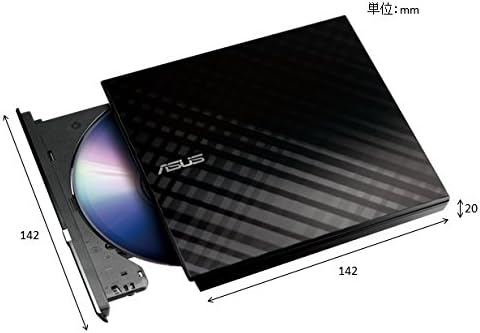
그림 3: 제품 치수(대략적)
This image provides a visual representation of the external DVD burner's dimensions, indicating its compact size.
| 특징 | 세부 사항 |
|---|---|
| 모델 번호 | SDRW-08D2S-U 라이트 |
| 상표 | 아수스 |
| 색상 | 검은색 |
| 인터페이스 | USB 2.0 |
| Write Speed (Optical Storage) | 8x |
| 운영 체제 호환성 | 윈도우 8, 맥 OS |
| 치수(길이 x 너비 x 높이) | 14.61 x 16.99 x 4.19cm (약 5.75 x 6.69 x 1.65인치) |
| 무게 | 281.23그램(약 0.62파운드) |
| 특별 기능 | M-Disc support, Disc Encryption, Drag-and-Burn function |
보증 및 지원
보증 정보는 제품과 함께 제공된 보증 카드를 참조하거나 공식 ASUS 지원을 방문하세요. website. ASUS provides technical support and service for its products.
For further assistance, driver downloads, or troubleshooting guides, please visit the official ASUS support web대지: www.asus.com/support
Ask a question about this manual
Ask about setup, troubleshooting, compatibility, parts, safety, or missing instructions. Manuals+ will review the question and use this page’s manual context to help answer it.