
D-Link DCS-5020L
D-Link Pan & Tilt Wi-Fi Camera
Model: DCS-5020L
브랜드: D-Link
1. 서론
This manual provides comprehensive instructions for the installation, operation, and maintenance of your D-Link Pan & Tilt Wi-Fi Camera (DCS-5020L). This camera offers advanced surveillance capabilities, allowing you to monitor your home or business remotely with ease.
Key features include ultra-smooth pan and tilt functionality, digital zoom, night vision, and motion/sound detection with instant alerts via the mydlink Lite app.
2. 제품 오버view 및 패키지 내용물
시작하기 전에 패키지에 모든 구성 요소가 들어 있는지 확인하세요.
- D-Link Pan & Tilt Wi-Fi Camera (DCS-5020L)
- 전원 어댑터
- 이더넷 케이블
- 설치 키트(나사 및 벽 앵커)
- 빠른 설치 가이드
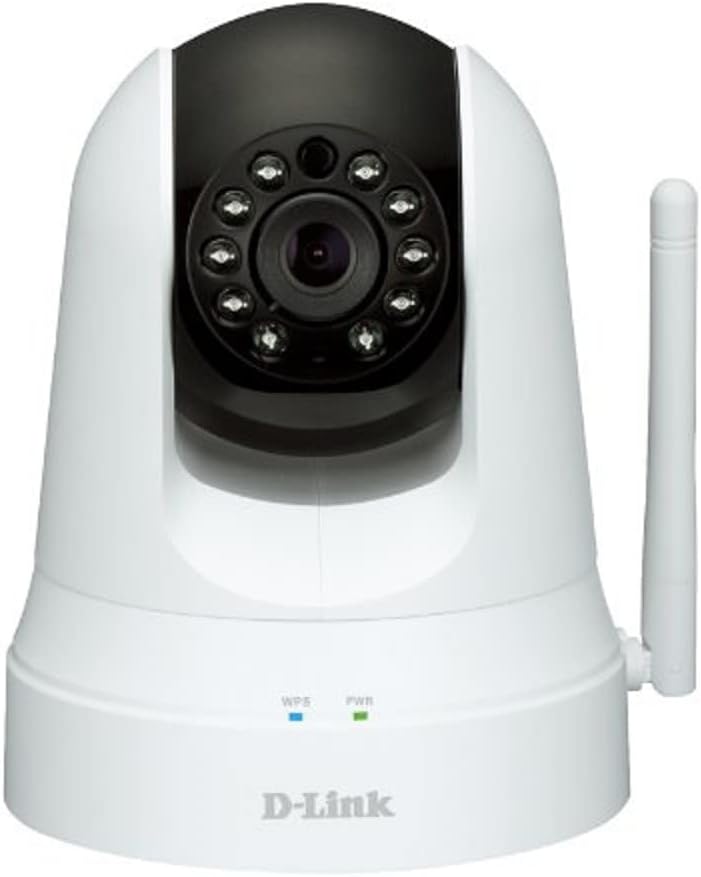
그림 2.1: 전면 view of the D-Link DCS-5020L camera. It features a white dome-shaped body with a black pan/tilt head. The camera lens is surrounded by infrared LEDs for night vision. Below the head, on the base, are indicators for WPS and Power, and a detachable antenna is visible on the right side.
3. 설정 및 설치
3.1. 배치
원하는 조건을 충족하는 위치를 선택하세요. viewing angle and is within range of your Wi-Fi network. The camera can be placed on a flat surface or mounted to a wall or ceiling using the provided mounting kit.
3.2. 전원 켜기
- 전원 어댑터를 카메라의 전원 포트에 연결합니다.
- Plug the power adapter into a wall outlet. The Power LED will illuminate.
3.3. 네트워크 연결(Wi-Fi)
There are two primary methods to connect your camera to your Wi-Fi network:
3.3.1. WPS(Wi-Fi Protected Setup) 방식
- Ensure your Wi-Fi router supports WPS.
- Press the WPS button on your D-Link camera. The WPS LED will blink.
- 2분 이내에 Wi-Fi 공유기의 WPS 버튼을 누르세요.
- Wait for the WPS LED on the camera to turn solid blue, indicating a successful connection.
3.3.2. Manual Setup via mydlink Lite App
- Download the free mydlink Lite app from the App Store (iOS), Google Play (Android), or Windows Phone Store.
- Open the app and create a mydlink account if you don't have one.
- Follow the on-screen instructions in the app to add your new camera. You will typically scan a QR code on the camera or manually enter its setup information.
- 이 앱은 카메라를 Wi-Fi 네트워크에 연결하는 방법을 안내해 드립니다.
4. 사용 설명서
4.1. Accessing Your Camera
The primary way to operate your D-Link camera is through the mydlink Lite app or the mydlink web 포털(www.mydlink.com).
4.2. 팬/틸트 제어
Within the mydlink app, you can remotely control the camera's pan (horizontal) and tilt (vertical) movements to view different areas. The camera offers 340° pan and 120° tilt capability.
4.3. 디지털 줌
Use the digital zoom feature (up to 4x) in the app to get a closer look at specific details within the camera's view.
4.4. 야간 투시경
이 카메라는 저조도 환경에서 자동으로 야간 투시 모드로 전환되어 최대 8미터(26피트) 거리까지 선명한 흑백 영상을 제공합니다.
4.5. 동작 및 소리 감지
Configure motion and sound detection settings in the mydlink app. When motion or sound is detected, the camera can send instant push notifications to your connected device, allowing you to stay informed of events.
비디오 4.1: 오버view of D-Link Wi-Fi Cameras, demonstrating their use for home security and monitoring. The video highlights features like remote viewing via mobile app, instant alerts for motion/sound detection, and ease of DIY installation. It shows scenarios such as monitoring children arriving home and receiving alerts about pets.
5. 유지관리
To ensure optimal performance and longevity of your D-Link camera, follow these maintenance guidelines:
- 청소: Gently wipe the camera lens and body with a soft, dry, lint-free cloth. Do not use liquid cleaners or aerosol sprays.
- 펌웨어 업데이트: Regularly check for and install firmware updates through the mydlink app or web portal. Updates often include performance improvements and security enhancements.
- 네트워크 안정성: Ensure your Wi-Fi network is stable and strong to prevent connection drops and ensure continuous monitoring.
- 전원 공급 장치: 카메라와 함께 제공된 정품 전원 어댑터만 사용하십시오.
6. 문제 해결
| 문제 | 가능한 해결책 |
|---|---|
| 카메라가 Wi-Fi에 연결되지 않습니다. |
|
| No video feed in mydlink app. |
|
| Motion/Sound alerts not received. |
|
| Pan/Tilt control is unresponsive. |
|
7. 사양
| 특징 | 세부 사항 |
|---|---|
| 모델명 | DCS-5020L |
| 상표 | 디링크 |
| 비디오 캡처 해상도 | 480p |
| Pan/Tilt Capability | 340° 팬, 120° 틸트 |
| 디지털 줌 | 4x |
| 나이트 비전 범위 | 26피트(8미터) |
| 연결 기술 | 무선(Wi-Fi) |
| 전원 | AC/DC Adapter (12 Volts, 1 Watt) |
| 호환 장치 | Smartphone, Tablet (iOS, Android, Windows Phone) |
| 특별 기능 | Motion Sensor, Sound Detection, Night Vision, Wi-Fi Extender |
| 치수(길이 x 너비 x 높이) | 4.03 x 4.54 x 5.26 인치 |
| 품목 무게 | 0.64파운드(10.2온스) |
| 색상 | 하얀색 |
| 국제 보호 등급 | IP65 |
8. 보증 및 지원
For warranty information and technical support, please refer to the D-Link official website or contact D-Link customer service. Keep your purchase receipt for warranty claims.
D-링크 지원 Web대지: support.dlink.com
Ask a question about this manual
Ask about setup, troubleshooting, compatibility, parts, safety, or missing instructions. Manuals+ will review the question and use this page’s manual context to help answer it.