
소개
This manual provides essential instructions for setting up, operating, maintaining, and troubleshooting your Sony KDL-32W655A 32-inch Full HD Smart TV. Please read this manual thoroughly before using your television to ensure proper and safe operation. Keep this manual for future reference.

Figure 1: Sony KDL-32W655A Smart TV (Front View)
안전 정보
텔레비전을 사용할 때는 항상 다음 안전 수칙을 준수하십시오.
- 통풍구를 막지 마세요. TV 주변에 충분한 공간을 확보하여 공기가 원활하게 흐르도록 하세요.
- 불안정한 카트, 스탠드, 삼각대, 브래킷 또는 테이블 위에 TV를 놓지 마세요.
- 전원 코드가 밟히거나 끼지 않도록 보호하세요.
- 번개가 칠 때나 장기간 사용하지 않을 때는 TV의 플러그를 뽑아 두세요.
- 모든 서비스는 자격을 갖춘 서비스 담당자에게 의뢰하세요.
설정
1. 풀기
TV와 모든 액세서리를 포장에서 조심스럽게 꺼내십시오. 향후 운송이나 서비스 시 필요할 수 있으므로 포장재를 보관해 두십시오.
2. 스탠드 조립
Attach the desktop stand to the television. Ensure all screws are securely fastened. Refer to the diagram below for proper assembly.

Figure 2: TV with Desktop Stand Attached
Alternatively, the TV can be wall-mounted using a compatible VESA wall mount (sold separately). Consult a professional for wall-mounting installation.
3. 주변기기 연결하기
외부 기기를 TV의 포트에 연결하세요. 연결하기 전에 TV의 전원 플러그를 뽑았는지 확인하십시오.
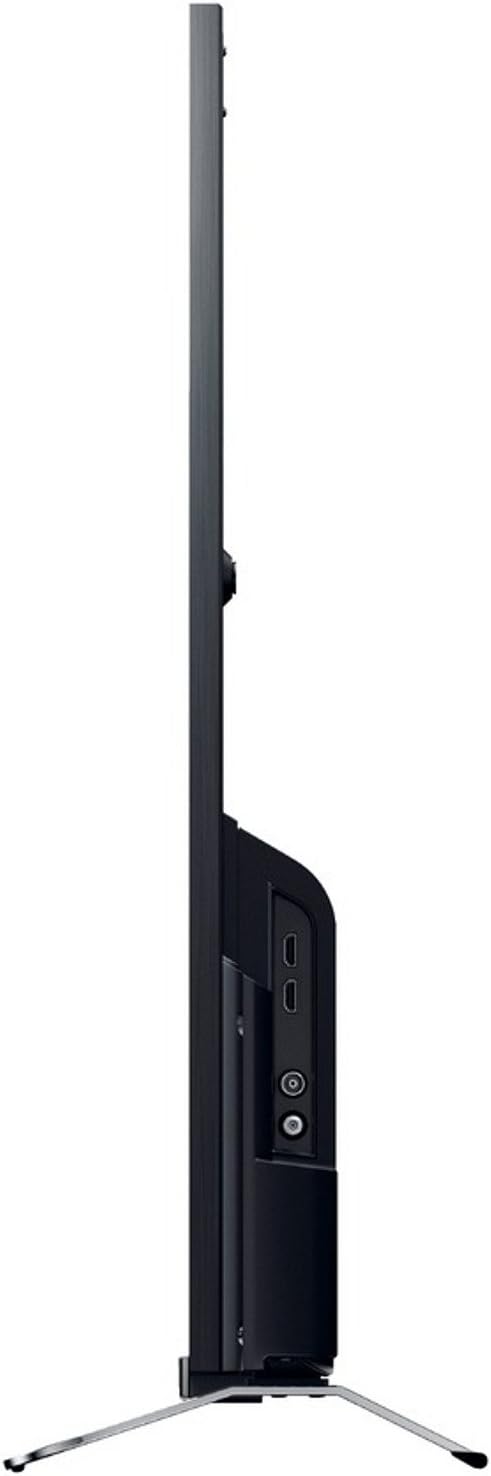
그림 3: 측면 View 연결 포트 포함
- 힘: Connect the power cord to the AC inlet on the TV and then to a wall outlet.
- HDMI : Use an HDMI cable to connect devices like Blu-ray players, game consoles, or set-top boxes to the HDMI 1 or HDMI 2 항구.
- USB: Connect USB storage devices for media playback or DVR functionality to the USB 2.0 포트.
- 이더넷(LAN): For a wired internet connection, connect an Ethernet cable to the 랜 포트.
- 안테나/케이블: Connect your antenna or cable TV feed to the RF 입력.
- Component Video (YPbPr/YCbCr): Connect older video devices using component cables to the dedicated input.
- 합성 비디오: Connect legacy video devices using a composite video cable to the dedicated input.
- 디지털 오디오 출력(광): For connecting to a soundbar or home theater system with an optical input.
- 헤드폰: 개인 청취를 위해 헤드폰을 연결하십시오.
4. 초기 설정 마법사
After connecting all cables, plug in the TV and press the power button on the remote control. The initial setup wizard will guide you through:
- 언어 선택.
- 지역/국가 선택.
- Channel scanning (for DVB-C, DVB-S, DVB-T).
- Network setup (Wi-Fi or wired Ethernet).
- 시간 및 날짜 설정.
작동 지침
1. 원격 제어 기능
The included remote control allows you to access all TV functions. Insert the provided batteries into the remote control, observing polarity.
- 전원 버튼: TV를 켜거나 끕니다.
- 채널 위/아래: TV 채널을 변경합니다.
- 볼륨 높이기/낮추기: 사운드 레벨을 조정합니다.
- 입력/소스: 입력 소스(HDMI, USB 등)를 선택합니다.
- Home/Smart TV: 스마트 TV 인터페이스에 접속합니다.
- Navigation Buttons (Arrows, Enter): 메뉴를 탐색하고 선택 사항을 확인합니다.
- 뒤로/돌아가기: 이전 화면 또는 메뉴로 돌아갑니다.
- 옵션: 상황에 맞는 옵션을 표시합니다.
2. 스마트 TV 기능
Your Sony KDL-32W655A is equipped with Smart TV capabilities, allowing access to internet content and applications.
- 인터넷 연결: Connect to your home network via Wi-Fi or Ethernet. Navigate to the Network Settings menu to configure.
- 인터넷 TV: Access various online streaming services and content directly from your TV.
- 응용 프로그램: The TV supports lifestyle applications such as Skype. An Opera browser is also available for web 브라우징.
- DLNA Certified: Stream media from compatible devices on your home network.
3. Media Playback and Recording
- USB 미디어 재생: Insert a USB storage device into the USB port. The TV will detect the device, allowing you to browse and play supported media files (JPG, MPO for images; 3GP, AVCHD, AVI, M-JPEG, MKV, MOV, MP4, MPEG1, MPEG2, TS, XVID for video).
- 디지털 비디오 레코더(DVR): Record digital TV broadcasts to a connected USB hard drive. Consult the on-screen menu for DVR setup and scheduling.
4. 화면 및 사운드 설정
사용자 정의 viewing and listening experience through the TV's settings menus.
- 사진 모드: Select from predefined picture modes such as 영화, 게임, 사진, 스포츠, 그리고 생생한 to optimize display settings for different content types.
- Motionflow 200 Hz: This technology enhances motion clarity for fast-moving scenes.
- 사운드 설정: Adjust bass, treble, and other audio parameters using the 6-band equalizer. The TV features 2 built-in speakers with a total RMS power of 10W.
- 화면 형식: Adjust the aspect ratio (16:9, 14:9, Auto, Zoom) to fit your content.
5. 추가 기능
- 전자 프로그램 가이드(EPG): View upcoming TV programs and schedule recordings.
- 화면 속 화면(PiP): Display two different sources simultaneously.
- Sleep Timer/On/Off Timer: Set the TV to automatically turn off or on at specified times.
유지
1. TV 청소
- 화면: 부드럽고 보풀이 없는 천으로 화면을 부드럽게 닦으세요. 잘 지워지지 않는 얼룩은 가볍게 닦아주세요.amp천에 물이나 특수 화면 세척제를 묻혀 닦으세요. 화면에 직접 액체를 뿌리지 마세요.
- 내각: TV 캐비닛은 부드럽고 마른 천으로 닦으세요. 연마성 세제나 용제는 사용하지 마세요.
- 통풍: Ensure the ventilation openings on the back of the TV remain clear of dust and obstructions.
2. 소프트웨어 업데이트
Periodically check for software updates to ensure your TV has the latest features and performance improvements. Updates can usually be performed via the network connection in the TV's settings menu.
문제 해결
고객 지원팀에 문의하기 전에 일반적인 문제에 대한 다음 솔루션을 시도해 보세요.
| 문제 | 가능한 원인 / 해결책 |
|---|---|
| 전원이 없습니다 |
|
| 그림 없음 / 검은색 화면 |
|
| 소리가 나지 않습니다 |
|
| Wi-Fi에 연결할 수 없습니다 |
|
| 리모컨이 작동하지 않음 |
|
위 단계를 시도한 후에도 문제가 지속되면 소니 고객 지원팀에 문의하십시오.
명세서
| 특징 | 세부 사항 |
|---|---|
| 모델 | KDL-32W655A |
| 화면 크기 | 32인치(81.3cm) |
| 디스플레이 기술 | 주도의 |
| 해결 | 풀 HD(1920 x 1080픽셀) |
| 모션 강화 | Motionflow 200 Hz |
| 종횡비 | 16시 9분 |
| 스마트 TV 기능 | Yes (Internet TV, Skype, Opera Browser, DLNA) |
| 와이파이 | 예 |
| 이더넷(LAN) | 1포트 |
| HDMI 포트 | 2 |
| USB 2.0 포트 | 1 |
| SCART 포트 | 1 |
| 컴포넌트 비디오 입력 | 1 |
| 컴포지트 비디오 입력 | 1 |
| RF 입력 | 1 |
| 디지털 오디오 출력 (광학) | 1 |
| 헤드폰 출력 | 1 |
| 튜너 유형 | Analog & Digital (DVB-C, DVB-S, DVB-S2, DVB-T) |
| 스피커 | 2(내장) |
| RMS 정격 전력 | 10와트 |
| 전력 소비(작동) | 41와트 |
| 전력 소비량(대기) | 0.45와트 |
| 연간 에너지 소비량 | 57킬로와트 |
| 에너지 효율 등급 | A |
| 스탠드 제외 치수(폭 x 높이 x 깊이) | 725mm x 438mm x 69mm |
| 스탠드 제외 무게 | 6.8kg |
| 스탠드 포함 무게 | 7.8kg |
| 색상 | 검은색 |
참고 : 사양은 예고없이 변경 될 수 있습니다.
보증 및 지원
Your Sony KDL-32W655A television comes with a limited warranty. Please refer to the warranty card included in your product packaging for detailed terms and conditions, including the warranty period and coverage.
For technical assistance, product registration, or to find authorized service centers, please visit the official Sony support website or contact Sony customer service in your region. Keep your purchase receipt and product serial number handy when contacting support.


