
1. 서론
This manual provides instructions for the OEM RMT-B119A remote control, designed as a replacement or secondary remote for various Sony Blu-ray player models. This remote offers full functionality for controlling your Blu-ray player's features.
Compatible Sony Blu-ray Player Models:
- BDP-BX59
- BDP-S390
- BDP-S590
- BDP-BX110
- BDP-S1100
- BDP-S3100
- BDP-BX310
2. 설정
2.1 배터리 설치
리모컨에는 AAA 배터리 두 개(2)가 필요합니다(별매). 배터리를 설치하려면 다음 단계를 따르세요.
- 리모콘 뒷면에 있는 배터리함 덮개를 찾으세요.
- 탭을 누르고 덮개를 아래로 밀어 수납 공간을 엽니다.
- AAA 배터리 2개를 넣고 양극(+)과 음극(-) 단자가 배터리 보관함 내부 표시와 올바르게 맞춰지도록 합니다.
- 배터리 덮개를 제자리에 밀어 넣어 딸깍 소리가 날 때까지 밀어 넣습니다.
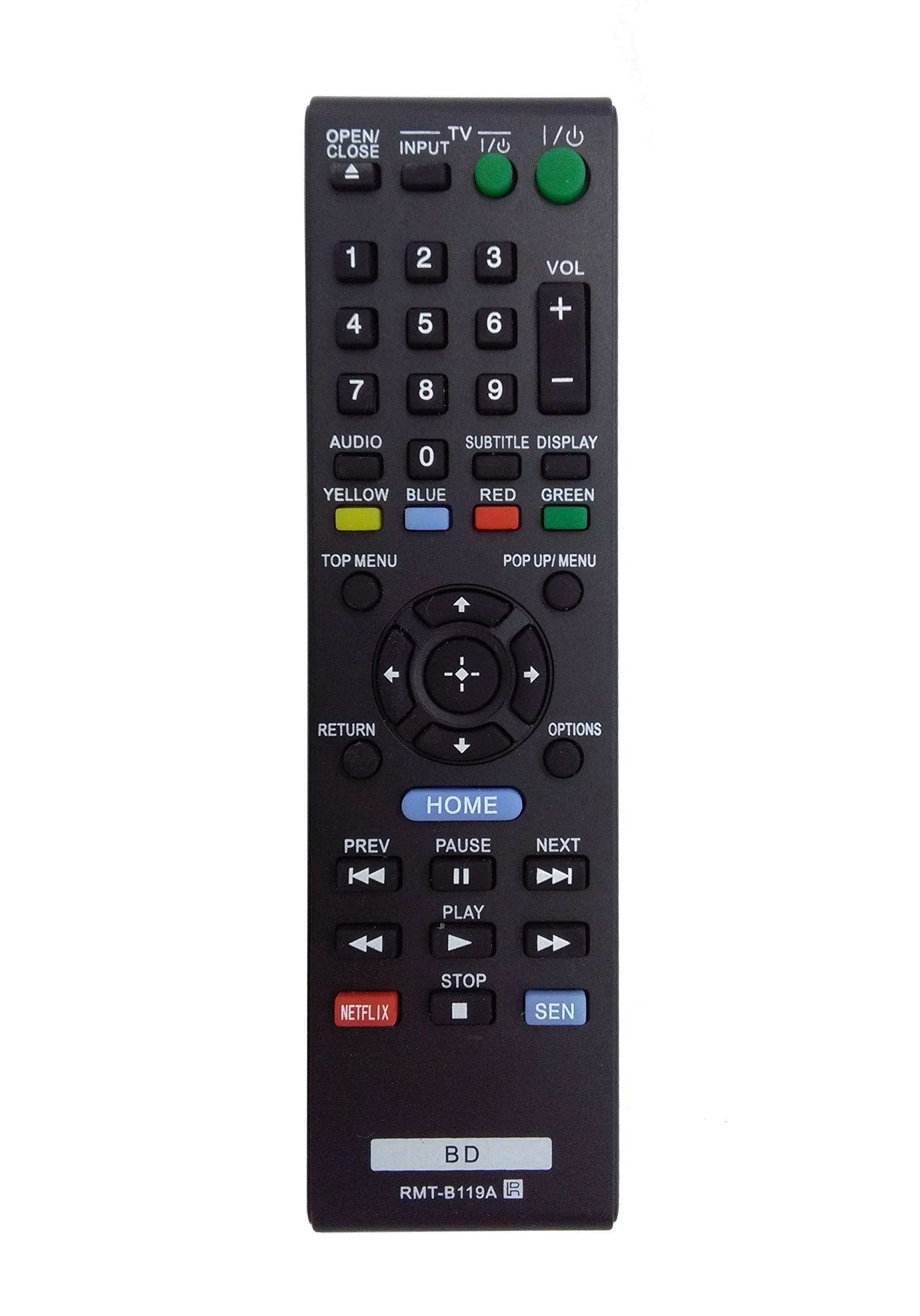
Image: The OEM RMT-B119A remote control, showing the full button layout on the front and a partial view of the open battery compartment on the back, revealing the battery terminals.
3. 사용 설명서
3.1 리모컨 레이아웃 및 버튼 기능
Familiarize yourself with the buttons on your RMT-B119A remote control. Below is a description of each button's primary function.
Image: The OEM RMT-B119A remote control, displaying all buttons and their labels.
- 전원(I/O): Turns the Blu-ray player on or off.
- OPEN/CLOSE (▲): 디스크 트레이를 열거나 닫습니다.
- 입력: Switches the input source on the connected TV (if programmed).
- TV: Switches the remote to TV control mode (if programmed).
- 숫자 패드(0-9): Used for direct track selection, chapter selection, or entering numerical data.
- 볼륨(+/-): Adjusts the volume level (typically for the connected TV, if programmed).
- 오디오: Changes the audio track or language during playback.
- SUBTITLE DISPLAY: Toggles subtitle display on or off, or cycles through available subtitle languages.
- YELLOW, BLUE, RED, GREEN: Color-coded function buttons, typically used for specific features within menus or interactive content. Their function varies depending on the disc or menu.
- 상위 메뉴: Accesses the main menu of the Blu-ray disc.
- POP UP/MENU: Displays the pop-up menu during disc playback.
- Directional Pad (↑↓←→): 메뉴와 옵션을 탐색합니다.
- Center Button (Enter/Select): 선택 사항을 확정하거나 메뉴 항목을 입력합니다.
- 반품: 이전 화면이나 메뉴로 돌아갑니다.
- 옵션: Displays context-sensitive options or settings.
- 집: Accesses the Blu-ray player's home menu.
- 이전 (◀◀): Skips to the beginning of the current track/chapter or the previous track/chapter.
- PAUSE (▌▌): 재생을 일시 중지합니다.
- 다음 (▶▶): Skips to the next track or chapter.
- 재생(▶): 재생을 시작하거나 재개합니다.
- 정지 (■): 재생을 중지합니다.
- 넷플릭스: 넷플릭스 스트리밍 서비스 바로가기 버튼입니다.
- 센: Direct access button for the Sony Entertainment Network (now PlayStation Video/Music).
- BD: Likely a dedicated button for Blu-ray Disc functions or to switch to Blu-ray mode.
4. 유지관리
리모컨의 수명과 정상적인 작동을 보장하려면 다음 유지 관리 지침을 따르십시오.
- 청소: 리모컨은 부드럽고 마른 천으로 닦으세요. 잘 지워지지 않는 오염은 가볍게 닦아주세요.amp천에 물이나 순하고 마모성이 없는 세제를 적셔주세요. 강한 화학 물질이나 용제는 사용하지 마세요.
- 배터리 교체: 리모컨의 반응이 느리거나 작동이 멈추면 배터리를 교체하세요. 항상 두 배터리를 동시에 같은 종류의 새 배터리로 교체하세요.
- 저장: 리모컨은 직사광선, 극한 온도 및 높은 습도를 피해 서늘하고 건조한 곳에 보관하십시오. 장기간 사용하지 않을 경우 배터리 누액을 방지하기 위해 배터리를 제거하십시오.
- 낙하 방지: 리모컨을 물리적 충격으로부터 보호하세요. 떨어뜨리면 내부 구성 요소가 손상될 수 있습니다.
5. 문제 해결
If you experience issues with your remote control, refer to the following table for common problems and solutions:
| 문제 | 가능한 원인 | 해결책 |
|---|---|---|
| 리모컨이 작동하지 않습니다. | 배터리가 방전되었거나 잘못 삽입되었습니다. | 배터리를 새 것으로 교체하고 극성(+/-)이 올바른지 확인하세요. |
| 원격근무는 간헐적으로 진행됩니다. | 배터리 잔량이 부족하거나 장애물이 있습니다. | Replace batteries. Ensure no objects are blocking the remote's signal path to the Blu-ray player. |
| 리모컨으로 TV를 제어할 수 없습니다. | Remote not programmed for TV or TV mode not selected. | This remote is primarily for Blu-ray players. TV control functionality may require specific programming not covered by this manual, or may not be supported by this OEM model. |
| 버튼이 반응하지 않거나 붙어 있습니다. | 단추 아래에 먼지나 이물질이 있습니다. | Clean the remote control surface. Avoid spilling liquids on the remote. |
6. 사양
- 상표: OEM
- 모델 번호: RMT-B119A
- 연결 기술 : 적외선 (IR)
- 호환 장치: Sony Blu-ray Players (specific models listed in Introduction)
- 전원: AAA 배터리 2개(포함되지 않음)
- 최대 범위: 약 10미터(33피트)
- 특징: 인체공학적 디자인
7. 보증 및 지원
This OEM RMT-B119A remote control comes with a 30일 보증 구매일로부터 제조상의 결함에 대한 보증을 제공합니다. 보증 청구를 위해 구매 증빙 서류를 보관해 주세요.
For technical support or warranty inquiries, please contact the retailer or manufacturer directly. Refer to your purchase documentation for specific contact information.