
AmScope B120C-E1
AmScope B120C-E1 Digital Binocular Compound Microscope User Manual
Model: B120C-E1 | Brand: AmScope
소개
This manual provides detailed instructions for the setup, operation, maintenance, and troubleshooting of your AmScope B120C-E1 Digital Binocular Compound Microscope. Please read this manual thoroughly before using the microscope to ensure proper function and longevity of the instrument.
제품 끝view
The AmScope B120C-E1 is a versatile digital binocular compound microscope designed for advanced observation and imaging. It features a Siedentopf binocular head, a mechanical 3D stage, LED illumination, and a 1.3MP USB camera for digital capture.

Figure 1: AmScope B120C-E1 Digital Binocular Compound Microscope. This image shows the complete microscope unit, highlighting its binocular head, objective lenses, mechanical stage, and base with illumination controls.
주요 특징
- 확대 설정: Six widefield magnification settings: 40x, 100x, 250x, 400x, 1000x, and 2500x.
- 쌍안경 헤드: 30-degree inclined, 360-degree swiveling Siedentopf binocular head for comfortable view주고받음.
- Stage: Robust 3D double-layer mechanical stage for precise samp르 포지셔닝.
- 초점: Coaxial coarse and fine focusing system for accurate adjustments.
- 조명: Powerful single-bulb LED illumination with variable intensity dimmer.
- 콘덴서: Abbe condenser with iris diaphragm and color filter for optimized lighting.
- 디지털 카메라: 1.3MP USB digital camera with advanced software for configuration, processing, and measurement, compatible with Windows XP/Vista/7/8/10.
패키지 내용
Upon unpacking, verify that all components are present and undamaged. The standard package includes:
- AmScope B120C-E1 Microscope Body
- Siedentopf Binocular Head
- WF10x Eyepieces (pair)
- WF25x Eyepieces (pair) - (Note: Based on image 61VFuTyeYGL, WF25X eyepieces are shown separately, implying they might be included or optional)
- Objective Lenses: 4x, 10x, 40x, 100x (oil)
- 1.3MP USB Digital Camera
- USB 케이블
- 소프트웨어 CD
- 침지 오일
- 더스트 커버
- 전원 코드
설정
1. 풀기 및 배치
- 포장에서 모든 구성품을 조심스럽게 꺼내십시오. 향후 운송 또는 보관을 위해 원래 포장재를 보관하십시오.
- Place the microscope on a stable, level surface, away from direct sunlight, excessive heat, dust, and vibrations.
- Ensure adequate space around the microscope for operation and ventilation.
2. Assembling the Microscope
- Attach the Binocular Head: Loosen the head locking screw on the top of the microscope body. Gently insert the binocular head into the top port, aligning the keyway, and tighten the locking screw.
- 접안렌즈를 삽입하세요: Remove the protective caps from the eyepiece tubes and insert the WF10x eyepieces. If using the WF25x eyepieces, insert those instead.
- 대물렌즈를 설치하세요: Rotate the revolving nosepiece until the lowest power objective (4x) is positioned over the stage. Screw the objective lenses into the nosepiece in increasing order of magnification (4x, 10x, 40x, 100x).
- 전원 연결: Plug the power cord into the microscope's power input and then into a suitable electrical outlet (110V AC).

Figure 2: Microscope head and objective lenses. This image illustrates the binocular head with eyepieces and the revolving nosepiece with objective lenses attached, ready for use.
3. Digital Camera Setup
- 소프트웨어 설치: Insert the provided software CD into your computer's CD/DVD drive and follow the on-screen instructions to install the camera software. Ensure your operating system is compatible (Windows XP/Vista/7/8/10).
- 카메라 연결: Remove one of the eyepieces and insert the 1.3MP USB digital camera into the eyepiece tube. Connect the camera to your computer using the supplied USB cable.
- 소프트웨어 실행: Open the installed camera software. The software should automatically detect the camera. Adjust settings as needed for live view촬영 및 이미지 캡처.

Figure 3: Microscope connected to a laptop via the digital camera. This image demonstrates the digital camera inserted into one of the eyepiece tubes and connected to a laptop, displaying a magnified image on the screen.
작동 지침
1. Power On and Illumination
- Turn on the main power switch located on the base of the microscope.
- Adjust the illumination intensity using the dimmer control knob to achieve comfortable and clear view주고받음.
2. Preparing a Specimen
- Place a prepared microscope slide onto the mechanical stage, s로 고정tage 클립.
- 사용tage control knobs to center the specimen directly under the objective lens.
3. 초점 및 확대
- Start with the lowest power objective (4x) in position.
- Look through the eyepieces and use the coarse focus knob to bring the specimen into approximate focus.
- 정밀한 초점을 맞추려면 미세 초점 조절 손잡이를 사용하십시오.
- Adjust the interpupillary distance (distance between eyepieces) and diopter setting on the left eyepiece for comfortable binocular view주고받음.
- To increase magnification, rotate the revolving nosepiece to the next objective lens (e.g., 10x, 40x). Re-focus using only the fine focus knob.
- For 100x objective, apply a small drop of immersion oil directly onto the slide over the area to be viewed. Lower the 100x objective into the oil until it makes contact. Focus carefully using the fine focus knob.
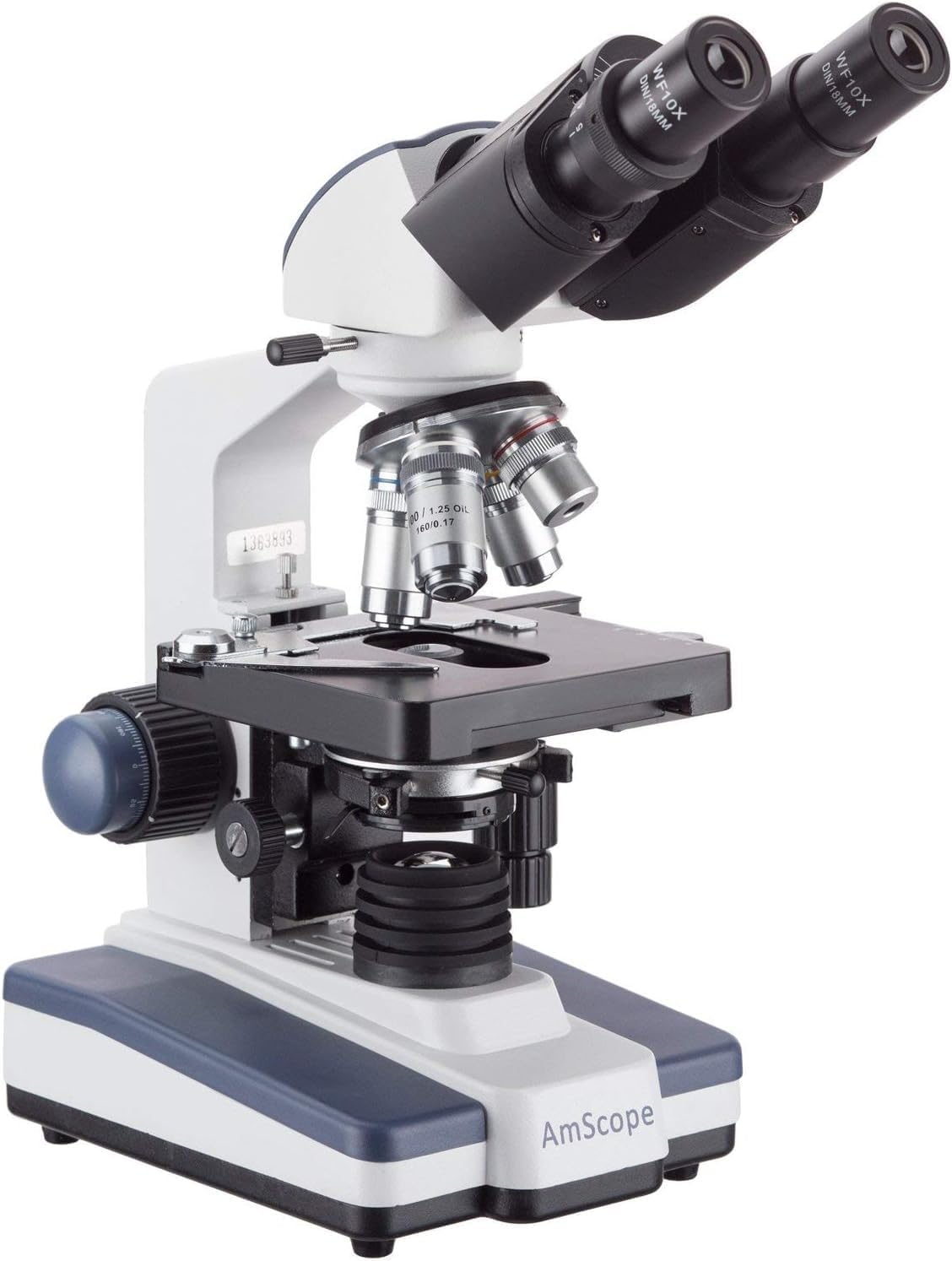
Figure 4: Microscope with 100x objective lens engaged. This image shows the 100x objective lens positioned over the stage, indicating readiness for oil immersion view주고받음.
4. Adjusting Illumination and Contrast
- 홍채 다이어프램: Adjust the iris diaphragm lever on the Abbe condenser to control the amount of light reaching the specimen and improve contrast.
- Condenser Height: Use the condenser adjustment knob to raise or lower the condenser for optimal illumination.
- Color Filter: Insert a color filter into the filter holder below the condenser if desired for specific view조건.
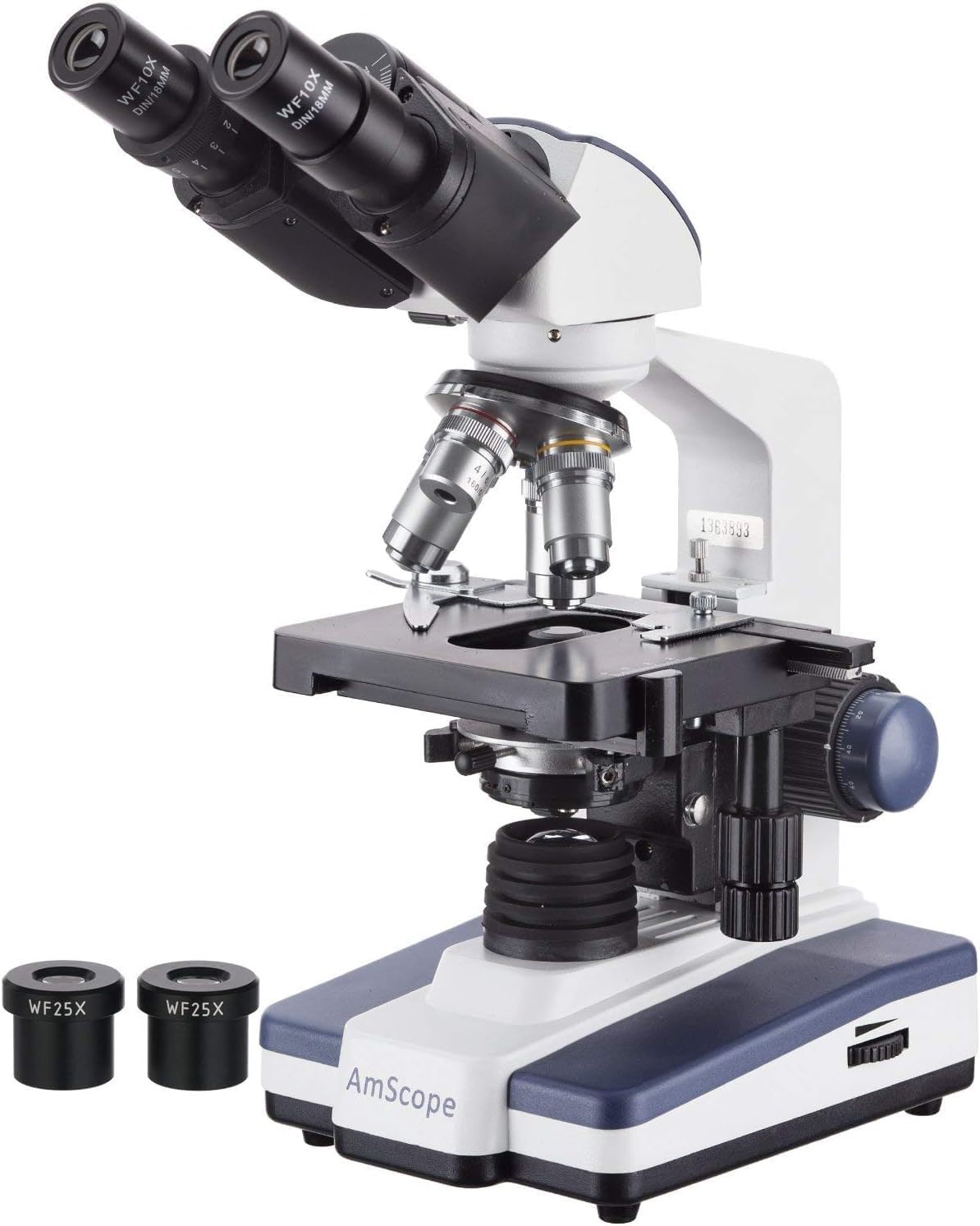
Figure 5: Microscope with WF25x eyepieces. This image displays the microscope with the higher magnification WF25x eyepieces, which can be used to achieve the maximum 2500x magnification.
5. 디지털 카메라 사용하기
Once the camera is connected and software installed, you can:
- 살다 View: Observe the magnified image directly on your computer screen.
- 이미지 캡처: Use the software's capture function to take still photographs of your observations.
- 비디오 녹화: 비디오 녹화tage of dynamic processes or observations.
- 측정: Utilize the software's measurement tools for precise analysis of specimens.
비디오 1: Example of microscopic observation. This video demonstrates the kind of live view and recording capabilities possible with the AmScope B120C-E1's digital camera, showing protists in stag난트 물.
유지
1. 청소
- 광학 부품: Use a soft, lint-free lens paper or cotton swab lightly moistened with lens cleaning solution to clean objective lenses and eyepieces. Avoid touching optical surfaces with bare hands.
- 몸: 현미경 본체를 부드러운 천으로 닦으십시오.amp 옷감. 강한 화학 물질이나 연마성 세제를 사용하지 마십시오.
- 침수 오일: After using the 100x oil immersion objective, always clean the objective lens and the slide immediately with lens paper and cleaning solution to prevent oil from hardening.
2. 보관
- When not in use, cover the microscope with the provided dust cover to protect it from dust and debris.
- 현미경은 직사광선과 극한의 온도를 피해 서늘하고 건조한 곳에 보관하세요.
- Ensure the 4x objective is in position and the stage is lowered before covering.
3. 전구 교체
The microscope uses an LED illumination system. While LEDs have a long lifespan, if replacement is ever needed, consult a qualified technician or the manufacturer's support for specific instructions and compatible parts.
문제 해결
| 문제 | 가능한 원인 | 해결책 |
|---|---|---|
| 조명 없음 | Power cord not connected; Power switch off; Dimmer set to minimum; LED bulb failure. | Check power connection; Turn on power switch; Increase dimmer intensity; Contact support for bulb replacement. |
| Image unclear/blurry | Incorrect focusing; Objective lens dirty; Eyepieces dirty; Slide upside down; Condenser not adjusted. | Use fine focus; Clean lenses; Ensure slide is correct side up; Adjust condenser and iris diaphragm. |
| 어두운 들판 view | Iris diaphragm closed; Condenser too low; Low illumination intensity; Objective not fully clicked into place. | Open iris diaphragm; Raise condenser; Increase dimmer intensity; Rotate nosepiece until objective clicks into position. |
| Digital camera not detected | USB cable loose; Software not installed or running; Driver issue. | Ensure USB cable is securely connected; Install/reinstall software; Check device manager for driver issues. |
| Dust spots in view | Dust on eyepiece, objective, or slide. | Clean eyepieces and objectives; Clean slide. |
명세서
- 모델: B120C-E1
- 현미경 유형: Binocular Compound
- 머리: 30-degree inclined 360-degree swiveling Siedentopf
- 접안렌즈: WF10x, WF25x
- 대물렌즈: Achromatic DIN 4x, 10x, 40x (spring), 100x (spring, oil)
- 총 배율 : 40배~2500배
- 노즈피스: Revolving Quadruple
- Stage: 3D Double Layer Mechanical Stage (130mm x 130mm)
- 초점: Coaxial Coarse & Fine Focus Knobs
- 콘덴서: NA1.25 Abbe Condenser with Iris Diaphragm
- 조명: Variable Intensity LED (110V AC)
- 디지털 카메라: 1.3MP USB (1280x1024 pixels)
- 카메라 호환성: 윈도우 XP/비스타/7/8/10
- 치수: 약 42×30×23 cm
- 무게: 약 4.4kg (9.7lbs)
- 재료: 금속
보증 및 지원
For warranty information, technical support, or service inquiries, please contact AmScope directly. Refer to the official AmScope web최신 연락처 정보 및 보증 조건은 웹사이트 또는 구매 시 함께 제공된 문서를 참조하십시오.
온라인 리소스: For additional support and software downloads, you may visit the official AmScope download page: https://www.amscope.com/download/
Ask a question about this manual
Ask about setup, troubleshooting, compatibility, parts, safety, or missing instructions. Manuals+ will review the question and use this page’s manual context to help answer it.