
1. 서론
This manual provides detailed instructions for the installation, operation, and maintenance of your Syba 2 External USB 3.0 Port and 19 Pin Internal Header PCIe 2.0 x1 expansion card. This card is designed to add two external USB 3.0 ports and one internal 19-pin USB 3.0 header to your computer system, utilizing a PCI-Express x1 slot. It is ideal for expanding connectivity and supporting modern USB 3.0 devices.
2. 주요 특징
- Based on Renesas USB 3.0 Host Controller IC.
- PCI-Express 2.0 1-Lane (x1) Interface.
- Adds two external USB 3.0 ports.
- Includes one internal 19-pin USB 3.0 header for front panel connectivity.
- Internal Molex Power Connector for supplying +5V power to the USB ports.
- Compliant with PCI Express base Specification 2.0.
- Backward compatible to PCI-Express 1.0A with data transfer rate up to 2.5Gbps.
- Full support of real-time dynamic Insertion and Removal of USB devices.
3. 상자 안에 무엇이 들어있나요?
패키지를 열 때 모든 구성품이 들어 있고 손상되지 않았는지 확인하세요.
- 1 x Syba 4 Port USB 3.0 PCI-Express x1 Card
- 1 x Software Driver CD
- 1 x 사용자 매뉴얼(이 문서)
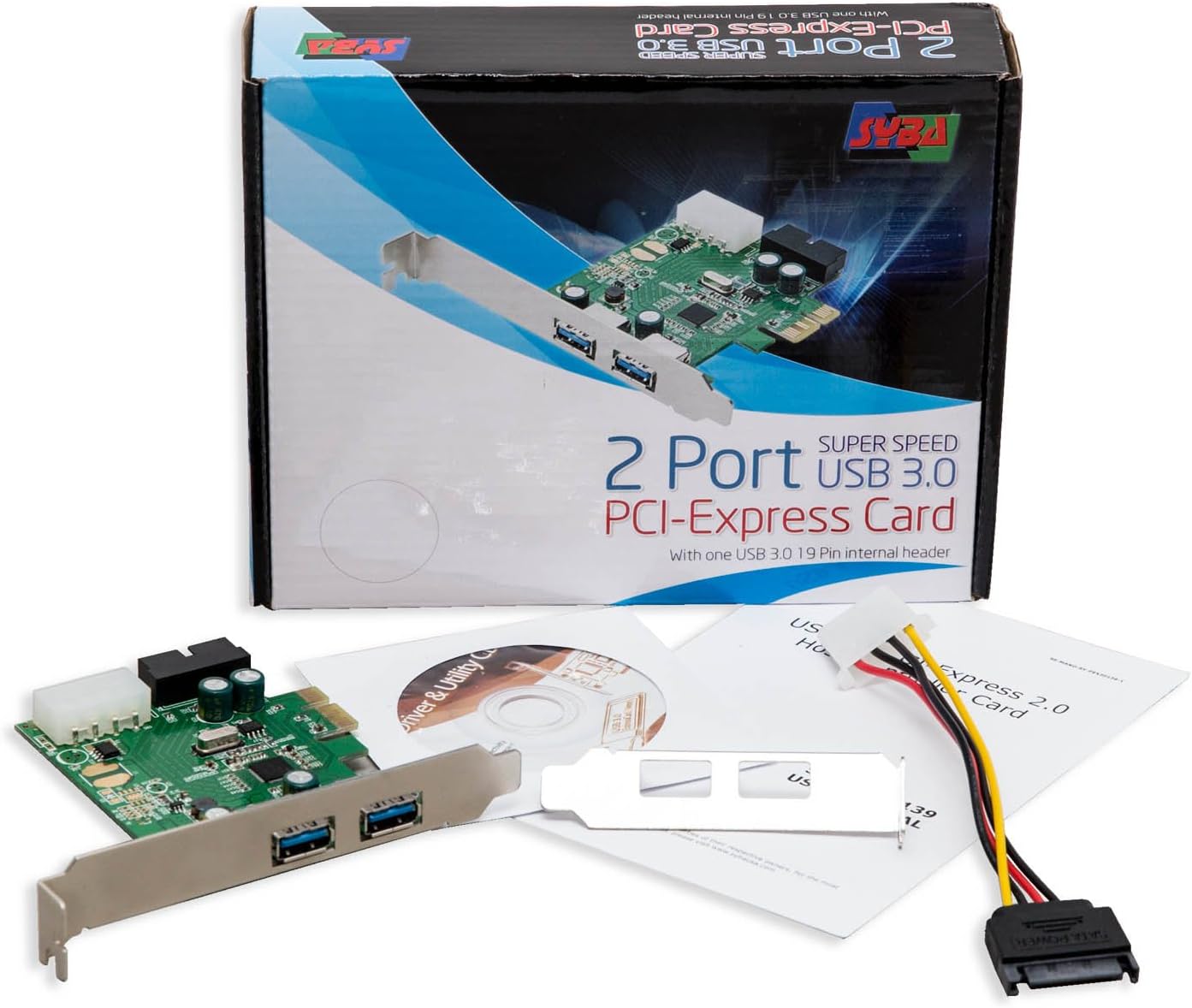
Figure 3.1: Package Contents. The image displays the Syba USB 3.0 PCIe card, a driver CD, and the user manual, alongside the product packaging.
4. 기술 사양
| 기인하다 | 세부 사항 |
|---|---|
| 모델 번호 | SD-PEX20139 |
| 인터페이스 | PCI-Express 2.0 x1 |
| USB 포트 | 2 External USB 3.0, 1 Internal 19-pin USB 3.0 Header |
| 칩셋 | Renesas D720201 |
| 전원 입력 | Molex Power Connector |
| 운영 체제 호환성 | 윈도우, 맥OS, 리눅스 |
| 치수(길이x너비x높이) | 5.6 x 4.8 x 1.2 인치 |
| 품목 무게 | 1.92 온스(0.12 파운드) |
| 색상 | 메탈릭 그린 |
5. 설정 및 설치
5.1. 설치 전 체크리스트
- Ensure your computer has an available PCI-Express x1 slot or higher (x4, x8, x16 slots are compatible).
- Verify your power supply has an available Molex power connector.
- Gather a Phillips head screwdriver.
- It is recommended to back up important data before performing hardware installations.
- 컴퓨터 전원을 끄고 벽면 콘센트에서 전원 코드를 뽑으세요.
- 부품을 다루기 전에 접지된 금속 물체를 만져 정전기를 방전시키십시오.
5.2. 하드웨어 설치
- 컴퓨터 케이스를 여세요. 케이스를 안전하게 여는 방법은 컴퓨터 설명서를 참조하세요.
- Locate an available PCI-Express x1 slot on your motherboard. These slots are typically shorter than graphics card slots.
- Remove the metal bracket cover from the corresponding expansion slot on the back of your computer case.
- Carefully align the Syba USB 3.0 PCIe card with the chosen PCI-Express slot. Apply even, firm pressure to seat the card fully into the slot until it clicks into place.
- Secure the card to the computer case using the screw removed earlier or a new one provided with your case.
- Connect a Molex power connector from your power supply to the Molex power input on the Syba card. This connection is crucial for stable operation and sufficient power delivery to the USB 3.0 ports.
- If your computer case has front panel USB 3.0 ports, connect the 19-pin USB 3.0 header cable from your case to the 19-pin header on the Syba card. Ensure correct orientation to avoid damage.
- Close your computer case and reconnect all peripherals and the power cable.

Figure 5.1: Syba USB 3.0 PCIe Card. This image shows the overall design of the expansion card, highlighting the PCIe connector and external USB 3.0 ports.
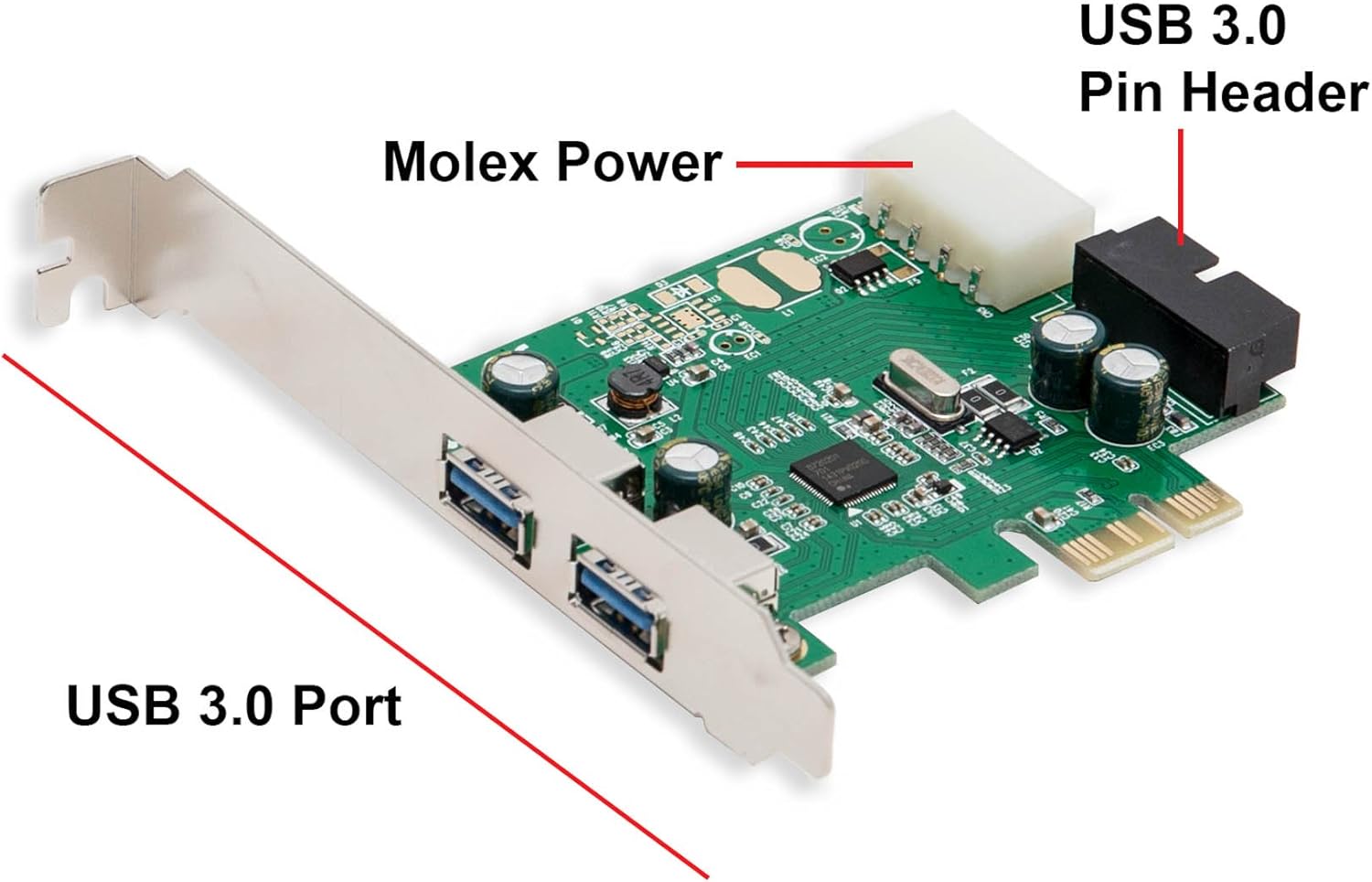
Figure 5.2: Card Components. This image clearly labels the Molex power connector, the 19-pin USB 3.0 header, and the external USB 3.0 ports on the card.
5.3. 드라이버 설치
While many modern operating systems (Windows 8/10/11, recent Linux distributions) may automatically install generic USB 3.0 drivers, it is highly recommended to install the specific drivers provided by Syba for optimal performance and compatibility.
- 컴퓨터의 전원을 켭니다.
- Insert the provided Software Driver CD into your computer's optical drive.
- Navigate to the CD drive in "My Computer" or "This PC" and locate the driver setup file (예를 들어, 설치 프로그램.exe or install.exe).
- 설정 실행 file 화면에 나타나는 지시에 따라 드라이버 설치를 완료하십시오.
- If you do not have an optical drive, you may need to download the latest drivers from the official Syba web대지. 방문 www.sybausa.com and search for model SD-PEX20139.
- After installation, it is advisable to restart your computer to ensure all changes take effect.
6. 사용 설명서
Once the card is installed and drivers are in place, the USB 3.0 ports will function like any other USB port on your system.
- 연결 장치: Plug your USB 3.0 (or backward compatible USB 2.0/1.1) devices into the external USB 3.0 ports on the back of your computer or the front panel ports connected via the 19-pin header.
- USB 3.0 속도: For optimal USB 3.0 speeds (up to 5Gbps), ensure you are using USB 3.0 compatible cables and devices. USB 3.0 ports are typically identified by their blue internal plastic.
- 전력 공급 : The Molex power connection ensures sufficient power for high-power USB devices. Avoid connecting devices that exceed the card's power capabilities without external power.
- 핫 스와핑: The card supports hot-swapping, meaning you can connect and disconnect USB devices while the computer is running.

Figure 6.1: External USB 3.0 Ports. This image provides a clear view of the two external USB 3.0 ports available on the card's bracket.
7. 유지관리
The Syba USB 3.0 PCIe card requires minimal maintenance. Follow these guidelines to ensure longevity:
- 깨끗하게 유지하십시오: Periodically open your computer case and gently clean any dust accumulation on the card using compressed air. Ensure the computer is powered off and unplugged before cleaning.
- 드라이버 업데이트 : Check the Syba website periodically for updated drivers. Keeping drivers current can improve performance and resolve compatibility issues.
- 물리적 검사: 카드에 느슨한 연결부나 눈에 띄는 손상이 있는지 주기적으로 점검하십시오.
8. 문제 해결
| 문제 | 가능한 원인 | 해결책 |
|---|---|---|
| Card not detected by OS. | Card not seated properly; driver not installed; faulty PCIe slot. | Reseat the card firmly. Install/reinstall drivers. Try a different PCIe slot. Check Device Manager for unrecognized devices. |
| USB devices not working or unstable. | No Molex power connected; insufficient power; driver issue; faulty USB device/cable. | Ensure Molex power cable is securely connected. Try a different USB device/cable. Reinstall drivers. Check power supply capacity. |
| USB 3.0 devices operating at USB 2.0 speeds. | Incorrect drivers; USB 2.0 cable/device; BIOS settings. | Ensure correct USB 3.0 drivers are installed. Use a certified USB 3.0 cable and device. Check BIOS settings for USB 3.0 enablement. |
| Front panel USB 3.0 ports not working. | 19-pin header cable not connected or incorrectly connected. | Verify the 19-pin header cable from the case is securely and correctly connected to the card's 19-pin header. |
9. 지원 및 보증
For technical assistance or warranty inquiries, please contact Syba customer support. Refer to the official Syba web최신 연락처 정보 및 보증 정책은 해당 사이트를 참조하십시오.
Syba Official Web대지: www.sybausa.com
Please have your product model number (SD-PEX20139) and purchase information ready when contacting support.