
소개
This manual provides detailed instructions for the installation, configuration, and operation of your D-Link DSR-150 VPN Router. The DSR-150 is designed to offer secure, high-performance networking solutions for small and medium businesses, integrating VPN capabilities and dynamic web 콘텐츠 필터링.
제품 끝view
The D-Link DSR-150 is a robust VPN router featuring multiple ports and indicator lights for easy status monitoring. Understanding the physical components is essential for proper setup and operation.
전면 패널
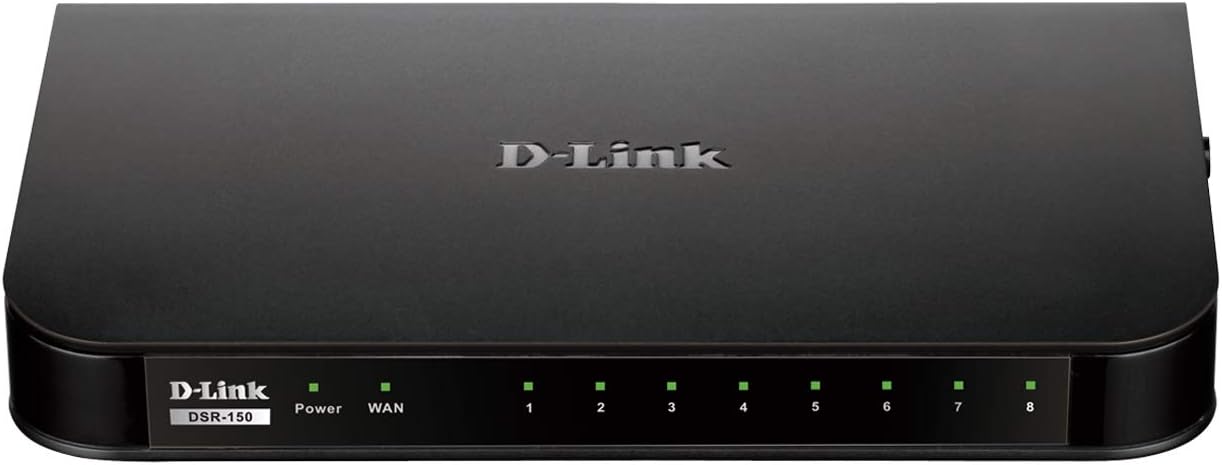
영상: 앞쪽 view of the D-Link DSR-150 VPN Router. This image displays the device's front panel, including the D-Link branding, model number (DSR-150), and a series of LED indicators. These indicators typically show the status of power, WAN connection, and activity for each of the eight LAN ports.
후면 패널
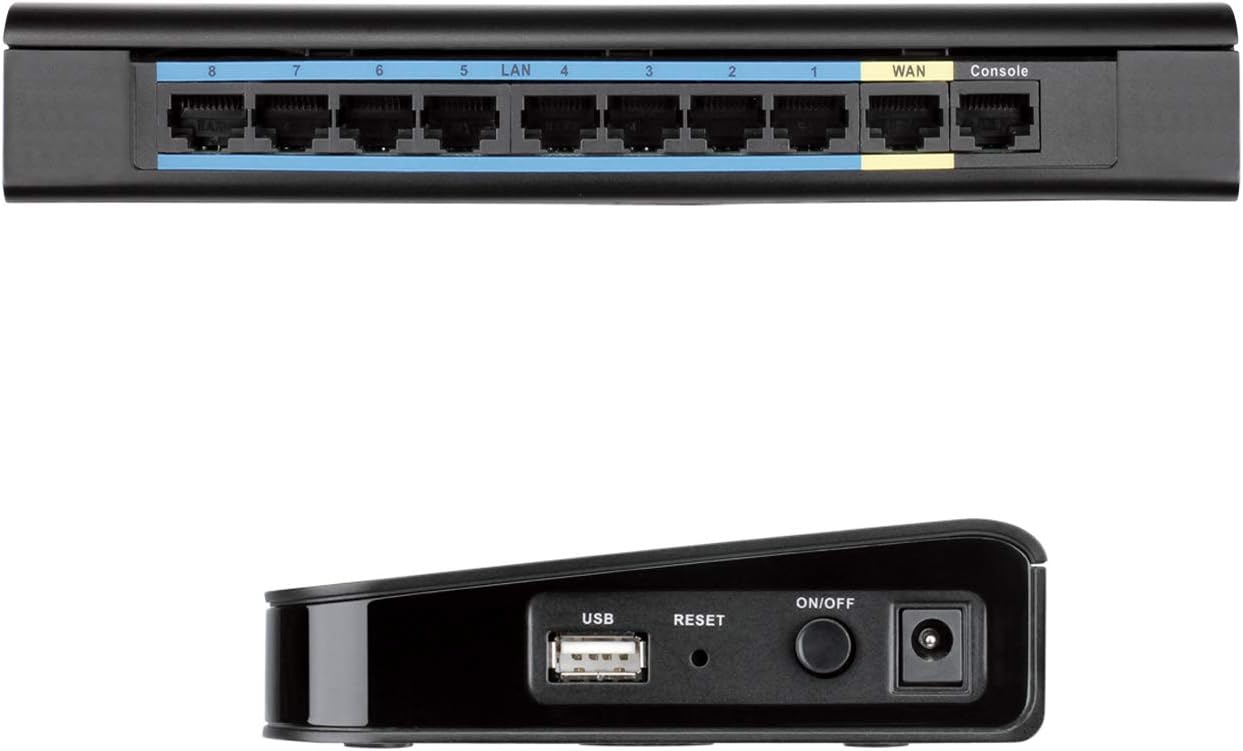
영상: 뒤쪽 view of the D-Link DSR-150 VPN Router. This image highlights the connectivity options on the back of the router, including eight LAN ports (typically for connecting local network devices), one WAN port (for connecting to the internet modem), and a Console port (for direct management access).
사이드 패널

영상: 옆 view of the D-Link DSR-150 VPN Router. This image shows the side of the device, featuring a USB port (for potential external storage or other peripherals), a recessed Reset button (for factory defaults), and the Power On/Off button alongside the power input jack.
주요 특징
The DSR-150 VPN Router offers a range of features designed for secure and efficient network management:
- High-Speed VPN Support: Integrated VPN tunnel support for secure remote network access.
- Multiple LAN/WAN Ports: Features eight (8) 10/100 LAN Ports and one (1) 10/100 WAN Port.
- Policy-Based Firewall: Policy-based service management allows for easy configuration of firewall rules.
- SSL VPN Tunnels: Supports one (1) SSL VPN tunnel for clientless remote access.
- GRE Tunnels: Supports five (5) Generic Routing Encapsulation (GRE) tunnels.
- IPsec/PPTP/L2TP Tunnels: Simultaneously supports up to ten (10) IPsec VPN tunnels plus ten (10) additional PPTP/L2TP tunnels for site-to-site connectivity.
- D-Link Green Ethernet: Incorporates D-Link Green Ethernet features to save power and reduce energy costs.
- 동적 Web 콘텐츠 필터링: Enables administrators to allow or block access to websites based on categories.
설정
1. 개봉 및 검사
Carefully unpack the router and verify that all components are present. This typically includes the DSR-150 router, a power adapter, and an Ethernet cable.
2. 물리적 연결
- Connect the provided power adapter to the router's power input port and then to a power outlet.
- Connect your internet modem or main network line to the 핏기 없는 port on the rear of the DSR-150 using an Ethernet cable.
- Connect your computers or other network devices to any of the 랜 ports (1-8) on the rear of the DSR-150 using Ethernet cables.
- 를 누르세요 켜기/끄기 button on the side panel to power on the router. Wait for the Power LED on the front panel to become solid.
3. 초기 구성 접근
접근하려면 web초기 구성을 위한 -기반 관리 인터페이스:
- 컴퓨터가 라우터의 LAN 포트 중 하나에 연결되어 있는지 확인하세요.
- 열기 web 브라우저(예: Chrome, Firefox, Edge).
- Enter the default IP address of the router (commonly
192.168.10.1or similar, refer to the device label or quick installation guide) into the browser's address bar and press Enter. - 기본 사용자 이름과 비밀번호를 입력하세요(일반적으로).
adminfor both, or as specified in the quick installation guide) when prompted.
작동 지침
VPN 구성
The DSR-150 supports various VPN types to establish secure connections for remote users and branch offices.

영상: VPN capabilities for remote access. This image illustrates the concept of secure remote access, showing a user with a laptop and icons representing different VPN protocols like SSL VPN, PPTP, and L2TP, which facilitate secure connections to a central network.

영상: Site-to-Site VPN Tunnels. This diagram visually explains how a main office and a branch office can establish a secure connection over the internet using various VPN protocols such as IPsec, PPTP, and L2TP, creating encrypted virtual links between locations.
- SSL VPN: For clientless remote access, navigate to the VPN > SSL VPN 섹션에 web interface. Configure user accounts and access policies.
- IPsec/PPTP/L2TP: For site-to-site connections, go to VPN > IPsec or VPN > PPTP/L2TP. Define tunnel parameters, authentication methods, and network ranges for secure communication between offices.
- GRE Tunnels: Configure Generic Routing Encapsulation tunnels under the VPN > GRE section for specific routing needs.
동적 Web 콘텐츠 필터링
This feature allows administrators to control internet usage by blocking or allowing access to websites based on their categories.

영상: Web Content Filtering. This image depicts a laptop screen showing lines of code, symbolizing the router's capability to filter web content. This feature helps administrators manage and control internet usage by blocking access to specific web사이트 또는 카테고리.
- 로 이동 Security > Content Filtering.
- Enable Dynamic Content Filtering.
- Configure policies to block or allow specific website categories or define custom URL/keyword filters.
방화벽 규칙
The DSR-150's policy-based service management allows for granular control over network traffic.
- 입장 Firewall > Rules to create, modify, or delete firewall policies.
- Define rules based on source/destination IP, port numbers, and protocols to secure your network.
유지
펌웨어 업데이트
Regularly updating the router's firmware is crucial for security, performance, and access to new features.
- Visit the official D-Link support website for the DSR-150 model to download the latest firmware.
- 라우터에서 web 인터페이스, 탐색 System > Firmware Upgrade.
- Follow the on-screen instructions to upload and install the new firmware. Do not power off the device during this process.
백업 및 복원 구성
It is recommended to back up your router's configuration settings before making significant changes or firmware updates.
- 이동하다 System > Configuration Management.
- Use the options to save the current configuration to your computer or restore a previously saved configuration.
장치 재부팅
A reboot can resolve minor network issues or apply certain configuration changes.
- 에서 web 인터페이스, 탐색 시스템 > 재부팅 그리고 작업을 확인하세요.
- Alternatively, power off the device using the On/Off button, wait 10 seconds, and then power it back on.
D-Link Green Ethernet
The DSR-150 incorporates D-Link Green Ethernet technology to optimize power consumption.

영상: Efficient Green Technology. This image features a D-Link router alongside a large power symbol composed of green leaves, symbolizing the device's adherence to WEEE directives and its environmentally responsible design through D-Link Green Ethernet features.
문제 해결
This section addresses common issues you might encounter with your DSR-150 router.
- 인터넷 접속 불가:
- Verify the WAN cable connection to your modem.
- Check the WAN status in the router's web 인터페이스.
- 모뎀이 제대로 작동하는지 확인하십시오.
- 접근할 수 없습니다 Web 인터페이스:
- Confirm your computer is connected to a LAN port.
- 컴퓨터의 IP 주소가 라우터와 동일한 서브넷에 있는지 확인하십시오(예: 192.168.10.x).
- 브라우저 캐시를 지우거나 다른 브라우저를 사용해 보세요.
- VPN 연결 문제:
- Double-check VPN tunnel settings, including IP addresses, authentication methods, and encryption.
- Ensure firewall rules are not blocking VPN traffic.
- 네트워크 성능 저하:
- 네트워크 트래픽이 많거나 대역폭을 많이 사용하는 애플리케이션이 있는지 확인하십시오.
- 이더넷 케이블에 손상이 있는지 점검하십시오.
- 라우터의 펌웨어가 최신인지 확인하세요.
명세서
- 모델 번호: DSR-150
- 상표: 디링크
- 연결 기술 : 열광한
- 포트: 8 x 10/100 Fast Ethernet LAN, 1 x 10/100 Fast Ethernet WAN
- VPN 지원 : IPsec, PPTP, L2TP, SSL, GRE
- 치수(길이 x 너비 x 높이): 약 11.34 x 9.76 x 2.6cm(28.8 x 24.8 x 6.6인치)
- 무게: 약 1파운드(0.45kg)
- 특징: WPS (Wired Protected Setup)
- 안테나 유형: 내부
보증 및 지원
D-Link offers a 제한된 평생 보증 on the DSR Series VPN Routers, demonstrating their commitment to product quality and long-term customer confidence. For detailed warranty terms and conditions, please refer to the documentation included with your product or visit the official D-Link web대지.
If you encounter issues that cannot be resolved using this manual, please contact D-Link Technical Support for assistance. Support contact information can typically be found on the D-Link web사이트 또는 제품 포장에 포함되어 있습니다.