
beyerdynamic 721360
Beyerdynamic Stegos TB Wireless Boundary Microphone User Manual
모델: 721360
소개
This manual provides comprehensive instructions for the setup, operation, and maintenance of your Beyerdynamic Stegos TB Wireless Boundary Microphone. Please read this manual thoroughly before using the device to ensure optimal performance and longevity.
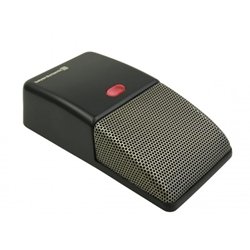
Image: Beyerdynamic Stegos TB Wireless Boundary Microphone. This image displays the compact, black wireless boundary microphone, designed for discreet placement on surfaces like conference tables.
중요 안전 지침
- 기기를 물이나 과도한 습기에 노출시키지 마세요.
- 극한의 온도를 피하세요.
- 장치를 열거나 개조하지 마십시오. 모든 정비는 자격을 갖춘 기술자에게 맡기십시오.
- 지정된 전원 및 액세서리만 사용하세요.
- 어린이의 손이 닿지 않는 곳에 보관하세요.
패키지 내용
패키지에 모든 품목이 들어 있는지 확인하세요.
- Beyerdynamic Stegos TB Wireless Boundary Microphone
- USB 충전 케이블(마이크로 USB)
- 사용 설명서 (본 문서)
설정
1. 마이크 충전
- Connect the Micro USB end of the charging cable to the microphone's charging port.
- Connect the standard USB end of the cable to a powered USB port (e.g., computer, USB wall adapter).
- The LED indicator on the microphone will show charging status.
- 완전히 충전되면 충전 케이블을 분리하세요.
2. 장치에 연결하기
The Stegos TB microphone connects wirelessly to compatible devices, typically personal computers, for video conferencing applications.
- 마이크가 충전되어 있고 전원이 켜져 있는지 확인하십시오.
- Activate Bluetooth on your personal computer or compatible device.
- Put the microphone into pairing mode (refer to the device's specific button combination, usually holding a power/pairing button). The LED indicator will typically flash to indicate pairing mode.
- On your computer, search for available Bluetooth devices. Select "Beyerdynamic Stegos TB" from the list.
- Once paired, the LED indicator on the microphone will show a solid light, indicating a successful connection.
- In your computer's sound settings or video conferencing software, select the "Beyerdynamic Stegos TB" as the input audio device.
작동 지침
전원 켜기/끄기
- To power on: Press and hold the power button for approximately 3 seconds. The LED indicator will illuminate.
- To power off: Press and hold the power button for approximately 3 seconds. The LED indicator will turn off.
음소거 기능
The microphone features a mute function for privacy during calls.
- To mute: Press the mute button once. The LED indicator may change color or flash to indicate mute status.
- To unmute: Press the mute button again. The LED indicator will return to its normal operating state.
Placement for Optimal Performance
For best audio pickup, place the Stegos TB microphone on a flat surface in the center of the participants. Its omnidirectional polar pattern ensures 360-degree sound capture.
유지
청소
- Wipe the microphone's exterior with a soft, dry, or slightly damp 옷감.
- 강한 화학 물질, 용제 또는 연마성 세척제를 사용하지 마십시오.
- Ensure no liquid enters the microphone grille or ports.
저장
When not in use for extended periods, store the microphone in a cool, dry place, away from direct sunlight and extreme temperatures. It is recommended to fully charge the battery before long-term storage and recharge it every few months to maintain battery health.
문제 해결
| 문제 | 가능한 원인 | 해결책 |
|---|---|---|
| 마이크 전원이 켜지지 않습니다. | 배터리가 부족하거나 방전되었습니다. | Charge the microphone using the provided USB cable. |
| 무선으로 연결할 수 없습니다. | Bluetooth is off on the device; microphone not in pairing mode; out of range. | Ensure Bluetooth is enabled. Put microphone into pairing mode. Move microphone closer to the device. |
| 마이크에서 소리가 입력되지 않습니다. | Microphone is muted; incorrect audio input selected on computer/software. | Unmute the microphone. Select "Beyerdynamic Stegos TB" as the input device in your system settings or application. |
| 오디오 품질이 좋지 않습니다. | Microphone too far from speaker; environmental noise; interference. | Place microphone closer to speakers. Reduce background noise. Ensure no obstructions between microphone and receiving device. |
명세서
- 상표: 베이어다이나믹
- 모델: Stegos TB (721360)
- 연결 기술 : Wireless (USB for charging)
- 커넥터 유형: 마이크로 USB(충전용)
- 특징: 무선 전화
- 호환 장치: 개인용 컴퓨터
- 색상: 검은색
- 극성 패턴: 전방위
- 전원: 배터리 구동
- 추천 용도: 비디오 컨퍼런스
보증 정보
Beyerdynamic products are covered by a limited warranty. For specific warranty terms and conditions, please refer to the warranty card included with your product or visit the official Beyerdynamic web사이트. 보증 청구를 위해 구매 증빙 자료를 보관하세요.
Note: Warranty details are subject to change and may vary by region.
지원 및 연락처
For further assistance, technical support, or service inquiries, please contact Beyerdynamic customer support through their official web사이트 또는 제품 포장에 제공된 연락처 정보를 참조하세요.
공식적인 Web대지: www.beyerdynamic.com
고객 지원팀에 문의하실 때는 모델 번호(721360)와 일련 번호를 준비해 주십시오.
Ask a question about this manual
Ask about setup, troubleshooting, compatibility, parts, safety, or missing instructions. Manuals+ will review the question and use this page’s manual context to help answer it.