
1. 서론
구매해주셔서 감사합니다asing the MOOER Reecho Digital Delay Pedal. This compact and versatile pedal offers three distinct delay modes: Analog, Real Echo, and Tape Echo, providing a wide range of delay effects for your guitar. Its small footprint and true bypass design make it an excellent addition to any pedalboard.
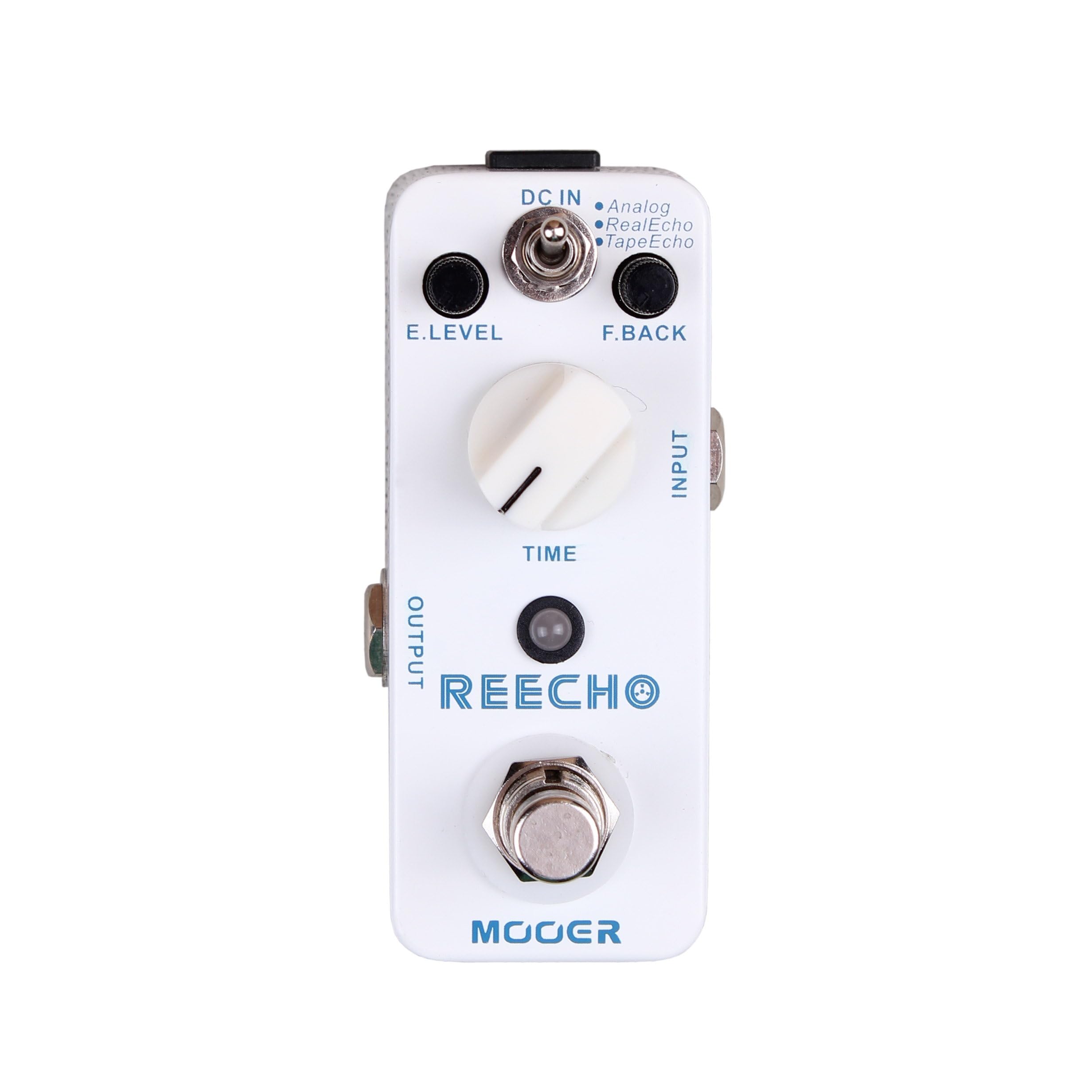
그림 1: 앞쪽 view of the MOOER Reecho Digital Delay Pedal. This image shows the compact white enclosure with the E.LEVEL knob, TIME knob, mode toggle switch, input/output jacks, and footswitch.
2. 주요 특징
- 세 가지 지연 모드: Choose between Analog, Real Echo, and Tape Echo for diverse sonic textures.
- Wide Delay Time Range: Offers a delay time from 5ms to 780ms, suitable for various musical styles.
- Full Metal Shell: Durable and robust construction for reliable performance.
- 컴팩트한 디자인: Very small and exquisite, optimizing pedalboard space.
- 트루 바이패스: 효과가 해제되었을 때 신호 무결성을 보장합니다.
3. 컨트롤 및 기능
Familiarize yourself with the controls of your Reecho pedal:
그림 2: 상세한 view of the MOOER Reecho pedal's controls, including E.LEVEL, TIME, and the mode switch. The image highlights the input and output jacks, DC input, and footswitch.
- E.LEVEL 노브: (Effect Level) Controls the mix of the delayed signal with the dry signal. Turn clockwise to increase the effect level, counter-clockwise to decrease it.
- 시간 노브: Adjusts the delay time, from a very short slapback to a longer, more ambient delay. Turn clockwise for longer delay times, counter-clockwise for shorter times.
- 모드 전환 스위치: Selects one of the three delay modes:
- 비슷한 물건: Emulates classic analog delay pedals, offering a warm, natural decay.
- 리얼 에코: Provides a clear, pristine digital delay with accurate repeats.
- 테이프 에코: Simulates the characteristics of vintage tape echo units, including subtle modulation and decay.
- 입력 잭: Connect your instrument or the output of another pedal here.
- 출력 잭: 이것을 당신의 것에 연결하세요 amp신호 체인의 다음 페달의 입력이나 라이저.
- DC 입력 잭: Connect a 9V DC power adapter (center negative) here.
- 풋스위치: Engages or disengages the effect. This pedal features true bypass, ensuring your tone remains unaffected when the pedal is off.
4. 설정 가이드
- 전원 연결: Connect a standard 9V DC power adapter (center negative) to the DC IN jack on the side of the pedal. Ensure the power supply meets the pedal's requirements to prevent damage.
- 입력 연결: Connect your guitar or the output of a preceding effect pedal to the INPUT jack on the right side of the Reecho pedal using a standard 1/4-inch instrument cable.
- 출력 연결: Connect the OUTPUT jack on the left side of the Reecho pedal to your amplifier's input or the input of the next effect pedal in your chain using a standard 1/4-inch instrument cable.
- 초기 설정: Before powering on, set the E.LEVEL and TIME knobs to their minimum positions (fully counter-clockwise) and the mode switch to your desired initial delay type (e.g., Real Echo).
- 전원 켜기: 모든 연결이 안전하게 완료되면 전원을 켜십시오. amp앰프를 연결하고 페달을 밟으세요.
메모: Always connect and disconnect cables with your amplifier turned off or on standby to avoid loud pops and potential damage to your equipment.
5. 사용 설명서
Using the MOOER Reecho pedal is straightforward. Follow these steps to achieve various delay effects:
- 효과를 활용하세요: Press the footswitch to turn the delay effect on. The LED indicator will illuminate. Press it again to bypass the effect (LED off).
- Select Delay Mode: Use the toggle switch to select one of the three delay modes:
- 비슷한 물건: For warm, vintage-style delays.
- 리얼 에코: For clear, modern digital delays.
- 테이프 에코: For delays with a characteristic tape saturation and subtle warble.
- 지연 시간 조정: Rotate the TIME knob to set the duration of the delay repeats. Experiment with different settings to find the perfect rhythm for your playing.
- Set Effect Level: Use the E.LEVEL knob to control how prominent the delayed signal is in your overall sound. Start with a lower setting and gradually increase it to avoid overwhelming your dry signal.
Experiment with different combinations of the TIME and E.LEVEL knobs within each delay mode to discover the full range of sounds the Reecho pedal can produce. From subtle ambience to rhythmic repeats, the possibilities are extensive.
6. 유지관리
- 청소: 페달 외부를 닦을 때는 부드럽고 마른 천을 사용하십시오. 연마성 세척제나 용제는 마감재를 손상시킬 수 있으므로 사용하지 마십시오.
- 저장: 장기간 사용하지 않을 경우, 페달을 직사광선과 극한 온도 변화를 피해 서늘하고 건조한 곳에 보관하십시오.
- 전원 공급 장치: Always use a regulated 9V DC, center-negative power supply. Incorrect power can damage the unit and void the warranty.
- 습기를 피하세요: Keep the pedal away from water and excessive humidity.
7. 문제 해결
| 문제 | 가능한 원인 | 해결책 |
|---|---|---|
| 페달을 밟아도 소리가 나지 않습니다. | Incorrect cable connection, no power, E.LEVEL knob set to minimum. | Check all cable connections. Ensure power supply is connected and functional. Increase E.LEVEL knob. |
| 아무런 효과가 없지만, 드라이 신호는 통과합니다. | E.LEVEL knob set to minimum, pedal bypassed. | Increase E.LEVEL knob. Press footswitch to engage effect (LED should be on). |
| 원치 않는 소음이나 윙윙거리는 소리. | Faulty power supply, ground loop, interference from other equipment. | Use a high-quality, regulated power supply. Try isolating the pedal's power. Check other cables and equipment. |
| Delay repeats are too short/long. | TIME knob setting. | Adjust the TIME knob to your desired delay duration. |
8. 사양
- 상표: 무어
- 모델: 리초
- 지연 모드: Analog, Real Echo, Tape Echo
- 지연 시간 범위: 5ms ~ 780ms
- 입력: 1/4" mono audio jack (Impedance: 470k Ohms)
- 산출: 1/4" mono audio jack (Impedance: 100 Ohms)
- 전력 요구 사항: 9V DC, center negative (Power consumption: 128mA)
- 치수: 93.5mm(D) × 42mm(W) × 52mm(H)
- 무게: 160g (0.16kg)
- 재료: 풀 메탈 쉘
9. 보증 및 지원
MOOER products are designed for reliability and performance. For warranty information and technical support, please refer to the official MOOER web사이트를 방문하거나 가까운 대리점에 문의하세요. 보증 청구를 위해 구매 증빙 자료로 구매 영수증을 보관하세요.
추가 지원을 받으려면 다음을 방문하세요. MOOER Store on Amazon or the official MOOER web대지.