
1. 서론
The D-Link GO-SW-5G is a 5-Port Unmanaged Gigabit Desktop Switch designed for home and small office environments. This device provides a simple and cost-effective solution to expand your network connectivity, offering high-speed Gigabit Ethernet ports for reliable data transfer. It incorporates D-Link's Green Technology for energy efficiency, reduced heat generation, and extended product lifespan.
This switch is a plug-and-play device, requiring no complex configuration or software installation, making it easy to integrate into an existing network.
2. 패키지 내용
아래 나열된 모든 품목이 패키지에 포함되어 있는지 확인하세요.
- D-Link GO-SW-5G 5-Port Gigabit Desktop Switch
- 전원 어댑터
- 빠른 설치 가이드
누락되거나 손상된 품목이 있는 경우 판매점에 문의하여 도움을 받으십시오.
3. 설정 지침
The D-Link GO-SW-5G switch is designed for easy plug-and-play installation. Follow these steps to set up your device:
3.1. 전원 어댑터 연결
- Locate the power input port on the side of the D-Link GO-SW-5G switch.
- 제공된 전원 어댑터를 이 포트에 연결하십시오.
- 전원 어댑터의 다른 쪽 끝을 표준 전기 콘센트에 꽂습니다.
- The power LED on the front of the switch will illuminate, indicating that the device is receiving power.

그림 1: 옆 view of the D-Link GO-SW-5G switch with the power input port.
3.2. 네트워크에 연결
- Using a standard Ethernet cable (RJ45), connect one end to an available LAN port on your router (not your modem).
- Connect the other end of this Ethernet cable to any of the five available ports on the back of the D-Link GO-SW-5G switch.
- The corresponding LED on the front of the switch will light up, indicating an active connection.
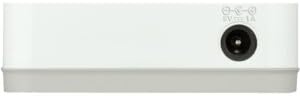
그림 2: 뒤쪽 view of the D-Link GO-SW-5G switch with five Ethernet ports.
3.3. Connect Network Devices
- Connect your network devices (e.g., computers, gaming consoles, network printers, smart TVs) to the remaining available Ethernet ports on the D-Link GO-SW-5G switch using Ethernet cables.
- Each connected device will have its corresponding LED on the front of the switch illuminate, confirming a successful connection.

그림 3: 앞쪽 view of the D-Link GO-SW-5G switch showing active port LEDs.
4. 사용 설명서
The D-Link GO-SW-5G is an unmanaged switch, meaning it operates automatically without requiring user configuration. Once connected as described in the Setup section, it will begin forwarding network traffic between connected devices.
- 자동 협상: The switch automatically detects the network speed (10/100/1000 Mbps) and duplex mode (half/full) of connected devices and adjusts accordingly.
- 자동 MDI/MDIX: All ports support automatic MDI/MDIX crossover, eliminating the need for crossover cables when connecting to other switches or hubs.
- LED 표시등: Each port has an LED indicator on the front panel. A lit LED indicates an active link, and blinking indicates network activity.
5. 유지관리
To ensure optimal performance and longevity of your D-Link GO-SW-5G switch, consider the following maintenance guidelines:
- 놓기: 스위치를 직사광선, 열원, 과도한 습기를 피해 서늘하고 건조한 곳에 보관하세요. 기기 주변에 충분한 통풍이 유지되도록 하세요.
- 청소: Use a soft, dry cloth to clean the exterior of the switch. Avoid using liquid or aerosol cleaners, as they may damage the device.
- 케이블 관리 : 엉킴과 연결 끊김을 방지하기 위해 이더넷 케이블을 깔끔하게 정리하세요.
- 전원 주기: If you experience network issues, a simple power cycle (unplugging the power adapter for 10 seconds and then plugging it back in) can often resolve minor problems.
6. 문제 해결
If you encounter issues with your D-Link GO-SW-5G switch, refer to the following common troubleshooting steps:
- 전원 LED 없음:
- 전원 어댑터가 스위치와 작동하는 콘센트에 제대로 연결되어 있는지 확인하십시오.
- 다른 장치를 연결해 전기 콘센트가 작동하는지 확인하세요.
- No Link/Activity LED for a Connected Device:
- 이더넷 케이블이 스위치 포트와 네트워크 장치에 제대로 연결되어 있는지 확인하십시오.
- 케이블에 결함이 있는지 확인하려면 다른 이더넷 케이블을 사용해 보세요.
- 연결된 장치의 전원이 켜져 있고 네트워크 어댑터가 올바르게 작동하는지 확인하세요.
- 장치를 스위치의 다른 포트에 연결해 보십시오.
- 네트워크 속도가 느립니다:
- Verify that all connected devices and cables support Gigabit Ethernet (1000 Mbps) for optimal performance. The switch will operate at the lowest common speed.
- Ensure your router and internet service provider (ISP) plan support the desired speeds.
- Perform a power cycle on the switch and your router.
- 간헐적인 연결:
- 느슨한 케이블 연결을 확인하십시오.
- 스위치가 과열되지 않도록 하고, 적절한 환기를 제공하십시오.
- 다양한 이더넷 케이블로 테스트해 보세요.
7. 사양
| 상표 | 디링크 |
| 모델 번호 | GO-SW-5G/B |
| 포트 수 | 5 |
| 스위치 유형 | 관리되지 않음 |
| 데이터 전송 속도 | 1기가비트/초 (10/100/1000Mbps) |
| 인터페이스 | RJ45 |
| 색상 | 하얀색 |
| 품목 무게 | 0.22 파운드 |
| 권tage | 100-240 볼트 |
| 호환 장치 | PC, Mac, and other Ethernet-enabled devices |
| 스위칭 패브릭 | 10Gbps |
| 한국어: | 790069365669 |
8. 보증 및 지원
한정된 보증: The D-Link GO-SW-5G switch comes with a 3-year limited warranty. For detailed terms and conditions, please refer to the warranty information included in your package or visit the official D-Link web대지.
기술 지원: For technical assistance, product registration, or to download the latest firmware and documentation, please visit the D-링크 지원 Web대지 or contact D-Link customer service.