
소개
This manual provides detailed instructions for the setup, operation, and maintenance of your iLive ISB212B Bluetooth Speaker. This compact speaker delivers audio wirelessly from compatible Bluetooth devices and also supports wired connections. Please read this manual thoroughly before using your speaker.
패키지 내용
- iLive ISB212B Bluetooth Speaker
- Mini-USB to USB Charging Cable
제품 특징
- 블루투스를 통한 무선 오디오 스트리밍
- LED pairing indicator for connection status
- Compact, cylindrical design
- Rechargeable battery with approximately 2 hours of playback
- Mini-USB port for battery recharging
- 3.5mm Audio Input for wired connections
제어 및 표시기
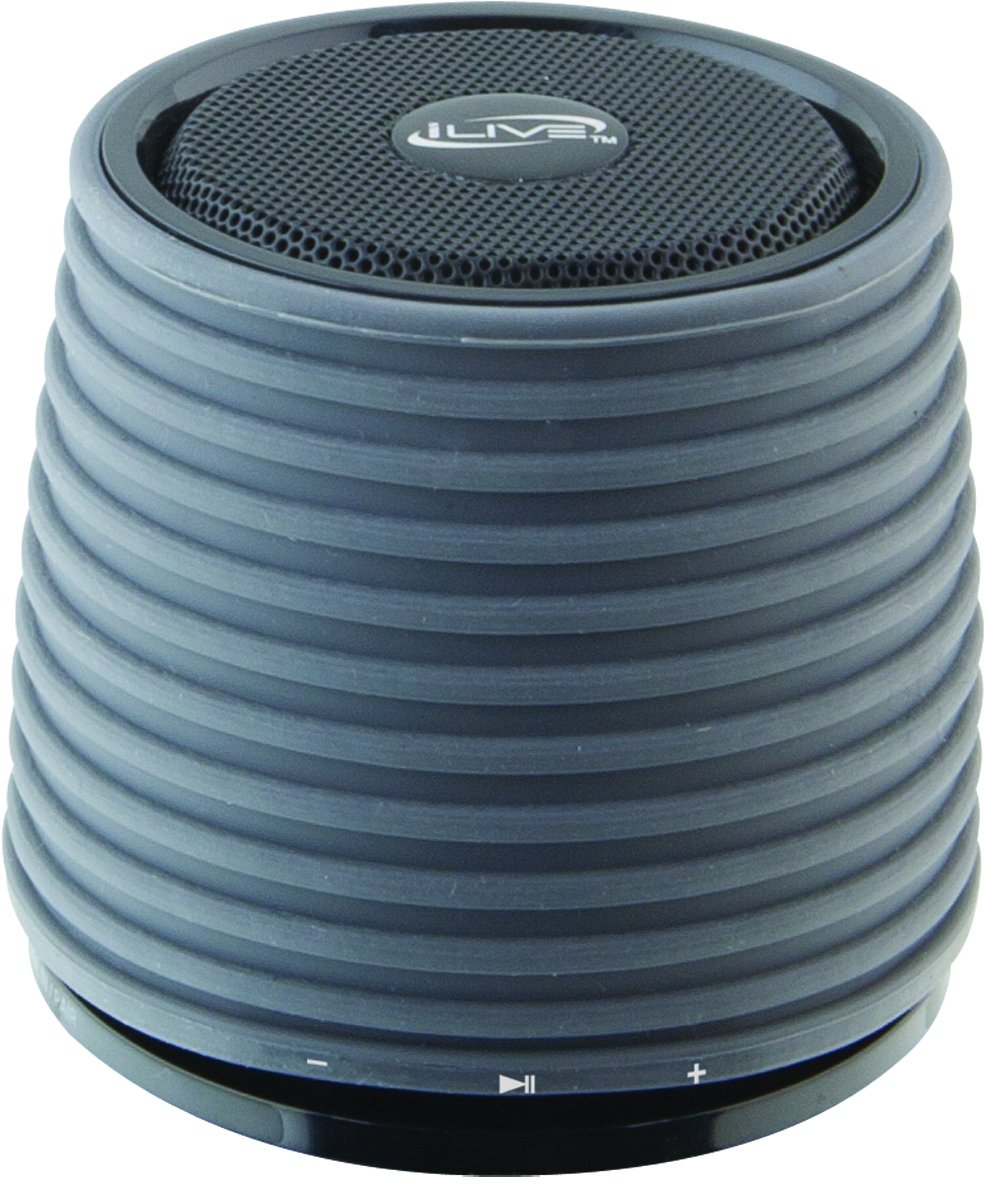
This image displays the iLive ISB212B Bluetooth Speaker. It features a cylindrical shape with a textured grey body and a black speaker grille on top. A band around the middle shows control buttons for play/pause, volume up/next track, and volume down/previous track.
- 전원 버튼: 전원을 켜거나 끄려면 길게 누릅니다.
- 재생/일시 정지 버튼: 오디오 재생을 제어합니다.
- 볼륨 높이기 / 다음 트랙 버튼: 짧게 누르면 볼륨이 커지고, 길게 누르면 다음 트랙이 됩니다.
- 볼륨 낮추기/이전 트랙 버튼: 짧게 누르면 볼륨이 낮아지고, 길게 누르면 이전 트랙으로 돌아갑니다.
- LED Pairing Indicator: Bluetooth 연결 상태를 보여줍니다.
- 미니 USB 포트: 내부 배터리를 충전합니다.
- 3.5mm 오디오 입력: 보조 케이블(별도 구매)을 사용하여 외부 오디오 장치를 연결할 수 있습니다.
설정
1. 배터리 충전
- Connect the small end of the included Mini-USB to USB charging cable to the Mini-USB port on the speaker.
- USB 충전 케이블의 큰 쪽 끝을 전원이 공급되는 USB 포트(예: 컴퓨터, USB 벽면 어댑터)에 연결하십시오.
- 충전 중에는 LED 표시등이 켜지고, 완전히 충전되면 꺼지거나 색상이 변경됩니다.
- 완충 시 약 2시간 동안 재생할 수 있습니다.
2. 전원 켜기 / 끄기
- 전원을 켜려면 LED 표시등이 켜질 때까지 전원 버튼을 길게 누르세요.
- 전원을 끄려면 LED 표시등이 꺼질 때까지 전원 버튼을 다시 길게 누르십시오.
작동 지침
1. 블루투스 페어링
- 스피커 전원이 켜져 있고 블루투스 기기에서 10미터(30피트) 이내에 있는지 확인하십시오.
- The LED pairing indicator will flash, indicating it is in pairing mode.
- On your Bluetooth device (smartphone, tablet, etc.), enable Bluetooth and search for new devices.
- Select "iLive ISB212B" from the list of available devices.
- Once paired, the LED pairing indicator will become solid, and you may hear an audible confirmation.
- 페어링에 실패하면 스피커와 기기의 전원을 끄고 단계를 반복하세요.
2. 오디오 재생
- After successful Bluetooth pairing, begin playing audio on your connected device.
- 스피커의 재생/일시정지 버튼을 사용하여 재생을 제어하세요.
- Use the Volume Up/Down buttons for volume adjustment. Long press for track navigation.
3. Using the 3.5mm Audio Input
- Connect one end of a 3.5mm audio cable (not included) to the 3.5mm Audio Input port on the speaker.
- 케이블의 다른 쪽 끝을 외부 오디오 장치의 헤드폰 잭이나 오디오 출력에 연결합니다.
- 스피커가 자동으로 보조 입력 모드로 전환됩니다.
- Adjust volume using your external device and the speaker's volume controls.
유지
- 부드럽고 마른 천으로 스피커를 닦으세요. 연마성 세제나 용제를 사용하지 마세요.
- 스피커를 물, 습기 및 극한 온도로부터 멀리하십시오. 본 제품은 방수 기능이 없습니다.
- 장시간 사용하지 않을 때는 스피커를 시원하고 건조한 곳에 보관하세요.
- 스피커를 분해하거나 개조하지 마십시오. 보증이 무효화됩니다.
문제 해결
| 문제 | 해결책 |
|---|---|
| 스피커의 전원이 켜지지 않습니다. | Ensure the battery is charged. Connect the speaker to a power source using the Mini-USB cable. |
| Bluetooth 장치와 페어링할 수 없습니다. |
|
| 소리가 나지 않거나 볼륨이 작습니다. |
|
| 배터리 수명이 짧습니다. | 스피커를 사용하기 전에 완전히 충전되었는지 확인하십시오. 배터리 수명은 볼륨 레벨 및 사용량에 따라 달라질 수 있습니다. |
명세서
| 특징 | 세부 사항 |
|---|---|
| 모델 번호 | ISB212B |
| 연결성 | Bluetooth, 3.5mm Auxiliary, Mini-USB (charging) |
| 스피커 출력 전력 | 3 와트 |
| 배터리 유형 | 리튬 이온 1개(포함) |
| 배터리 수명(대략) | 2시간 |
| 제품 치수 | 7.8 x 7.8 x 7.01cm |
| 품목 무게 | 295g |
| 원산지 | 중국 |
| 방수복 | 아니요 |
보증 및 지원
This iLive ISB212B Bluetooth Speaker comes with a 90일 보증 from the date of purchase. This warranty covers manufacturing defects. For technical support or warranty claims, please refer to the contact information provided with your product packaging or visit the official iLive web대지.