
1. 서론
This manual provides essential information for the safe and efficient operation, setup, and maintenance of your Zipper ZI-FS200 Tile Cutter. Please read these instructions thoroughly before using the machine to ensure proper handling and to prevent injury or damage.
2. 안전 지침
화재, 감전, 신체 상해의 위험을 줄이려면 전기 도구를 사용할 때 항상 기본적인 안전 예방 조치를 따르세요.
- 설명서 전체를 읽으십시오: 작동 전에 모든 지침과 경고를 이해하세요.
- 개인 보호 장비(PPE)를 착용하십시오. Always wear safety glasses, hearing protection, and appropriate gloves. A dust mask is recommended when cutting.
- 안전한 작업 공간을 확보하세요: 작업 공간은 깨끗하고 밝으며 장애물이 없도록 유지하십시오. 어두운 곳에서는 작업하지 마십시오.amp 또는 습한 환경.
- 전기 안전: Ensure the power supply matches the tool's requirements (230V, 50Hz). Use a Residual Current Device (RCD) or Ground Fault Circuit Interrupter (GFCI) for added protection, especially with the integrated PRCD plug.
- 작업물을 고정하세요: Always ensure the tile is firmly supported and guided during cutting.
- 경비원을 제자리에 배치하십시오: Never operate the tile cutter without all safety guards properly installed.
- 전원 분리: Always unplug the tool before making adjustments, changing blades, or performing maintenance.
- 주의 산만을 피하세요: Focus entirely on the task at hand.
- 도구를 유지 관리하세요: 최상의 성능과 안전을 위해 칼날을 항상 날카롭고 깨끗하게 유지하십시오.
3. 제품 오버view
The Zipper ZI-FS200 is an electric tile cutter designed for precise cutting of various tile materials. It features a powerful motor, a diamond cutting disc, and a submersible pump for wet cutting operations.
3.1 주요 구성 요소
- Motor unit with diamond cutting disc
- Work table (685 x 400 mm)
- 분리형 스탠드
- 잠수 펌프
- 세로 정지
- PRCD plug (Personal Residual Current Device)
3.2 제품 다이어그램
Refer to the image below for a visual representation of the Zipper ZI-FS200 Tile Cutter.
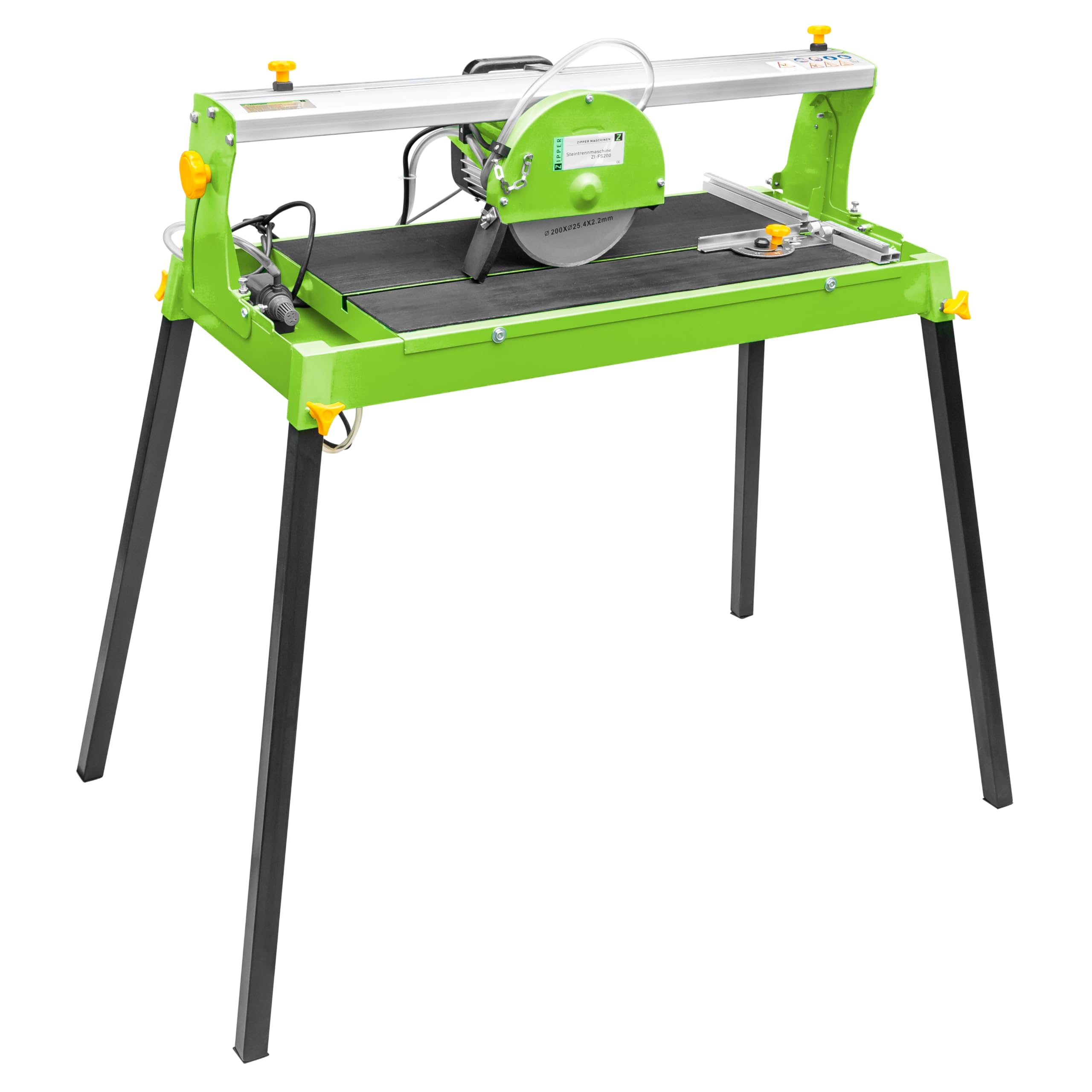
그림 1: 메인 view of the Zipper ZI-FS200 Tile Cutter, showing the motor, cutting disc, work table, and stand.
4. 설치 및 조립
Before operating the tile cutter, ensure it is properly assembled and set up according to these instructions.
- 짐 풀기: 모든 구성품을 포장에서 조심스럽게 꺼내세요. 배송 중 손상된 부분이 있는지 확인하세요.
- 스탠드 어셈블리: Attach the removable stand to the main unit. Ensure all fasteners are securely tightened.
- Water Reservoir and Pump: Fill the water reservoir with clean water. Position the submersible pump within the reservoir, ensuring it is fully submerged. The water level should be sufficient to cool the diamond blade during operation.
- Longitudinal Stop: Install the longitudinal stop on the work table. This guide assists in making straight and consistent cuts. Adjust its position based on the desired tile dimensions.
- 전기 연결: Connect the PRCD plug to a suitable 230V, 50Hz power outlet. Test the PRCD function before use by pressing the "TEST" button, then "RESET".
5. 사용 설명서
Follow these steps for safe and effective tile cutting.
- 준비:
- Ensure the water reservoir is filled and the pump is operating, providing water to the blade.
- Mark the cutting line on your tile.
- Adjust the longitudinal stop and/or angle guide for the desired cut.
- 머신 시작:
- Switch on the tile cutter. Allow the diamond blade to reach full operating speed (2950 min-1) before beginning the cut.
- Cutting the Tile:
- Place the tile firmly against the longitudinal stop and align the cutting line with the blade.
- Slowly and steadily push the tile through the blade. Do not force the cut.
- Maintain a firm grip on the tile throughout the cutting process.
- The maximum cutting length at 90° is 600 mm.
- The maximum cutting depth at 90° is 30 mm.
- The maximum cutting depth at 45° is 22 mm.
- 절단 후:
- Switch off the machine and wait for the blade to stop completely before removing the cut tile or making any adjustments.
5.1 권장 표면
This tile cutter is suitable for cutting various materials including porcelain, ceramic, granite, and marble.
6. 유지관리
Regular maintenance ensures the longevity and safe operation of your Zipper ZI-FS200 Tile Cutter.
- 전원 분리: Always unplug the machine from the power source before any cleaning or maintenance.
- 청소: After each use, clean the work table, blade guard, and water reservoir. Remove any tile debris or sludge.
- 물 펌프: Regularly clean the submersible pump to prevent blockages from tile dust and debris. Ensure the water intake is clear.
- 날 점검 및 교체:
- Inspect the diamond cutting disc for wear, cracks, or damage before each use. A dull or damaged blade can lead to poor cuts and increased risk of injury.
- Replace the blade when it becomes dull or damaged. Use only diamond cutting discs with dimensions 200 x 25.4 x 2.2 mm.
- Refer to the manufacturer's instructions for specific blade replacement procedures.
- 저장: Store the tile cutter in a clean, dry place, out of reach of children.
7. 문제 해결
This section addresses common issues you might encounter with your tile cutter.
| 문제 | 가능한 원인 | 해결책 |
|---|---|---|
| 기계가 시작되지 않습니다 | No power supply; PRCD tripped; faulty switch. | Check power connection; reset PRCD; contact qualified service personnel. |
| Poor cut quality / Chipping | Dull or damaged blade; insufficient water cooling; incorrect feed rate; tile not secured. | Replace blade; ensure adequate water flow; reduce feed rate; secure tile firmly. |
| 과도한 진동이나 소음 | Loose blade; damaged blade; motor issues. | Check blade mounting; replace damaged blade; contact service personnel. |
| 워터펌프가 작동하지 않음 | Clogged pump; low water level; faulty pump. | Clean pump and filter; refill water reservoir; replace pump if necessary. |
8. 기술 사양
- 모델: 지아이-FS200
- Motor Power (S1): 800와트
- 권tage: 230V / 50Hz
- 보호 등급: 아이피 54
- 무부하 속도: 2950 분-1
- Work Table Dimensions: 685 x 400mm
- Diamond Disc Dimensions: 200 x 25.4 x 2.2mm
- Max. Cutting Length (90°): 600mm (XNUMXmm)
- 최대 절단 깊이(90°): 30mm (XNUMXmm)
- 최대 절단 깊이(45°): 22mm (XNUMXmm)
- 제품 크기(길이 x 너비 x 높이): 97 x 48 x 104cm
- 무게: 29kg
- 전원: 전기 케이블
- 블레이드 소재: 다이아몬드
- 추천 표면: Porcelain, ceramic, granite, marble
9. 보증 및 지원
For warranty information, technical support, or spare parts, please contact your retailer or the manufacturer directly. Keep your purchase receipt as proof of purchase.
Manufacturer: Zipper


