
1. 서론
This manual provides comprehensive instructions for the installation, operation, maintenance, and troubleshooting of your D-Link DGS-1100-08 8 Port Easy Smart Managed Gigabit Network Internet Desktop Switch. Please read this manual thoroughly before using the device to ensure proper functionality and to prevent damage.
2. 안전 정보
Observe the following safety guidelines to ensure safe operation of the device:
- Ensure the power adapter is connected to a compatible power source.
- 기기를 물이나 과도한 습기에 노출시키지 마세요.
- 장치를 열지 마십시오.asing; 모든 서비스는 자격을 갖춘 인력에게 의뢰하세요.
- Place the device on a stable, flat surface with adequate ventilation.
- 열원 근처나 직사광선에 장치를 두지 마십시오.
3. 패키지 내용
패키지에 다음 품목이 포함되어 있는지 확인하십시오.
- D-Link DGS-1100-08 8 Port Easy Smart Managed Gigabit Network Internet Desktop Switch
- 전원 어댑터
- 설명서 (빠른 설치 가이드, 보증서)
4. 제품 오버view
The DGS-1100-08 is an 8-port Gigabit Ethernet switch designed for small and medium businesses, offering essential management functions.
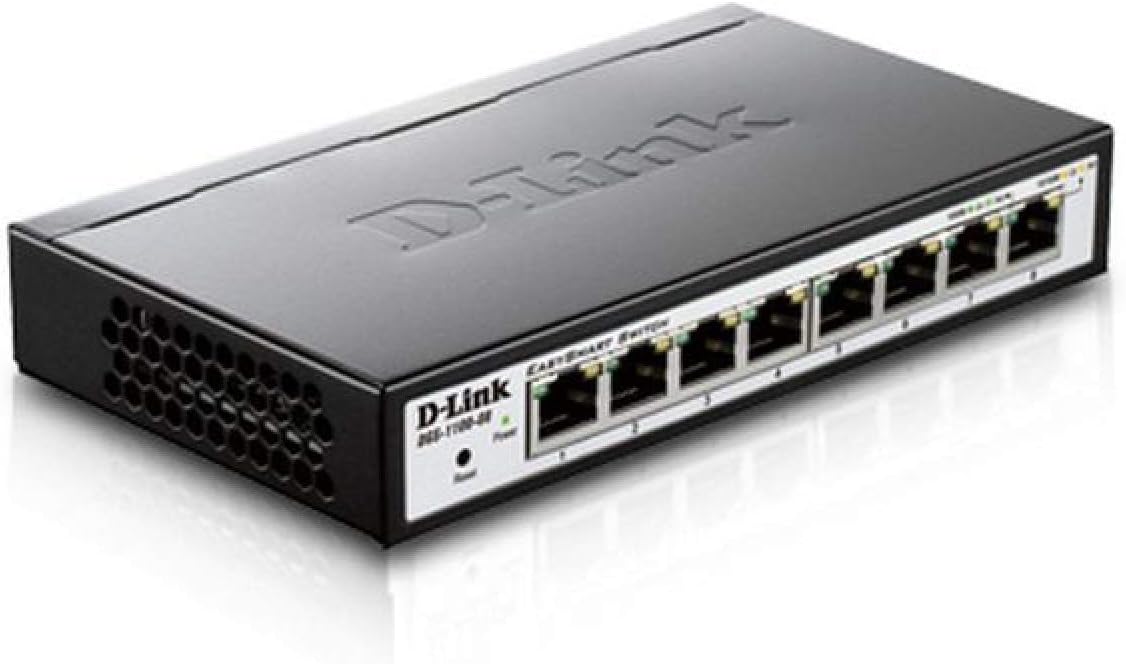
그림 4.1: 각도 view of the D-Link DGS-1100-08 switch, showing the D-Link logo, model number, power and reset buttons, and the eight Gigabit Ethernet ports with their corresponding LED indicators.

그림 4.2: 전면 view of the D-Link DGS-1100-08 switch, clearly displaying the eight Gigabit Ethernet ports labeled 1 through 8, along with the Power LED and Reset button.
4.1 전면 패널
- 이더넷 포트(1-8): Eight 10/100/1000BASE-T Gigabit Ethernet ports for network connections.
- 전원 LED: 장치의 전원 상태를 나타냅니다.
- 재설정 버튼: 기기를 공장 초기 설정으로 되돌리는 데 사용됩니다.
4.2 LED 표시등
| 주도의 | 상태 | 설명 |
|---|---|---|
| 힘 | 솔리드 그린 | 장치의 전원이 켜져 있습니다. |
| 링크/액트(포트별) | 솔리드 그린 | A valid network connection is established at Gigabit speed. |
| 링크/액트(포트별) | 호박색으로 켜짐 | A valid network connection is established at 10/100 Mbps speed. |
| 링크/액트(포트별) | 깜박임 | 포트에서 데이터가 전송되거나 수신되고 있습니다. |
5. 설정
Follow these steps to set up your DGS-1100-08 switch:
- 물리적 연결: Connect your network devices (computers, servers, network printers) to the Ethernet ports (1-8) on the switch using standard Ethernet cables.
- 전원 연결: Connect the provided power adapter to the power input on the switch and then plug it into a power outlet. The Power LED should illuminate.
- 초기 접근: The switch has a default IP address of 10.90.90.90 and a default username/password of 관리자/관리자. 액세스하려면 web management interface, you may need to temporarily configure your computer's IP address to be in the same subnet (e.g., 10.90.90.100 with a subnet mask of 255.0.0.0).
- Web 인터페이스 접근: 열기 web 브라우저를 열고 입력하세요
http://10.90.90.90in the address bar. Log in with the default credentials. - 펌웨어 업데이트 : It is recommended to check for and install the latest firmware version from the D-Link support web사이트의 최적 성능과 최신 기능 및 버그 수정 사항에 대한 접근성을 보장하기 위해 사이트를 업데이트합니다.
6. 사용 설명서
The DGS-1100-08 is a managed switch, offering various features configurable via its web 관리 인터페이스:
- VLAN(가상 근거리 통신망): Configure 802.1Q VLANs for network segmentation and enhanced security.
- 서비스 품질(QoS): 음성 및 비디오와 같은 중요한 애플리케이션에 대한 네트워크 트래픽을 우선시합니다.
- Bandwidth Limiting: Control the maximum bandwidth for specific ports to manage network congestion.
- 링크 집계: 여러 개의 물리적 링크를 하나의 논리적 링크로 결합하여 대역폭과 중복성을 높입니다.
- IGMP 스누핑: Optimize multicast traffic delivery, preventing unnecessary flooding to all ports.
- 포트 미러링: 네트워크 모니터링 및 분석을 위해 하나 이상의 소스 포트에서 대상 포트로 트래픽을 복사합니다.
온라인 도움말을 참조하세요. web management interface for detailed configuration steps for each feature.
7. 유지관리
To ensure the longevity and optimal performance of your switch:
- 기기를 깨끗하고 먼지가 없는 상태로 유지하세요. 청소 시에는 부드럽고 마른 천을 사용하세요.
- 환기구에 장애물이 없도록 하여 적절한 환기가 이루어지도록 하십시오.
- Regularly check the D-Link support website for firmware updates and apply them as recommended.
- Perform periodic backups of your switch configuration to a local file.
8. 문제 해결
If you encounter issues with your DGS-1100-08 switch, consider the following:
- 전원 없음: Ensure the power adapter is securely connected to both the switch and a working power outlet. Check the Power LED.
- 포트에 링크가 없습니다: 이더넷 케이블의 양쪽 끝이 제대로 연결되었는지 확인하십시오. 다른 케이블이나 포트를 사용하여 테스트해 보십시오. 연결된 장치가 전원이 켜져 있고 정상적으로 작동하는지 확인하십시오.
- 접근할 수 없습니다 Web 인터페이스: Double-check your computer's IP address configuration to ensure it is in the same subnet as the switch (default 10.90.90.90). Clear your browser's cache or try a different browser.
- 네트워크 성능 문제: Check for excessive network traffic, loopbacks (ensure loopback detection is enabled), or incorrect QoS configurations.
- 공장 기본값으로 재설정: If issues persist, use the reset button on the front panel to restore the switch to its original factory settings. This will erase all custom configurations.
9. 사양
| 특징 | 세부 사항 |
|---|---|
| 모델 번호 | DGS-1100-08 |
| 포트 수 | 8 x 10/100/1000BASE-T Gigabit Ethernet |
| 데이터 전송 속도 | 초당 1000메가비트 |
| 제품 크기(LxWxH) | 6.75 x 3.94 x 1.13 인치 |
| 품목 무게 | 15 온스 |
| 관리 유형 | Easy Smart Managed |
| 절전 | D-Link Green Technology, IEEE 802.3az (Energy Efficient Ethernet) |
| 포함된 구성 요소 | Switch - 8 ports - managed |
10. 보증 및 지원
D-Link provides a 평생 보증 for the DGS-1100-08 switch, ensuring long-term reliability and peace of mind.
For further assistance, technical support, or to download the full user guide and latest firmware, please visit the official D-Link support website or refer to the User Guide (PDF) available at https://manuals.plus/m/ecc0db5b29561c67ba510c6e291c2f520d486733cbbed65950841084a1c2cb4f.
You can also visit the D-Link Store for more product information and resources: D-Link Store on Amazon.