
디링크 DIR-636L
D-Link Wireless N 300 Mbps Home Cloud App-Enabled Gigabit Router (DIR-636L) User Manual
Model: DIR-636L
소개
This manual provides comprehensive instructions for setting up, operating, and maintaining your D-Link Wireless N 300 Mbps Home Cloud App-Enabled Gigabit Router (DIR-636L). Please read this manual thoroughly before using the device to ensure optimal performance and safety.
상자 안에 무엇이 들어있나요?
- D-Link Cloud Router 1200 (DIR-636L)
- 이더넷 케이블
- 전원 어댑터
- 빠른 설치 가이드
제품 끝view


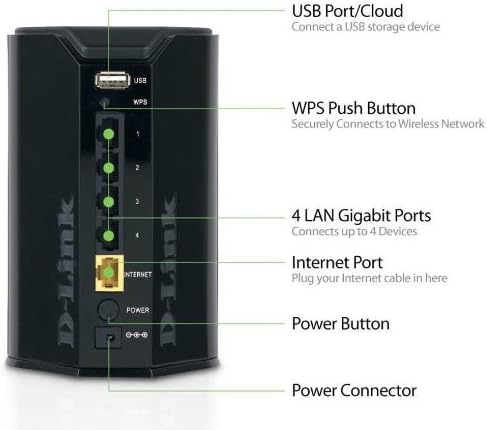
The D-Link DIR-636L Cloud Router is designed for high-performance wireless connectivity and network management. It features a compact, vertical design with indicator lights on the front and all connectivity ports on the rear for efficient cable management.
설정
초기 설치
- 라우터 압축 풀기: 상자에서 모든 구성품을 조심스럽게 꺼내세요.
- 라우터 위치 지정: Place the router in a central location in your home for optimal wireless coverage. Avoid placing it near large metal objects or other electronic devices that may cause interference.
- 모뎀 연결: Connect one end of the provided Ethernet cable to the Internet port (yellow) on the back of the DIR-636L router and the other end to your modem's Ethernet port.
- 전원 연결: Plug the power adapter into the router's power connector and then into a wall outlet. The power LED on the front of the router should illuminate.
- 전원 켜기: Press the power button on the back of the router. Wait for the Internet LED to turn solid green, indicating a successful connection.
구성을 통해 Web 브라우저
- 라우터에 연결: Connect your computer to one of the LAN Gigabit ports (1-4) on the router using an Ethernet cable, or connect wirelessly to the default Wi-Fi network (SSID and password are on a label on the router).
- 액세스 설정 마법사: 열기 web 브라우저와 유형 http://dlinkrouter.local or http://192.168.0.1 주소창에 입력하세요.
- 화면의 지시를 따르세요: The D-Link Setup Wizard will guide you through configuring your Internet connection, wireless network name (SSID), and password.
Configuration via QRS Mobile App
For quick setup using your smartphone or tablet, download the free D-Link QRS Mobile app from your device's app store. The app will guide you through the setup process step-by-step.
라우터 작동
무선 연결
The DIR-636L provides wireless speeds up to 300 Mbps, ideal for video streaming and web surfing. Its built-in high-powered amplifier ensures wall-to-wall coverage throughout your home.
Connecting Devices Wirelessly:
- 표준 연결: On your device, select your Wi-Fi network name (SSID) and enter the password you configured during setup.
- WPS(Wi-Fi 보호 설정): Press the WPS button on the back of the router (labeled "WPS") and then activate WPS on your wireless device within two minutes to establish a secure connection without entering a password.
유선 연결
The router features four Gigabit Ethernet ports for blazing fast wired connections. These are ideal for gaming consoles, smart TVs, desktop computers, and other devices requiring stable, high-speed connections.
SharePort Mobile App
Utilize the free D-Link SharePort Mobile app to wirelessly access media files (videos, music, photos) stored on a USB drive connected to the router's USB 2.0 port. This allows you to stream content directly to your iPhone, iPad, or Android device.
Official D-Link video demonstrating the features of the Wireless-N300 Dual-Band Gigabit Cloud Router, including wireless file sharing and network monitoring capabilities.
mydlink Cloud Services
The mydlink app allows you to monitor and manage your home network remotely from your iPhone, iPad, or Android device. You can view web browsing history, see connected and blocked devices in real-time, and receive automatic email alerts for unauthorized connections.
유지
- 정기 재부팅: Periodically rebooting your router (unplugging and replugging the power) can help clear its memory and improve performance. A monthly reboot is generally sufficient.
- 펌웨어 업데이트: Check the D-Link support web펌웨어 업데이트 사이트입니다. 라우터 펌웨어를 최신 상태로 유지하면 최적의 성능, 보안 및 새로운 기능에 대한 액세스를 보장할 수 있습니다.
- 물리적 청소: Keep the router clean and free of dust to prevent overheating. Use a soft, dry cloth.
- 보안: Wi-Fi 비밀번호와 라우터 로그인 정보를 정기적으로 변경하세요. 강력하고 고유한 비밀번호를 사용하세요.
문제 해결
인터넷 연결 없음
- 케이블 확인: 모든 이더넷 케이블이 라우터와 모뎀의 올바른 포트에 제대로 연결되어 있는지 확인하십시오.
- 재부팅 장치: Power cycle your modem first, wait 30 seconds, then power cycle your router. Wait for all indicator lights to stabilize.
- ISP 문제: 인터넷 서비스 제공업체(ISP)에 연락하여 서비스 중단이 없는지 확인하십시오.tag귀하의 지역에는 다음이 있습니다.
Slow Wireless Speed or Poor Coverage
- 라우터 배치: Move the router to a more central location, away from obstructions like thick walls, large metal objects, or other electronics.
- 간섭: Other wireless devices (cordless phones, microwaves) can cause interference. Try changing your Wi-Fi channel in the router settings.
- 장치가 너무 많습니다: If many devices are connected, consider upgrading to a higher-speed router or optimizing network usage.
라우터 설정 페이지에 접근할 수 없습니다
- IP 주소: 컴퓨터가 IP 주소를 자동으로 받도록(DHCP) 설정되어 있는지 확인하세요.
- 정확한 주소: Double-check that you are typing the correct address (http://dlinkrouter.local or http://192.168.0.1).
- 방화벽/안티바이러스: 컴퓨터의 액세스를 차단할 수 있는 방화벽이나 바이러스 백신 소프트웨어를 일시적으로 비활성화하세요.
- 공장 초기화 : As a last resort, perform a factory reset by pressing and holding the reset button on the router for 10 seconds. 참고: 이렇게 하면 모든 사용자 지정 설정이 삭제됩니다.
명세서
| 특징 | 세부 사항 |
|---|---|
| 모델명 | 디알-636L |
| 무선형 | 802.11억 |
| 무선 속도 | 최대 300Mbps |
| 이더넷 포트 | 4 x 기가비트 이더넷 |
| USB 포트 | 1개의 USB 2.0 |
| 보안 | Wi-Fi Protected Access (WPA/WPA2), WPS |
| IPv6 Certified | 예 |
| 치수(길이x너비x높이) | 4.5 x 3.8 x 5.5 인치 |
| 품목 무게 | 9.9 온스 |
| 호환되는 운영 체제 | Windows 7, Windows Vista, Windows XP SP2, Mac OS X (v10.4) |
보증 및 지원
The D-Link Wireless N 300 Mbps Home Cloud App-Enabled Gigabit Router (DIR-636L) comes with a 1년 한정 보증. D-Link also provides 24/7 basic installation support.
For further assistance, technical support, or to check for the latest firmware updates, please visit the official D-Link support web사이트를 방문하거나 고객 서비스에 문의하세요.
Note: Warranty terms may vary by region. Please refer to the warranty card included with your product or the D-Link web자세한 내용은 사이트를 참조하십시오.
Ask a question about this manual
Ask about setup, troubleshooting, compatibility, parts, safety, or missing instructions. Manuals+ will review the question and use this page’s manual context to help answer it.