
1. 설정
1.1 언박싱 및 초기 검사
Carefully remove all components from the packaging. Verify that all items listed in the 'What's in the box' section are present and undamaged.
- ASUS 32GB Transformer Pad TF300T 10.1-Inch Tablet
- 전원 공급 장치
- 1년 보증 카드

Image: The ASUS Transformer Pad TF300T tablet alongside its retail packaging.
1.2 장치 충전
Before first use, connect the tablet to the power supply and charge it fully. The charging port is located on the bottom edge of the tablet. A full charge ensures optimal performance and battery calibration.
1.3 전원 켜기/끄기
- 전원을 켜려면: Press and hold the power button, located on the top edge of the tablet, until the ASUS logo appears on the screen.
- 전원을 끄려면: Press and hold the power button until a menu appears. Select 'Power off' and confirm.
- 재시작하기 위해: 전원 메뉴에서 '다시 시작'을 선택합니다.
1.4 초기 설정 마법사
태블릿을 처음 켜면 초기 설정 과정을 안내합니다. 여기에는 다음이 포함됩니다.
- 언어 선택: 선호하는 언어를 선택하십시오.
- Wi-Fi 연결: Connect to an available Wi-Fi network to enable internet access.
- Google 계정 설정: 기존 Google 계정으로 로그인하거나 새 계정을 만드세요. Google Play 스토어 및 기타 Google 서비스를 이용하려면 계정 생성이 필수입니다.
- 날짜 및 시간 설정: 날짜와 시간을 올바르게 설정하십시오.
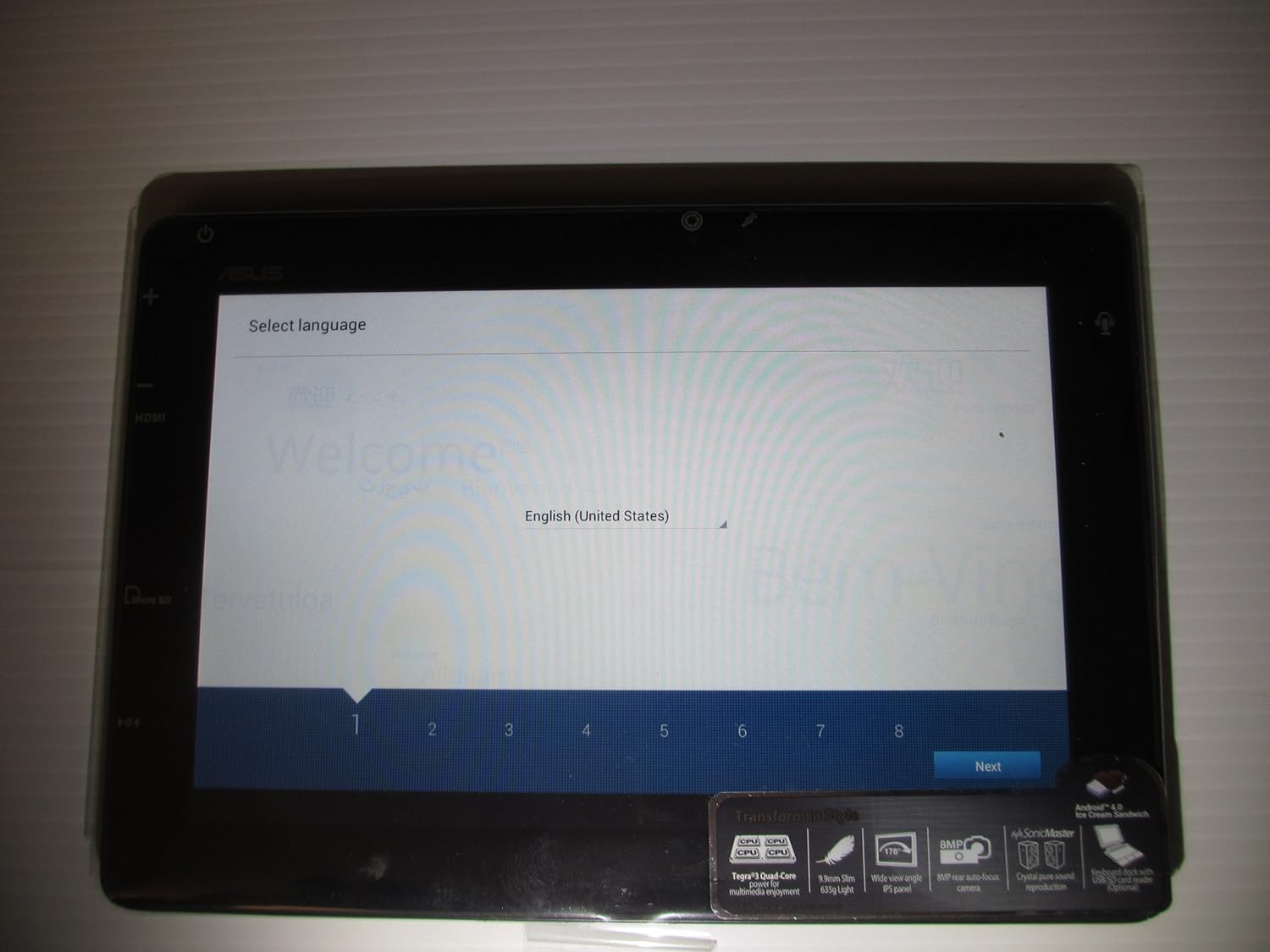
Image: The ASUS Transformer Pad TF300T screen showing the 'Select Language' prompt, with 'English (United States)' highlighted.
2. 사용 설명서
2.1 Basic Navigation and Touchscreen Gestures
The ASUS Transformer Pad TF300T utilizes a multi-touch display for interaction. Common gestures include:
- 수도꼭지: 항목을 선택하거나 애플리케이션을 엽니다.
- 길게 누르기 : 상황에 맞는 메뉴에 접근하거나 아이콘을 이동합니다.
- 강타: Navigate through home screens, lists, or web 페이지.
- 핀치 투 줌: Enlarge or reduce content size (e.g., photos, web 페이지).
2.2 Android 4.0 (Ice Cream Sandwich) Overview
The tablet runs on Android 4.0, providing a user-friendly interface. Key features include:
- 홈 화면: Customizable screens for app shortcuts and widgets.
- Notifications Bar: Located at the top, displays alerts and quick settings.
- 앱 서랍: Access to all installed applications.
- 최근 앱: Button to quickly switch between recently used applications.
2.3 연결성
The TF300T supports various connectivity options:
- Wi-Fi (802.11bgn): Connect to wireless networks for internet access. Configure via Settings > Wi-Fi.
- 블루투스 3.0 : Pair with compatible devices such as headphones, speakers, or keyboards. Configure via Settings > Bluetooth.
- GPS: Integrated Global Positioning System for location services and navigation.
2.4 포트 및 슬롯
The tablet features several ports for expanded functionality:
- 마이크로 HDMI: 외부 디스플레이 또는 TV에 연결하세요.
- Docking Port: For connecting to the optional keyboard dock.
- 3.5mm 헤드폰/마이크 잭: 오디오 출력 및 입력용.
- 마이크로 SD 카드 슬롯: Expand storage capacity with a Micro SD card.
2.5 카메라 사용
The TF300T is equipped with two cameras:
- 전면 카메라(1.2 MP): Suitable for video calls and self-portraits.
- Rear Camera (8 MP): 사진과 비디오를 촬영하는 데 사용합니다.
Access the camera application from the home screen or app drawer to take pictures or record videos.
2.6 Optional Keyboard Dock
The ASUS Transformer Pad TF300T is compatible with an optional keyboard dock (sold separately). This dock provides:
- 물리적 키보드: For enhanced typing experience.
- Additional Battery: Extends the tablet's battery life.
- USB 포트: USB 장치를 연결하는 데 사용됩니다.
- SD 카드 슬롯: For additional storage expansion.

이미지: 클로즈업 view of the ASUS Transformer Pad TF300T, highlighting key features such as the NVIDIA Tegra 3 processor, IPS panel, 8MP camera, SonicMaster audio, and Android 4.0 Ice Cream Sandwich operating system.
3. 유지관리
3.1 장치 청소
- 화면: 부드럽고 보푸라기가 없는 천을 사용하여 약간 damp물이나 화면 세정제를 사용하여 화면을 부드럽게 닦아주세요. 강한 화학 약품은 사용하지 마십시오.
- 몸: Wipe the tablet's body with a soft, dry cloth. Keep liquids away from ports and openings.
3.2 소프트웨어 업데이트
Regularly check for and install software updates to ensure optimal performance, security, and access to new features. Updates can typically be found in Settings > About tablet > System updates.
3.3 스토리지 관리
The tablet comes with 32GB of internal storage. To manage storage effectively:
- Delete Unused Apps: Uninstall applications you no longer need.
- 캐시 지우기: Regularly clear the cache of applications.
- Use Micro SD Card: Store photos, videos, and documents on an external Micro SD card to free up internal space.
4. 문제 해결
4.1 일반적인 문제 및 해결 방법
| 문제 | 가능한 해결책 |
|---|---|
| 태블릿이 반응하지 않거나 멈췄습니다. | 전원 버튼을 10~15초간 길게 눌러 강제로 다시 시작하세요. |
| Wi-Fi 연결 문제 | Ensure Wi-Fi is enabled in settings. Restart the tablet and your Wi-Fi router. Forget and reconnect to the network. |
| Slow performance or lag | Close unused applications. Clear app caches. Check for system updates. Consider a factory reset if issues persist. |
| 배터리가 빨리 소모됩니다 | Reduce screen brightness. Disable Wi-Fi/Bluetooth/GPS when not in use. Close background apps. Check battery usage in settings to identify power-hungry apps. |
| Apps crashing or not installing | Ensure sufficient storage space. Clear Google Play Store cache. Restart the tablet. |
4.2 공장 초기화
If persistent issues occur, a factory reset can restore the tablet to its original state. Warning: This will erase all data on the tablet. Back up important data before proceeding.
- 설정 > 백업 및 재설정으로 이동합니다.
- Select 'Factory data reset'.
- Confirm the action. The tablet will restart and erase all data.
5. 사양
Detailed technical specifications for the ASUS Transformer Pad TF300T-B1-BL:
| 특징 | 사양 |
|---|---|
| 상표 | 아수스 |
| 모델명 | Transformer Pad |
| 모델 번호 | TF300T-B1-BL |
| 운영 체제 | Android 4.0 (Ice Cream Sandwich) |
| 프로세서 | NVIDIA Tegra 3 Quad-Core (1.2 GHz) |
| 그래픽 코프로세서 | Nvidia Tegra 3 |
| 화면 크기 | 10.1 인치 |
| 디스플레이 해상도 | 1280 x 800 Pixels (WXGA IPS Touch Panel) |
| 램 메모리 | 1GB DDR3 |
| 저장 용량 | 32GB 플래시 메모리(SSD) |
| 확장 가능한 스토리지 | 마이크로 SD 카드 슬롯 |
| 전면 카메라 | 1.2 MP |
| 후방 카메라 | 8 MP |
| 무선 연결 | 802.11bgn Wi-Fi, Bluetooth 3.0, GPS |
| 포트 | 1x Micro HDMI, 1x Docking, 1x 3.5mm Headphone/Microphone |
| 배터리 수명 | Up to 10 Hours (22W/h Lithium Polymer) |
| 센서 | G-Sensor, E-Compass, Light Sensor, Gyroscope |
| 품목 무게 | 1.4 파운드 |
| 한국어: | 886227185054 |
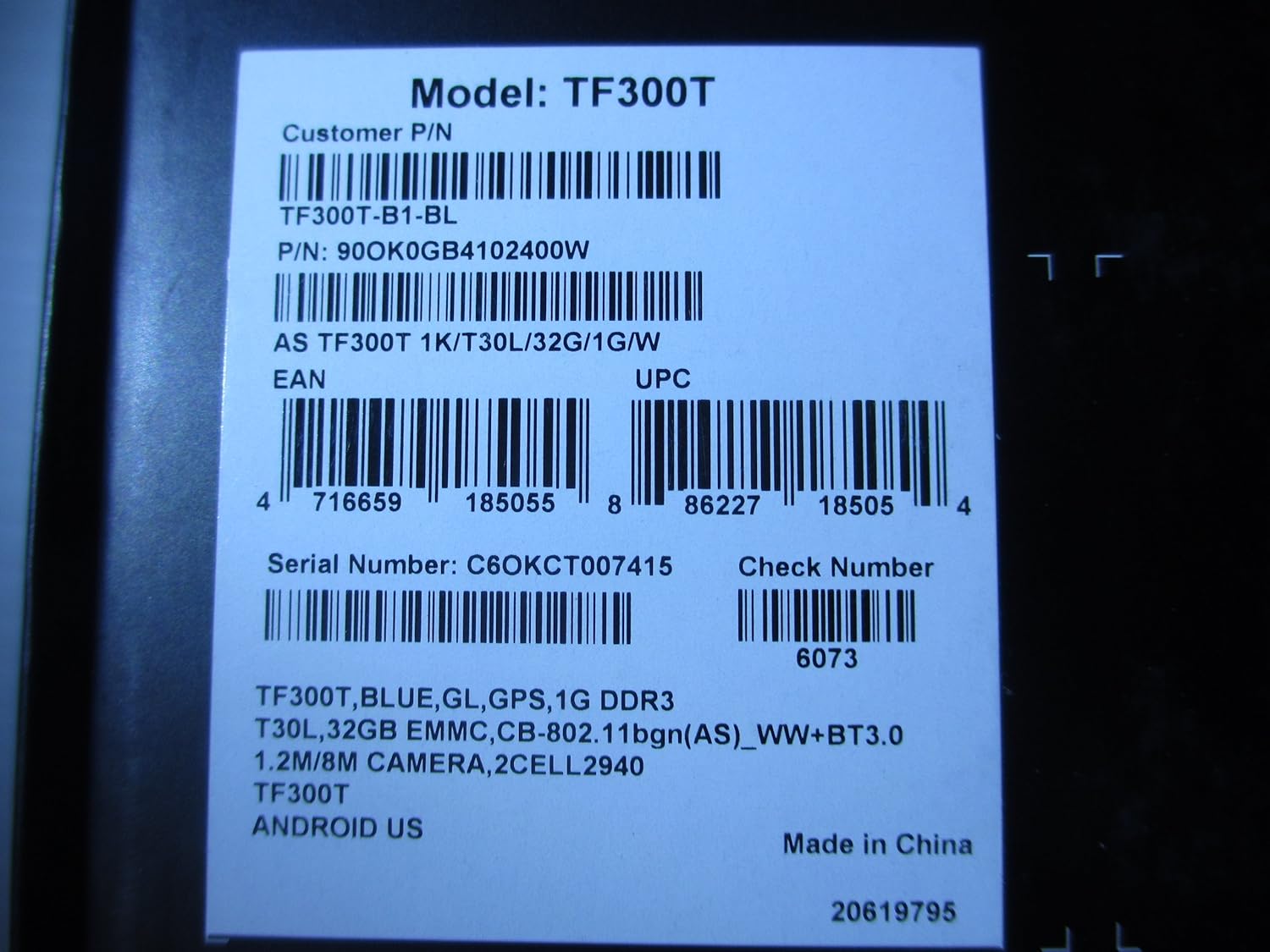
Image: A product label displaying the model number TF300T, part number TF300T-B1-BL, serial number C6OKCT007415, and UPC 886227185054.
6. 보증 및 지원
6.1 보증 정보
The ASUS Transformer Pad TF300T comes with a 1-Year North American Warranty. This warranty covers manufacturing defects under normal use conditions. Please refer to the warranty card included in your product packaging for full terms and conditions.
6.2 고객 지원
For technical assistance, troubleshooting beyond this manual, or warranty claims, please contact ASUS customer support. You can find contact information and additional resources on the official ASUS web대지:
- 방문하세요 Amazon의 ASUS 스토어 제품 정보를 확인하세요.
- ASUS 공식 지원 페이지를 참조하십시오. website for service centers and contact details.