
소개
The Eton American Red Cross FRX2 is a versatile, multi-powered emergency weather radio designed to keep you informed and connected during emergencies. It features AM/FM and NOAA weather band reception, multiple charging options including solar and hand turbine, an LED flashlight, and a USB port for charging small devices. This manual provides detailed instructions for the proper setup, operation, and maintenance of your FRX2 radio.

Figure 1: Eton American Red Cross FRX2 Emergency Weather Radio
안전 정보
- 제품을 극한 온도, 장시간 직사광선 또는 높은 습도에 노출시키지 마십시오.
- 장치를 물이나 기타 액체로부터 멀리 두십시오.
- 라디오를 분해하거나 개조하지 마십시오. 이는 보증을 무효화하고 손상이나 부상을 초래할 수 있습니다.
- Use only the specified charging methods (USB, solar, hand crank).
- Ensure the hand turbine crank is fully retracted when not in use to prevent damage.
- 현지 규정에 따라 배터리를 폐기하십시오.
제품 끝view
Familiarize yourself with the various components and controls of your FRX2 radio.
전면 패널

그림 2: 전면 패널 컨트롤
- 튜닝 다이얼: Used to select AM, FM, or Weather Band frequencies.
- 볼륨 조절: 오디오 출력 레벨을 조정합니다.
- 밴드 선택기: Switches between AM, FM, and Weather Band (WB) modes.
- LED 표시등: Shows charging status and alert status.
Side and Back Panels

Figure 3: Side Panel with Solar Panel
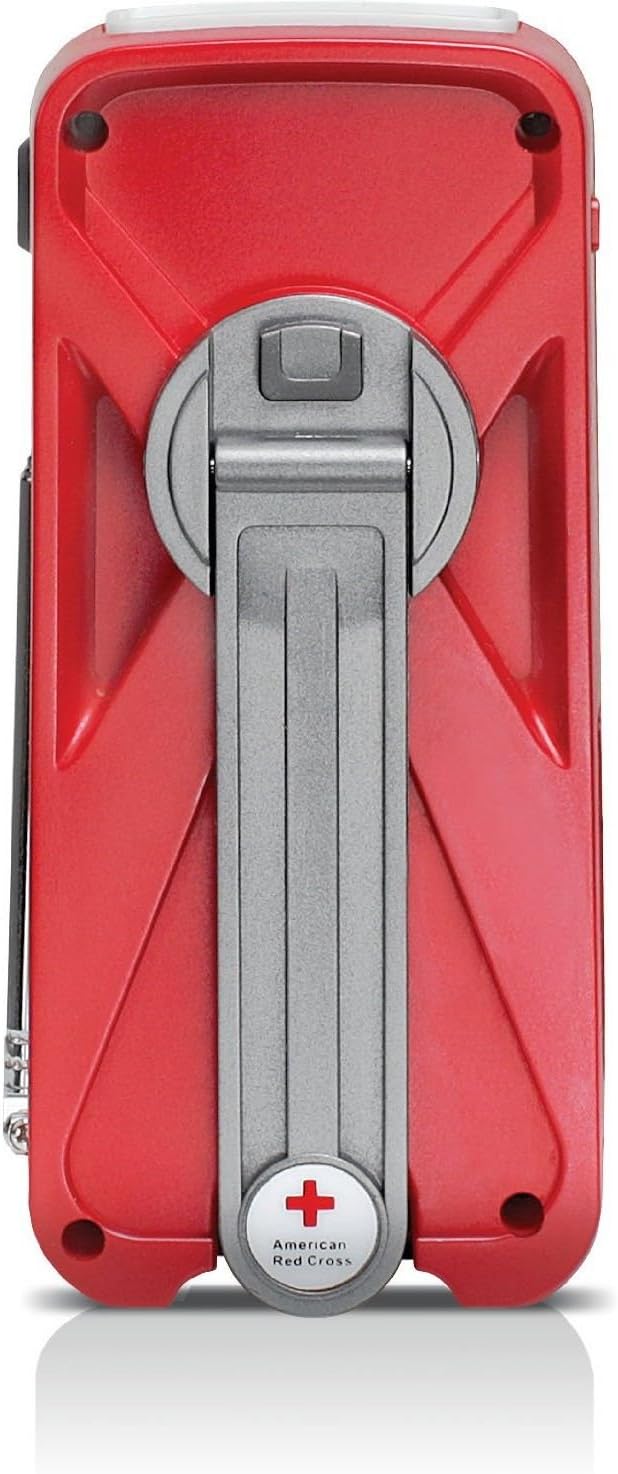
Figure 4: Back Panel with Hand Turbine Crank
- 태양광 패널: Located on the top/side for solar charging.
- Hand Turbine Crank: Fold-out crank on the back for manual power generation.
- 텔레스코픽 안테나: 라디오 수신 성능 향상을 위한 확장형 안테나.
- 플래시: LED 손전등이 내장되어 있습니다.
포트 및 커넥터
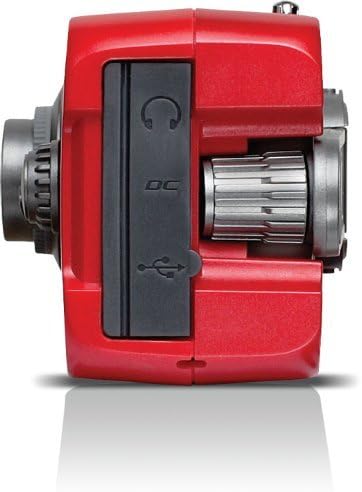
그림 5: 상단 패널 포트
- Mini-USB DC Input: For charging the internal battery via an AC adapter (not included) or computer USB port.
- USB 출력: 스마트폰 등 외부 장치를 충전하는 데 사용됩니다.
- 헤드폰 잭: 개인적으로 듣기 위한 것입니다.
설정
초기 충전
Before first use, fully charge the internal battery using one of the following methods:
- USB 충전: Connect the supplied USB cable to the radio's Mini-USB DC input and to a powered USB port (e.g., computer, USB wall adapter). The charging indicator LED will illuminate.
- 태양열 충전: Place the radio with the solar panel facing direct sunlight. The solar panel charges the internal battery. This method is slower and best for maintaining charge or trickle charging.
- Hand Turbine Charging: Unfold the hand turbine crank and rotate it clockwise or counter-clockwise for 1-2 minutes. This provides power for immediate use or a quick boost to the internal battery.
배터리 정보
The FRX2 is powered by a built-in 1000mAh rechargeable internal battery. This battery is designed for long-term use and is not user-replaceable. For optimal performance, ensure the battery is regularly charged.
작동 지침
전원 켜기/끄기
회전하다 볼륨 조절 knob clockwise to turn the radio on. Rotate it counter-clockwise until it clicks to turn the radio off.
Radio Tuning (AM/FM/Weather Band)
- 최적의 수신을 위해 망원 안테나를 확장하세요.
- 사용하세요 밴드 선택기 switch to choose between AM, FM, or WB (Weather Band).
- 회전하다 튜닝 다이얼 to find your desired station. The tuning indicator LED will light up when a strong signal is received.
- 조정하다 볼륨 조절 편안한 청취 수준으로.
NOAA Weather Alert Function
In WB mode, the radio can receive NOAA weather alerts. When an alert is broadcast, the radio will automatically switch from standby to the alert broadcast. Ensure the radio is in WB mode to receive these alerts.
손전등 작동
Press the flashlight button to cycle through different modes: On, SOS (flashing), and Off. The flashlight provides illumination during power outag또는 어두운 환경에서.
Smartphone Charging (Dump Charge)
The FRX2 can provide a 'dump charge' to small USB-powered devices like smartphones. This means it will transfer its stored battery power to the connected device. It is not designed for a full charge but can provide enough power for emergency communication.

Figure 6: Charging a Smartphone
- Ensure the FRX2's internal battery has sufficient charge.
- Connect your smartphone's USB charging cable to the FRX2's USB output port.
- The radio will begin transferring power to your device.
유지
- 청소: 부드러운 d로 라디오를 닦으십시오.amp 천. 연마성 세척제나 용매를 사용하지 마십시오.
- 저장: Store the radio in a cool, dry place when not in use. For long-term storage, ensure the internal battery is charged every 3-6 months to maintain its lifespan.
- 안테나: Handle the telescopic antenna with care to prevent bending or breakage. Retract it when not in use.
문제 해결
| 문제 | 가능한 원인 | 해결책 |
|---|---|---|
| No power/Radio not turning on | 내부 배터리가 방전되었습니다. | Charge the radio using USB, solar, or hand turbine. |
| 라디오 수신 불량 | 안테나가 확장되지 않았거나, 신호가 약하거나, 간섭이 있습니다. | 텔레스코픽 안테나를 완전히 펼치세요. 라디오 위치를 바꿔보세요. |
| 스마트폰이 충전되지 않음 | Radio battery too low, incorrect cable, or device incompatibility. | Ensure radio is sufficiently charged. Use the correct USB cable. Note that the FRX2 provides a 'dump charge' and may not fully charge all devices. |
| 수동 크랭크가 뻑뻑하거나 충전이 되지 않습니다. | 메커니즘 막힘 또는 내부 문제. | Ensure the crank moves freely. If issues persist, contact customer support. |
명세서
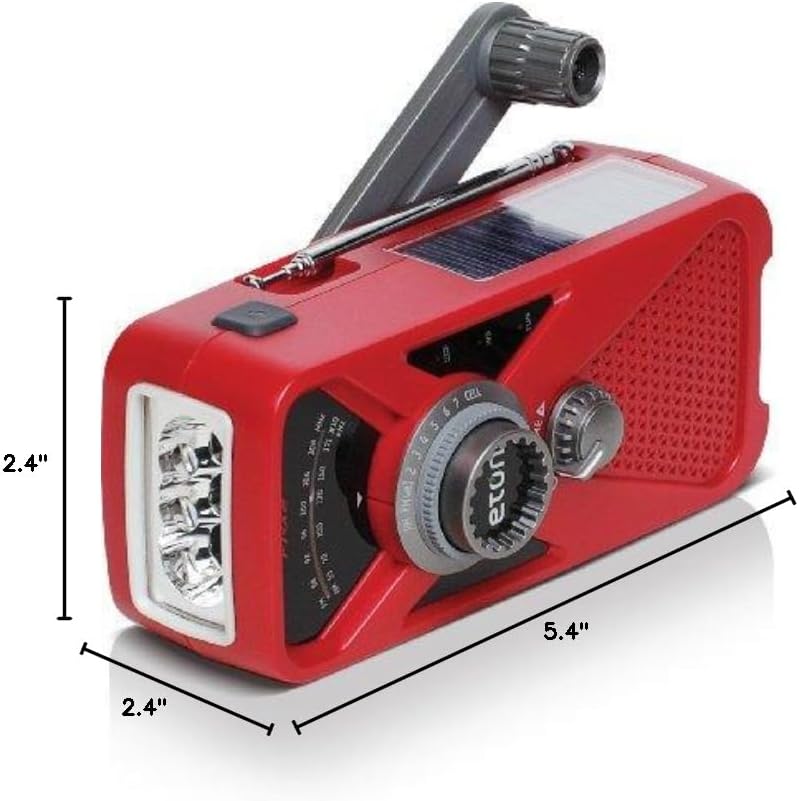
그림 7: 제품 치수
- 모델: ARCFRX2WXR
- 치수(길이 x 너비 x 높이): 5.4인치 x 2.4인치 x 2.4인치
- 무게: 0.56파운드
- 라디오 밴드: AM, FM, NOAA Weather Band
- 전원: Internal Rechargeable Battery (1000mAh), Solar Panel, Hand Turbine, Mini-USB DC Input
- 산출: USB(외부 장치 충전용)
- 특징: LED Flashlight, Headphone Jack
보증 정보
Eton products are designed for reliability and performance. For specific warranty details, please refer to the warranty card included with your product or visit the official Eton web사이트. 보증 청구를 위해 구매 증빙 자료를 보관하세요.
지원하다
If you have any questions or require assistance with your Eton American Red Cross FRX2 radio, please contact Eton Customer Support:
- Web대지: www.etoncorp.com
- 이메일: 참조하다 web연락처 양식이나 이메일 주소를 입력하세요.
- 핸드폰: 참조하다 web현재 지원 전화번호를 확인할 수 있는 사이트입니다.