
소개
This manual provides comprehensive instructions for the setup, operation, maintenance, and troubleshooting of your DISH DISH211 4-Device Universal Remote. Designed for ease of use, this remote supports DISH TV receivers and can control up to four different devices, including TVs and other entertainment systems. Its ability to learn commands from original remotes makes it a versatile replacement.
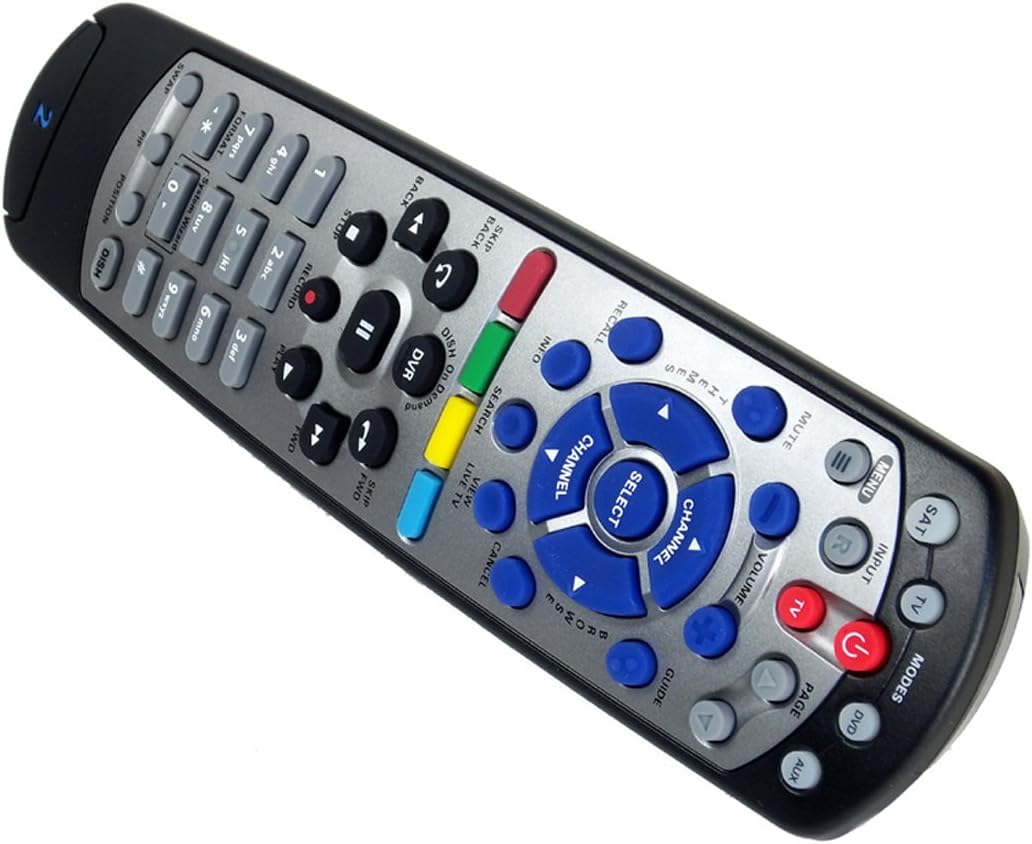
Figure 1: The DISH DISH211 4-Device Universal Remote, showcasin인체공학적 디자인과 버튼 레이아웃이 특징입니다.
설정
1. 배터리 설치
The DISH211 remote requires two (2) AA batteries for operation. To install:
- 리모컨 뒷면에서 배터리함을 찾으세요.
- 배터리 덮개를 아래로 밀고 들어 올려 여세요.
- AA 배터리 두 개를 넣고 양극(+)과 음극(-) 단자가 배터리 보관함 내부의 표시기와 일치하도록 합니다.
- 배터리 덮개를 위로 밀어서 딸깍 소리가 날 때까지 제자리에 고정합니다.
2. Device Pairing and Programming
The DISH211 remote can be programmed to control your DISH receiver and other devices. It supports both Infrared (IR) and Ultra High Frequency (UHF) communication, depending on your receiver model.

Figure 2: Cover of the official DISH Remote User Guide, which provides detailed programming instructions.
For DISH Receiver Pairing (UHF/IR):
Some DISH receivers may require setting the remote's address and communication type (UHF or IR). A small switch near the battery compartment may allow selection between UHF and IR modes. Ensure this switch is set correctly for your receiver type.
To address the remote to your receiver:
- 를 누르세요 시스템 정보 button on the front of your receiver to access the system information screen.
- 를 누르고 계세요 앉았다 button on the remote until all mode lights illuminate.
- Enter a number between 1-15 on the remote keypad. This number corresponds to the TV-2 UHF address displayed on your receiver's screen.
- 를 누르세요 # (pound) button once.
- 를 누르세요 기록 버튼을 세 번 누릅니다.
- 선택하다 완료 on the system info screen and test the remote's functionality.
For Other Devices (TV, DVD, AUX):
The remote has a large code library and can learn commands from your original remotes. Refer to the official DISH remote user guide (often included with the product or available online) for specific programming codes and learning instructions for various brands and device types.

Figure 3: The back of the DISH remote packaging, indicating compatible DISH receiver models for both IR and IR/UHF configurations.
작동 지침
The DISH211 remote is designed for intuitive control of your entertainment system. It features backlit active MODE keys for visibility in low light conditions and dedicated DVR controls.
1. 모드 선택
Press the desired mode button (e.g., 앉았다 for DISH receiver, TV 텔레비전 방송용으로, DVD for DVD player, 보조 for auxiliary device) at the top of the remote to select the device you wish to control. The selected mode button will illuminate.
2. 기본 제어
- 힘: 를 누르세요 힘 선택한 기기를 켜거나 끄는 버튼입니다.
- 용량: 사용하세요 볼륨 높이기/낮추기 buttons to adjust the audio level of your television.
- 채널: 사용하세요 채널 업/다운 buttons to change channels on your DISH receiver or television.
- 무음: 를 누르세요 음소거 소리를 음소거하는 버튼입니다.
- 입력: 를 누르세요 입력 button to cycle through video inputs on your television.
3. DVR Controls
The remote includes dedicated buttons for DVR functionality:
- 기록: 현재 프로그램 녹화를 시작합니다.
- 재생/일시 중지: Starts or pauses playback of recorded content or live TV.
- 중지: 재생을 중지합니다.
- 되감기/빨리 감기: Controls playback speed and direction.
- Skip Forward (DISH Skip Forward): Allows quick skipping through commercials or segments.
- 뒤로 건너 뛰기 : Skips backward in recorded content.

그림 4: 클로즈업 view of the DISH DISH211 remote, highlighting the central navigation and DVR control buttons.
유지
1. 배터리 교체
When the remote's performance degrades or buttons become unresponsive, it is likely time to replace the batteries. Follow the battery installation steps outlined in the Setup section.
2. 청소
To clean your remote, gently wipe the surface with a soft, dry cloth. For stubborn dirt, slightly dampen the cloth with water or a mild, non-abrasive cleaner. Avoid using excessive liquid or harsh chemicals, as these can damage the remote's electronics or finish.
문제 해결
원격 응답 없음
- 배터리 확인: 배터리가 올바르게 설치되었고 충전량이 충분한지 확인하세요. 필요한 경우 교체하세요.
- 가시선(적외선): If using IR mode, ensure there is a clear line of sight between the remote and the device's IR receiver. Obstructions can block the signal.
- 모드 선택: Verify that the correct mode button (e.g., SAT, TV) is selected for the device you are trying to control.
- Remote Address/UHF-IR Switch: For DISH receivers, confirm the remote's address is correctly set and the UHF/IR switch (if present) matches your receiver's configuration. Incorrect settings can prevent communication.
간헐적 기능
- 간섭: Other electronic devices or strong light sources (like plasma TV IR interference) can sometimes interfere with IR signals. Try operating the remote from a different angle or location.
- DVR Directory Update: If experiencing lag or unresponsiveness with DVR functions, ensure your DVR's directory is updated. Consult your DISH receiver's manual for instructions on updating its software or directory.
버튼이 작동하지 않음
- 리모컨 청소: Dirt or debris under buttons can cause them to stick or become unresponsive. Clean the remote as described in the Maintenance section.
- 재프로그래밍: If specific buttons for a device are not working, the remote may need to be reprogrammed for that device.
명세서
| 특징 | 세부 사항 |
|---|---|
| 모델 번호 | DISH211 |
| 상표 | 접시 |
| 제품 치수 | 1.75 x 4.81 x 11.38 인치 |
| 품목 무게 | 9.6 온스 |
| 필요한 배터리 | AA 배터리 2개 |
| 지원되는 최대 장치 수 | 4 |
| 호환 장치 | Television, DISH TV receivers (TV1 and TV2 locations) |
| 연결 기술 | Infrared (IR), Ultra High Frequency (UHF) |
| 특별 기능 | Backlit keys, Universal compatibility, Learning capability |
보증 및 지원
보증 정보
The DISH DISH211 Universal Remote typically comes with a 90일 한정 보증. Please refer to the documentation enclosed with your product for specific terms, conditions, and details regarding warranty claims.
고객 지원
For further assistance with programming, troubleshooting, or general inquiries, it is recommended to consult the official DISH Network support resources. This may include their website, online user guides, or customer service contact information. The manufacturer of this product is Audiovox Accessories Corporation.