
1. 서론
The Canon Speedlite 600EX-RT is a high-performance flash unit designed for advanced photography with Canon DSLR cameras. It features advanced wireless two-way radio communication, an expanded zoom range, and a high guide number, offering enhanced control and reliability for diverse lighting scenarios. This manual provides essential information for setting up, operating, and maintaining your Speedlite 600EX-RT.

Image 1.1: The Canon Speedlite 600EX-RT with its included accessories and packaging.
2. 설정
2.1. 배터리 설치
The Speedlite 600EX-RT requires four AA batteries for operation. Ensure batteries are inserted with correct polarity as indicated inside the battery compartment.
- 플래시 장치 측면에 있는 배터리 칸 덮개를 엽니다.
- Insert four AA batteries, matching the positive (+) and negative (-) terminals.
- 배터리 덮개를 단단히 닫으세요.
2.2. 카메라에 장착하기
Attach the Speedlite 600EX-RT to your Canon DSLR camera's hot shoe mount.
- Slide the flash unit onto the camera's hot shoe until it clicks into place.
- Rotate the lock lever clockwise to secure the flash to the camera.
- To remove, rotate the lock lever counter-clockwise and slide the flash off.
3. 사용 설명서
3.1. 전원 켜기/끄기 및 기본 제어
To power on the flash, slide the power switch to the 'ON' position. The dot-matrix LCD panel will illuminate, displaying current settings.
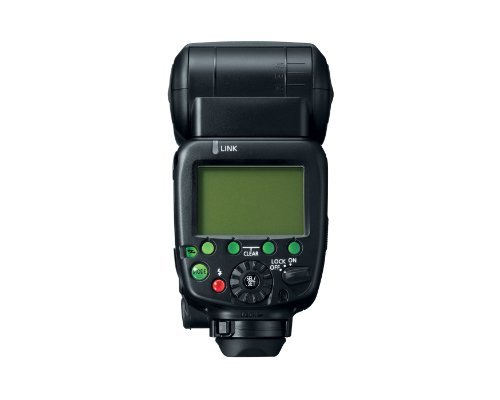
이미지 3.1: 앞면 view of the Speedlite 600EX-RT, highlighting the LCD panel and control buttons.
3.2. 무선 통신
The Speedlite 600EX-RT supports both optical and radio wave wireless communication for multi-flash setups. Radio transmission operates on 2.4 GHz frequencies, offering enhanced reliability and range up to 98.4 feet (30 meters) without line-of-sight limitations.
- 무선 전송: Supports up to 5 groups with a total of 15 individual Speedlites. 15 transmission channels are available, selectable manually or automatically. Radio transmission IDs can be set to prevent interference.
- 광학 투과율: Traditional wireless communication method.
3.3. Zoom Flash Head
The flash head covers a wide range of 20mm to 200mm. When the built-in wide panel is pulled out, flash coverage extends to 14mm. The flash can automatically adjust its zoom position based on the camera's image sensor size (full-frame, APS-H, and APS-C) to optimize power and minimize energy consumption.
3.4. LCD Panel and Backlit Controls
The dot-matrix LCD panel (172 x 104 dots) displays comprehensive information including flash status, wireless configuration, and all flash settings. Backlit operation buttons ensure visibility in low-light conditions.
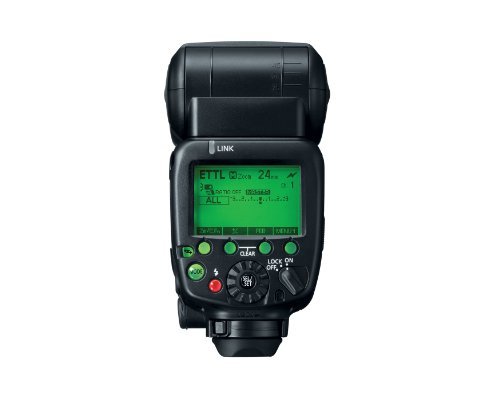
Image 3.2: The LCD panel showing ETTL mode and zoom settings.
3.5. AF Assist Beam
The built-in AF assist beam aids the camera's autofocus system in dark or low-contrast situations. It is compatible with Canon's 61-Point High Density Reticular AF system and works with all lenses 28mm or longer.
3.6. Color Filter Holder
A dedicated color filter holder allows for attaching Canon and third-party color gelatin filters. This helps match the flash's color temperature to ambient light, ensuring consistent color balance. The flash can transmit color information and light output decrease to the camera for proper white balance and exposure adjustments.
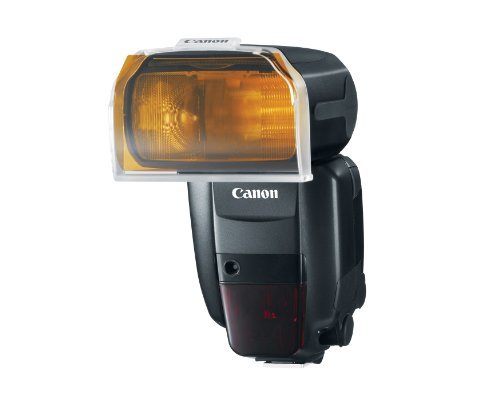
Image 3.3: The Speedlite 600EX-RT with a color filter attached.
3.7. Custom and Personal Functions
The Speedlite 600EX-RT features 18 Custom Functions (C.Fn) and 7 Personal Functions (P.Fn) for advanced customization.
- 사용자 정의 함수: Control settings such as flash exposure bracketing, modeling flash, test firing, AF assist control, power and energy saving features, and beep sound.
- Personal Functions: Adjust settings like LCD panel illumination color and Master/Slave configurations.
3.8. 바운스 플래시
The flash head offers full swivel capabilities for bounce flash photography. It can be angled 90° up, 7° down, and rotated 180° left and right. A bounce lock with a release button secures the head position. A built-in catch light panel is available when the flash head is positioned front and 90° up.
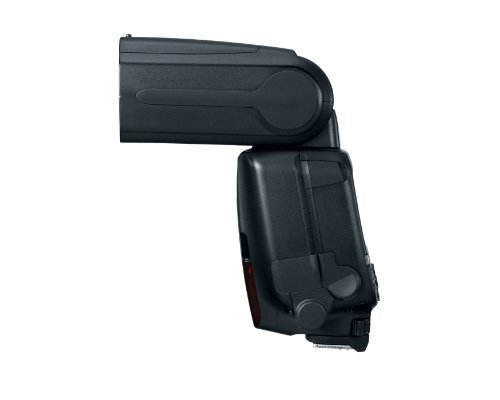
Image 3.4: The Speedlite 600EX-RT flash head angled for bounce photography.
4. 유지관리
The Speedlite 600EX-RT is designed with enhanced durability and weather resistance.
- 먼지 및 방수: The unit features improved sealing for all moving parts, display, and buttons, providing reliable performance in challenging conditions. A dust and water resistant adapter for the mounting foot creates a seal between the camera and flash.
- 청소: 부드럽고 마른 천을 사용하여 플래시 장치를 청소하십시오. 잘 지워지지 않는 오염의 경우, 약간amp cloth may be used, followed by immediate drying. Avoid using solvents or abrasive cleaners.
- 저장: When not in use for extended periods, remove the batteries to prevent leakage. Store the flash in a cool, dry place away from direct sunlight.
5. 문제 해결
If you encounter issues with your Speedlite 600EX-RT, refer to the following common solutions:
- 플래시가 터지지 않음:
- 배터리 잔량을 확인하고 배터리가 올바르게 삽입되었는지 확인하십시오.
- Verify the flash is securely mounted to the camera's hot shoe.
- Ensure the flash is powered on and not in sleep mode.
- 카메라 설정을 확인하여 외부 플래시가 활성화되어 있는지 확인하세요.
- 무선 통신 문제:
- Ensure all units (master and slave) are set to the same channel and ID.
- Check for physical obstructions between units when using optical transmission.
- Reduce distance between units if exceeding recommended range.
- Change channels to avoid interference from other devices.
- 잘못된 노출:
- Verify flash exposure compensation settings on both the flash and camera.
- Check ISO and aperture settings on the camera.
- 플래시 헤드 줌이 렌즈 초점 거리와 일치하는지 또는 자동으로 설정되어 있는지 확인하십시오.
6. 사양
| 상표 | 정경 |
| 모델 번호 | 5296B002 |
| 호환 가능한 마운팅 | 정경 |
| 카메라 플래시 유형 | 핫슈 |
| 색상 | 검은색 |
| 연결 기술 | 무선 전화 |
| 무선 기술 유형 | RF |
| 배터리 수 | AA 건전지 4개 필요 |
| 호환 장치 | 캐논 DSLR 카메라 |
| 최소 셔터 속도 | 0.004초 |
| 최대 셔터 속도 | 1/200초 |
| 방수 레벨 | 방수 |
| 품목 무게 | 14.99 온스 |
7. 보증 및 지원
7.1. 보증 정보
The Canon Speedlite 600EX-RT comes with a 1년 제한 warranty from the date of purchase. Please retain your proof of purchase for warranty claims. For detailed terms and conditions, refer to the warranty card included with your product or visit the official Canon web대지.
7.2. 고객 지원
기술 지원, 서비스 또는 추가 정보가 필요하시면 캐논 고객 지원 센터에 문의하시거나 캐논 공식 웹사이트를 방문하십시오. website. You can also find more resources and product information at the 캐논 스토어.


