
1. 서론
This manual provides essential information for the safe and efficient operation of your SANYO PLC-XK2200 XGA Ultra-Portable Multimedia Projector. Please read this manual thoroughly before using the projector and retain it for future reference.
The SANYO PLC-XK2200 is designed to deliver clear and bright images with 2200 lumens and a 2000:1 contrast ratio, suitable for various presentation environments.
2. 안전 정보
- 전원: 지정된 전원 공급 장치만 사용하세요. 전원 코드가 단단히 연결되어 있는지 확인하세요.
- 통풍: 환기구를 막지 마십시오. 과열을 방지하기 위해 프로젝터 주변에 충분한 공간을 확보하여 공기가 원활하게 흐르도록 하십시오.
- Lamp 경고: 프로젝터 lamp 프로젝터는 고온 고압 환경에서 작동합니다. 이동하거나 유지보수를 하기 전에 프로젝터가 식을 때까지 기다리십시오. 프로젝터 작동 중에는 렌즈를 직접 쳐다보지 마십시오.amp 켜져있습니다.
- 액체 노출: Do not expose the projector to rain, moisture, or liquids.
- 서비스: 모든 정비는 자격을 갖춘 서비스 담당자에게 맡기십시오. 프로젝터를 직접 열거나 수리하지 마십시오.
3. 제품 오버view
3.1 상단 패널 컨트롤
The top panel provides access to essential controls for power, menu navigation, focus, and zoom adjustments.

이미지: 상단 view of the SANYO PLC-XK2200 projector. Visible controls include the focus and zoom rings, the power button, and buttons for menu navigation (Menu, Select, Volume, Auto Setup, Lamp 다시 놓기).
3.2 후면 패널 연결
The rear panel houses various input and output ports for connecting external devices.

이미지: 후면 view of the SANYO PLC-XK2200 projector. Ports visible include Control Port, Computer In 1 (S-Video In/Component In), Computer In 2 (Monitor Out), Video In, Audio In/Out, and a network port.
3.3 측면 및 바닥 Views
측면 view shows the power input and ventilation, while the bottom view reveals mounting points and product labels.
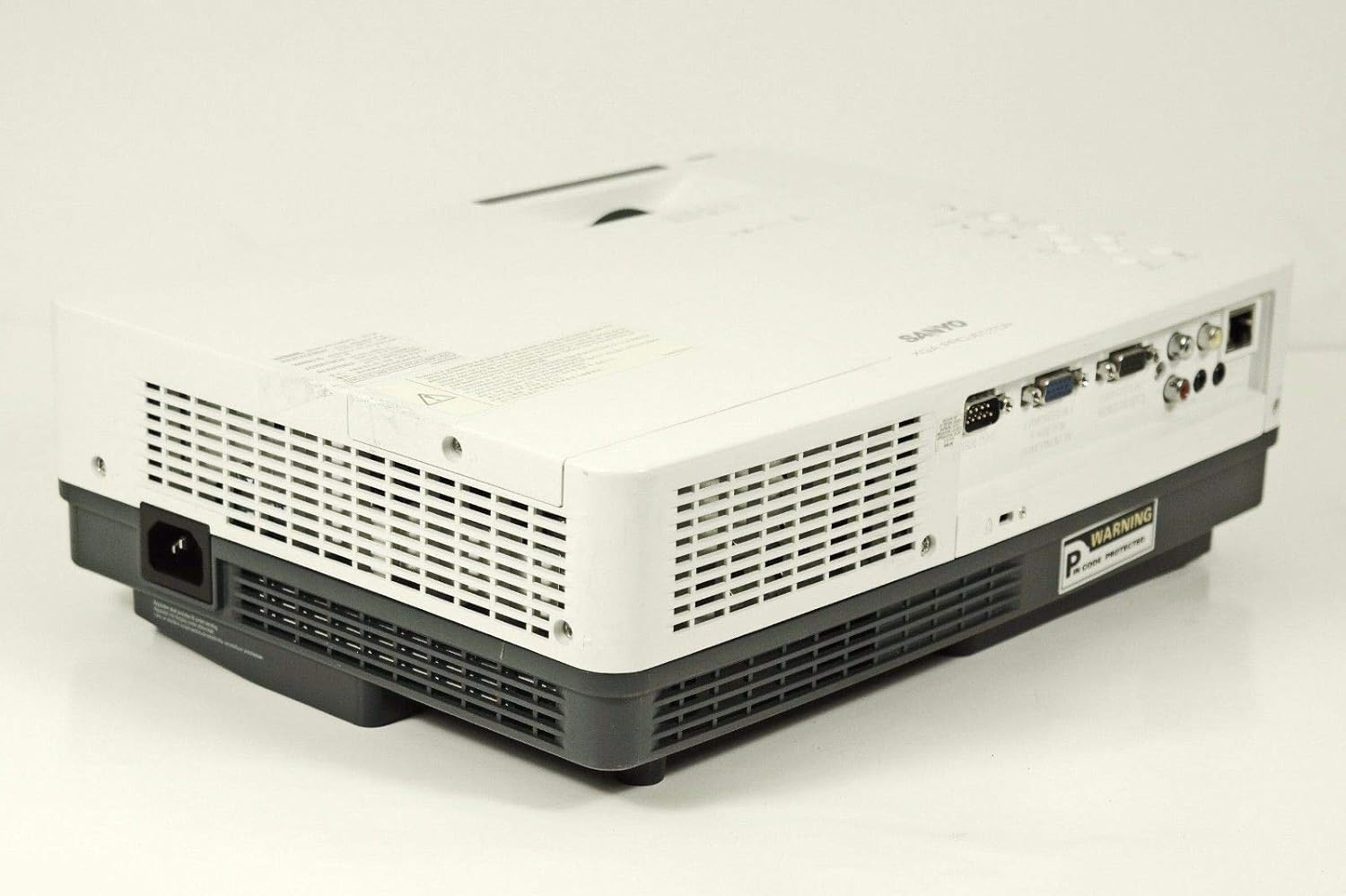
이미지: 측면 view of the SANYO PLC-XK2200 projector, highlighting the power input socket and exhaust vents.

이미지: 하단 view of the SANYO PLC-XK2200 projector, displaying screw holes for mounting, ventilation grilles, and the product information label.
4. 설정
4.1 프로젝터 배치
Place the projector on a stable, flat surface or mount it securely. Ensure there is sufficient space around the projector for ventilation. Avoid placing it in direct sunlight or near heat sources.
4.2 전원 연결
- 프로젝터의 AC 전원 입력 단자에 전원 코드를 연결하세요.
- 전원 코드의 다른 쪽 끝을 접지된 전기 콘센트에 꽂습니다.
- The power indicator light will illuminate, typically in amber, indicating standby mode.
4.3 입력 소스 연결
Connect your video source (e.g., computer, DVD player) to the appropriate input port on the projector's rear panel. The PLC-XK2200 supports various inputs including VGA (Computer In 1/2), S-Video, and Composite Video.
- 컴퓨터: Use a VGA cable to connect your computer's video output to the COMPUTER IN 1 or COMPUTER IN 2 port.
- 비디오 장치 : For S-Video, connect to the S-VIDEO IN port. For composite video, connect to the VIDEO IN port using an RCA cable.
- 오디오: Connect audio cables from your source device to the AUDIO IN ports if you wish to use the projector's internal speaker or audio output.
5. 사용 설명서
5.1 전원 켜기/끄기
- 전원을 켜려면: Press the POWER button on the projector's top panel or remote control. The power indicator will turn green, and the lamp 밝아질 것이다.
- 전원을 끄려면: Press the POWER button twice. The projector will enter cooling mode, and the power indicator will flash amber. Once cooled, it will return to standby mode (solid amber).
5.2 이미지 조정
- 집중하다: Rotate the FOCUS ring on the lens until the image is sharp and clear.
- 줌: Rotate the ZOOM ring on the lens to adjust the image size.
- 키스톤 보정: Use the AUTO SETUP button or navigate through the menu to adjust vertical keystone distortion, which corrects trapezoidal images.
5.3 입력 선택
Press the INPUT button on the projector or remote control to cycle through available input sources (e.g., Computer 1, Computer 2, Video, S-Video).
5.4 메뉴 탐색
Press the MENU button to access the on-screen display (OSD) menu. Use the arrow buttons to navigate and the SELECT button to confirm choices. Press MENU again to exit.
6. 유지관리
6.1 프로젝터 청소
- 외부: Use a soft, dry cloth to clean the projector's casing. For stubborn dirt, dampen the cloth with a mild detergent solution.
- 렌즈: Gently wipe the lens with a lens cleaning cloth or lens paper. Avoid harsh chemicals or abrasive materials.
- 에어 필터: Regularly clean the air filter to maintain proper ventilation and prevent overheating. Refer to the filter cover for removal instructions.
6.2리터amp 대사
난amp 수명이 유한합니다. l이amp 표시등이 켜지거나 이미지가 어두워지면 lamp may need replacement. Always allow the projector to cool completely before attempting lamp replacement. Consult a qualified technician for lamp replacement if you are unsure.
경고: High pressure lamp. Risk of explosion if improperly handled. Refer to the service manual for detailed lamp 교체 절차.
7. 문제 해결
| 문제 | 가능한 원인 | 해결책 |
|---|---|---|
| 이미지가 표시되지 않음 | Incorrect input selected; loose cable connection; projector in standby. | Press INPUT to select correct source; check cable connections; press POWER button to turn on. |
| 이미지가 흐릿함 | 초점이 조정되지 않았습니다. 프로젝터가 화면에서 너무 가깝거나 멀리 떨어져 있습니다. | Adjust the FOCUS ring; reposition the projector or use the ZOOM ring. |
| 이미지는 사다리꼴입니다 | 프로젝터가 화면에 수직이 아닙니다. | Use Auto Vertical Keystone correction or manually adjust. |
| 프로젝터가 과열되어 꺼집니다 | 환기가 막혔고 공기 필터가 더러워졌습니다. | Ensure clear airflow around vents; clean or replace air filter. |
8. 사양

이미지: 측면 view of the SANYO PLC-XK2200 projector, displaying the model number label (MODEL NO. PLC-XK2200).
- 모델 이름: PLC-XK2200
- 상표: 산요
- 디스플레이 기술: 액정표시장치
- 명도: 2200루멘
- 대비율: 2000시 1분
- 네이티브 해상도: XGA(1024 x 768)
- 종횡비: 4:3(네이티브)
- 폼 팩터: 가지고 다닐 수 있는
- 장착 유형: 탁상 마운트
- 입력 단자: VGA (x2), S-Video, Composite Video, Audio In (RCA)
- 출력 단자: VGA (Monitor Out), Audio Out (RCA)
- 제어 포트: RS-232C
- 한국어: 086483079498
9. 보증 및 지원
For warranty information, please refer to the warranty card included with your product or contact your local SANYO dealer. Technical support may be available through authorized service centers.
No official product videos were provided in the input data for this manual.