
소개
This manual provides instructions for the Silverlit 84506 I/R Black Hawk 3-Channel remote-controlled helicopter. This model is a replica of a combat helicopter, designed for indoor use. It features 3-channel infrared control for precise speed and direction, and a 3-band system for multi-user play.
안전 경고
- Recommended for ages 10 years and older. Adult supervision is recommended during operation.
- Do not operate near people, animals, or obstacles. Ensure sufficient clear space for flight.
- 회전하는 날에 손가락, 머리카락, 헐렁한 옷이 닿지 않도록 하십시오.
- 제품을 개조하지 마십시오.
- Use only specified batteries. Do not mix old and new batteries or different types of batteries.
- Do not attempt to catch the helicopter while it is in flight.
패키지 내용
- Silverlit 84506 I/R Black Hawk Helicopter
- 적외선 원격 제어
- 사용 설명서
설정
배터리 설치(리모컨)
The remote control requires 6 x LR06 (AA) batteries, which are not included.
- 리모콘 뒷면에서 배터리함을 찾으세요.
- Open the battery compartment cover, typically by unscrewing a small screw.
- Insert 6 new LR06 (AA) batteries, observing the correct polarity (+/-) as indicated inside the compartment.
- Close the battery compartment cover securely and fasten the screw.
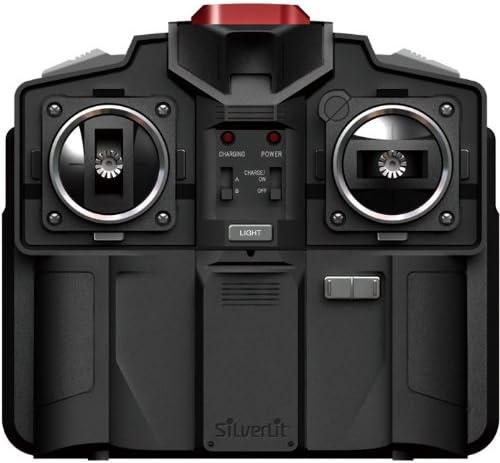
Image: The Silverlit 84506 infrared remote control. The battery compartment is located on the back. Note the power switch and charging indicator lights.
헬리콥터 충전
The helicopter is powered by an internal rechargeable battery. The remote control can be used to charge the helicopter.
- Ensure the remote control has fresh batteries installed and is powered off.
- Locate the charging cable on the remote control (usually stored in a compartment).
- 헬리콥터의 충전 포트에 충전 케이블을 연결하세요.
- Turn on the remote control. The "CHARGING" indicator light on the remote control will illuminate.
- Once charging is complete, the indicator light may change or turn off. Disconnect the charging cable.
Charging time may vary. Do not overcharge the helicopter battery.

Image: The Silverlit 84506 I/R Black Hawk helicopter. The charging port is typically located on the side or underside of the helicopter body.
Pairing the Helicopter and Remote Control
The helicopter and remote control use a 3-band system (A, B, C), allowing up to three users to play simultaneously in the same area.
- 헬리콥터와 리모컨 모두 전원이 꺼져 있는지 확인하십시오.
- Select a desired band (A, B, or C) on the remote control using the band selector switch.
- 헬리콥터를 켭니다.
- 리모콘을 켭니다.
- The remote control and helicopter should automatically pair. If pairing fails, turn both devices off and repeat the process, ensuring no other Silverlit I/R devices are operating nearby on the same band.
작동 지침
통제 수단
The remote control features 3-channel infrared control for various flight movements:
- Throttle Stick (Left Stick): Controls vertical movement. Push up to ascend, pull down to descend.
- Directional Stick (Right Stick): Controls forward/backward movement and left/right rotation. Push up for forward flight, pull down for backward flight. Move left/right to rotate the helicopter.
- 트림 제어: Small buttons or sliders near the directional stick. Use these to fine-tune the helicopter's rotation if it spins unintentionally during hover. Adjust incrementally until stable.
Image: The Silverlit 84506 remote control, illustrating the left throttle stick, right directional stick, and trim controls.
첫 비행
- Place the helicopter on a flat, clear surface in an open indoor area.
- Ensure the helicopter and remote control are powered on and paired.
- Gently push the throttle stick (left stick) up to lift off. Make small, controlled adjustments to maintain a stable hover.
- Practice hovering before attempting forward or rotational movements.
- Always land gently by slowly pulling the throttle stick down.
- Remember, this helicopter is designed for indoor use only. Avoid drafts or strong air currents.
유지
- 청소: Wipe the helicopter and remote control with a soft, dry cloth. Do not use chemical cleaners, solvents, or water, as these can damage electronic components.
- 저장: When not in use, store the helicopter and remote control in a cool, dry place, away from direct sunlight and extreme temperatures. Remove batteries from the remote control if storing for extended periods to prevent leakage.
- 블레이드 검사: Regularly check rotor blades for damage, cracks, or bends. Damaged blades can affect flight performance and safety. Replace damaged blades immediately if replacements are available.
- 배터리 관리 : Do not leave depleted batteries in the remote control. Dispose of batteries responsibly according to local regulations.
문제 해결
- Helicopter does not respond to remote control:
- 헬리콥터와 리모컨 모두 전원이 켜져 있는지 확인하십시오.
- Check battery levels in the remote control and ensure the helicopter is fully charged.
- Verify that the remote control and helicopter are set to the same band (A, B, or C).
- Ensure there are no obstructions between the remote control's infrared emitter and the helicopter's receiver.
- Try turning both devices off and on again to re-establish pairing.
- Helicopter is difficult to control or spins unintentionally:
- Adjust the trim controls on the remote control to correct any unwanted rotation.
- Ensure rotor blades are not damaged and are properly installed.
- Practice gentle and gradual control inputs. Sudden movements can make the helicopter unstable.
- Ensure you are operating in a calm indoor environment, free from drafts.
- 짧은 비행 시간:
- 비행 전 헬리콥터 배터리가 완전히 충전되어 있는지 확인하세요.
- Battery performance may decrease over time with repeated use and charging cycles.
명세서
| 특징 | 세부 사항 |
|---|---|
| 상표 | 실버라이트 |
| 모델 번호 | 84506 |
| 재료 | 플라스틱 |
| 제어 유형 | Infrared (I/R) |
| 채널 | 3개 채널 |
| 원격 제어 배터리 | 6 x AA (LR06) (not included) |
| 추천연령 | 10세 이상 |
| 사용환경 | 실내 |
보증 및 지원
For warranty information or technical support regarding your Silverlit 84506 I/R Black Hawk helicopter, please refer to the official Silverlit web사이트를 방문하거나 고객 서비스 부서에 문의하세요. 보증 청구에 대비해 구매 증빙 자료로 구매 영수증을 보관하세요.