
1. 서론
This manual provides comprehensive instructions for the assembly, operation, and maintenance of your AmScope D200 Two-Observing Compound Microscope. This instrument is designed for teaching and training purposes, featuring a unique double binocular head for simultaneous observation by two users.
주요 특징은 다음과 같습니다.
- Two Binocular Heads for simultaneous observation.
- Fully Coated Optical System ensuring high resolution and sharp images.
- Magnification range: 40X, 100X, 400X, and 1000X.
- 45-degree inclined, 360-degree swiveling compensation-free binocular heads.
- Large Double Layer Mechanical Stage with slide clips for precise samp르 포지셔닝.

Figure 1.1: AmScope D200 Two-Observing Compound Microscope, showing its dual viewing heads and main body.
2. 안전 정보
Please read and understand all safety precautions before operating the microscope. Failure to do so may result in injury or damage to the instrument.
- 전기 안전: Ensure the microscope is connected to a grounded power outlet with the correct voltage (240 Volts). Do not operate with wet hands. Disconnect power before cleaning or servicing.
- 손질: Always carry the microscope by its arm and base. Avoid sudden impacts or vibrations.
- 광학 부품: Do not touch optical surfaces with bare hands. Use lens paper or a soft, lint-free cloth for cleaning.
- 빛의 출처: The halogen light source can become hot during operation. Avoid direct contact with the bulb or lamp 주택.
- 약: When working with chemical samples, ensure proper ventilation and use appropriate personal protective equipment. Avoid spilling corrosive liquids on the microscope.
- 어린이들: This microscope is not a toy. Supervise children closely if they are using the instrument.
3. 구성 요소 식별
Familiarize yourself with the various parts of your AmScope D200 microscope before assembly and operation.
- Eyepieces (Oculars): 당신이 보는 렌즈 view the specimen. The D200 features two sets of binocular heads.
- Binocular Heads: The upper part of the microscope containing the eyepieces, designed for comfortable view주고받음.
- 팔: Connects the head to the base and stage, used for carrying the microscope.
- 회전식 노즈피스: Holds the objective lenses and allows for easy switching between magnifications.
- 대물렌즈: Lenses located just above the specimen, providing the primary magnification. The D200 includes 4X, 10X, 40X, and 100X achromatic objectives.
- Stage: The flat platform where the specimen slide is placed. The D200 has a large double-layer mechanical stage.
- Stag전자 클립: Secure the specimen slide on the stage.
- 기계식 Stage Knobs: Allow precise movement of the specimen slide (X-Y axis).
- 초점 조절 노브: Large knob for rapid focusing adjustments.
- 미세 초점 조절 노브: Smaller knob for precise focusing adjustments.
- 콘덴서: s 아래에 위치함tage, it focuses light onto the specimen.
- 홍채 다이어프램: Adjustable aperture within the condenser to control the amount of light reaching the specimen.
- Illuminator (Light Source): Built-in halogen lamp providing illumination from below the stage.
- 광도 제어: Rheostat knob to adjust the brightness of the illuminator.
- 베이스: The bottom support of the microscope, housing the illuminator and electronics.
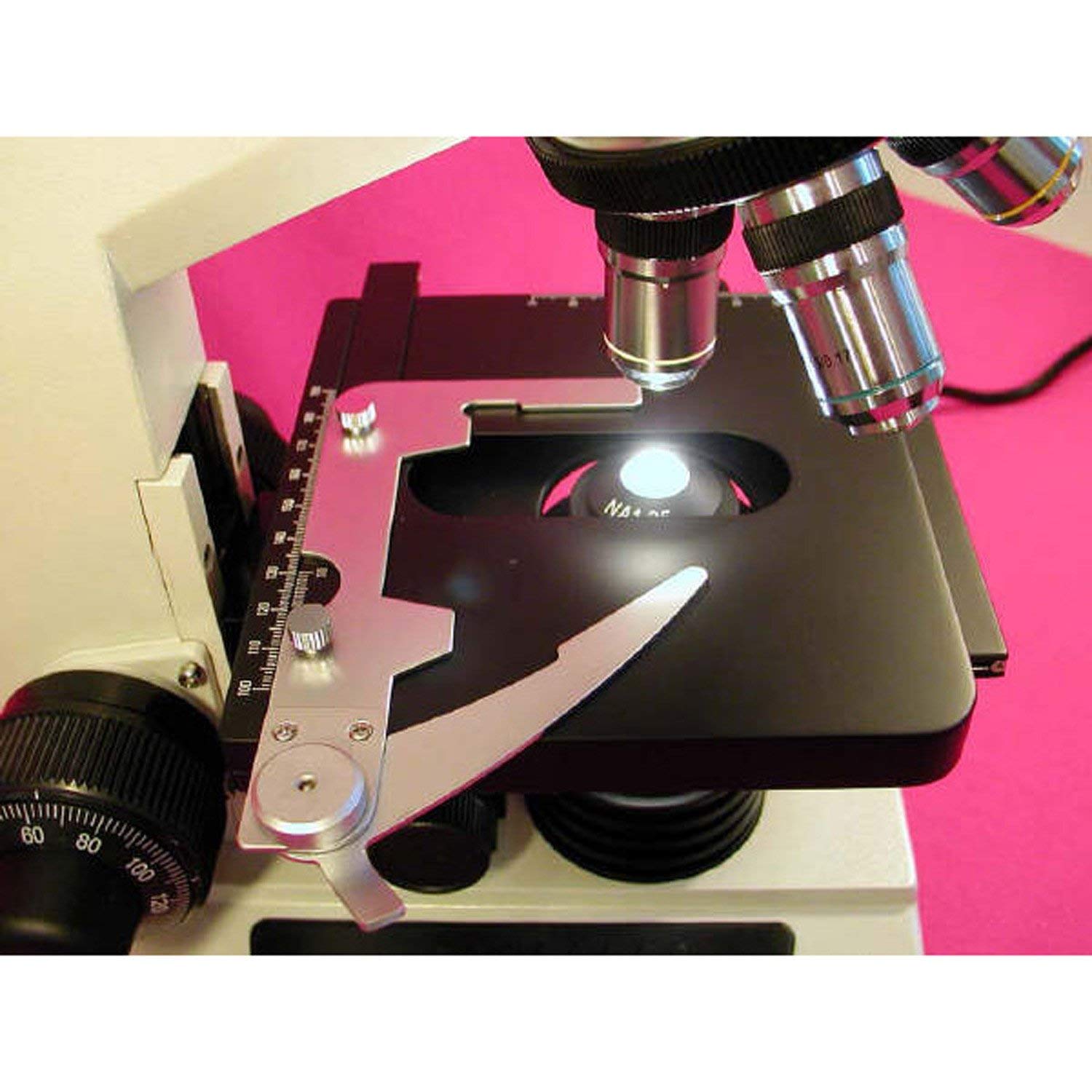
그림 3.1: 클로즈업 view 기계의 stage, objective lenses, and illuminator of the AmScope D200 microscope.
4. 설정
Follow these steps to set up your AmScope D200 microscope:
- 짐 풀기: 포장에서 모든 구성품을 조심스럽게 꺼내십시오. 향후 운송 또는 보관을 위해 원래 포장재를 보관하십시오.
- 놓기: Place the microscope on a stable, level surface, away from direct sunlight, excessive heat, dust, and vibrations.
- 헤드 설치: Gently place the binocular heads onto the top of the microscope arm. Secure them by tightening the set screw, if present.
- 접안렌즈 설치: Insert the eyepieces into the eyepiece tubes of both binocular heads.
- 전원 연결: Connect the power cord to the microscope's power input and then to a grounded 240V AC power outlet.
- 조명 점검: Turn on the power switch and adjust the light intensity control to ensure the illuminator is functioning.
5. 사용 설명서
5.1 Preparing a Specimen
- Place the prepared microscope slide onto the mechanical stage.
- 사용tage clips to gently secure the slide in place.
- Use the mechanical stage knobs to position the specimen directly over the center of the illuminator opening.
5.2 Focusing and View잉
- Start with Lowest Magnification: Rotate the revolving nosepiece to select the 4X objective lens. Ensure it clicks firmly into place.
- 조명 조정: Turn on the illuminator and adjust the light intensity to a comfortable level. Adjust the iris diaphragm for optimal contrast.
- Lower Stage: Using the coarse focus knob, lower the stage as far as it will go.
- Raise Stage and Focus: While looking through the eyepieces, slowly raise the stage using the coarse focus knob until the specimen comes into rough focus.
- 정밀 초점: Use the fine focus knob to achieve a sharp, clear image.
- 동공 간 거리 조절하기: Adjust the distance between the two eyepiece tubes to match the distance between your eyes for comfortable binocular view주고받음.
- Adjust Diopter (if applicable): If one eyepiece has a diopter adjustment ring, adjust it to compensate for differences in vision between your eyes.
- 배율 변경: To increase magnification, rotate the revolving nosepiece to the next higher objective (e.g., 10X, 40X, 100X). The microscope is parfocal, meaning only minor fine focus adjustments should be needed when changing objectives.
- Using 100X Oil Immersion Objective: For the 100X objective, a drop of immersion oil must be placed on the specimen slide directly over the area to be viewed. Lower the objective into the oil until it makes contact. After use, clean the 100X objective and slide thoroughly with lens paper and lens cleaning solution.
6. 유지관리 및 관리
적절한 유지 관리는 현미경의 수명과 최적의 성능을 보장합니다.
- Cleaning Optical Components:
- Use a soft brush or air blower to remove loose dust.
- For smudges or fingerprints, use lens paper lightly moistened with lens cleaning solution. Wipe gently in a circular motion from the center outwards.
- Never use abrasive cloths or harsh chemicals.
- Clean the 100X oil immersion objective immediately after use to prevent oil from hardening.
- 세척 본체: 부드러운 d로 외부 표면을 닦으십시오.amp cloth. Avoid getting moisture into electrical components.
- 저장: 사용하지 않을 때는 먼지와 이물질로부터 현미경을 보호하기 위해 먼지 덮개를 씌우십시오. 서늘하고 건조한 곳에 보관하십시오.
- Lamp 대사: If the illuminator lamp burns out, disconnect power, allow it to cool, and replace it with a compatible halogen bulb (refer to specifications for bulb type).
7. 문제 해결
| 문제 | 가능한 원인 | 해결책 |
|---|---|---|
| 조명 없음 | Power cord disconnected; Power switch off; Bulb burnt out; Light intensity too low. | Check power connection; Turn on power switch; Replace bulb; Increase light intensity. |
| 이미지가 흐릿하거나 초점이 맞지 않습니다. | Incorrect focus adjustment; Slide upside down; Objective not clicked into place. | Adjust coarse/fine focus; Flip slide; Rotate nosepiece until objective clicks. |
| 어두운 들판 view | Iris diaphragm closed; Condenser too low; Light intensity too low. | Open iris diaphragm; Raise condenser; Increase light intensity. |
| Dust/spots in view | Dust on eyepiece, objective, or slide. | Clean optical components and slide. Rotate eyepiece to determine if dust is on eyepiece. |
| Cannot see through both eyepieces clearly | Interpupillary distance incorrect; Diopter not adjusted. | Adjust interpupillary distance; Adjust diopter on eyepiece. |
8. 사양
| 특징 | 세부 사항 |
|---|---|
| 모델 번호 | 디200 |
| 확대 범위 | 40배, 100배, 400배, 1000배 |
| 대물렌즈 | Achromatic (4X, 10X, 40X, 100X Oil) |
| 접안렌즈 | Widefield (specific magnification not provided, typically 10X) |
| 머리 유형 | Two Binocular Heads, 45-degree inclined, 360-degree swiveling |
| Stage | Large Double Layer Mechanical Stage with Slide Clips |
| 초점 맞추기 | Coaxial Coarse & Fine Focus |
| 조명 | Halogen, Brightfield, with Light Intensity Control |
| 전원 | 코드식 전기 |
| 권tage | 240 볼트 |
| 품목 무게 | 30파운드(약 13.6kg) |
| 제조업체 | 암스코프 |
| ASIN | B005OSCR0Y |
| 한국어: | 013964560619 |
9. 보증 및 지원
For specific warranty information regarding your AmScope D200 microscope, please refer to the documentation included with your purchase or contact AmScope customer support directly. Warranty terms and conditions may vary.
For technical support, parts, or service inquiries, please visit the official AmScope website or contact their customer service department. When contacting support, please have your model number (D200) and ASIN (B005OSCR0Y) available.
자세한 정보와 연락처는 다음에서 확인할 수 있습니다. AmScope Store on Amazon.