
1. 서론
The D-Link Wireless N300 Dual Band PCI Express Desktop Adapter (DWA-566) provides high-speed wireless connectivity for your desktop computer. Utilizing Wireless N technology, it maximizes the speed and range of your wireless signal, offering superior performance compared to Wireless G devices. The dual-band capability supports both 2.4GHz and 5GHz wireless signals, allowing for flexible network usage, such as browsing on 2.4GHz and HD streaming or gaming on the clearer 5GHz band.
This adapter is designed to fit into any standard PCI Express slot, offering a higher performance interface than legacy PCI. It supports secure wireless networks with WPA or WPA2 encryption.

Figure 1.1: D-Link DWA-566 Wireless N300 Dual Band PCI Express Desktop Adapter with antennas.
2. 특징
The DWA-566 adapter includes the following key features:
- IEEE 802.11n, 802.11g, and 802.11a Compliant
- Dual Band Technology for Superior Wireless Performance (2.4GHz or 5GHz)
- Access secure wireless networks using advanced WPA or WPA2 encryption
- Fits into any standard PCI Express slot
- PCI Express Interface provides higher performance than a legacy PCI interface
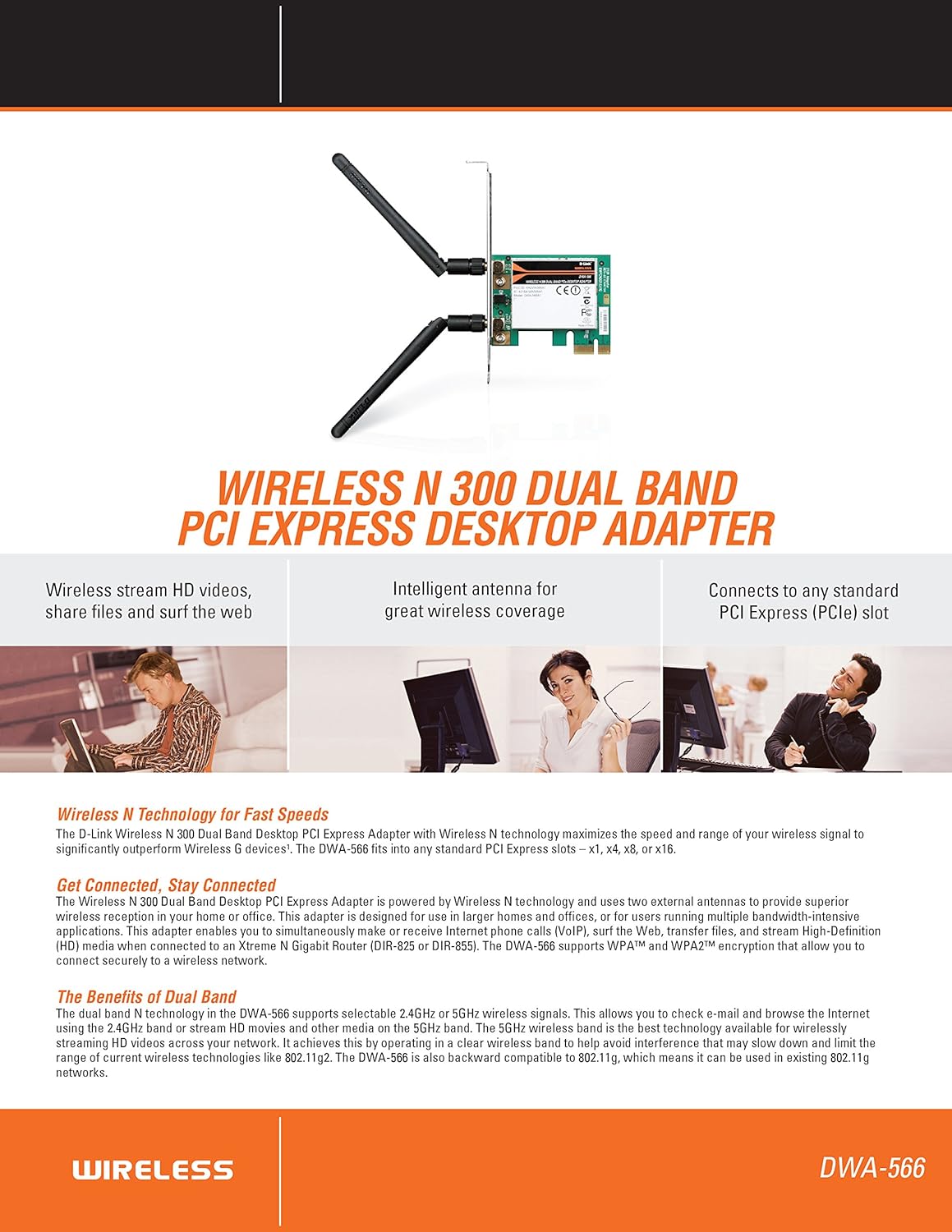
그림 2.1: 이상view of DWA-566 features and benefits.
3. 패키지 내용
패키지에 다음 품목이 포함되어 있는지 확인하십시오.
- Wireless N 300 Dual Band PCI Express Adapter (DWA-566)
- 분리형 안테나 2개
- 로우프로file 장착 브래킷
- 빠른 설치 가이드
- CD-ROM with:
- D-Link 무선 연결 관리자
- 운전자
- 제품 설명서
4. 시스템 요구 사항
Before installing the DWA-566, ensure your system meets the following minimum requirements:
- Computer with an available PCI Express slot
- Windows operating system (Windows XP, Vista, 7, 8, 10)
- CD-ROM drive (for driver installation from included CD)
- Internet Explorer 7 or Firefox 3.0 and above (for viewing documentation)
- 인터넷 서비스 공급자(ISP) 구독
For optimal performance, a D-Link Wireless N router (DIR-655 or DIR-825) is recommended.

Figure 4.1: Detailed technical specifications, minimum requirements, and network diagram.
5. 설정 및 설치
5.1 하드웨어 설치
- 컴퓨터 전원 끄기: 컴퓨터를 끄고 전원 코드를 뽑으세요.
- 컴퓨터 케이스 열기: 컴퓨터 케이스 덮개를 제거하세요.
- PCI Express 슬롯을 찾으십시오. Find an available PCI Express slot on your motherboard.
- 어댑터 삽입: Carefully insert the DWA-566 adapter into the PCI Express slot, ensuring it is seated firmly.
- 보안 어댑터: Secure the adapter with a screw to the computer chassis.
- 안테나 부착: Screw the two included antennas onto the connectors on the adapter.
- 케이스를 닫고 전원을 켜세요: 컴퓨터 케이스 덮개를 다시 씌우고 전원 코드를 연결한 다음 컴퓨터 전원을 켜세요.

Figure 5.1: DWA-566 adapter with antennas attached, ready for installation.
5.2 소프트웨어 설치
After hardware installation, proceed with driver and utility installation:
- 설치 CD를 삽입하십시오. Insert the DWA-566 installation CD into your computer's CD-ROM drive. The setup wizard should launch automatically. If not, navigate to the CD drive and run the 'Setup.exe' file.
- 화면의 지침을 따르세요: Follow the prompts of the D-Link setup wizard to install the drivers and the D-Link Wireless Connection Manager utility.
- 컴퓨터를 다시 시작합니다. 설치가 완료되면 메시지가 나타날 때 컴퓨터를 다시 시작하십시오.
메모: For Windows 7/8 64-bit systems, ensure you are using the latest drivers available from the official D-Link support website to avoid potential compatibility issues.
6. 사용 설명서
Once the drivers are installed, you can connect to a wireless network:
- Launch Connection Manager: Open the D-Link Wireless Connection Manager utility or use the built-in Windows wireless network utility.
- 네트워크 검색: 이 유틸리티는 해당 지역에서 사용 가능한 무선 네트워크를 검색합니다.
- 네트워크 선택: 목록에서 원하는 무선 네트워크(SSID)를 선택하세요.
- 보안 키를 입력하십시오: If the network is secured, enter the correct WPA/WPA2 security key or passphrase.
- 연결하다: 무선 연결을 설정하려면 '연결'을 클릭하십시오.
A successful connection will be indicated by a strong signal strength and internet access.
7. 유지관리
To ensure optimal performance and longevity of your DWA-566 adapter:
- 드라이버 업데이트 유지: Periodically check the D-Link support website for the latest drivers and firmware updates.
- 적절한 환기를 확보하세요: Make sure your computer case has adequate airflow to prevent overheating of internal components, including the wireless adapter.
- 안테나 포지셔닝: Adjust the antennas for the best possible signal reception.
- 환경적 요인: Avoid placing your computer near large metal objects or other devices that may cause wireless interference.
8. 문제 해결
If you encounter issues with your DWA-566 adapter, consider the following:
8.1 무선 연결 없음
- Verify Hardware Installation: Ensure the adapter is correctly seated in the PCI Express slot and antennas are securely attached.
- 운전자 확인: Confirm that the drivers are installed correctly. Check Device Manager for any error symbols next to the network adapter. Reinstall drivers if necessary.
- 라우터 상태: Ensure your wireless router is powered on and broadcasting a signal.
- 보안 키: Double-check that the correct wireless security key (WPA/WPA2 passphrase) is entered.
- 방화벽 설정: Temporarily disable your computer's firewall to see if it is blocking the connection. If it resolves the issue, configure your firewall to allow the D-Link utility.
8.2 Slow Connection Speed or Frequent Disconnections
- 안테나 조정: Try repositioning the antennas for better signal reception.
- 간섭: Move the computer away from potential sources of interference (e.g., cordless phones, microwaves, Bluetooth devices).
- 라우터 근접성: Ensure the computer is within the effective range of your wireless router.
- 듀얼 밴드 사용: If your router supports it, try connecting to the 5GHz band for less interference and potentially higher speeds, especially for streaming or gaming.
- 드라이버 업데이트: Update the adapter drivers to the latest version from the D-Link web대지.
9. 사양
| 특징 | 사양 |
|---|---|
| 상표 | 디링크 |
| 모델 번호 | DWA-566 |
| 하드웨어 인터페이스 | PCI 익스프레스 |
| 데이터 링크 프로토콜 | IEEE 802.11n, 802.11g, 802.11a |
| 데이터 전송 속도 | 초당 최대 300메가비트 |
| 주파수 대역 | 2.4GHz / 5GHz (듀얼 밴드) |
| 보안 | WPA, WPA2 |
| 호환 장치 | 데스크탑 컴퓨터 |
| 품목 무게 | 0.4파운드(약 181그램) |
| 외부 테스트 인증 | FCC B, IC B, CE, C-Tick |
10. 보증 및 지원
The D-Link Wireless N300 Dual Band PCI Express Desktop Adapter (DWA-566) comes with a 1년 한정 보증. For specific terms and conditions, please refer to the warranty documentation included with your product or visit the official D-Link web대지.
D-Link provides 24/7 Basic Installation Support to assist with initial setup and configuration. For technical assistance, driver downloads, and further product information, please visit the D-Link support web사이트를 방문하거나 고객 서비스에 문의하세요.
D-링크 지원 Web대지: https://support.dlink.com/