
인포커스 IN126
InFocus IN126 DLP 프로젝터 사용 설명서
Model: IN126 | Brand: InFocus
1. 제품 오버view
The InFocus IN126 is a DLP projector designed for various projection needs, offering high brightness and a clear image. This manual provides essential information for the proper setup, operation, and maintenance of your projector.
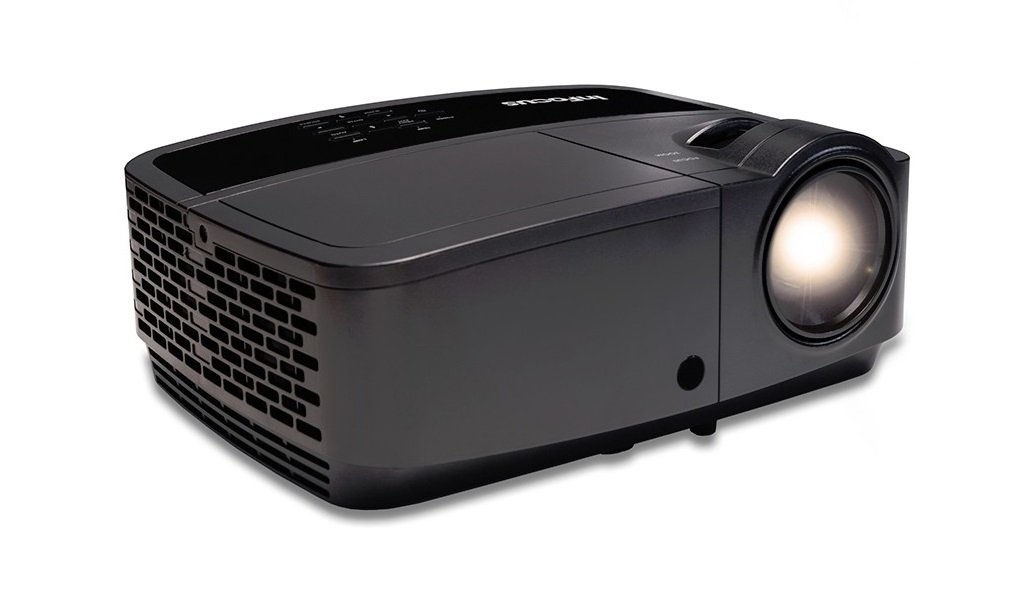
이미지 1.1: 앞면 view of the InFocus IN126 DLP Projector.
주요 특징:
- High brightness of up to 3200 lumens for clear images in various lighting conditions.
- High 3000:1 contrast ratio for sharp detail.
- Compact and portable design, weighing approximately 4.8 lbs. (2.17 kg).
- 3D-Ready capability for immersive view경험을 쌓습니다.
- HDMI connectivity for versatile input options.
2. 설정 및 설치
2.1 풀기
Carefully remove the projector and all accessories from the packaging. Verify that all components are present according to the packing list.
2.2 프로젝터 배치
Place the projector on a stable, flat surface or mount it securely. Ensure adequate ventilation around the projector to prevent overheating. Position the projector at an appropriate distance from the screen to achieve the desired image size.
2.3 장치 연결
Connect your video source (e.g., laptop, gaming console) to the projector using an HDMI cable. Ensure the cable is securely plugged into both the source device and the projector's HDMI input port.

Image 2.1: An InFocus projector set up for a business presentation, demonstrating typical usage.
2.4 전원 켜기/끄기
- 전원을 켜려면: Connect the power cord to the projector and a power outlet. Press the power button on the projector or remote control. The power indicator light will illuminate.
- 전원을 끄려면: Press the power button twice. The projector will enter a cooling cycle before completely shutting down. Do not unplug the projector during the cooling cycle.
2.5 이미지 조정
- 집중하다: 렌즈의 초점 링을 돌려 이미지가 선명하고 깨끗해질 때까지 돌립니다.
- 키스톤 보정: Use the keystone adjustment feature (usually found in the projector's menu or via dedicated buttons) to correct trapezoidal image distortion if the projector is not perfectly perpendicular to the screen.
3. 프로젝터 작동
3.1 입력 소스 선택
Press the 'Source' or 'Input' button on the remote control or projector control panel to cycle through available input sources (e.g., HDMI, VGA). Select the input corresponding to your connected device.
3.2 메뉴 탐색
Use the arrow buttons on the remote or control panel to navigate the on-screen display (OSD) menu. Press 'Enter' or 'OK' to confirm selections and 'Menu' or 'Exit' to go back or close the menu.
3.3 사진 조정
OSD 메뉴에서 다양한 그림 설정을 조정할 수 있습니다.
- 명도: 이미지의 전체적인 밝기 또는 어두움을 조절합니다.
- 차이: 이미지에서 가장 밝은 부분과 가장 어두운 부분 사이의 차이를 조절합니다.
- 색상: 색상의 강도를 조절합니다.
- 종횡비: 화면 표시 형식을 선택합니다(예: 4:3, 16:9).
3.4 오디오 설정
If your projector has built-in speakers or is connected to an external audio system, you can adjust the volume and other audio settings through the OSD menu.
3.5 3D 작동
The IN126 projector is 3D-Ready. To view 3D content, you will need compatible 3D glasses, a 3D-enabled source device, and 3D content. Refer to your 3D glasses and source device manuals for specific instructions on enabling 3D mode.
4. 유지관리
4.1 렌즈 청소
광학 렌즈 전용으로 제작된 부드럽고 보풀 없는 천으로 프로젝터 렌즈를 살살 닦아주세요. 연마성 세척제나 과도한 힘을 사용하면 렌즈에 흠집이 생길 수 있으므로 피하십시오.
4.2 Cleaning the Projector Casing
프로젝터 외부를 닦으세요asing는 부드러운 d로 발음합니다.amp 옷감. 강한 화학물질이나 용제를 사용하지 마십시오.
4.3 공기 필터 유지 관리
Regularly check and clean the air filter to ensure proper airflow and prevent overheating. Refer to the full product manual for instructions on locating and cleaning or replacing the air filter.
4.4리터amp 대사
프로젝터 lamp has an estimated operating life of up to 20,000 hours. When the lamp reaches the end of its life, a warning message may appear, or the image brightness may significantly decrease. Refer to the full product manual for detailed instructions on safe lamp replacement. Always use genuine InFocus replacement lamps.
5. 문제 해결
이 섹션에서는 InFocus IN126 프로젝터에서 발생할 수 있는 일반적인 문제에 대해 설명합니다.
5.1 화면에 이미지가 없습니다
- 프로젝터 전원이 켜져 있고 전원 표시등이 켜져 있는지 확인하십시오.
- 모든 케이블 연결(HDMI, 전원)이 제대로 되어 있는지 확인하십시오.
- 프로젝터에서 올바른 입력 소스가 선택되었는지 확인하십시오.
- Confirm the source device (laptop, etc.) is powered on and outputting a signal.
5.2 이미지가 왜곡되거나 흐릿함
- 렌즈의 초점링을 조정합니다.
- Use keystone correction to fix trapezoidal distortion.
- Ensure the projector is placed on a stable surface and is not vibrating.
- Check the resolution settings of your source device; ensure it is compatible with the projector's native resolution (1280 x 720).
5.3 소리가 나지 않습니다
- 프로젝터와 소스 장치의 볼륨을 모두 높이세요.
- 외부 스피커를 사용하는 경우 스피커가 제대로 연결되고 전원이 켜져 있는지 확인하세요.
- Check audio settings in the projector's OSD menu.
5.4 프로젝터 과열
- Ensure there is sufficient space around the projector for ventilation.
- Clean the air filter to remove any dust buildup.
- 통풍구를 막지 마십시오.
6. 사양
The following table outlines the key technical specifications for the InFocus IN126 DLP Projector:
| 특징 | 사양 |
|---|---|
| 상표 | 인포커스 |
| 모델명 | IN126 DLP |
| 디스플레이 유형 | 디엘피(DLP) |
| 네이티브 해상도 | 1280 x 720 |
| 최대 디스플레이 해상도 | 1920 x 1080 |
| 명도 | 3200 lumens (ANSI) |
| 대비율 | 3000시 1분 |
| 광원 작동 수명 | 20000시간 |
| Lamp 왓tage | 230 와트 |
| 연결 기술 | HDMI |
| 특징 | 3D 지원 |
| 폼 팩터 | 가지고 다닐 수 있는 |
| 장착 유형 | 탁상 마운트 |
| 품목 무게 | 4.85파운드(2.2kg) |
| 외부 테스트 인증 | UL, c-UL, FCC, CE |
7. 보증 정보
The InFocus IN126 DLP Projector comes with a limited manufacturer's warranty. For specific details regarding warranty coverage, duration, and terms, please refer to the warranty card included with your product or visit the official InFocus web사이트. 보증 청구를 위해 구매 증빙 자료를 보관하세요.
8. 고객 지원
For further assistance, technical support, or to inquire about replacement parts, please visit the official InFocus support website or contact their customer service department. Contact information can typically be found on the InFocus website or in the documentation included with your projector.
Ask a question about this manual
Ask about setup, troubleshooting, compatibility, parts, safety, or missing instructions. Manuals+ will review the question and use this page’s manual context to help answer it.