
1. 서론
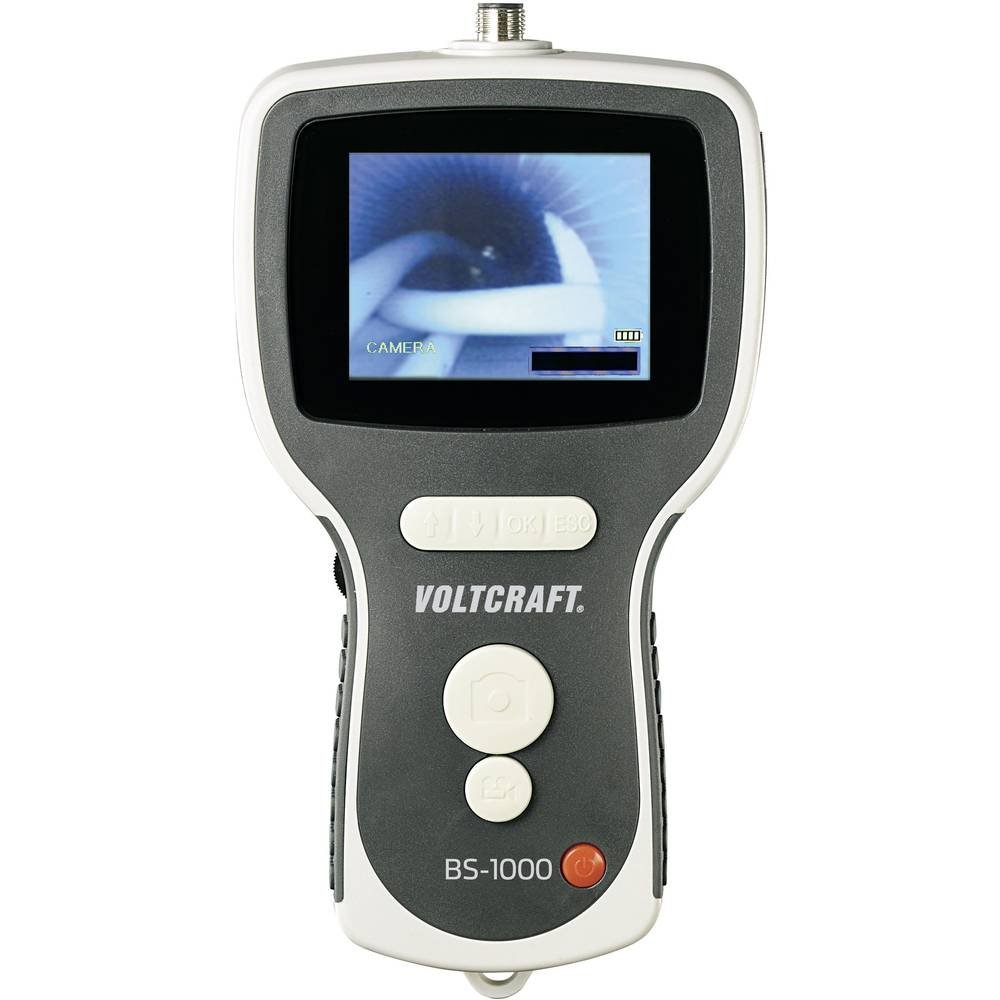
The VOLTCRAFT BS-1000T is a high-quality endoscope base unit designed for detailed visual inspection in various applications. It operates with a rechargeable battery and features a mini USB interface, a large 8.89 cm (3.5 inch) 320 x 240 pixel screen, an SD card slot, and a TV output. This base unit is compatible with various endoscope cameras, allowing for flexible use.
주요 특징은 다음과 같습니다.
- 8.89 cm (3.5 inch) LCD screen
- 디지털 줌 기능
- TV output for external display
- Video and photo recording capabilities
- Continuous brightness adjustment for the camera light
- Integrated LiPo battery for up to 4 hours of operation
- SD card support for media storage
- Tripod mounting thread for stable positioning
The VOLTCRAFT BS-1000T endoscope base unit, an SD card, and various accessories neatly organized within a black, hard-shell protective carrying case.
2. 안전 지침
기기를 작동하기 전에 모든 안전 지침을 읽고 숙지하십시오. 이 지침을 따르지 않을 경우 감전, 화재 또는 심각한 부상을 입을 수 있습니다.
- 장치를 물과 습기로부터 멀리하십시오.
- 장치를 열거나 개조하지 마십시오. 모든 정비는 자격을 갖춘 기술자에게 맡기십시오.
- Use only the specified power adapter for charging the integrated LiPo battery.
- 장치를 극한의 온도나 직사광선에 노출시키지 마십시오.
- Ensure the endoscope camera probe is clean and undamaged before insertion into any area.
- Do not use the device in environments with explosive gases or vapors.
- 어린이의 손이 닿지 않는 곳에 보관하세요.
3. 제품 구성품
The BS-1000T endoscope base unit consists of the main display unit, control buttons, and connection ports. It is designed to be used with a compatible endoscope camera probe (sold separately or included in specific kits).
본체 특징 :
- 3.5인치 LCD 화면: 실시간 영상과 녹화된 미디어를 표시합니다.
- 제어 버튼: For power, menu navigation, zoom, brightness, and recording functions.
- 미니 USB 포트: 컴퓨터 충전 및 데이터 전송용.
- SD 카드 슬롯: For storing videos and images.
- AV 출력 : For connecting to an external display (e.g., TV).
- 카메라 커넥터: For attaching the flexible endoscope camera probe.
- 삼각대 스레드: 삼각대에 장착할 수 있도록 하단에 위치해 있습니다.

The VOLTCRAFT BS-1000T endoscope base unit held in hand, with a flexible camera probe extending from its top. The unit's screen shows a live feed from the camera.
4. 설정
4.1. 배터리 충전
- Connect the provided USB cable to the mini USB port on the BS-1000T unit.
- USB 케이블의 다른 쪽 끝을 적합한 USB 전원 어댑터(별도 구매) 또는 컴퓨터의 USB 포트에 연결하십시오.
- The charging indicator will illuminate. A full charge provides up to 4 hours of operation.
4.2. SD 카드 삽입
- Locate the SD card slot on the side of the BS-1000T unit.
- Insert a compatible SD card (up to 32GB, Class 10 recommended) into the slot with the metal contacts facing down until it clicks into place.
- To remove, gently push the SD card until it springs out.
4.3. Connecting the Endoscope Camera
- Ensure the BS-1000T unit is powered off.
- Align the connector of the endoscope camera probe with the camera connector port on the top of the BS-1000T unit.
- Gently push and twist the connector to secure the camera probe. Do not force the connection.
5. 운영
5.1. 전원 켜기 / 끄기
- 전원을 켜려면 화면이 켜질 때까지 전원 버튼을 길게 누르세요.
- 전원을 끄려면 화면이 꺼질 때까지 전원 버튼을 길게 누르세요.
5.2. 비디오 녹화
- With the unit powered on and camera connected, press the Video Record button to start recording. A recording indicator will appear on the screen.
- 녹화를 중지하려면 비디오 녹화 버튼을 다시 누르십시오. file will be saved to the inserted SD card.
5.3. 이미지 캡처
- 라이브 중 view or video playback, press the Photo Capture button to take a still image.
- 이미지 file will be saved to the inserted SD card.
5.4. 줌 기능
- Press the Zoom button to digitally magnify the image on the screen.
- Repeated presses will cycle through different zoom levels.
5.5. 밝기 조정
- Use the Brightness control buttons to adjust the intensity of the camera's LED lights.
- This allows for optimal illumination in various inspection environments.
5.6. Image Mirroring
- The device supports mirroring the displayed image. This feature is useful when using mirror attachments on the camera probe to correct the visual orientation.
- Refer to the on-screen menu for mirroring options.
5.7. TV Output
- Connect an AV cable (not included) from the AV output port on the BS-1000T unit to the AV input of a television or external monitor.
- The live feed or recorded media will be displayed on the external screen.

A close-up shot of the VOLTCRAFT BS-1000T endoscope's color LCD screen, showing a detailed image captured by the connected camera.

A person is shown holding the VOLTCRAFT BS-1000T endoscope base unit, with its flexible camera probe inserted into a sink drain for inspection. The unit's screen displays the live view from inside the drain.
6. 유지관리
6.1. 청소
- 본체를 부드럽고 마른 천으로 닦으십시오. 연마성 세제나 용제를 사용하지 마십시오.
- For the camera probe, gently clean the lens with a lens cleaning cloth. If necessary, use a slightly damp 천으로 덮고 보관하기 전에 완전히 말랐는지 확인하세요.
6.2. 보관
- Store the BS-1000T unit and its accessories in a cool, dry place, away from direct sunlight and extreme temperatures.
- 장기간 보관할 경우, 배터리 수명을 연장하려면 배터리를 부분적으로(약 50%) 충전해 두세요.
7. 문제 해결
If you encounter issues with your VOLTCRAFT BS-1000T, please refer to the following common problems and solutions:
| 문제 | 가능한 원인 | 해결책 |
|---|---|---|
| 장치의 전원이 켜지지 않습니다. | 배터리가 소진되었습니다. | USB 케이블을 사용하여 기기를 충전하세요. |
| 화면에 이미지가 나오지 않습니다. | Camera probe not connected properly or faulty. | Ensure the camera probe is securely connected. Test with another compatible probe if available. |
| Cannot record video or capture images. | SD card is full, not inserted, or faulty. | Check if the SD card is inserted correctly. Delete old files or replace the SD card. Ensure the card is not write-protected. |
| 이미지가 흐릿하거나 불분명합니다. | Camera lens is dirty or focus is incorrect. | Clean the camera lens. Adjust the focus type (manual focus for this model). |
| No output on external TV. | AV cable not connected correctly or TV input not selected. | Verify AV cable connection. Select the correct AV input source on your television. |
8. 기술 사양
| 특징 | 사양 |
|---|---|
| 상표 | 볼트크래프트 |
| 모델 | BS-1000T |
| 색상 | 검은색 |
| 화면 크기 | 8.89cm(3.5인치) |
| 비디오 해상도 | 320 x 240 픽셀 |
| 연결 기술 | USB |
| 지원되는 형식 | Video, Image |
| 호환 장치 | Endoscope cameras |
| 제품 크기(L x W x H) | 42 x 34 x 12cm |
| 품목 무게 | 450그램 |
| 줌 타입 | 디지털 |
| 초점 유형 | 수동 |
| 효과적인 스틸 해상도 | 320 픽셀 |
9. 보증 및 지원
VOLTCRAFT products are designed for reliability and performance. For information regarding spare parts availability, please note that spare parts are guaranteed for 1 year from the date of purchase within the EU.
For further assistance, technical support, or warranty claims, please contact your retailer or visit the official VOLTCRAFT web연락처 정보 사이트.