
1. 서론
This manual provides detailed instructions for the installation, configuration, and operation of the D-Link Xstack DGS-3120-48PC Managed L3 Switch. The DGS-3120-48PC is a high-performance Layer 3 managed switch designed for enterprise and campus networks, offering advanced features for network management, security, and quality of service.
2. 주요 특징
- 44 x 10/100/1000BASE-T PoE Ports: Provides power and data over a single Ethernet cable to connected devices.
- 4 x Combo SFP Ports: Offers flexible uplink options using fiber or copper transceivers.
- Layer 3 Management: Supports static routing for efficient network segmentation and traffic management.
- 고급 QoS: Prioritizes network traffic to ensure optimal performance for critical applications.
- 강력한 보안 기능 : Includes access control lists (ACLs), port security, and authentication mechanisms.
- Standard and Enhanced Software Images: Offers different feature sets (SI for basic L2/L3, EI for advanced L3 features like ERPS, Double VLAN, IPv6).
3. 패키지 내용
Verify the following items are included in your DGS-3120-48PC package:
- D-Link DGS-3120-48PC Switch
- 전원 코드
- 랙 마운트 키트(브래킷 및 나사)
- 콘솔 케이블(RJ-45 - DB-9)
- 고무발(탁상 설치용)
- 빠른 설치 가이드
If any item is missing or damaged, please contact your local D-Link reseller for assistance.
4. 물리적 설명
4.1. 전면 패널
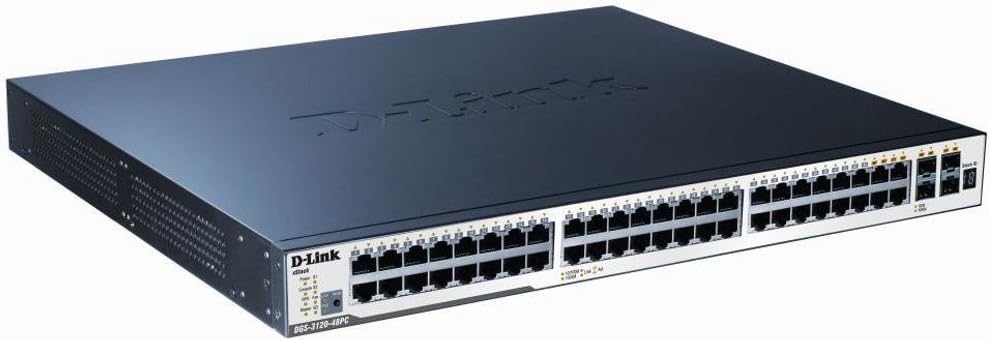
Figure 1: D-Link DGS-3120-48PC Front Panel
The front panel of the DGS-3120-48PC switch features 44 Gigabit Ethernet ports with Power over Ethernet (PoE) capabilities, and 4 additional combo SFP ports for flexible uplink connections. LED indicators provide status information for power, system, and individual port activity.
LED 표시등:
- 전원 LED: 전원 상태(켜짐/꺼짐)를 나타냅니다.
- 시스템 LED: 시스템 작동 상태를 나타냅니다.
- Link/Act/Speed LEDs (per port): Indicates link status, activity, and connection speed (10/100/1000 Mbps).
- PoE 상태 LED(PoE 포트당): PoE 전원 공급 상태를 나타냅니다.
포트:
- RJ-45 포트(1-44): 10/100/1000BASE-T Gigabit Ethernet ports with PoE.
- Combo SFP Ports (45-48): Can be used with SFP transceivers for fiber connections or with corresponding RJ-45 ports for copper connections.
- 콘솔 포트: RJ-45 port for command-line interface (CLI) management.
4.2. 후면 패널
The rear panel typically includes the AC power inlet, grounding screw, and possibly ventilation openings. Specific details may vary slightly.
- AC 전원 인렛: 전원 코드에 연결합니다.
- 접지 나사: For connecting an earth ground cable.
5. 설정 및 설치
5.1. 안전수칙
- 전원 공급 장치 볼륨을 확인하십시오.tage는 스위치의 요구 사항을 충족합니다.
- 환기구를 막지 마십시오.
- 스위치를 직사광선, 열원 근처 또는 습도가 높은 곳에 두지 마십시오.
- 전기 위험을 방지하기 위해 적절한 접지를 확인하십시오.
5.2. 스위치 장착
데스크탑 설치:
- 포함된 고무발을 스위치 바닥에 부착합니다.
- Place the switch on a flat, stable surface with adequate ventilation.
랙 설치:
- Attach the two rack-mounting brackets to the sides of the switch using the provided screws.
- Secure the switch in a standard 19-inch equipment rack using appropriate rack screws.
5.3. 전원 연결하기
- Connect one end of the AC power cord to the power inlet on the rear panel of the switch.
- 전원 코드의 다른 쪽 끝을 접지된 전기 콘센트에 연결합니다.
- Ensure the Power LED on the front panel illuminates, indicating the switch is receiving power.
5.4. Connecting Network Devices
- Connect Ethernet cables from your network devices (e.g., computers, servers, access points) to the RJ-45 ports (1-44) on the switch.
- For fiber uplinks, insert compatible SFP transceivers into the SFP ports (45-48) and connect fiber optic cables.
- Observe the Link/Act/Speed LEDs for each connected port to confirm proper connection and activity.
6. 스위치 작동
6.1. 초기 구성
The DGS-3120-48PC can be configured via a web그래픽 사용자 인터페이스(GUI) 또는 콘솔 포트를 통한 명령줄 인터페이스(CLI)를 제공합니다.
Web기반 GUI:
- Connect a computer to any of the switch's Ethernet ports.
- Configure your computer's IP address to be in the same subnet as the switch's default IP address (refer to the Quick Installation Guide for default IP).
- 열기 web 브라우저에 접속하여 스위치의 기본 IP 주소를 입력합니다.
- 기본 사용자 이름과 비밀번호를 사용하여 로그인하십시오(문서를 참조하십시오).
명령줄 인터페이스(CLI):
- Connect the console cable from your computer's serial port to the switch's console port.
- 적절한 직렬 포트 설정(예: 115200 보드, 8 데이터 비트, 패리티 없음, 1 정지 비트, 흐름 제어 없음)을 사용하여 터미널 에뮬레이션 프로그램(예: PuTTY, Tera Term)을 사용하십시오.
- 기본 사용자 이름과 비밀번호를 사용하여 로그인하세요.
6.2. 기본 네트워크 구성
After initial access, it is recommended to:
- 기본 관리자 암호를 변경하세요.
- Configure the switch's IP address, subnet mask, and default gateway.
- Set up system time and NTP synchronization.
6.3. 고급 기능
The DGS-3120-48PC supports a wide range of advanced features:
- VLAN(가상 근거리 통신망): 보안과 성능을 개선하려면 네트워크를 세분화하세요.
- 스패닝 트리 프로토콜(STP/RSTP/MSTP): 네트워크 루프를 방지합니다.
- 링크 집계(LACP): 대역폭을 늘리고 링크 중복성을 제공합니다.
- 서비스 품질(QoS): Prioritizes traffic based on various criteria.
- 액세스 제어 목록(ACL): 정의된 규칙에 따라 네트워크 트래픽을 필터링합니다.
- PoE 관리: Control power delivery to connected PoE devices.
- 정적 라우팅: Configure routes for inter-VLAN or inter-network communication.
Refer to the D-Link DGS-3120 Series User Manual for detailed configuration instructions on these advanced features.
7. 유지관리
7.1. 펌웨어 업데이트
Regularly check the D-Link support website for the latest firmware versions. Firmware updates can provide new features, performance improvements, and security patches. Follow the instructions provided with the firmware download carefully.
7.2. 청소
최적의 성능을 유지하고 스위치의 수명을 연장하려면:
- Ensure the switch is powered off and unplugged before cleaning.
- 부드럽고 마른 천으로 스위치 외부를 닦으세요.
- 압축 공기를 사용하여 환기구의 먼지를 제거하십시오.
- 액체 또는 에어로졸 세척제를 사용하지 마십시오.
8. 문제 해결
This section provides solutions to common issues you may encounter with the DGS-3120-48PC switch.
| 문제 | 가능한 원인 | 해결책 |
|---|---|---|
| 전원 LED 표시 없음 | Power cord not connected; Power outlet faulty; Switch power supply issue. | Ensure power cord is securely connected. Test power outlet with another device. Contact D-Link support if issue persists. |
| No Link/Act LED on connected port | Incorrect cable type; Faulty cable; Connected device is off or faulty; Port configuration issue. | Use appropriate Ethernet cable (Cat5e/6). Replace cable. Ensure connected device is powered on and functioning. Check port status in switch management interface. |
| 접근할 수 없습니다 web 그래픽 사용자 인터페이스(GUI) | Incorrect IP address configuration on PC; Switch IP address changed; Network connectivity issue. | Verify PC's IP address is in the same subnet as the switch. Try accessing via console CLI. Check network cable connection. |
| PoE 장치가 전원을 공급받지 못하고 있습니다. | PoE budget exceeded; Device not PoE compatible; Cable issue; PoE port disabled. | Check PoE budget in switch management. Ensure device is 802.3af/at compliant. Verify cable integrity. Enable PoE on the port if disabled. |
9. 사양
| 특징 | 설명 |
|---|---|
| 모델 | DGS-3120-48PC |
| 상표 | 디링크 |
| 포트 | 44 x 10/100/1000BASE-T PoE, 4 x Combo SFP |
| 인터페이스 유형 | PoE, SFP |
| 데이터 전송 속도 | 초당 1기가비트(포트당) |
| 레이어 지원 | 레이어 3 관리 |
| 제품 치수 | 14.96 x 17.32 x 1.73인치(38 x 44 x 4.4cm) |
| 품목 무게 | 19.98파운드(9.08킬로그램) |
| 한국어: | 790069344510 |
| 첫 번째 이용 가능 | 8년 2012월 XNUMX일 |
10. 보증 및 기술 지원
For information regarding the warranty policy, please refer to the warranty card included with your product or visit the official D-Link website. Technical support resources, including FAQs, documentation, and software downloads, are available on the D-Link support portal. Please have your product model and serial number ready when contacting support.
디링크 Web대지: www.dlink.com