
1. 서론
This manual provides instructions for the installation, operation, and maintenance of your D-Link DWA-123 Wireless N 150 USB Adapter. This device allows you to connect your desktop or notebook computer to a wireless network with speeds up to 150 Mbps, ideal for web 브라우징, file sharing, and streaming.
2. 제품 오버view
The D-Link DWA-123 is a compact USB adapter designed for easy integration into your computer system. It supports Wireless N 150 technology, offering enhanced speed and range compared to older wireless standards.
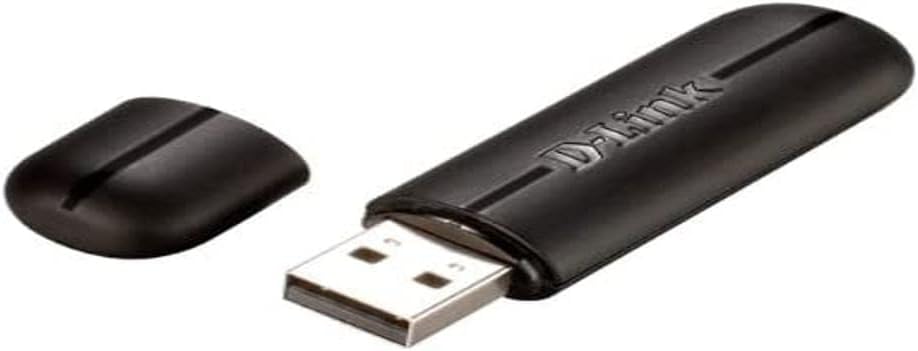
Figure 2.1: The D-Link DWA-123 Wireless N 150 USB Adapter. This image shows the adapter with its protective cap removed, revealing the standard USB Type-A connector. The D-Link logo is visible on the adapter's body.
주요 특징은 다음과 같습니다.
- Wireless N 150 Technology: Provides faster wireless speeds and better coverage.
- Up to 150 Mbps Data Rate: Suitable for various internet activities.
- WPS External Button Design: 안전한 무선 연결 설정을 간소화합니다.
- 고급 보안: Supports WPA/WPA2 (PSK, AES, TKIP) and 128/64-bit WEP for secure network access.
- 작동 주파수: 2.4GHz ~ 2.48GHz.
- 표준: IEEE 802.11 b/g/n compliant.

그림 2.2: 클로즈업 view of the D-Link DWA-123 adapter. This image highlights a small indicator light, typically used to show network activity or connection status.
그림 2.3: 상세 view of the D-Link DWA-123 adapter's casing. This image focuses on the textured surface and design elements of the adapter's black plastic housing.
3. 설정 지침
Follow these steps to install your D-Link DWA-123 Wireless N 150 USB Adapter:
- 어댑터를 삽입합니다: Plug the DWA-123 USB adapter into an available USB port on your desktop or notebook computer. Ensure it is fully seated.
- 드라이버 설치:
- Automatic Installation (Windows): In most modern Windows operating systems, the necessary drivers may install automatically. Wait for a notification indicating that the device is ready for use.
- 수동 설치: If drivers do not install automatically, you may need to use the included driver CD (if provided) or download the latest drivers from the official D-Link support website. Follow the on-screen instructions during the driver installation process.
- 설치 확인: After driver installation, check your computer's Device Manager (Windows) or System Information (macOS) to confirm that the DWA-123 adapter is recognized and functioning correctly.
4. 사용 설명서
Once the DWA-123 adapter is installed, you can connect to a wireless network:
- 무선 설정에 액세스하려면 다음 단계를 따르세요.
- 윈도우: Click the wireless network icon in the system tray (usually in the bottom-right corner of the screen).
- 맥 OS : Click the Wi-Fi icon in the menu bar (usually in the top-right corner of the screen).
- 네트워크 선택: 사용 가능한 무선 네트워크 목록이 나타납니다. 원하는 네트워크(SSID)를 선택하세요.
- 연결하다:
- 수동 연결: Enter the network security key or passphrase when prompted.
- WPS(Wi-Fi 보호 설정): If your router supports WPS and has a WPS button, you can press the WPS button on your router and then press the WPS button on the DWA-123 adapter (if available, or follow software prompts) within two minutes to establish a secure connection automatically.
- 연결 확인: Once connected, the wireless network icon will indicate a successful connection, and you should be able to access the internet.
5. 유지관리
To ensure optimal performance and longevity of your D-Link DWA-123 adapter:
- 깨끗하게 유지하십시오: 어댑터의 먼지를 제거하려면 부드럽고 마른 천으로 살살 닦아주세요. 액체 세척제나 용제를 사용하지 마세요.
- USB 커넥터 보호: When not in use, keep the protective cap on the USB connector to prevent dust and damage.
- 극한의 환경을 피하세요: 어댑터를 극한의 온도, 습도 또는 직사광선에 노출시키지 마세요.
- 드라이버 업데이트 : Periodically check the D-Link support web호환성과 성능 개선을 위해 업데이트된 드라이버를 제공하는 사이트입니다.
6. 문제 해결
If you encounter issues with your DWA-123 adapter, consider the following:
- 무선 네트워크가 감지되지 않았습니다.
- Ensure the adapter is properly inserted into a USB port.
- Verify that the drivers are correctly installed.
- Check if your wireless router is powered on and broadcasting a signal.
- Try moving closer to the wireless router.
- 네트워크에 연결할 수 없습니다.
- Double-check the network security key or passphrase. It is case-sensitive.
- Restart your computer and the wireless router.
- Ensure your network is not configured to block new devices (e.g., MAC address filtering).
- 느린 연결 속도:
- Ensure you are within optimal range of your wireless router.
- 다른 전자 장치(예: 전자레인지, 무선 전화기)의 간섭이 있는지 확인하세요.
- 어댑터 드라이버를 최신 버전으로 업데이트하세요.
- Verify that your router is configured for Wireless N mode if you expect 150 Mbps speeds.
7. 기술 사양
| 특징 | 세부 사항 |
|---|---|
| 모델 번호 | DWA-123 |
| 무선 표준 | IEEE 802.11b/g/n |
| 무선 속도 | Up to 150 Mbps (Wireless N 150) |
| 주파수 범위 | 2.4GHz - 2.48GHz |
| 보안 | WPA/WPA2 (PSK, AES, TKIP), 128/64-bit WEP, WPS |
| 인터페이스 | USB 2.0 |
| 운영 볼륨tage | 5V 직류 |
| 치수 | Approximately 25.02 x 12.54 x 16.38 cm (Product dimensions from data, likely packaging) |
| 무게 | 약 100g |
| 호환 장치 | Desktop computers (and notebooks) |
8. 보증 및 지원
For warranty information and technical support, please refer to the documentation included with your product or visit the official D-Link website. D-Link provides various support resources, including FAQs, driver downloads, and contact information for technical assistance.
온라인 지원: www.dlink.com/support