
에디파이어 M1360
Edifier M1360 유선 멀티미디어 스피커 시스템 사용 설명서
모델: M1360
1. 서론
구매해주셔서 감사합니다asing the Edifier M1360 Wired Multimedia Speaker System. This 2.1 speaker system is designed to provide a convenient and high-quality audio solution for various multimedia applications, including computers, laptops, gaming consoles, and MP3 players. Featuring upward-angled satellites and a downward-angled subwoofer, the system delivers clear sound with steady bass output. The wired remote control offers easy volume adjustment and includes a headphone jack for private listening.
2. 중요한 안전 정보
- Read these instructions thoroughly before operating the product.
- 이 설명서를 향후 참고용으로 보관하세요.
- 화재나 감전을 방지하기 위해 장치를 비나 습기에 노출시키지 마십시오.
- 환기구를 막지 마십시오. 제조업체의 지침에 따라 설치하십시오.
- 라디에이터, 난방 조절기, 스토브 또는 기타 장치(다음을 포함)와 같은 열원 근처에 설치하지 마십시오. amp열을 생성하는 발전기.
- 전원 코드가 밟히거나 끼지 않도록 보호하세요. 특히 플러그, 편의용 콘센트 및 기기에서 나오는 부분은 보호하세요.
- 제조사가 지정한 부속품/액세서리만 사용하세요.
- 번개 폭풍 시 또는 장기간 사용하지 않을 때는 기기의 플러그를 뽑아두세요.
- 모든 서비스는 자격을 갖춘 서비스 담당자에게 의뢰하십시오. 전원 코드나 플러그가 손상되었거나, 액체가 쏟아졌거나, 물체가 기기에 떨어졌거나, 기기가 비나 습기에 노출되었거나, 정상적으로 작동하지 않거나, 떨어졌을 때와 같이 기기가 어떤 식으로든 손상된 경우 서비스가 필요합니다.
3. 패키지 내용
포장 내용물을 확인해 주세요. 누락된 품목이나 손상된 품목이 있을 경우 판매점에 문의해 주십시오.
- 1x Edifier M1360 Subwoofer
- 2x 위성 스피커
- 1x 유선 원격 제어
- 3.5mm 오디오 입력 케이블 1개
- 1x 사용자 매뉴얼(이 문서)
4. 제품 오버view
4.1 시스템 구성 요소
- 서브 우퍼 : 주요 주택 amplifier and bass driver. Connects to the satellite speakers and the audio source.
- 위성 스피커: Two compact speakers for mid-range and high-frequency audio.
- 유선 원격 제어: Features a volume dial, power switch, and headphone output.
4.2 구성 요소 식별

그림 1: 전면 view of the Edifier M1360 speaker system, showing the central subwoofer, two angled satellite speakers, and the wired remote control unit.
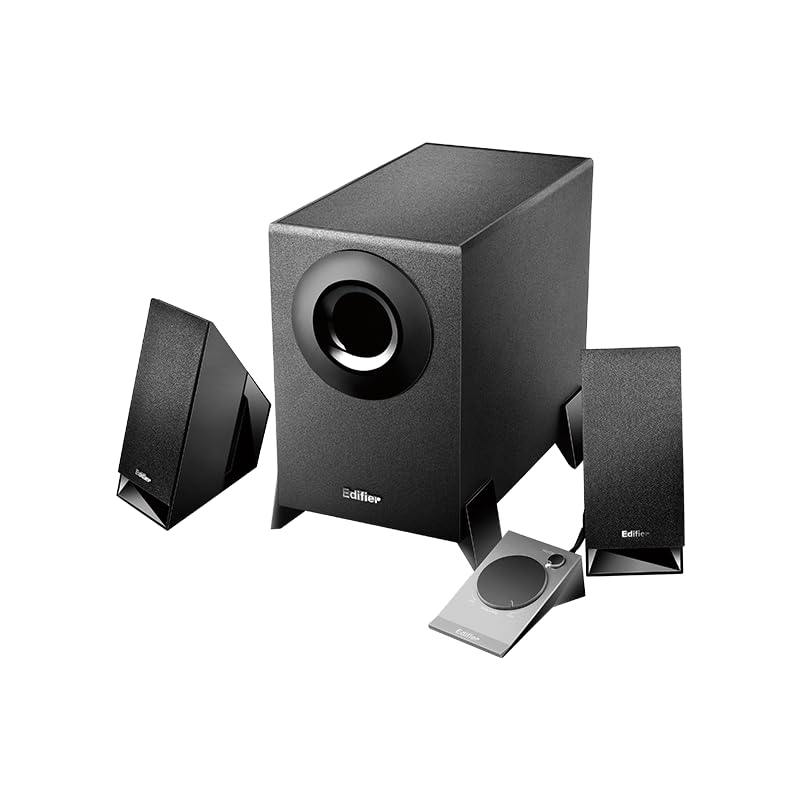
Figure 2: Another perspective of the Edifier M1360 speaker system, highlighting the compact design of the satellite speakers and the wired remote's placement.
5. 설정
5.1 배치
- Place the subwoofer on the floor or a sturdy surface near your computer or audio source.
- Position the satellite speakers on either side of your monitor or listening area, ensuring they are angled towards you for optimal sound.
- Ensure adequate ventilation around all components.
5.2 연결
- Connect the satellite speakers to the corresponding output jacks on the back of the subwoofer. Ensure the left and right speakers are connected correctly.
- Connect the wired remote control cable to the dedicated port on the subwoofer.
- Connect the 3.5mm audio input cable from the "AUDIO IN" port on the subwoofer to the audio output (headphone jack) of your computer, laptop, MP3 player, or other audio source.
- Plug the power cord of the subwoofer into a standard AC power outlet.
6. 사용 설명서
6.1 전원 켜기/끄기
- To turn on the speaker system, press the power button located on the wired remote control. The power indicator light will illuminate.
- To turn off the speaker system, press the power button again. The power indicator light will turn off.
6.2 볼륨 조절
- Rotate the large dial on the wired remote control clockwise to increase the volume.
- Rotate the large dial counter-clockwise to decrease the volume.
6.3 헤드폰 출력
- To listen privately, plug your headphones into the 3.5mm headphone jack on the wired remote control.
- When headphones are connected, the speaker output will automatically mute.
- Unplug the headphones to resume audio playback through the speakers.
7. 유지관리 및 관리
- 청소: 스피커와 서브우퍼 표면은 부드럽고 마른 천으로 닦으십시오. 액체 세척제나 에어로졸 스프레이는 사용하지 마십시오.
- 통풍: Ensure that the ventilation openings on the subwoofer are not blocked. Proper airflow prevents overheating.
- 저장: 시스템을 장기간 보관할 경우 전원을 차단하고 직사광선과 극한 온도 변화를 피해 서늘하고 건조한 곳에 보관하십시오.
- 습기를 피하세요: Keep the speaker system away from water, humidity, and other liquids.
8. 문제 해결
| 문제 | 가능한 원인 | 해결책 |
|---|---|---|
| 소리가 나지 않습니다 |
|
|
| 왜곡된 소리 |
|
|
| 스피커 1개가 작동하지 않음 |
|
|
9. 사양
| 특징 | 세부 사항 |
|---|---|
| 모델명 | M1360 |
| 스피커 유형 | 멀티미디어 |
| 서라운드 사운드 채널 구성 | 2.1 |
| 연결 기술 | Wired (3.5mm stereo input) |
| 오디오 출력 모드 | 스테레오 재생 |
| 스피커 최대 출력 전력 | 8.5 와트 |
| 서브우퍼 직경 | 5 인치 |
| 트위터 직경 | 1 인치 |
| 신호 대 잡음 비율 | 85데시벨 |
| 주파수 응답 | 20 KHz (Note: This is likely the upper limit, not the full range. Common for speakers to list only max freq.) |
| 호환 장치 | Smartphone, Laptop, Desktop, Gaming Console, MP3 Player |
| 제품 치수 | 6.4D x 11.2W x 14H 센티미터 |
| 품목 무게 | 2.5kg(2500그램) |
| 전원 | AC |
| 색상 | 검은색 |
| 원산지 | 중국 |
10. 보증 및 지원
For detailed warranty information and customer support, please refer to the warranty card included with your product packaging or visit the official Edifier web대지.
제조사: 에디파이어
Importer: Nikita Distributors - Green Terrace Building, Lane Number 5, South Koregaon Park, Pune 411001, MH, India
Ask a question about this manual
Ask about setup, troubleshooting, compatibility, parts, safety, or missing instructions. Manuals+ will review the question and use this page’s manual context to help answer it.