
소개
The Vanco SS6 is a low-profile speaker selector unit designed to distribute high-level (amplified) stereo signals to up to six independent zones. It features a manually activated impedance protection circuit to safeguard your receiver and maintain optimal sound quality across all connected speakers. This manual provides essential information for proper installation, operation, and maintenance of your SS6 unit.
중요한 안전 정보
- 기기를 작동하기 전에 모든 지침을 주의 깊게 읽으세요.
- 본 기기를 비나 습기에 노출시키지 마십시오.
- 오디오 시스템 전원을 켜기 전에 모든 연결이 제대로 되어 있는지 확인하십시오.
- Always disconnect power before making or changing any connections.
- 본 제품의 수리를 직접 시도하지 마십시오. 모든 수리는 자격을 갖춘 전문가에게 맡기십시오.
패키지 내용
패키지에 다음 품목이 포함되어 있는지 확인하십시오.
- Vanco SS6 6-Pair Stereo Speaker Selector Box
- 사용 설명서(본 문서)
제품 끝view
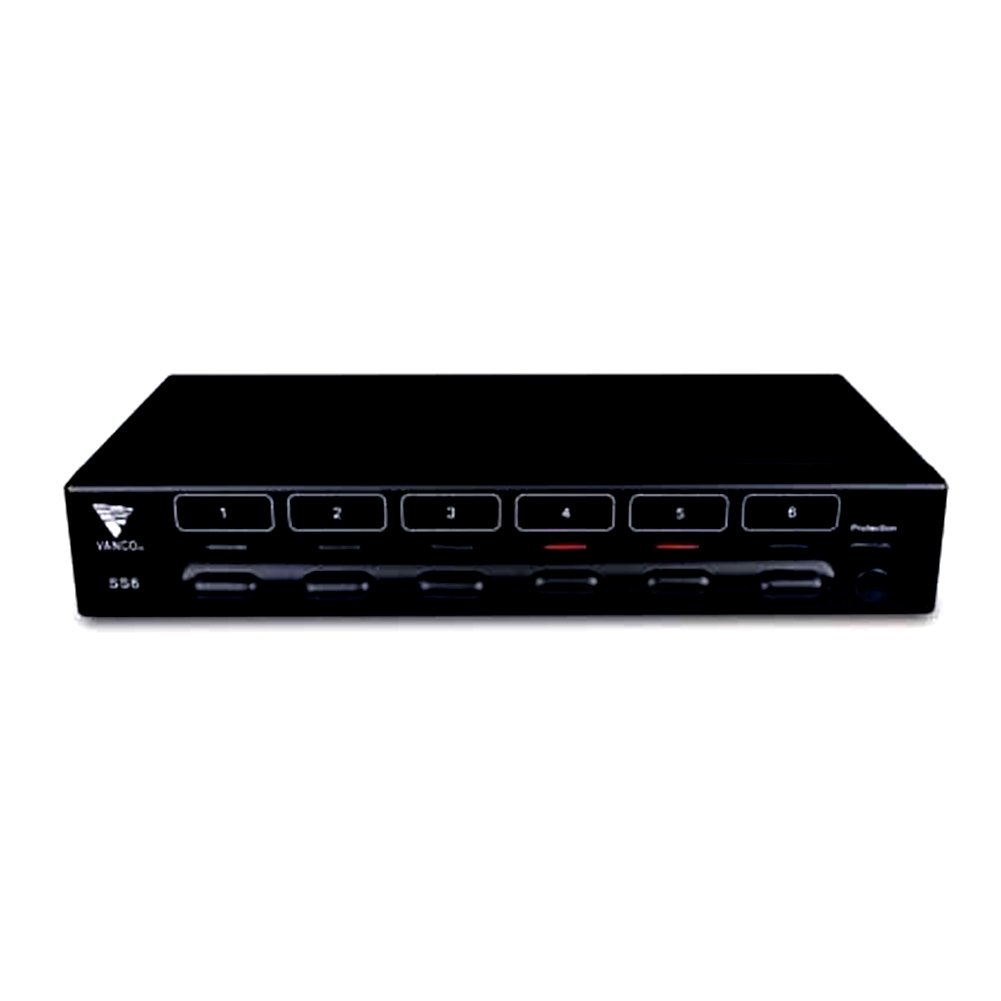
그림 1: 앞쪽 view of the Vanco SS6 6-Pair Stereo Speaker Selector Box. This image shows the compact design and the individual speaker zone selection buttons.

그림 2: 뒤쪽 view of the Vanco SS6 showing the push terminal connections for amplifier input and six speaker zone outputs. Note the impedance protection switch.
The Vanco SS6 allows you to connect a single stereo amplifier to up to six pairs of speakers, enabling audio distribution to different rooms or zones. Each zone can be independently turned on or off. The unit incorporates an impedance protection circuit to prevent your amplifier from operating below a safe impedance level, which can be manually activated or deactivated depending on your system's configuration and the use of impedance-matching volume controls.
설정 및 설치
Follow these steps to properly set up your Vanco SS6 speaker selector box:
- 전원 끄기 : 귀하의 것을 확인하십시오 amplifier and all audio components are powered off and unplugged from the main power supply before making any connections.
- 스피커 케이블 준비: Prepare your speaker wires (14 to 22 AWG recommended) by stripping approximately 1/4 inch (6mm) of insulation from the ends. Twist the bare wire strands tightly.
- 연결하다 Amp정수기: Connect the speaker output terminals of your stereo amp"AMPLIFIER INPUT" push terminals on the rear of the SS6 unit. Ensure correct polarity (+ to + and - to -).
- 스피커 연결: Connect each pair of speakers to the corresponding "SPEAKER ZONE" push terminals (1 through 6) on the rear of the SS6 unit. Maintain correct polarity for each speaker pair.
- 임피던스 보호:
- Activate (Recommended): For most setups, especially when connecting multiple speaker pairs to a single amplifier without impedance-matching volume controls, activate the impedance protection circuit. This prevents the amplifier's impedance from dropping below 5 ohms, protecting your receiver.
- 비활성화: If you are using impedance-matching volume controls in each zone or have a specific system design that accounts for impedance, you may deactivate the protection circuit. Consult an audio professional if unsure.
- 놓기: Place the SS6 unit in a well-ventilated area, away from heat sources and direct sunlight. Its low-profile design allows for flexible placement.
- 전원 켜기: Once all connections are secure and verified, plug in and power on your amplifier and other audio components.
작동 지침
Using your Vanco SS6 is straightforward:
- Select Zones: Press the corresponding button on the front panel for each speaker zone you wish to activate. The button will typically illuminate or indicate its active status.
- Deselect Zones: Press the button again to deactivate a speaker zone.
- 볼륨 조절: 볼륨을 조절하려면 다음을 사용하세요. amplifier's volume control. If using impedance-matching volume controls in individual zones, adjust those as needed.
- 임피던스 보호: If the impedance protection circuit is activated, it will automatically prevent the amplifier from seeing an impedance below 5 ohms, regardless of how many speaker pairs are active or their individual impedance ratings.
유지
The Vanco SS6 requires minimal maintenance. Keep the unit clean and free from dust. Use a soft, dry cloth for cleaning. Do not use liquid cleaners or solvents. Ensure adequate ventilation around the unit to prevent overheating.
문제 해결
- 소리 없음:
- 모든 스피커 배선 연결부의 연결 상태와 극성을 확인하십시오.
- 확인하십시오 amplifier is powered on and playing audio.
- Verify that the desired speaker zones are selected on the SS6 unit.
- 양쪽의 볼륨 레벨을 확인하세요 amplifier and any in-zone volume controls.
- 왜곡된 소리:
- 스피커 선이 닳거나 합선되지 않았는지 확인하십시오.
- Check that the impedance protection is correctly set for your system.
- 줄이다 amplifier volume to see if distortion persists.
- 장치 과열:
- Ensure adequate ventilation around the SS6 unit.
- Verify that the impedance protection is activated if you are running multiple low-impedance speakers.
명세서
| 모델 번호 | SS6 |
| 제품 치수 | 6.5 x 17 x 2.5 인치 |
| 품목 무게 | 2.85파운드 |
| 정격 전력 | 100 Watts continuous per channel |
| 임피던스 범위 | 4 ~ 16 옴 |
| 스피커 와이어 게이지 | 14~22AWG |
| 포트 수 | 6(쌍) |
| 색상 | 검은색 |
보증 및 지원
For warranty information or technical support, please refer to the Vanco official web사이트를 방문하거나 고객 서비스 부서에 문의하세요. 보증 청구에 대비해 구매 증빙 자료로 구매 영수증을 보관하세요.