
lightmaXX LCD-502
lightmaXX DJ Scan LED 사용 설명서
모델: LCD-502
1. 서론
Thank you for choosing the lightmaXX DJ Scan LED. This professional LED scanner is designed to provide dynamic lighting effects for various applications, including DJ sets, clubs, and events. Featuring a powerful LED light source and precise scanning capabilities, it offers vibrant colors and versatile patterns to enhance any performance space.
This manual provides essential information for the safe and efficient operation of your lightmaXX DJ Scan LED. Please read it thoroughly before installation and use, and keep it for future reference.

그림 1: 이상view of the lightmaXX DJ Scan LED unit.
2. 안전 지침
안전한 작동을 위해 다음 안전 예방 조치를 준수해 주시기 바랍니다.
- 항상 접지된 전원 콘센트에 장치를 연결하세요.
- 본 제품을 비나 습기에 노출시키지 마십시오.
- 과열을 방지하기 위해 장치 주변에 적절한 환기를 확보하세요.
- 광원에 눈이 직접 노출되지 않도록 하십시오.
- 청소 또는 정비를 하기 전에 전원을 차단하십시오.
- 자격을 갖춘 인력만이 수리를 수행해야 합니다.
- 가연성 물질에서 멀리 두세요.
3. 패키지 내용
패키지에 모든 품목이 들어 있는지 확인하세요.
- lightmaXX DJ Scan LED unit
- 전원 케이블
- 사용 설명서 (본 문서)
- Mounting bracket (if included)
4. 특징
The lightmaXX DJ Scan LED offers a range of features for dynamic lighting:
- 빛의 출처: Powerful LED technology for bright and efficient illumination.
- 색상 혼합: RGBAW (Red, Green, Blue, Amber, White) color mixing for a wide spectrum of colors.
- 스캐너 유형 : Designed as a scanner for precise beam movement and pattern projection.
- 제어: DMX control for integration into professional lighting setups.
- 표시하다: Digital display for easy navigation and setting adjustments.

그림 2: 전면 view showing the LED lens and light output.
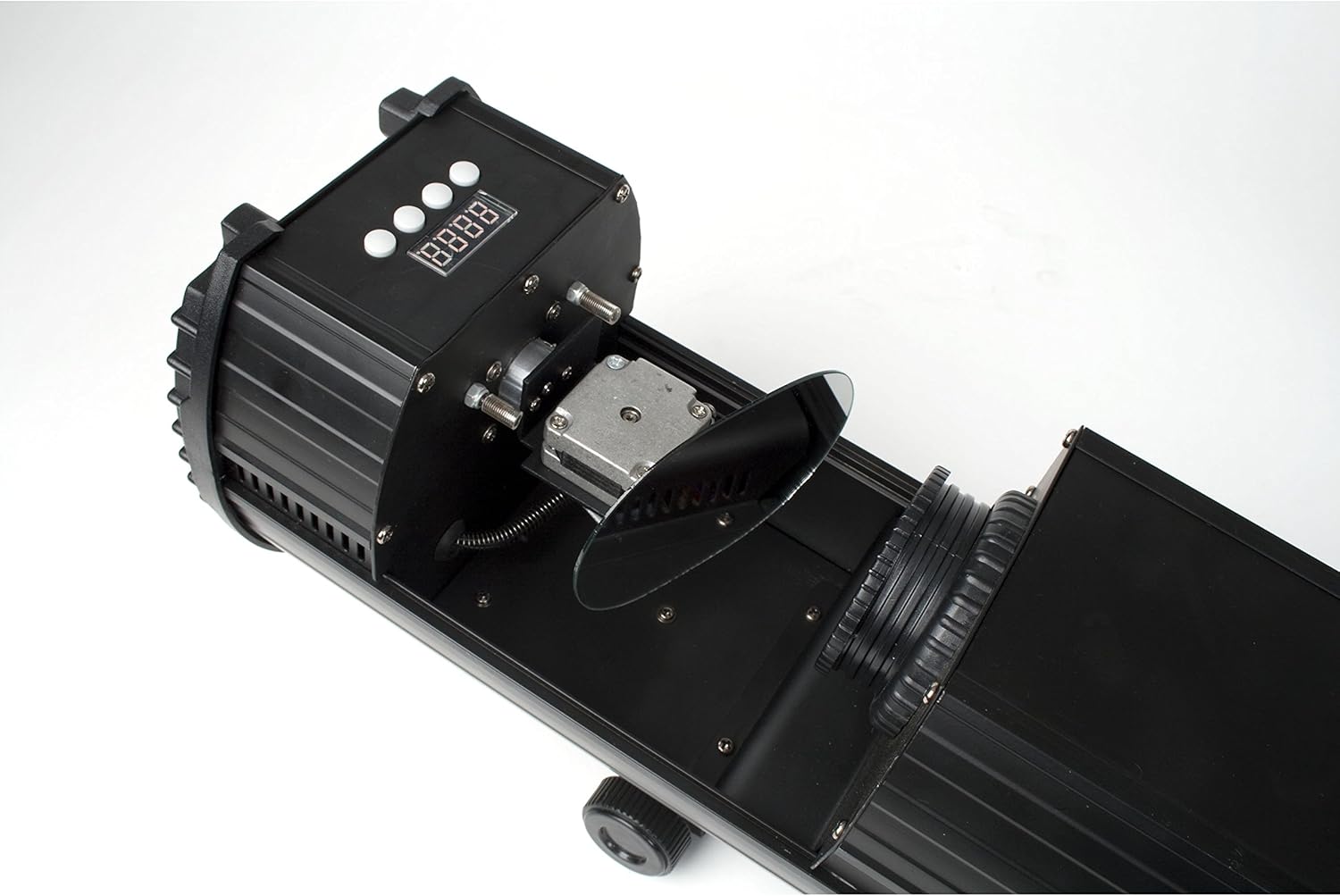
Figure 3: Internal mirror mechanism for dynamic scanning effects.
5. 설정
5.1 장착
The lightmaXX DJ Scan LED can be mounted on a truss, stand, or placed on a flat surface. Ensure the mounting surface or structure can support the weight of the unit securely. Use appropriate clamps and safety cables when mounting overhead.
5.2 전원 연결
Connect the supplied power cable to the power input on the rear of the unit and then to a suitable grounded power outlet (230V AC, 50Hz). Ensure the power switch is in the OFF position before connecting.

Figure 4: Rear panel with power input and cooling fan.
5.3 DMX 연결(선택 사항)
For DMX control, connect a standard 3-pin DMX cable from your DMX controller's output to the DMX IN port on the lightmaXX DJ Scan LED. If connecting multiple units, daisy-chain them by connecting the DMX OUT of the first unit to the DMX IN of the next.

Figure 5: Control panel and DMX input/output ports.
6. 운영
6.1 제어판
The control panel features a digital display and several buttons for navigating menus and adjusting settings. Refer to Figure 5 for the location of the control panel.
- 메뉴: Accesses the main menu or goes back to the previous menu.
- 위아래: 메뉴 옵션을 탐색하거나 값을 조정합니다.
- 시작하다: Confirms a selection or saves a setting.
6.2 작동 모드
The lightmaXX DJ Scan LED typically supports the following operating modes:
- DMX 모드: Allows full control over all functions via a DMX controller. Set the DMX address using the control panel.
- 사운드 활성 모드: The unit reacts to sound via a built-in microphone, creating dynamic light shows synchronized with music.
- 자동 모드 : Runs pre-programmed light sequences automatically.
- 마스터/슬레이브 모드: Connect multiple units where one acts as the master, controlling the others (slaves) for synchronized operation without a DMX controller.

그림 6: 예ample of a green light beam projection.

그림 7: 예ample of a red light beam projection.
7. 유지관리
7.1 청소
Regular cleaning helps maintain optimal performance. Disconnect the unit from power before cleaning.
- 부드럽고 보풀 없는 천으로 외부를 닦으십시오.
- For lenses and mirrors, use a specialized lens cleaning solution and cloth to avoid scratches.
- 냉각 팬과 통풍구를 주기적으로 청소하여 적절한 공기 흐름을 유지하십시오.
7.2 보관
When not in use, store the unit in a dry, dust-free environment, preferably in its original packaging or a protective case.
8. 문제 해결
문제가 발생할 경우, 아래 표에서 일반적인 문제와 해결 방법을 참조하십시오.
| 문제 | 가능한 원인 | 해결책 |
|---|---|---|
| 장치의 전원이 켜지지 않습니다. | No power connection; faulty cable; blown fuse. | Check power cable connection; try another outlet; replace fuse if necessary. |
| 빛 출력이 없습니다. | Unit in standby; DMX signal issue; LED failure. | Check operating mode; verify DMX connection and address; contact support if LED is faulty. |
| DMX 제어 기능이 없습니다. | 잘못된 DMX 주소; 불량 DMX 케이블; DMX 컨트롤러 문제. | Set correct DMX address; test DMX cable; check DMX controller settings. |
| Beam movement is erratic. | 장애물; 내부 메커니즘 문제. | Ensure no physical obstructions; contact support if issue persists. |
9. 사양
| 특징 | 세부 사항 |
|---|---|
| 모델 번호 | LCD-502 |
| 광원 | 주도의 |
| 라이트 타입 | 스캐너 |
| 색상 혼합 | RGBAW (Red, Green, Blue, Amber, White) |
| 전원 공급 장치 | 230V AC, 50Hz (typical) |
| 제어 모드 | DMX, Sound Active, Auto, Master/Slave |
| ASIN | B004CTLQXK |

Figure 8: Energy efficiency information for the LED light source.
10. 보증 및 지원
lightmaXX products are designed for reliability and performance. For warranty information and technical support, please refer to the warranty card included with your product or visit the official lightmaXX web사이트. 보증 청구를 위해 구매 증빙 자료를 보관하세요.
For further assistance, please contact lightmaXX customer service.
Ask a question about this manual
Ask about setup, troubleshooting, compatibility, parts, safety, or missing instructions. Manuals+ will review the question and use this page’s manual context to help answer it.