
1. 서론
The D-Link DES-1008E is an 8-Port Fast Ethernet Desktop Switch designed to expand your network connectivity. This unmanaged switch provides eight 10/100 Mbps Ethernet ports, allowing you to connect multiple devices such as computers, printers, and network-attached storage (NAS) to your network. It supports full-duplex mode, delivering up to 200 Mbps throughput per port for efficient data transfer. The plug-and-play design ensures easy installation without the need for software configuration.
2. 패키지 내용
패키지에 다음 품목이 모두 들어 있는지 확인해 주십시오.
- D-Link DES-1008E 8-Port Fast Ethernet Desktop Switch
- 전원 어댑터
- 빠른 설치 가이드
If any items are missing or damaged, please contact your local D-Link reseller for assistance.
3. 설정
Follow these steps to set up your D-Link DES-1008E switch:
- 스위치 위치를 조정하세요: Place the switch on a flat, stable surface or mount it to a wall using appropriate hardware (not included). Ensure adequate ventilation around the device.
- 전원 어댑터 연결: Plug the provided power adapter into the power port on the back of the DES-1008E switch. Connect the other end of the power adapter to a standard electrical outlet. The power LED on the front of the switch should illuminate.
- 네트워크 장치 연결: Connect your network devices (e.g., computers, routers, game consoles) to any of the eight Ethernet ports on the switch using standard Ethernet cables. The corresponding port LED on the front of the switch will illuminate when a connection is established.
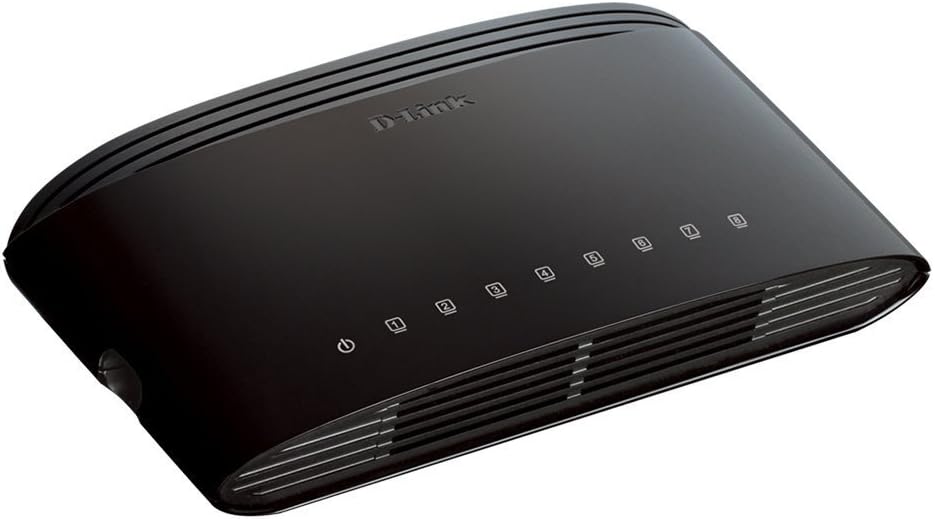
그림 1: 전면 view of the D-Link DES-1008E switch, showing the power indicator and eight port status LEDs.

그림 2: 후면 view of the D-Link DES-1008E switch, illustrating the eight Ethernet ports for device connections.
The D-Link DES-1008E is a plug-and-play device, requiring no software installation or configuration. Once connected, your devices should automatically detect the network connection.
4. 스위치 작동
The DES-1008E operates automatically once powered on and connected. It functions as an unmanaged switch, meaning it requires no user intervention for basic network traffic management.
LED 표시등:
- 전원 LED: Illuminates green when the switch is receiving power.
- 포트 LED(1-8): Each port has an associated LED. This LED illuminates green when a device is connected to the port and flashes to indicate network activity (data transmission).
5. 유지관리
To ensure optimal performance and longevity of your D-Link DES-1008E switch, consider the following maintenance guidelines:
- 청소: Gently wipe the exterior of the switch with a soft, dry cloth. Avoid using liquid or aerosol cleaners directly on the device.
- 통풍: Ensure that the ventilation slots on the switch are not blocked. Proper airflow prevents overheating.
- 환경: 스위치는 지정된 온도 및 습도 범위 내에서 작동하십시오. 직사광선, 과도한 열 또는 습기에 노출시키지 마십시오.
- 전원 주기: If the switch experiences issues, a simple power cycle (unplugging and replugging the power adapter) can often resolve minor problems.
6. 문제 해결
If you encounter issues with your D-Link DES-1008E switch, refer to the following troubleshooting tips:
- 전원 없음:
- 전원 어댑터가 스위치와 작동하는 콘센트에 제대로 연결되어 있는지 확인하십시오.
- 다른 장치를 연결해 전기 콘센트가 작동하는지 확인하세요.
- 전원 어댑터에 눈에 보이는 손상이 있는지 확인하세요.
- 포트에 링크/활동이 없습니다.
- 이더넷 케이블이 스위치 포트와 연결된 장치 모두에 제대로 연결되어 있는지 확인하십시오.
- 케이블에 결함이 있는지 확인하려면 다른 이더넷 케이블을 사용해 보세요.
- Connect a different device to the same port to check if the port is functional.
- 연결된 장치의 전원이 켜져 있고 네트워크 어댑터가 활성화되어 있는지 확인하세요.
- 네트워크 성능 저하:
- Verify that all connected devices are operating at their expected speeds.
- 연결된 기기에서 과도한 네트워크 트래픽이나 대역폭을 많이 사용하는 애플리케이션이 실행 중인지 확인하십시오.
- Ensure your internet service provider (ISP) is delivering the expected speeds to your router.
- High-Pitched Sound from Power Adapter:
- Some users have reported a high-pitched sound from the included power adapter. If this occurs, consider using an alternative 5V power supply with compatible specifications. Ensure the replacement power supply meets the voltage and current requirements of the switch to avoid damage.
7. 사양
| 모델 번호 | DES-1008E |
| 포트 수 | 8 |
| 이더넷 표준 | 10/100Mbps 고속 이더넷 |
| 데이터 전송 속도 | Up to 200 Mbps (full-duplex) |
| 스위칭 용량 | 1.6Gbps |
| MAC 주소 테이블 크기 | 1K 항목 |
| 전원 입력 | 5V 직류 |
| 품목 무게 | 9.44 온스 |
| 색상 | 검은색 |
8. 보증 및 지원
The D-Link DES-1008E 8-Port Fast Ethernet Desktop Switch comes with a 제한된 평생 보증. For detailed warranty terms and conditions, please refer to the warranty information provided with your product or visit the official D-Link web대지.
For technical support, product registration, or to download the latest firmware and documentation, please visit the D-Link support website or contact D-Link customer service in your region. Support contact information can typically be found on the D-Link official web대지.