
1. 서론
구매해주셔서 감사합니다asing Stagg 15-Watt Guitar Amplifier with Digital Reverb. This amplifier is designed to provide a versatile and reliable sound solution for guitar and double bass players. Please read this manual thoroughly to understand the features and proper operation of your new amp리퍼.
2. 안전 지침
- 이 제품을 비나 습기에 노출시키지 마십시오.
- 통풍구를 막지 마십시오.
- 전원 코드가 밟히거나 끼이지 않도록 하십시오.
- 플러그를 뽑다 amp번개 폭풍 중이나 장기간 사용하지 않을 때는 보호하십시오.
- 모든 서비스는 자격을 갖춘 서비스 담당자에게 의뢰하세요.
3. 패키지 내용
아래 나열된 모든 품목이 패키지에 포함되어 있는지 확인하세요.
- Stagg 15-Watt Guitar Amplifier (Model: 15 GA DR USA)
- 전원 코드
- 사용 설명서 (본 문서)
4. 제품 오버view조작법 및 기능
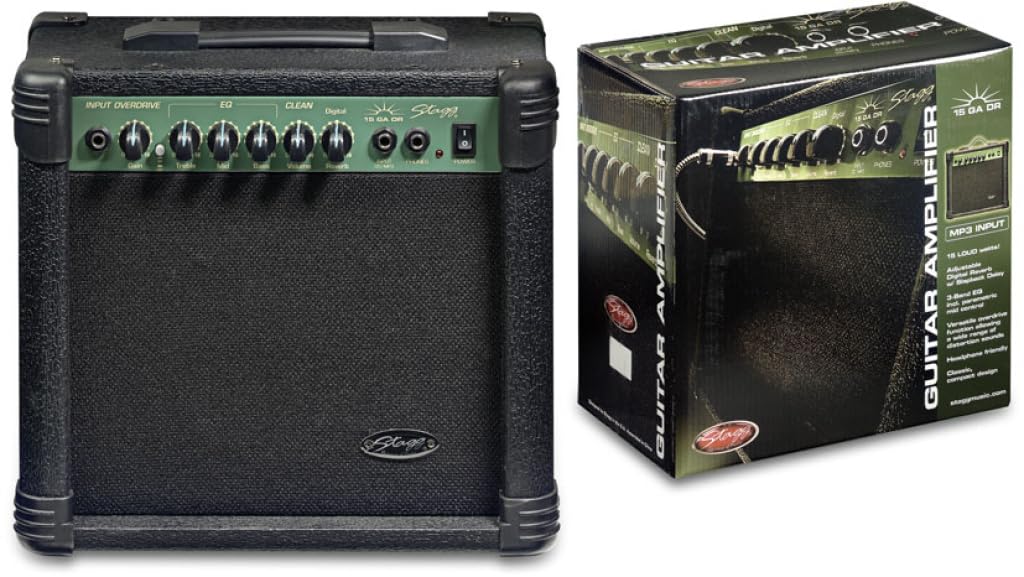
Figure 1: Front panel of the Stagg 15-Watt Guitar Amplifier. Shows input jack, control knobs, and switches.
Stagg 15-Watt Guitar Amplifier features a comprehensive set of controls for shaping your sound:
- 입력 잭 : 기타나 다른 악기를 여기에 연결하세요.
- 게인 컨트롤 : Adjusts the input sensitivity and the amount of overdrive.
- Overdrive Switch: Engages the built-in distortion effect for versatile sounds.
- 볼륨 조절: 전체 출력 레벨을 조정합니다. amp리퍼.
- 3-Band EQ (Bass, Middle, Treble): Allows for precise tonal shaping across low, mid, and high frequencies.
- Parametric Mid Control: Provides additional control over the mid-range frequencies for fine-tuning your sound.
- Digital Reverb: Adds a spacious, ambient effect to your sound.
- 헤드폰 출력: For silent practice. Connect standard stereo headphones.
- Stereo Jack Input (CD/MP3 Players): Connect external audio sources like CD or MP3 players for practice along.
5. 설정
- 놓기: 배치하다 amp앰프는 안정적이고 평평한 표면에 놓으십시오. 제품 주변에 충분한 환기가 이루어지도록 하십시오.
- 전원 연결: 확인하십시오 amp앰프의 전원 스위치가 OFF 위치에 있습니다. 제공된 전원 코드를 연결하십시오. amp앰프의 전원 입력 단자에 연결한 다음 적절한 AC 전원 콘센트에 연결하십시오.
- 계기 연결: Connect your guitar or double bass to the 입력 잭 using a standard 6.35mm instrument cable.
- 외부 오디오(선택 사항): If desired, connect an external audio source (e.g., CD/MP3 player) to the Stereo Jack Input 적절한 케이블을 사용합니다.
- 헤드폰(선택 사항): 조용한 연습을 위해 헤드폰을 연결하세요. 헤드폰 출력. This will mute the amp앰프의 스피커.
6. 사용 설명서
- 전원 켜기: 켜다 amplifier's power switch to the ON position. The power indicator light should illuminate.
- 초기 설정:
- 설정하다 용량 control to its minimum position.
- 설정하다 얻다 control to a low setting.
- 설정하다 베이스, 가운데, 그리고 고음부 EQ controls to their center (12 o'clock) positions.
- 확인하십시오 Overdrive Switch is disengaged for a clean sound.
- 볼륨 및 게인 조정: 천천히 증가 용량 control to your desired listening level. Adjust the 얻다 control to achieve the desired amount of input sensitivity and clean tone. For distorted sounds, engage the Overdrive Switch and then adjust the 얻다 control to increase the distortion level.
- 톤 쉐이핑: 사용하세요 베이스, 가운데, 그리고 고음부 controls to adjust the amplifier's tonal characteristics. The Parametric Mid Control allows for more precise adjustments to the mid-range frequencies.
- 리버브 효과: 조정하다 디지털 리버브 control to add depth and ambiance to your sound.
- 전원 끄기 : Before disconnecting any cables or moving the amplifier, turn the 용량 control to minimum and then switch the power OFF.
7. 유지관리
- 청소: 부드럽고 건조한 천을 사용하여 청소하십시오. amp증폭기 외부에 연마성 세척제나 용제를 사용하지 마십시오.
- 저장: 저장하다 amp증폭기는 직사광선과 극한 온도 변화를 피해 건조하고 서늘한 곳에 보관하십시오.
- 통풍: 과열을 방지하기 위해 환기구에 먼지와 이물질이 쌓이지 않도록 하십시오.
- 케이블 관리: Regularly inspect power and instrument cables for damage. Replace any damaged cables immediately.
8. 문제 해결
| 문제 | 가능한 원인 | 해결책 |
|---|---|---|
| 소리가 나지 않습니다 |
|
|
| Distorted sound (unintended) |
|
|
| 윙윙거리는 소리 |
|
|
9. 사양
| 모델 | 15 GA DR USA |
| 출력 와트tage | 15 와트 |
| 치수(길이 x 너비 x 높이) | 12.2 x 13.8 x 7.5 인치 |
| 품목 무게 | 13.9파운드 |
| 커넥터 유형 | 6.35mm 잭 |
| 전원 | 코드식 전기 |
| 호환 장치 | Guitar, Double Bass |
10. 보증 및 지원
For warranty information and technical support, please refer to the warranty card included with your purchase or visit the official Stagg web사이트. 보증 청구를 위해 구매 증빙 자료를 보관하세요.
제조업체: Stagg
Web대지: www.staggmusic.com