
1. 설정
1.1 포장 풀기 및 초기 검사
Carefully remove your ASUS K52F-A2B laptop from its packaging. Inspect the laptop and all accessories for any signs of damage. The package should contain the laptop, AC adapter, power cord, and documentation.
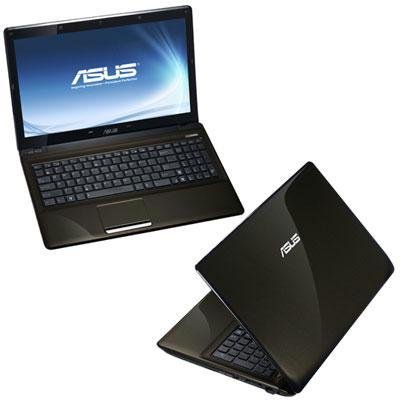
Image 1.1: The ASUS K52F-A2B laptop. This image shows the closed laptop from an angle, highlighting its dark brown finish and sleek design.
1.2 AC 어댑터 연결
Before initial use, connect the AC adapter to the laptop and a power outlet. This ensures the battery is charged and provides stable power for setup.
- AC 어댑터를 노트북 측면의 전원 커넥터에 꽂으세요.
- 전원 코드를 AC 어댑터에 꽂으세요.
- 전원 코드의 다른 쪽 끝을 접지된 전기 콘센트에 꽂습니다.
1.3 초기 전원 켜기
Once the AC adapter is connected, open the laptop lid and press the power button. The laptop will begin its initial boot sequence. Follow the on-screen instructions to complete the operating system setup (Windows 7 Professional 64-bit).
2. Operating Your ASUS K52F-A2B Laptop
2.1 전원 켜기/끄기 및 절전 모드
- 전원 켜기: 키보드 위에 있는 전원 버튼을 누르세요.
- 전원 끄기 : Click the Start button, then select 'Shut down'.
- 수면 모드 : Close the laptop lid or select 'Sleep' from the Start menu. Press the power button or any key to wake the laptop.
2.2 키보드 및 터치패드 사용
The ASUS K52F-A2B features a full-sized keyboard and a multi-touch touchpad.
- 건반: Standard QWERTY layout with function keys (Fn) for brightness, volume, and other system controls.
- 터치패드: Supports multi-touch gestures for scrolling, zooming, and navigation. Refer to the operating system's help for detailed gesture information.
2.3 외부 장치 연결
노트북에는 외부 장치를 연결하기 위한 다양한 포트가 있습니다.
- USB 포트: 마우스, 키보드, 외장 저장 장치 등의 USB 장치를 연결하는 데 사용합니다.
- HDMI 포트 : Connects to external displays or TVs for high-definition video and audio output.
- VGA 포트: Connects to older external monitors or projectors.
- 오디오 잭: 헤드폰 및 마이크용입니다.
- 이더넷 포트 : 유선 네트워크 연결의 경우.
2.4 Using the Optical Disk Drive
The laptop includes a Super Multi Optical Disk Drive for reading and writing CDs and DVDs.
- 드라이브의 배출 버튼을 눌러 트레이를 여세요.
- CD 또는 DVD를 라벨이 위를 향하도록 트레이에 놓으십시오.
- 트레이가 딸깍 소리가 나면서 닫힐 때까지 노트북 안쪽으로 살살 밀어 넣으세요.
3. 유지관리
3.1 노트북 청소
정기적인 청소는 노트북의 외관과 기능을 유지하는 데 도움이 됩니다.
- 화면: 부드럽고 보풀이 없는 천을 살짝 사용하십시오. damp물이나 화면 세척제로 닦아주세요. 화면에 직접 액체를 분사하지 마세요.
- 키보드와 Casing: 부드럽고 마른 천을 사용하세요. 잘 지워지지 않는 얼룩은 물기를 살짝 제거한 천으로 닦아내세요.ampened with mild soap and water can be used. Ensure the laptop is powered off and unplugged before cleaning.
- 통풍구 : Use compressed air to clear dust from the cooling vents to prevent overheating.
3.2 배터리 관리
배터리 수명과 성능을 극대화하려면:
- 배터리를 자주 완전히 방전시키지 마세요.
- 장시간 사용하지 않을 때는 노트북을 시원하고 건조한 곳에 보관하세요.
- 장기간 보관할 경우, 보관 전에 배터리를 약 50%까지 충전하세요.
3.3 소프트웨어 업데이트
Regularly update your operating system and drivers to ensure optimal performance and security. Check the ASUS support website for the latest drivers for your K52F-A2B model.
4. 문제 해결
This section addresses common issues you might encounter with your ASUS K52F-A2B laptop.
4.1 전원 문제
- 노트북이 켜지지 않습니다: Ensure the AC adapter is securely connected to both the laptop and a working power outlet. Check if the power outlet is functional. If the battery is completely drained, allow it to charge for a few minutes before attempting to power on.
- Laptop shuts down unexpectedly: This could indicate overheating. Ensure cooling vents are clear and the laptop is on a hard, flat surface.
4.2 디스플레이 문제
- 화면에 표시되지 않음: Connect an external monitor to the VGA or HDMI port to check if the issue is with the laptop's internal display. Press Fn+F8 to toggle display output modes.
- 어두운 디스플레이: Adjust screen brightness using the Fn+F5 (dim) and Fn+F6 (bright) function keys.
4.3 연결 문제
- Wi-Fi가 연결되지 않음: Ensure Wi-Fi is enabled (often via a function key, e.g., Fn+F2). Check network settings in Windows.
- USB 장치가 인식되지 않습니다: 장치를 다른 USB 포트에 연결해 보세요. 장치 드라이버가 설치되어 있는지 확인하세요.
4.4 Operating System Recovery
The ASUS K52F-A2B comes with Windows 7 Professional. For system recovery or reinstallation, it is recommended to use the recovery partition or create recovery media as instructed by ASUS. Note that official support for downgrading to Windows XP Pro may be limited, and recovery media for Windows 7 Pro might need to be created by the user.
5. 기술 사양
| 특징 | 사양 |
|---|---|
| 모델 번호 | K52F-A2B |
| 프로세서 | 인텔 코어 i3-350M(2.26GHz) |
| 운영 체제 | 윈도우 7 프로페셔널 64비트 |
| 표시하다 | 15.6-inch HD (1366x768) LED |
| 제도법 | 인텔 GMA HD (통합형) |
| 램 메모리 | 3 GB DDR3 1066MHz (Max 8GB) |
| 저장 | 320 GB Hard Drive (5400 RPM) |
| 광학 드라이브 | DVD 슈퍼멀티 |
| 무선 연결 | 802.11억 |
| 포트 | HDMI, VGA, USB, Audio Jacks |
| Web캠 | 0.3 MP |
| 무게 | 5.8 파운드 |
6. 보증 및 지원
6.1 보증 정보
Your ASUS K52F-A2B laptop comes with the following warranty coverage:
- 2년 글로벌 보증
- 1-Year Accidental Damage Warranty
- 30-Day Zero Bright Dot Guarantee
- 2-way FREE shipping for repairs
6.2 기술 지원
For technical assistance, driver downloads, or further information, please visit the official ASUS support website. 24/7 technical support is available as part of your warranty.
For the most up-to-date support contact information, please refer to the documentation included with your product or visit www.asus.com/support.


