
VTech 80-109744
VTech Schulstart Laptop E Instruction Manual
모델 : 80-109744
1. 서론
This manual provides essential information for the safe and effective use of your VTech Schulstart Laptop E. This learning computer is designed for children aged 6 and up, offering 160 educational games in both German and English. It covers subjects such as letters, words, mathematics, nature, science, and creativity.
기기를 작동하기 전에 이 설명서를 자세히 읽고 나중에 참조할 수 있도록 보관하세요.
2. 안전 정보
경고: Choking hazard due to small parts that can be swallowed. Not suitable for children under 36 months.
경고: Strangulation hazard. Keep packaging materials away from children.
- 사용 중에는 항상 어린이를 감독하십시오.
- 장치를 극한의 온도나 직사광선에 노출시키지 마십시오.
- 기기를 건조한 상태로 유지하십시오. 물이나 기타 액체에 담그지 마십시오.
- 부드럽고 마른 천으로 기기를 닦으십시오. 연마성 세척제를 사용하지 마십시오.
- 배터리가 극성 표시에 따라 올바르게 삽입되었는지 확인하세요.
- 소모된 배터리는 즉시 제거하십시오.
- 오래된 건전지와 새 건전지, 다른 종류의 건전지를 혼용하지 마세요.
- 충전이 불가능한 배터리는 충전해서는 안 됩니다.
- 충전식 배터리는 성인의 감독 하에 충전해야 합니다.
- 충전하기 전에 장난감에서 충전식 배터리를 제거하세요.
- 전원 단자는 단락되어서는 안 됩니다.
3. 패키지 내용
The VTech Schulstart Laptop E package includes:
- 1 x VTech Schulstart Laptop E
- 1 x Cursor Mouse
- 3 x AA Demonstration Batteries (for test purposes only)
Note: A VTech power adapter and VTech laptop bag are sold separately and are not included.
4. 설정
4.1 배터리 설치
The device requires 3 AA batteries. The included demonstration batteries are for testing purposes only and should be replaced with new batteries for regular use.
- 노트북 밑면에서 배터리 수납공간을 찾으세요.
- 드라이버를 사용하여 배터리실 덮개를 엽니다.
- Remove the old demonstration batteries (if present).
- AA 배터리 3개를 넣고, 배터리 칸 안쪽에 표시된 대로 극성(+/-)을 올바르게 맞춰 넣으세요.
- 배터리실 커버를 교체하고 나사로 고정합니다.

Figure 4.1: Battery installation guide. Replace demonstration batteries with new ones for extended play.
4.2 Connecting the Cursor Mouse
The VTech Schulstart Laptop E comes with a wired cursor mouse for interactive play.
- Locate the mouse port on the side of the laptop.
- Carefully insert the mouse connector into the port.
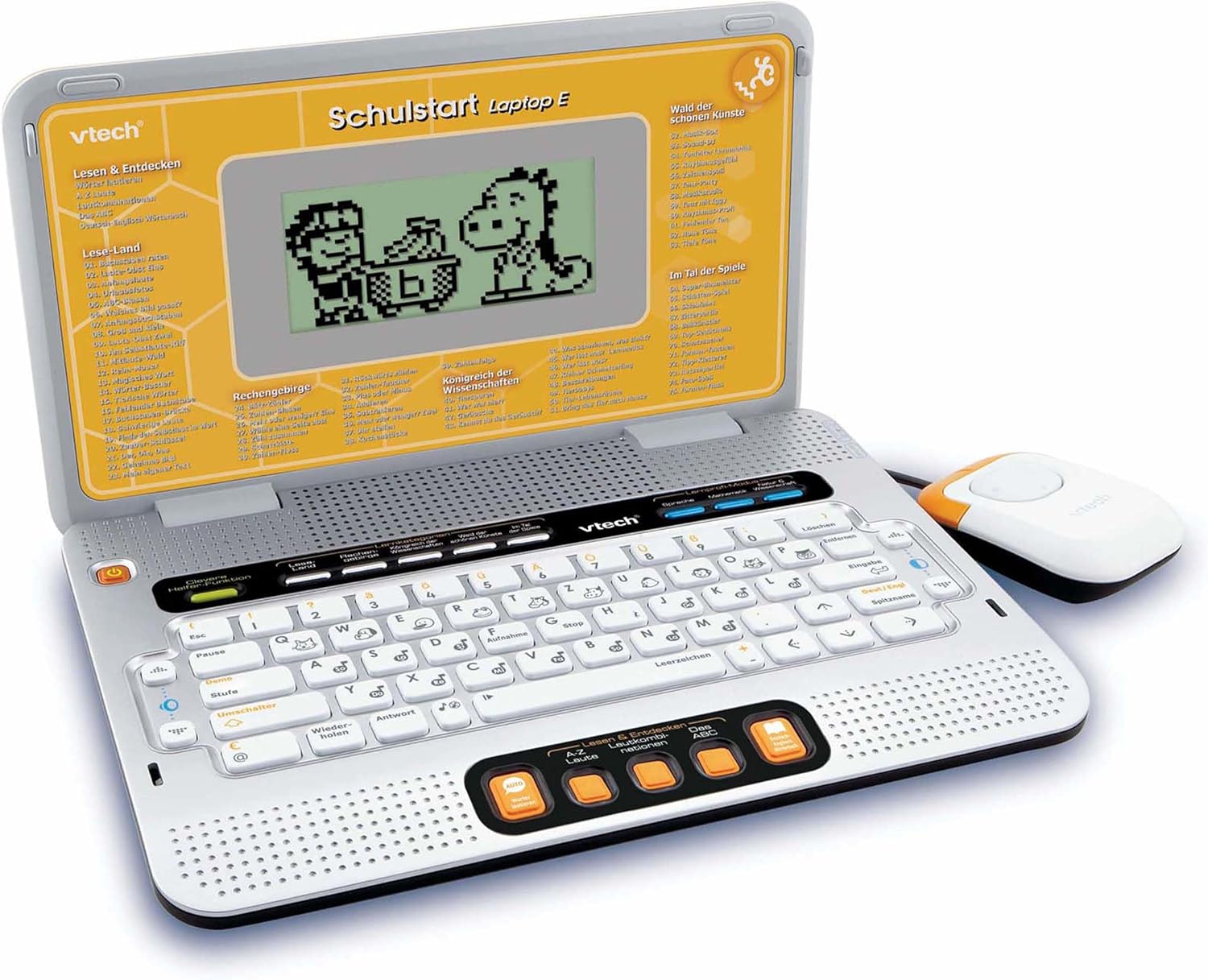
Figure 4.2: VTech Schulstart Laptop E with connected cursor mouse.
5. 사용 설명서
5.1 전원 켜기/끄기
To turn on the laptop, press the 힘 button, usually located on the top left of the keyboard area. To turn off, press the 힘 button again or the laptop will automatically shut down after a period of inactivity to conserve battery life.
5.2 언어 선택
The VTech Schulstart Laptop E supports both German and English. You can switch between languages using the dedicated language selection button or through the settings menu, if available. Refer to the on-screen prompts for initial setup.
5.3 Game Categories and Selection
The laptop features 160 educational games categorized as follows:
- Language Tools: 5개 프로그램
- 글자와 단어: 23개 프로그램
- 수학: 16개 프로그램
- Nature & Science: 12개 프로그램
- 창의성: 12개 프로그램
- 논리와 게임: 12개 프로그램
Use the arrow keys and the Enter button on the keyboard, or the cursor mouse, to navigate through the menu and select a game.

Figure 5.1: Navigating game categories on the VTech Schulstart Laptop E.
5.4 Tutor Function and Learning Modes
The laptop includes a Tutor function and a Learning Pro mode to enhance the learning experience:
- Tutor Function: Features 5 direct-dial keys for language tools (sounds, phonics, sound combinations, ABC with example words, German-English dictionary). These programs assist with letter pronunciation and reading.
- Learning Pro Mode: Offers progressive learning through increasing difficulty levels, adapting to the child's progress.
- Smart Helper Function: Provides additional hints and tips in many educational games upon request.

Figure 5.2: Child using the VTech Schulstart Laptop E's interactive learning features.
6. 유지관리
6.1 청소
To clean the VTech Schulstart Laptop E, use a soft, slightly damp 천을 사용하십시오. 강한 화학 물질이나 연마성 세제는 사용하지 마십시오. 청소하기 전에 기기의 전원을 끄고 모든 전원에서 분리하십시오.
6.2 보관
Store the laptop in a cool, dry place away from direct sunlight and extreme temperatures. If the device will not be used for an extended period, remove the batteries to prevent leakage.

Figure 6.1: Optional VTech laptop bag for storage and transport (sold separately).
7. 문제 해결
| 문제 | 가능한 원인 | 해결책 |
|---|---|---|
| 장치가 켜지지 않습니다. |
|
|
| 화면이 비어 있거나 깜빡입니다. |
|
|
| Keys or mouse not responding. |
|
|
| 소리가 왜곡되거나 들리지 않습니다. |
|
|
8. 사양
- 모델 번호: 80-109744
- 치수(길이 x 너비 x 높이): 4 x 28 x 20cm(1.57 x 11.02 x 7.87인치)
- 무게: 1.29kg(2.84파운드)
- 추천 연령: 6세 이상
- 배터리: 3 x AA (not included for regular use)
- 언어: 독일어, 영어
- 게임 수: 160
- 출시일: 31년 2010월 XNUMX일
9. 보증 및 지원
보증 정보 및 고객 지원에 대해서는 VTech 공식 웹사이트를 참조하십시오. web해당 웹사이트를 방문하거나 가까운 VTech 대리점에 문의하십시오. 구매 영수증을 보관하여 구매 증빙 자료로 활용하십시오.
VTech 공식 Web대지: www.vtech.com
Ask a question about this manual
Ask about setup, troubleshooting, compatibility, parts, safety, or missing instructions. Manuals+ will review the question and use this page’s manual context to help answer it.