
소개
구매해주셔서 감사합니다asing the Optimus F-1760 16-inch Wave Oscillating Stand Fan. This manual provides important information regarding the safe operation, assembly, maintenance, and troubleshooting of your fan. Please read these instructions thoroughly before use and retain them for future reference.

Image: The Optimus F-1760 stand fan positioned in a bedroom, showcasin가구에 비해 디자인과 크기가 중요합니다.
중요 안전 지침
전기 제품을 사용할 때는 화재, 감전, 인명 피해 위험을 줄이기 위해 다음 사항을 포함한 기본 예방 조치를 항상 따라야 합니다.
- 이 팬을 사용하기 전에 모든 지침을 읽으십시오.
- 이 선풍기는 설명서에 명시된 대로만 사용하십시오. 권장하지 않는 용도로 사용할 경우 화재, 감전 또는 부상을 입을 수 있습니다.
- 감전 사고를 방지하기 위해 선풍기를 창가에 두거나, 본체, 플러그 또는 코드를 물에 담그거나 액체를 뿌리지 마십시오.
- 어린이가 가전제품을 사용하거나 어린이 근처에서 사용할 때는 면밀한 감독이 필요합니다.
- Unplug fan from outlet when not in use, when moving fan from one location to another, and before cleaning.
- Do not operate fan in the presence of explosive and/or flammable fumes.
- 화기, 조리기구, 기타 난방기구 근처에 팬이나 부품을 두지 마세요.
- Do not operate fan with a damaged cord or plug, or after the fan malfunctions or has been dropped or damaged in any manner.
- 움직이는 부품과의 접촉을 피하세요.
- 분리하려면 플러그를 잡고 벽면 콘센트에서 잡아당기세요. 코드를 잡아당기지 마세요.
- 항상 건조하고 평평한 표면에서 사용하세요.
- 벽이나 천장에 팬을 걸거나 설치하지 마세요.
- 팬 그릴이 제대로 설치되지 않은 상태에서 작동하지 마십시오.
- This product employs overload protection (fuse). A blown fuse indicates an overload or short-circuit situation. If the fuse blows, unplug the product from the outlet. Replace the fuse as per the servicing instructions (follow product marking for proper fuse rating) and check the product. If the replacement fuse blows, a short-circuit may be present and the product should be discarded or returned to an authorized service facility for examination and/or repair.
설정 및 조립
The Optimus F-1760 fan requires minimal assembly. Ensure all components are present and undamaged before proceeding.
- 기본 조립: Attach the weighted base legs to the main pole. Ensure they are securely fastened to provide stability. The base is designed to be sturdy, with weights at the ends of the feet.
- 높이 조정: The fan's height can be adjusted. Loosen the height adjustment knob on the pole, extend or retract the pole to the desired height, and then securely tighten the knob.
- 팬 헤드 부착: Ensure the fan head is securely attached to the top of the pole. The motor housing and fan blade are plastic, while the grill is metal.
- 놓기: Place the fan on a dry, level surface. Ensure there is adequate space around the fan for proper air circulation and oscillation.
작동 지침
The Optimus F-1760 fan offers multiple control options and features for customized comfort.
제어판
The fan features a 4-position push-button switch on the pole for basic operation.
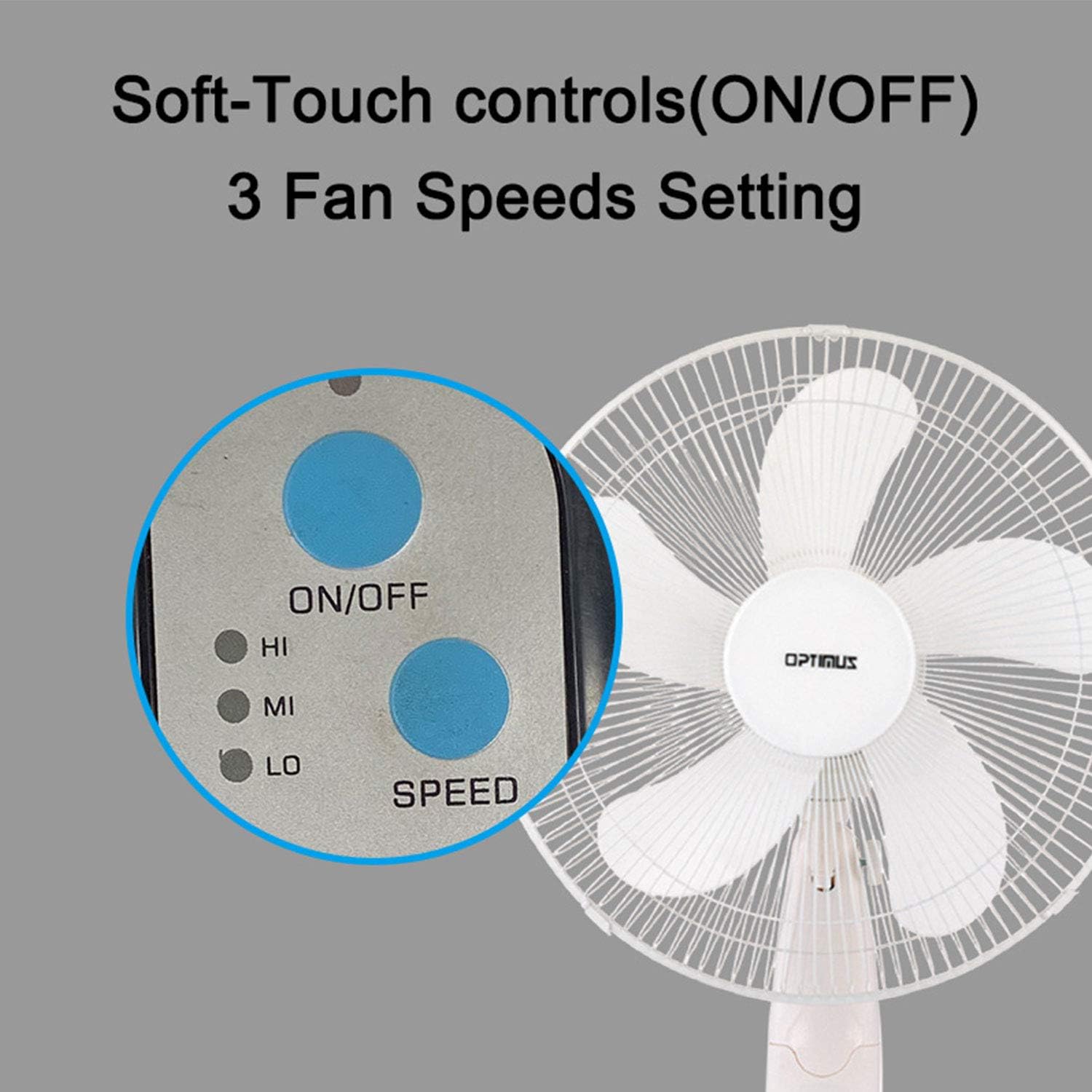
Image: The fan's soft-touch control panel, showing buttons for ON/OFF and SPEED, with indicators for High (HI), Medium (MI), and Low (LO) fan speeds.
- 켜기/끄기: 팬을 켜거나 끄려면 누릅니다.
- 속도 설정: Select from Low, Medium, or High speeds. The 3-speed, energy-saving, whisper-quiet operation motor provides efficient airflow.
원격 제어
The fan comes with a remote control for convenient operation from a distance. (Batteries not included).

Image: The remote control for the fan, featuring buttons for Mode, Time, Speed, and ON/OFF functions.
- 켜기/끄기: 팬을 켜거나 끕니다.
- 속도: Cycles through the three fan speeds (Low, Medium, High).
- 오시는 길 : Selects between different wind modes.
- 시간: Activates and sets the shut-off timer.
바람 모드
The fan offers three distinct wind modes to suit your preference:

Image: The fan's control panel highlighting the MODE button and indicators for Normal, Natural, and Sleep wind modes.
- 일반 모드: The fan blows at a constant speed based on your selected setting.
- 자연 모드: The fan speed fluctuates to mimic a natural breeze.
- 수면 모드 : The fan operates at a lower, quieter speed, ideal for sleeping, with gentle speed variations.
진동
The F-1760 features unique wave oscillation for comprehensive air distribution.

Image: A diagram illustrating the fan's capability for both vertical (up/down) and horizontal (left/right) wave oscillation, providing wider air coverage.
- Up/Down & Left/Right Wave Oscillating: Activates a unique oscillation pattern that moves the fan head both horizontally and vertically, distributing air throughout the room.
- To stop oscillation, press the oscillation button again.
타이머 기능
지정된 시간 후 선풍기가 자동으로 꺼지도록 설정하세요.

Image: The fan's control panel showing the TIME button and indicators for 1 hour (1H), 2 hours (2H), and 4 hours (4H) timer settings. The fan can be programmed for up to 7 hours.
- The timer can be set for 1, 2, 4, or up to 7 hours. Press the TIME button repeatedly to cycle through the desired duration.
유지관리 및 청소
정기적으로 청소하면 팬의 성능을 유지하고 수명을 연장하는 데 도움이 됩니다.
- 청소 전: 청소하기 전에 항상 팬의 플러그를 전기 콘센트에서 뽑으세요.
- 외부 청소: 부드러운 d를 사용하세요amp 팬 외부 표면을 닦을 때는 천을 사용하세요. 연마성 세제나 용제는 사용하지 마세요.
- Grill Cleaning: The metal grill can be cleaned with a soft brush or vacuum cleaner to remove dust. For thorough cleaning, the grill may need to be carefully removed.
- 블레이드 청소: If necessary, the fan blades can be cleaned. Ensure the fan is completely off and unplugged. The care instructions specify "Hand Wash" for components.
- 저장: 장기간 사용하지 않을 때는 선풍기를 서늘하고 건조한 곳에, 가급적 원래 포장 상태로 보관하십시오.
문제 해결
| 문제 | 가능한 원인 | 해결책 |
|---|---|---|
| 팬이 켜지지 않습니다. | No power supply. Blown fuse. | Ensure the fan is plugged into a working outlet. Check the fuse in the plug and replace if necessary (refer to safety instructions for fuse replacement). |
| 선풍기는 작동하지만 공기 흐름이 약합니다. | Low speed setting. Dust accumulation on blades/grill. | Increase the fan speed. Clean the fan blades and grills as per maintenance instructions. |
| 원격 제어가 작동하지 않습니다. | Dead batteries. Obstruction between remote and fan. | Replace batteries in the remote control. Ensure a clear line of sight between the remote and the fan's receiver. |
| Fan changes speed automatically or unexpectedly. | Interference from other remote controls (e.g., TV remote). | This fan may respond to frequencies from other remote controls. Try operating the fan manually or repositioning the fan/other devices to minimize interference. |
| Fan makes clicking noises during oscillation. | Normal operation of oscillation gears. | A slight clicking noise from the oscillation gears can occur during normal operation. If the noise is excessive or new, ensure the fan head is securely attached. |
| Fan feels unstable. | Base not properly assembled or tightened. Uneven surface. | Ensure all base components are securely fastened and the fan is placed on a firm, level surface. |
명세서
- 모델 이름: F-1760
- 상표: 옵티머스
- 팬 직경: 16인치
- 선풍기 디자인: 플로어 팬
- 전원: 코드식 전기
- 왓tage: 60 와트
- 권tage: 6 볼트
- 블레이드 수 : 3
- 속도 설정: 3단계 RPM (낮음, 중간, 높음)
- 제어 방법: 리모컨, 푸시 버튼
- 특별 기능: Up/Down & Left/Right Wave Oscillating, Adjustable Height, Timer Function (up to 7 hours), Wind Modes (Normal, Natural, Sleep)
- 실내/실외 사용: 실내
- 품목 무게: 9.9파운드
- 포함된 구성 요소: 제품, 설명서
보증 정보
This Optimus F-1760 fan comes with a 1년 한정 보증 구매일로부터 유효합니다. 본 보증은 정상적인 사용 조건에서 발생하는 재료 및 제조상의 결함에 적용됩니다. 오용, 사고, 개조 또는 무단 수리로 인한 손상은 보증 대상에서 제외됩니다. 보증 청구를 위해 구매 증빙 자료를 보관해 주십시오.
고객 지원
For technical assistance, warranty claims, or questions regarding your Optimus F-1760 fan, please contact Optimus customer service. Refer to the product packaging or the official Optimus web최신 연락처 정보는 사이트에서 확인하세요.