소개
구매해주셔서 감사합니다asing the Sharper Image Digital Camera. This compact and easy-to-use digital camera is designed to capture your precious moments with clarity. Featuring a 3.0 MP effective still image resolution and 4x digital zoom, it is ideal for everyday photography. This manual provides detailed instructions to help you set up, operate, and maintain your camera for optimal performance.
안전 정보
- 배터리 안전: Use only the specified battery type. Do not mix old and new batteries, or different types of batteries. Insert batteries with correct polarity. Remove batteries if the camera will not be used for an extended period.
- 물과 습기: Keep the camera away from water and excessive moisture. Do not operate the camera with wet hands.
- 온도: Avoid exposing the camera to extreme temperatures (hot or cold) or direct sunlight for prolonged periods.
- 청소: 부드럽고 마른 천으로 닦으십시오. 액체 세제나 용제를 사용하지 마십시오.
- 분해 : 카메라를 직접 분해하거나 수리하지 마십시오. 모든 정비는 자격을 갖춘 기술자에게 맡기십시오.
- 처분: Dispose of the camera and batteries according to local regulations.
패키지 내용
패키지에 모든 품목이 들어 있는지 확인하세요.
- Sharper Image Digital Camera (Model F3405471)
- USB 케이블
- 손목 스트랩
- 사용 설명서 (본 문서)
- (Optional: Software CD, Pouch, Batteries - check your specific packaging)
제품 끝view
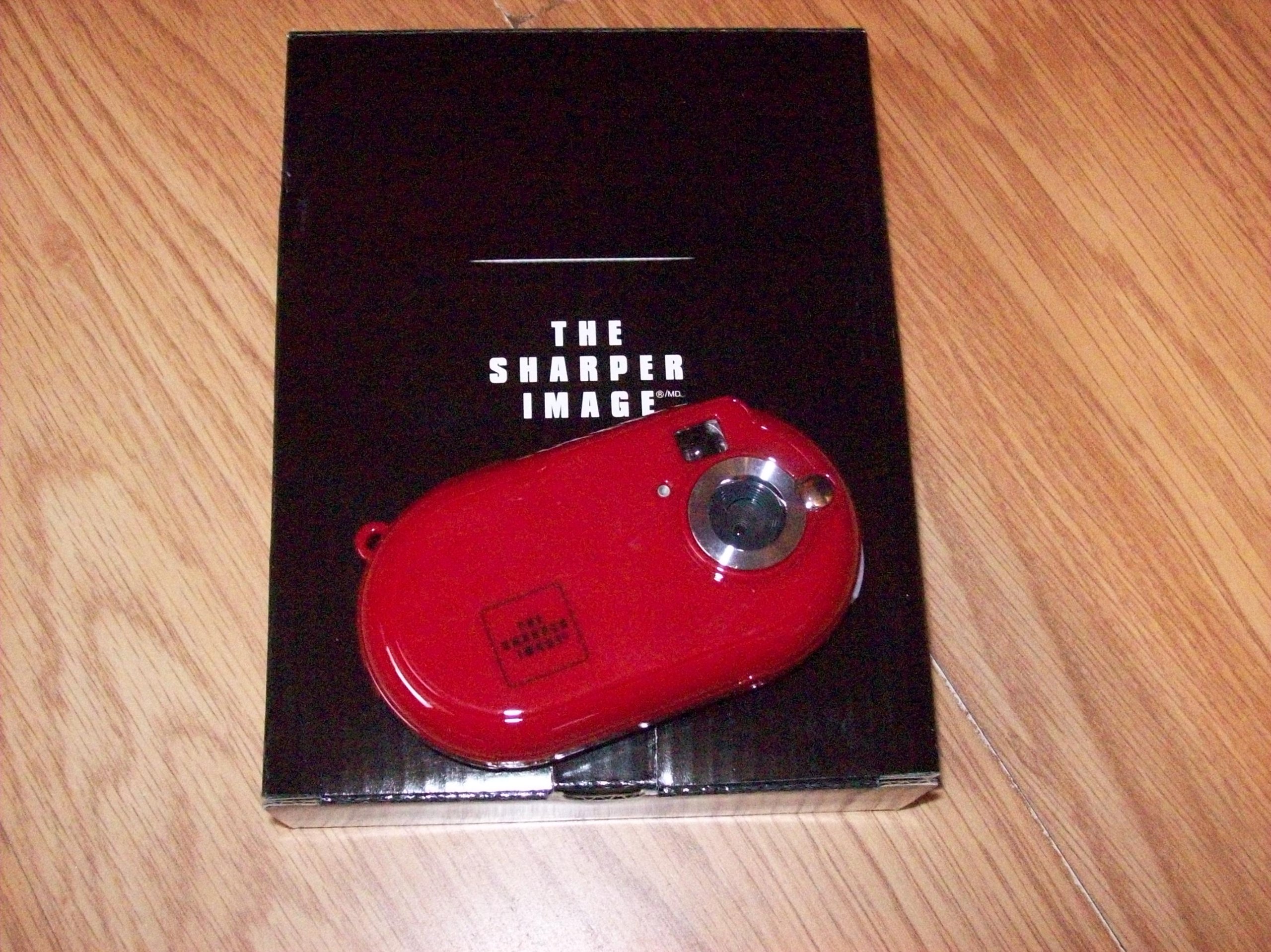
Figure 1: The Sharper Image Digital Camera (red, oval-shaped) resting on its black packaging box, which features the "THE SHARPER IMAGE" logo.
The Sharper Image Digital Camera is a compact device with a distinctive red, oval-shaped body. It features a lens assembly on the front, along with a flash and a small indicator light. The camera is designed for portability and ease of use, making it suitable for capturing everyday moments.
주요 구성 요소:
- 렌즈: 이미지를 캡처합니다.
- 플래시: 조명이 어두운 환경에서 조명을 제공합니다.
- 셔터 버튼: 사진을 찍기 위해 카메라를 활성화합니다.
- 전원 버튼: 카메라를 켜거나 끕니다.
- LCD Screen (if applicable): Displays menus, captured images, and live view.
- 탐색 버튼: For menu navigation and playback.
- 배터리 칸: 배터리를 보관합니다.
- 메모리 카드 슬롯: For inserting an SD card or similar storage media.
- USB 포트: For connecting to a computer to transfer photos.
설정
- 배터리 삽입: Open the battery compartment cover. Insert the required batteries (e.g., AAA or AA, refer to the compartment label) ensuring correct polarity (+/-). Close the cover securely.
- 메모리 카드 삽입: Locate the memory card slot. Insert a compatible memory card (e.g., SD card) until it clicks into place. Ensure the card is inserted in the correct orientation.
- 손목 스트랩을 부착하세요: Thread the wrist strap through the designated loop on the camera body to prevent accidental drops.
- 전원 켜기: Press and hold the Power button until the camera turns on.
- 초기 설정: If prompted, set the date, time, and language using the navigation buttons and confirmation button.
작동 지침
사진 찍기:
- 켜기: 전원 버튼을 눌러 카메라를 켭니다.
- 사진의 구도를 잡다: Use the LCD screen or viewfinder (if available) to compose your image.
- Zoom (Digital): Use the zoom buttons (if present) to digitally zoom in or out. Note that digital zoom may reduce image quality compared to optical zoom.
- 사진 찍기: Press the Shutter button fully down to capture the image. The camera may take a moment to process and save the photo.
Viewing Photos (Playback Mode):
- 재생 시작: 재생 버튼(대개 삼각형 아이콘으로 표시됨)을 누르세요.
- 먹다: Use the left/right navigation buttons to scroll through your captured images.
- Exit Playback: Press the Playback button again or the Shutter button to return to shooting mode.
컴퓨터에 연결:
- 케이블 연결: With the camera turned off, connect one end of the USB cable to the camera's USB port and the other end to a free USB port on your computer.
- Turn On Camera: Turn on the camera. It should be recognized as a removable disk or mass storage device by your computer.
- 옮기다 Files: Open the camera's drive on your computer and copy the desired image files to your computer's hard drive.
- 안전하게 연결을 끊으세요. USB 케이블을 분리하기 전에 카메라를 컴퓨터에서 안전하게 꺼내세요.
유지
- 카메라 본체 청소: 부드럽고 보풀 없는 천으로 카메라 본체를 닦으세요. 잘 지워지지 않는 얼룩은 살짝 두드려 닦아내세요.amp천에 물을 묻힌 후 닦아 말리세요.
- 렌즈 청소: Use a lens cleaning brush or a soft, clean microfiber cloth specifically designed for optics. Gently wipe the lens in a circular motion. Do not use abrasive materials or harsh chemicals.
- 저장: When not in use, store the camera in a cool, dry place, away from direct sunlight and extreme temperatures. If storing for a long period, remove the batteries to prevent leakage.
- 배터리 관리 : Rechargeable batteries should be fully charged before storage and periodically recharged if stored for extended periods.
문제 해결
| 문제 | 가능한 원인 / 해결책 |
|---|---|
| 카메라가 켜지지 않습니다. |
|
| 사진을 찍을 수 없습니다. |
|
| 이미지가 흐릿합니다. |
|
| 카메라가 컴퓨터에서 인식되지 않습니다. |
|
명세서
| 특징 | 세부 사항 |
|---|---|
| 제품 모델 번호 | F3405471 |
| 광학 줌 배율 | 4 엑스 |
| 렌즈 구성 | 줌 |
| 모터 유형 | Digital, Digital Zoom |
| 배터리 포함 | 아니요 |
| 품목 무게 | 907.18g |
| 모델명 | Sharper Image Digital Camera |
| Effective Still Image Resolution | 3 MP |
보증 및 지원
For warranty information and technical support, please refer to the warranty card included with your product or visit the official Sharper Image web사이트. 보증 청구에 대비해 구매 증빙 자료로 구매 영수증을 보관하세요.
If you encounter issues not covered in the Troubleshooting section, please contact Sharper Image customer service for assistance.