
1. 서론
Thank you for choosing the SHARP KC850U Air Purifier and Humidifier. This appliance is designed to improve indoor air quality and maintain optimal humidity levels in medium-sized rooms. It combines a multi-stage filtration system with Plasmacluster Ion Technology to effectively reduce airborne particles, odors, and maintain a comfortable environment.
Please read this manual thoroughly before operating the unit to ensure safe and efficient use. Keep this manual for future reference.
2. 안전 정보
To reduce the risk of electric shock, fire, or injury, always follow basic safety precautions when using electrical appliances:
- 손상된 코드나 플러그를 사용하여 장치를 작동하지 마십시오.
- 제품을 열원 근처나 직사광선이 비치는 곳에 두지 마십시오.
- 장치가 안정적이고 평평한 표면에 놓여 있는지 확인하십시오.
- 공기 흡입구나 배출구를 막지 마십시오.
- 청소나 유지관리 작업을 하기 전에는 반드시 장치의 플러그를 뽑으세요.
- 장치를 물이나 다른 액체에 담그지 마십시오.
- 어린이와 애완동물의 손이 닿지 않는 곳에 보관하세요.
- Use only genuine SHARP replacement parts and filters.
3. 제품 오버view
The SHARP KC850U integrates air purification and humidification functions into a single unit. Key components include the air intake, air outlet, control panel, dust and humidity sensors, and water tank.

그림 3.1: 앞쪽 view of the SHARP KC850U Air Purifier and Humidifier, showing the control panel and display.
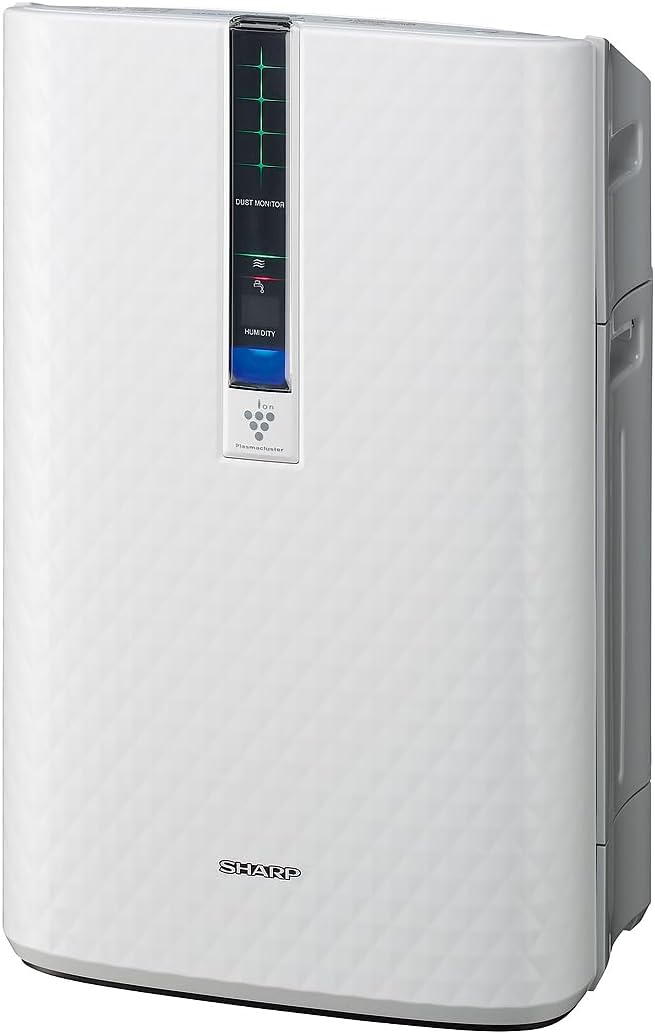
그림 3.2: 옆 view of the SHARP KC850U, illustrating its compact design.
제어판 및 디스플레이
The unit features an intuitive control panel and a display that provides real-time information on air quality and humidity levels.

그림 3.3: 맨 위 view of the control panel, showing buttons for power, fan speed, modes, and light control.
- 전원 버튼: 장치를 켜거나 끕니다.
- 팬 속도 버튼: Cycles through Max, Med, and Low fan speeds.
- 모드 버튼: Selects operating modes including Auto, Pollen, and Quick Clean.
- 조명 버튼: Adjusts the brightness of the display lights (Bright, Dim, Off).
- Dust Monitor: Visual indicator of air impurity levels (e.g., green for clean, red for high impurity).
- 습도 표시: 현재 상대 습도 백분율을 표시합니다.tage.
4. 설정
4.1 풀기
- 장치를 포장에서 조심스럽게 꺼냅니다.
- 보호재와 비닐봉투를 모두 제거하십시오.
- Ensure all filters are properly installed before first use. Refer to the Maintenance section for filter installation details.
4.2 배치
For optimal performance, place the air purifier in a location where air can circulate freely. Avoid placing it directly against a wall or furniture that might obstruct air intake or output.
- Recommended for use in bedrooms, living rooms, studies, or exercise rooms.
- Ensure at least 12 inches (30 cm) of clear space around the unit.
- 단단하고 평평한 표면에 놓으십시오.
4.3 Filling the Water Tank (for Humidification)
If you intend to use the humidification function, fill the water tank:
- Remove the water tank from the side of the unit.
- Open the tank cap and fill with clean tap water.
- Securely close the cap and reinsert the water tank into the unit.
5. 사용 설명서
5.1 전원 켜기/끄기
를 누르세요 힘 버튼을 눌러 장치를 켜거나 끕니다.
5.2 팬 속도 선택
를 누르세요 팬 속도 button repeatedly to cycle through the available fan speeds:
- 최대: Highest air purification and humidification.
- Med : Moderate operation.
- 낮은: Quiet operation, suitable for sleeping (as quiet as 23 dBA).
5.3 모드 선택
를 누르세요 방법 button repeatedly to select an operating mode:
- 자동 모드 : The unit automatically adjusts fan speed and humidification based on sensor readings for air quality and humidity.
- 꽃가루 모드: Optimized for pollen removal.
- 빠른 청소 모드: Releases high-density Plasmacluster ions for rapid air purification.
5.4 플라즈마클러스터 이온 기술
The Plasmacluster Ion Technology actively disperses positive and negative ions into the air to help reduce microscopic pollutants. This function operates automatically with the unit. A slight clicking sound may be audible during operation, which is normal.
5.5 디스플레이 조명 제어
를 누르세요 허파 button to adjust the brightness of the display indicators:
- 밝은: Full illumination.
- 어둑한: Reduced illumination.
- 끄다: Display lights are off, suitable for dark rooms.

그림 5.1: Display showing 'Lo' for low humidity and green dust monitor indicators.

그림 5.2: Display showing 'Hi' for high humidity and red dust monitor indicators, indicating higher impurity levels.
6. 유지관리
Regular maintenance ensures optimal performance and extends the lifespan of your SHARP KC850U. Always unplug the unit before cleaning or replacing filters.
6.1 필터 시스템 이상view
The KC850U utilizes a triple filtration system:
- 세척 가능한 사전 필터: Traps large airborne particles like dust and pet dander.
- Activated Carbon Deodorizing Filter: Helps reduce common household odors.
- 진정한 HEPA 필터: Captures 99.97% of particles 0.3 microns and larger.
- Humidifying Filter: Used for the humidification function.

그림 6.1: Diagram showing the air purification process through the humidifying filter, True HEPA filter, carbon filter, and pre-filter.
6.2 필터 청소 및 교체
- 사전 필터 : Clean regularly by vacuuming or washing with water. Allow to dry completely before reinstallation.
- Activated Carbon Deodorizing Filter: May be washed. Refer to the filter's specific instructions for cleaning frequency and method. Replace as needed, typically every 2-5 years depending on usage and environment.
- 진정한 HEPA 필터: This filter is not washable. Replace typically every 2-5 years, depending on usage and environment. The unit will indicate when replacement is due.
- Humidifying Filter: Clean regularly to prevent mineral buildup. Replace as needed, typically every 2-5 years depending on water quality and usage.
Actual filter life may vary significantly based on air quality, usage frequency, and environmental conditions.
6.3 일반 청소
- 부드러운 천으로 기기 외부를 닦아주세요.amp 옷감.
- Clean the dust and humidity sensors periodically to ensure accurate readings.
- Clean the water tank and humidifying tray regularly to prevent mold or bacteria growth.
7. 문제 해결
If you encounter issues with your SHARP KC850U, refer to the following common problems and solutions:
| 문제 | 가능한 원인 | 해결책 |
|---|---|---|
| 기기가 켜지지 않습니다. | Power cord not properly plugged in; no power at outlet. | 전원 연결을 확인하세요. 다른 장치로 콘센트를 테스트하세요. |
| Air purification/humidification is ineffective. | Filters are dirty or clogged; water tank is empty (for humidification). | Clean or replace filters as per Maintenance section; refill water tank. |
| Unusual noise (e.g., clicking). | Normal operation of Plasmacluster Ion generator; foreign object in fan. | A slight clicking is normal. If noise is excessive, unplug and check for obstructions. |
| Odor persists or unit emits strange smell. | Carbon filter saturated; new unit odor; mold in water tank. | Replace carbon filter; new unit odor will dissipate; clean water tank and humidifying filter. |
| 습도 수준은 증가하지 않았습니다.asing. | Water tank empty; humidifying filter dirty or damaged. | Refill water tank; clean or replace humidifying filter. |
위 해결 방법을 시도한 후에도 문제가 지속되면 샤프 고객 지원팀에 문의하십시오.
8. 사양
| 특징 | 사양 |
|---|---|
| 모델 번호 | KC850U |
| 상표 | 날카로운 |
| 색상 | 하얀색 |
| 제품 크기(D x W x H) | 10.5인치 x 14.87인치 x 23.11인치 |
| 품목 무게 | 20.5파운드 |
| 권장 바닥 면적 | 254 Square Feet (4.8 air changes/hour) |
| 소음 수준 | 23 dBA (Quiet Sleep setting) to 36 dB (typical) |
| 입자 보유 크기 | 0.3 Micrometer (HEPA filter) |
| 컨트롤러 유형 | 버튼 제어 |
| 왓tage | 50 와트 |
| CADR (Smoke / Dust / Pollen) | 164 / 164 / 174 |
| 인증 | ENERGY STAR Rated, AHAM Verifide Tested, CARB Certified |

그림 8.1: Dimensions of the SHARP KC850U unit.

그림 8.2: Room coverage diagram, showing 254 sq. ft. for 4.8 air changes per hour.
9. 보증 및 지원
9.1 보증 정보
The SHARP KC850U Air Purifier and Humidifier comes with a 1년 한정 보증. Please retain your proof of purchase for warranty claims. For detailed terms and conditions, refer to the warranty card included with your product or visit the official SHARP web대지.
9.2 고객 지원
For technical assistance, troubleshooting beyond this manual, or to inquire about replacement parts and filters, please contact SHARP customer support. Contact information can typically be found on the SHARP official web사이트 또는 제품 포장에 표시되어 있습니다.