
소개
The Nokia Bluetooth Stereo Headset BH-905 is designed to provide a superior audio experience with active noise cancellation and wide compatibility. This manual provides instructions for setting up, operating, and maintaining your headset to ensure optimal performance.
The headset features 10 microphones: 8 dedicated to capturing ambient noise for cancellation and 2 for capturing speech in noisy environments. It offers versatile connectivity, supporting both wireless Bluetooth and wired connections with various devices.
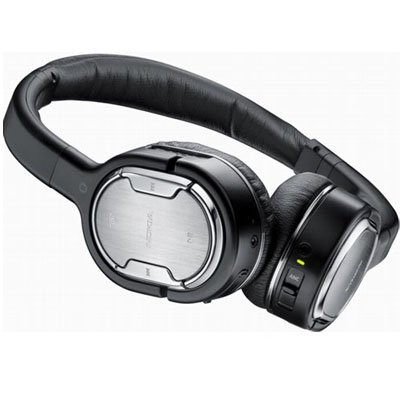
Image: The Nokia Bluetooth Stereo Headset BH-905, showcasing its sleek design and over-ear cups.
주요 특징
- 능동형 소음 제거(ANC): Significantly reduces ambient noise for an immersive listening experience.
- 마이크 10개: Utilizes 8 microphones for noise capture and 2 for clear speech transmission in loud surroundings.
- 폭넓은 호환성: Connects wirelessly via Bluetooth or wired to a variety of mobile phones, music players, and other audio devices.
- 끊김 없는 제어: Intuitive controls allow for easy switching between music and calls without needing to look at the device.
설정
블루투스 페어링
- 헤드셋이 충전되어 있고 전원이 꺼져 있는지 확인하십시오.
- 모바일 기기에서 Bluetooth를 활성화하세요.
- Press and hold the power button on the headset until the indicator light flashes blue rapidly, indicating pairing mode.
- On your device, search for Bluetooth devices and select "Nokia BH-905" from the list.
- If prompted, enter the passcode (usually "0000").
- 페어링이 완료되면 표시등이 파란색으로 계속 켜지거나 천천히 깜빡입니다.
유선 연결
For devices without Bluetooth or when battery is low, use the provided audio cables. The headset includes plugs for standard audio jacks and airplane adapters for versatile use.
- Connect one end of the audio cable to the headset's audio input port.
- Connect the other end to your audio source (e.g., mobile phone, MP3 player, airplane entertainment system).
작동 지침
전원 켜기/끄기
- 전원을 켜려면 표시등이 켜질 때까지 전원 버튼을 길게 누르세요.
- 전원을 끄려면 표시등이 꺼질 때까지 전원 버튼을 길게 누르십시오.
능동 잡음 제거 (ANC)
The BH-905 features advanced Active Noise Cancellation technology. With 8 dedicated microphones, it captures ambient low-frequency noise and generates an inverse sound wave, effectively canceling out unwanted sounds. This allows for a clearer audio experience, especially in noisy environments like airplanes or busy streets.
- To activate ANC, locate the ANC switch on the headset and slide it to the 'On' position. A green indicator light will confirm activation.
- To deactivate ANC, slide the switch to the 'Off' position.
통화 관리
The headset is equipped with 2 microphones specifically designed for speech. These microphones not only capture your voice clearly but also work to cancel out ambient noise, ensuring that the person you are speaking with hears you, not your surroundings.
- 전화 받기 / 끊기 : Use the dedicated call button on the headset.
- Switching between Music and Calls: The headset allows for seamless transitions between listening to music and taking calls. When a call comes in, your music will pause, and you can answer the call directly from the headset.
음악 재생
Control your music directly from the headset using the intuitive buttons. The design supports "blind usage," meaning you can operate the controls by feel without needing to look at them.
- 재생/일시 중지: 재생/일시정지 버튼을 사용하세요.
- 트랙 건너 뛰기 : Use the forward/backward track buttons.
- 볼륨 조절: 전용 볼륨 버튼을 사용하여 볼륨을 조절하세요.
Video: An official Nokia video demonstrating the features and technology behind the BH-905 headset, including its active noise cancellation and multi-microphone system for clear audio and calls.
유지
- 부드럽고 마른 천으로 헤드셋을 정기적으로 청소하세요.
- 헤드셋을 극한 온도, 습기 또는 직사광선에 노출시키지 마십시오.
- Store the headset in its protective case when not in use to prevent damage.
- 헤드셋을 분해하거나 개조하지 마십시오. 그렇게 하면 보증이 무효화됩니다.
문제 해결
- 전원 없음: 헤드셋이 완전히 충전되었는지 확인하세요.
- 페어링할 수 없습니다: Make sure the headset is in pairing mode and within range of your device. Try restarting both devices.
- 소리가 나지 않음/음질이 나쁨: Check volume levels on both the headset and your connected device. For wired connections, ensure cables are securely plugged in. For Bluetooth, ensure a stable connection.
- ANC가 효과적으로 작동하지 않음: ANC 스위치가 '켜짐' 위치에 있는지 확인하십시오.
- Callers Cannot Hear Me Clearly: Ensure the headset's microphones are not obstructed.
If issues persist, refer to the Nokia support web추가 지원이 필요하면 사이트를 방문하거나 고객 서비스에 문의하세요.
명세서
| 특징 | 사양 |
|---|---|
| 상표 | 노키아 |
| 모델 번호 | 02716J5 |
| 폼 팩터 | Over-ear (two_ear) |
| 소음 제어 | 능동 소음 제거 |
| 연결 기술 | 블루투스, 유선 |
| 무선 통신 기술 | 블루투스 |
| 추가 기능 | Microphone; Stereo |
| 제어 유형 | 미디어 제어 |
| 품목 무게 | 0.32 파운드 |
| 한국어: | 758478021477 |
| GTIN | 758478021477 |
보증 및 지원
The Nokia Bluetooth Stereo Headset BH-905 comes with a 12개월 보증 구매일로부터. 본 보증은 정상적인 사용 중 발생한 제조상의 결함에 적용됩니다. 보증 청구를 위해 구매 증빙 서류를 보관해 주십시오.
For technical support, warranty service, or additional information, please visit the official Nokia support website or contact your local Nokia customer service center.