
소개
The Sharp AQUOS BD-HDW43 is a 320GB Blu-ray recorder featuring dual-tuner simultaneous full HD recording. This advanced model supports up to 8.5x full HD recording, allowing approximately 36 hours of recording on a single 50GB Blu-ray disc. It is designed to record full HD video, 5.1ch audio, and linked data with high-quality pure recording, enabling full digital double recording for extended high-definition recording of two programs simultaneously. This manual provides essential information for setting up, operating, maintaining, and troubleshooting your device.

그림 1: 전면 view of the Sharp AQUOS BD-HDW43 Blu-ray Recorder.
설정
Follow these steps to properly set up your Sharp AQUOS BD-HDW43 Blu-ray Recorder:
- 짐 풀기: Carefully remove the recorder and all accessories from the packaging. Ensure all components are present.
- 놓기: 녹음기를 통풍이 잘 되는 안정되고 평평한 곳에 설치하십시오. 열원 근처나 직사광선에 노출되지 않도록 하십시오.
- 안테나 연결: Connect your TV antenna cable to the 'Antenna Input' terminal on the rear of the recorder. Then, connect an RF cable from the 'Antenna Output' terminal on the recorder to the 'Antenna Input' on your television.
- 비디오/오디오 연결(HDMI): For the best picture and sound quality, connect an HDMI cable from the HDMI output terminal on the recorder to an available HDMI input on your TV.
- 기타 연결(선택 사항):
- LAN : Connect an Ethernet cable to the LAN terminal for network features.
- DV Terminal: Use for connecting compatible digital video cameras.
- D-Terminal (D4x1): For connecting to TVs with D-terminal inputs.
- 광학 디지털 오디오: For high-quality digital audio output to an amplifier 또는 홈 시어터 시스템.
- 전원 연결: Plug the power cord into the AC inlet on the recorder, then into a wall outlet.
- 초기 설정 : Turn on the recorder and your TV. Follow the on-screen instructions for initial setup, including channel scanning and clock settings.

Figure 2: Rear panel connections of the Sharp AQUOS BD-HDW43 Blu-ray Recorder.
작동 지침
This section covers basic operations of your Blu-ray recorder.
녹화 프로그램
- 예약 녹화 : Access the electronic program guide (EPG) to select programs for recording. The BD-HDW43 supports dual-tuner simultaneous recording, allowing you to record two programs at once.
- 녹음 모드: Choose from various recording modes, including full HD recording at up to 8.5x compression, which maximizes storage capacity while maintaining high video quality.
- 즉시 녹음: Press the 'Record' button on the remote control to start recording the currently view에드 프로그램.
재생
- HDD 재생: Navigate to the recorded title list to select and play back programs stored on the internal hard disk drive.
- 블루레이/DVD 재생: Insert a Blu-ray disc or DVD into the disc drive. The recorder will typically start playback automatically. Use the remote control for playback functions such as play, pause, stop, fast forward, and rewind.
디스크 관리
- 더빙: Transfer recorded content from the HDD to a Blu-ray disc or DVD. Refer to the on-screen menu for dubbing options and settings.
- 디스크 마무리 작업: After recording to a BD-R/RE or DVD-R/RW, finalize the disc if you intend to play it on other compatible players.
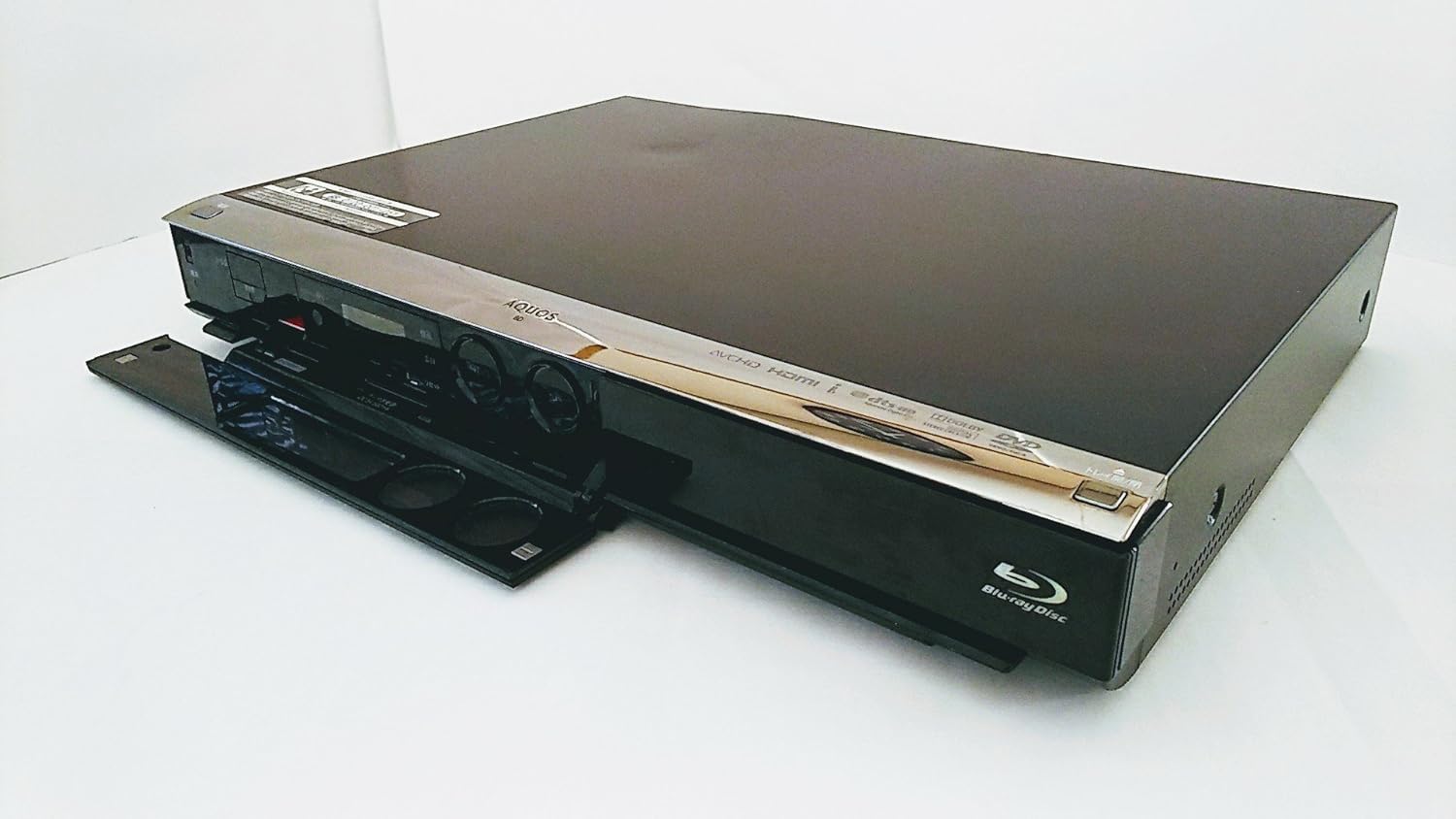
Figure 3: Front panel of the recorder with the disc tray open, showing controls.
유지
적절한 유지 관리는 녹음기의 수명과 최적의 성능을 보장합니다.
- 장치 청소: Wipe the exterior of the recorder with a soft, dry cloth. Do not use liquid cleaners, abrasive pads, or chemical sprays, as these can damage the finish.
- 디스크 관리: Handle discs by their edges. Keep them clean and free of scratches. Store discs in their cases when not in use. Avoid exposing discs to direct sunlight or extreme temperatures.
- 통풍: Ensure that the ventilation openings on the recorder are not blocked. Adequate airflow prevents overheating.
- 펌웨어 업데이트: Periodically check the Sharp support website for any available firmware updates for your model. Updates can improve performance and add new features.
문제 해결
If you encounter issues with your recorder, refer to the following common problems and solutions:
| 문제 | 가능한 원인 / 해결책 |
|---|---|
| 전원이 없습니다 | Ensure the power cord is securely plugged into both the recorder and a working wall outlet. |
| TV에 화면/소리가 나오지 않습니다 | Check all video and audio cables (e.g., HDMI) are correctly connected. Ensure the TV input is set to the correct source (e.g., HDMI 1). |
| Disc Not Reading / Playback Issues | Ensure the disc is clean and free of scratches. Try a different disc to rule out a faulty disc. If the issue persists, the disc drive may require servicing. |
| 리모콘이 응답하지 않음 | Check the batteries in the remote control and replace them if necessary. Ensure there are no obstructions between the remote and the recorder's IR sensor. If using a universal remote, ensure it is programmed correctly for Sharp devices. |
| Poor Recording Quality (especially at 8.5x mode) | Highly compressed recording modes (like 8.5x) may show reduced detail or artifacts, especially in fast-moving scenes or complex images. For critical recordings, use a lower compression mode (e.g., 5x or less) for better quality. |
| Scheduled Recording Failed | Verify that the program guide information is correct and that the recorder was powered on or in standby mode at the scheduled time. Check for conflicting recordings. |
명세서
Detailed technical specifications for the Sharp AQUOS BD-HDW43 Blu-ray Recorder:
- 상표: 날카로운
- 모델 번호: BD-HDW43
- 저장 용량: 320GB 하드디스크
- 튜너: 2 (Dual-tuner simultaneous recording)
- 호환 가능한 미디어 : BD/DVD-R/-RW
- 해결: 1920 x 1080 pixels (1080p video output)
- 연결 기술 : HDMI, USB
- 입력/출력 단자:
- LAN Terminal: Yes
- DV Terminal: Yes
- D-Terminal (Output): D4x1
- Optical Digital Audio (Output): 1
- HDMI Terminal (Output): 1
- HDD Recording Time: Approximately 453 hours (standard mode) / 28 hours (high quality mode)
- Media Recording Time: Approximately 36 hours (8.5x full HD recording on 50GB BD) / 4.3 hours (standard mode on 50GB BD)
- High-speed HD Dubbing (HDD to Disc): 60배
- Max Scheduled Programs: 65/년
- 3D 비디오: 지원되지 않음
- 진행형 스캔: 지원됨
- 프로그램 가이드(EPG): 예
- 오디오 출력 모드: 스테레오, 서라운드
- 지원되는 오디오 형식: 돌비 디지털, DTS, PCM
- 스피커 채널 구성: 5.1
- 비디오 인코딩 형식: H.264/AVC
- 호환 장치: TV
- 아날로그 비디오 형식: 한국어:
- File Formats (Playback): MP4, AVI, MP3, JPEG
- 품목 무게: 4.5kg

Figure 4: Product label showing model number BD-HDW43 and other details.
보증 및 지원
For warranty information, technical support, or service inquiries, please contact Sharp customer service directly. Details regarding your product's warranty period and terms can typically be found in the documentation included with your purchase or on the official Sharp web대지.
제조업체: 샤프 주식회사