
Creative Inspire S2
Creative Inspire S2 블루투스 무선 멀티미디어 스피커 시스템 사용 설명서
Model: Inspire S2 (51MF0390AA003)
제품 끝view
The Creative Inspire S2 Bluetooth Wireless Multimedia Speaker System provides high-quality audio through its two satellite speakers and a subwoofer, with the added convenience of Bluetooth wireless connectivity. This system is designed for use with computers and other Bluetooth-enabled devices, offering a versatile audio solution.
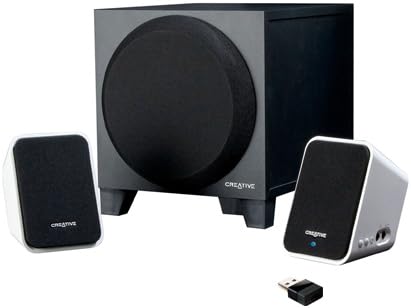
Image: The Creative Inspire S2 system, showing the central subwoofer unit, two compact satellite speakers, and a small USB Bluetooth transmitter. The satellite speakers are white with black grilles, and the subwoofer is black.
상자 내용물
모든 구성품이 포장에 들어 있는지 확인하세요.
- 두 개의 위성 스피커
- 하나의 서브우퍼
- USB 블루투스 송신기
- 범용 전원 어댑터
- 빠른 시작 가이드(자세한 지침은 이 설명서를 참조하세요)
- Warranty/Technical Support Leaflet
설치 지침
1. 물리적 연결
- 위치: Place the subwoofer on the floor or a sturdy surface. Position the two satellite speakers on either side of your computer monitor or listening area for optimal stereo separation.
- 위성 스피커 연결: 위성 스피커의 케이블을 서브우퍼 뒷면의 해당 포트에 연결하십시오. 단단히 연결되었는지 확인하십시오.
- 전원 연결: Plug the universal power adapter into the subwoofer's power input, then connect the adapter to a wall outlet.
2. Bluetooth Connection (Wireless Audio)
For Computers (using included USB Bluetooth Transmitter):
- 송신기 삽입: Plug the included USB Bluetooth transmitter into an available USB port on your computer. Your computer may automatically install necessary drivers.
- Power On Speakers: Ensure the speaker system is powered on. The power button is typically located on one of the satellite speakers. A green light should indicate power.
- 자동 페어링: The speaker system and USB transmitter should automatically pair. A blue light on the satellite speaker will indicate a successful Bluetooth connection.
- 오디오 출력 선택: On your computer, navigate to your sound settings and select the "Creative Inspire S2" or similar Bluetooth audio device as your default playback device.
For Other Bluetooth Devices (e.g., Smartphones, Tablets, Laptops with built-in Bluetooth):
- Power Off Speakers: Ensure the speaker system is turned off.
- 페어링 모드 시작: With the speakers off, press and hold the '+' (volume up) button on the satellite speaker. Continue holding until a blue light begins to flash rapidly. This indicates the speakers are in pairing mode.
- 기기에서 블루투스를 활성화하세요: On your smartphone, tablet, or laptop, go to the Bluetooth settings and ensure Bluetooth is enabled.
- Select "Inspire S2": In the list of available devices, select "Inspire S2" (or similar). If prompted for a passcode, enter "0000" (four zeros).
- 연결 확인: Once paired, the blue light on the satellite speaker will become solid, indicating a successful connection.
3. Wired Connection (Auxiliary Input)
The Inspire S2 system also supports a wired connection for devices without Bluetooth or for a direct audio link.
- 오디오 케이블 연결: Connect a 3.5mm audio cable (not included) from the audio output of your device (e.g., MP3 player, laptop headphone jack) to the "Audio In" port on the side of the satellite speaker.
- Power On Speakers: 스피커 시스템의 전원이 켜져 있는지 확인하십시오.
- 재생: Begin audio playback from your connected device. The system will automatically prioritize the wired input if a cable is connected.
작동 지침
전원 켜기/끄기
- To power on the system, press the power button located on one of the satellite speakers. A green LED will illuminate.
- To power off, press the power button again. The LED will turn off.
볼륨 조절
- Use the '+' and '-' buttons on the satellite speaker to adjust the system's volume.
- You can also control the volume from your connected Bluetooth device or computer.
오디오 재생
- Once connected via Bluetooth or auxiliary cable, simply start playing audio from your source device.
- Ensure the volume on both the speaker system and your source device is adjusted appropriately.
유지
- 청소: Use a soft, dry cloth to clean the surfaces of the speakers and subwoofer. Avoid using liquid cleaners or abrasive materials.
- 놓기: Ensure the speakers are placed on stable surfaces to prevent accidental falls. Avoid placing them in direct sunlight, near heat sources, or in excessively humid environments.
- 통풍: Do not block the ventilation openings on the subwoofer to ensure proper airflow and prevent overheating.
- 케이블 관리 : Keep cables organized and untangled to prevent damage and tripping hazards.
문제 해결
| 문제 | 가능한 해결책 |
|---|---|
| 스피커에서 소리가 나지 않습니다. |
|
| Bluetooth device cannot pair or connect. |
|
| 소리가 왜곡되거나 간헐적입니다. |
|
| Speakers turn off unexpectedly when using auxiliary input. |
|
명세서
| 특징 | 세부 사항 |
|---|---|
| 모델명 | Inspire S2 |
| 모델 번호 | 51MF0390AA003 |
| 스피커 유형 | Desktop Multimedia Speaker System |
| 연결 기술 | Bluetooth Wireless, Wired (3.5mm Auxiliary) |
| 스피커 최대 출력 전력 | 7와트(RMS) |
| 신호 대 잡음 비율 | 75데시벨 |
| Product Dimensions (Satellite) | 2.9 x 2.9 x 4.05 인치(대략) |
| 품목 무게 | 3파운드(전체 시스템) |
| 전원 | 코드식 전기 |
| 특별 기능 | USB Bluetooth technology, Creative DIRECT-THROW subwoofer, easy-access controls, Energy Star qualified |
보증 및 지원
For warranty information and technical support, please refer to the warranty/technical support leaflet included in your product packaging. You may also visit the official Creative web최신 지원 리소스, FAQ 및 연락처 정보를 제공하는 사이트입니다.
온라인 지원: www.creative.com/support
Ask a question about this manual
Ask about setup, troubleshooting, compatibility, parts, safety, or missing instructions. Manuals+ will review the question and use this page’s manual context to help answer it.