
소개
구매해주셔서 감사합니다asing the Snakebyte Wireless Bluetooth Premium PS3 Controller. This manual provides detailed instructions for setting up, operating, maintaining, and troubleshooting your new controller. Please read this manual thoroughly before use to ensure optimal performance and longevity of your device.
패키지 내용
패키지에 모든 품목이 들어 있는지 확인하세요.
- Snakebyte Wireless Bluetooth Premium PS3 Controller
- USB Charging Cable (approximately 3 meters)
- 사용 설명서(본 문서)

Image: The Snakebyte Wireless Bluetooth Premium PS3 Controller shown in its retail blister packaging, indicating the product and included cable.
설정
1. 컨트롤러 충전
Before initial use, fully charge the controller. Connect the supplied USB charging cable to the controller's charging port and the other end to a USB port on your PlayStation 3 console or a compatible USB power adapter. The indicator lights on the controller will show charging status and turn off or change color when fully charged.
2. PlayStation 3 연결하기
To connect the controller wirelessly to your PlayStation 3 console:
- 플레이스테이션 3 콘솔의 전원이 켜져 있는지 확인하십시오.
- Connect the controller to the PS3 console using the supplied USB charging cable. This will register the controller with the console.
- 를 누르세요 PS 버튼 (located in the center of the controller) once. The controller will power on and attempt to establish a connection.
- Once the controller is registered and connected, the indicator lights will illuminate, typically assigning a player number.
- You can now disconnect the USB cable for wireless gameplay. If the connection is lost, reconnect the USB cable and press the PS button again.

이미지: 앞면 view of the Snakebyte Wireless Bluetooth Premium PS3 Controller, showing the button layout including the central PS button.
작동 지침
컨트롤러 레이아웃 및 기능
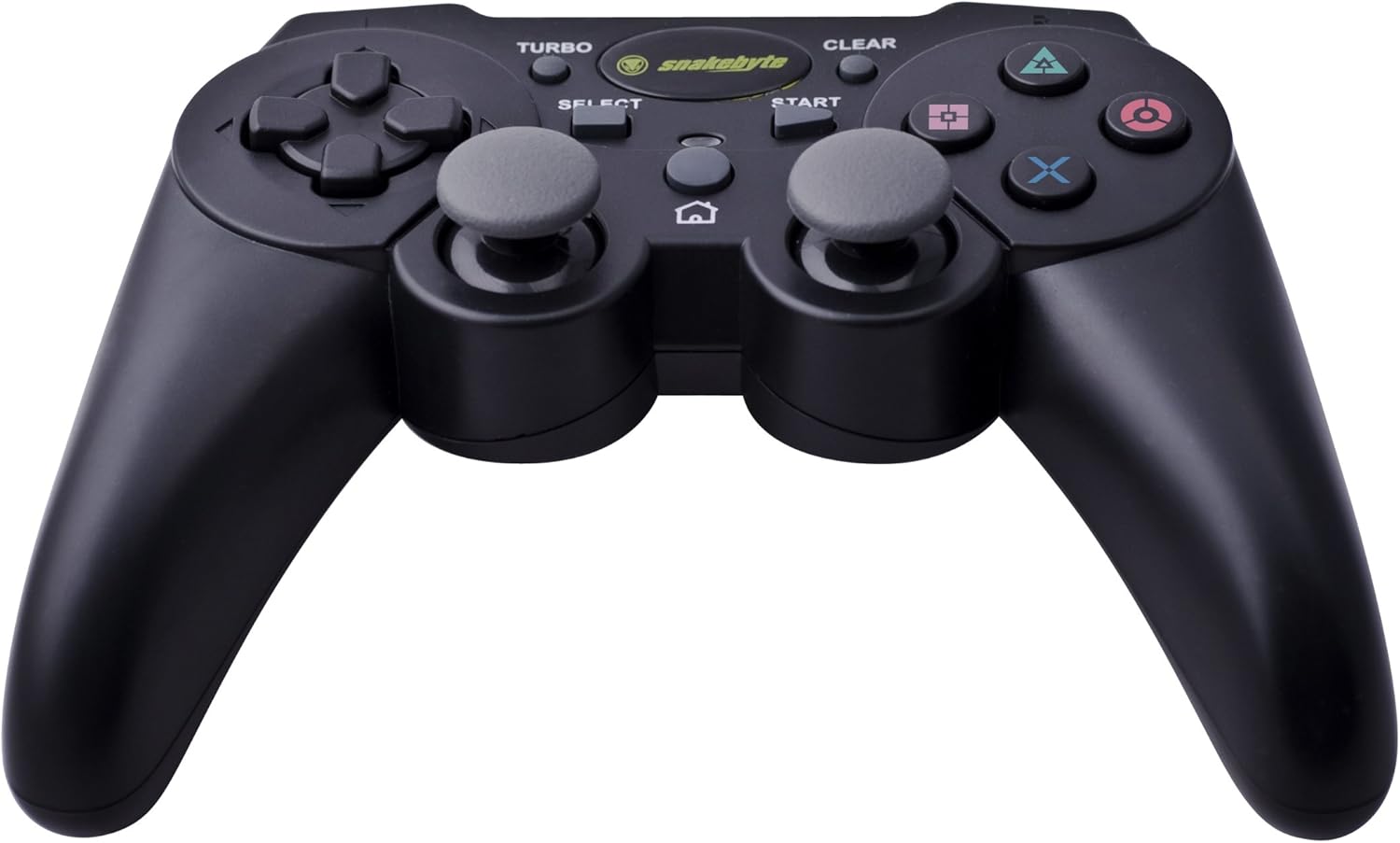
Image: The Snakebyte Wireless Bluetooth Premium PS3 Controller, highlighting the dual analog sticks and various buttons.
- 방향 패드(D-패드): For precise directional input in games.
- 왼쪽 아날로그 스틱: 주요 동작 제어.
- 오른쪽 아날로그 스틱: 카메라 제어 또는 2차적 움직임.
- 액션 버튼(삼각형, 원, 엑스, 사각형): 게임별 동작.
- L1/R1 버튼: 게임 내 다양한 기능을 위한 어깨 버튼.
- L2/R2 트리거: Analog triggers for pressure-sensitive input, often used for acceleration/braking or aiming/firing.
- 시작 버튼: 게임을 일시 정지하거나 메뉴를 엽니다.
- 선택 버튼: Opens in-game maps, inventories, or other menus.
- PS 버튼: Powers on the controller, accesses the PS3 XMB (Cross Media Bar) menu, or turns off the controller/console.
- 터보 버튼: Activates the turbo function for other buttons.
- 지우기 버튼: 터보 기능을 비활성화합니다.
터보 기능
The controller features a TURBO function, allowing a selected button to register multiple presses rapidly with a single hold. This can be useful for certain game mechanics.
- To activate TURBO: Press and hold the 터보 버튼, then press the desired action button (e.g., Cross, Square, Circle, Triangle, L1, R1, L2, R2). Release both buttons. The selected button will now have the TURBO function enabled.
- To deactivate TURBO for a specific button: Press and hold the 지우기 버튼, then press the button for which TURBO is currently active. Release both buttons.
- To deactivate all TURBO functions: Press the 지우기 버튼 once without holding it down.
Motion Sensing and Vibration Feedback
This controller supports motion sensing capabilities, allowing for intuitive control in compatible games. It also provides vibration feedback to enhance immersion during gameplay, reacting to in-game events such as impacts or explosions.
전원 켜기 및 끄기
- 전원을 켜려면: 누르세요 PS 버튼.
- To power off: The controller will automatically enter sleep mode after a period of inactivity to conserve battery. Alternatively, you can hold the PS 버튼 for several seconds to bring up the PS3 menu, where you can choose to turn off the controller.
유지
- 청소: 부드럽고 마른 천을 사용하여 컨트롤러를 닦으세요. 연마성 세제나 용제는 사용하지 마세요.
- 저장: 컨트롤러는 직사광선과 극한의 온도를 피해 서늘하고 건조한 곳에 보관하세요.
- 배터리 관리 : 배터리 수명을 연장하려면 컨트롤러를 자주 완전히 방전시키지 마십시오. 계속 사용하지 않더라도 정기적으로 충전하십시오.
- 손상을 방지하세요: Do not drop the controller or expose it to excessive force or moisture.
문제 해결
| 문제 | 가능한 해결책 |
|---|---|
| 컨트롤러가 무선으로 연결되지 않습니다. |
|
| 버튼이나 아날로그 스틱이 반응하지 않습니다. |
|
| 컨트롤러가 충전되지 않습니다. |
|
컨트롤러 재설정
If the controller behaves erratically or becomes unresponsive, you can perform a reset. Locate the small reset button on the back of the controller (often in a small hole). Use a thin, pointed object (like a straightened paperclip) to press and hold the reset button for a few seconds. This will restart the controller's internal electronics.
명세서
- 상표: 스네이크바이트
- 모델 번호: SB904714
- 호환 플랫폼 : 소니 플레이스테이션 3
- 연결성: 무선(블루투스)
- 버튼 수: 16
- 치수(길이 x 너비 x 높이): 약 23.01 x 16.31 x 8.51cm(9.06 x 6.42 x 3.35인치)
- 무게: 약 419.99g(0.93파운드)
- 색상: 검은색
보증 및 지원
For warranty information and technical support, please refer to the documentation provided with your purchase or contact your retailer. You may also visit the official Snakebyte web추가 지원 및 제품 정보는 해당 사이트를 참조하십시오.