
Aroma AMT-530 Clip Tuner Metronome
사용자 설명서
소개
구매해주셔서 감사합니다asing the Aroma AMT-530 Clip Tuner Metronome. This compact and versatile device is designed to assist musicians in tuning various instruments and maintaining precise rhythm during practice. It combines a highly accurate tuner with a functional metronome, all in a convenient clip-on design.
Please read this manual carefully to understand the features and operation of your AMT-530.
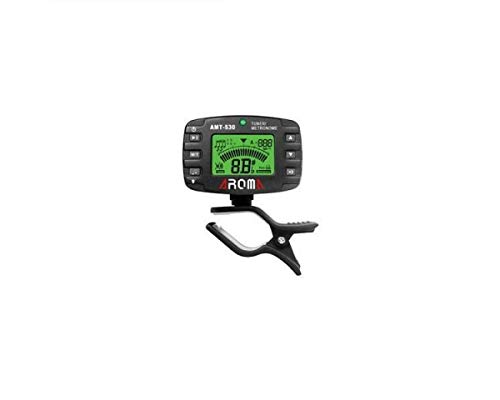
이미지: 앞면 view of the Aroma AMT-530 Clip Tuner Metronome, showing the display and control buttons.
제품 특징
- 튜닝 모드: Chromatic (C), Guitar (G), Bass (B), Ukulele (U), Violin (V).
- 감지 범위: A0 (27.5Hz) – C8 (4186.00Hz).
- Tuning Type: Clip (vibration sensor).
- Pitch Base: 430 Hz – 450 Hz.
- 튜닝 정확도: ± 0.5 cent.
- 표시하다: Two-color backlight for improved readability.
- 기능: Tuner and Metronome.
설정
1. 배터리 설치
The AMT-530 typically uses a CR2032 coin cell battery. To install or replace the battery:
- 장치 뒷면에서 배터리 칸을 찾으세요.
- 구획 덮개를 엽니다.
- 새 CR2032 배터리를 양극(+)이 위를 향하게 하여 삽입하세요.
- 배터리 덮개를 단단히 닫으세요.
2. 전원 켜기 / 끄기
를 누르고 계세요 전원 버튼 (usually located on the top left) for a few seconds to turn the device on or off.
3. Attaching to Instrument
The AMT-530 features a clip-on design. Attach the clip securely to the headstock of your instrument (for tuning) or to a music stand/sheet music (for metronome use). Ensure the display is visible for easy reading.
작동 지침
튜너 모드
In Tuner Mode, the device detects the vibration of your instrument to display the note and indicate whether it is sharp, flat, or in tune.
- 모드 선택: 를 누르세요 M/T 버튼 (Mode/Tuner) to switch to Tuner Mode. The display will show "TUNER".
- 악기를 선택하세요: 반복해서 누르세요 Tuning Item button (often labeled with a musical note icon) to cycle through the available tuning items: Chromatic (C), Guitar (G), Bass (B), Ukulele (U), Violin (V). Select the appropriate setting for your instrument.
- Adjust Pitch Base (A4): 를 누르세요 A4 버튼 (often labeled with a speaker icon or A4) to adjust the A4 reference pitch, typically from 430 Hz to 450 Hz. The standard is 440 Hz.
- 악기 튜닝: Pluck a single string on your instrument. The display will show the detected note and a meter indicating if the note is flat, sharp, or in tune.
- If the backlight is 빨간색 and the needle is to the left, the note is flat.
- If the backlight is 빨간색 and the needle is to the right, the note is sharp.
- If the backlight is 녹색 and the needle is in the center, the note is in tune.

Image: The AMT-530 display showing tuner mode, indicating a note and the A4 reference pitch, clipped to a guitar headstock.
메트로놈 모드
In Metronome Mode, the device provides a steady beat to help you practice rhythm and timing.
- 모드 선택: 를 누르세요 M/T 버튼 to switch to Metronome Mode. The display will show "METRONOME".
- 템포(BPM) 조정: 사용하세요 위/아래 화살표 버튼 (often on the right side) to adjust the Beats Per Minute (BPM).
- Select Beat: 를 누르세요 비트 버튼 (often labeled with a time signature icon) to cycle through different beat patterns (e.g., 1/4, 2/4, 3/4, 4/4, etc.).
- 리듬 선택: 를 누르세요 리듬 버튼 (often labeled with a note value icon) to choose different rhythmic subdivisions (e.g., quarter notes, eighth notes, triplets).
- Start/Stop Metronome: 를 누르세요 재생/일시정지 버튼 (often a triangle icon) to start or stop the metronome click.

Image: The AMT-530 display showing metronome mode, with BPM and beat pattern visible.
백라이트
The AMT-530 features a two-color backlight (red/green) for clear visibility in various lighting conditions. The backlight color changes in tuner mode to indicate tuning status.
유지
- 청소: 부드럽고 마른 천을 사용하여 기기를 닦으세요. 액체 세척제나 연마재를 사용하지 마세요.
- 저장: Store the AMT-530 in a cool, dry place away from direct sunlight and extreme temperatures.
- 배터리: 장기간 기기를 사용하지 않을 경우 누액을 방지하기 위해 배터리를 분리하십시오.
- 손질: 장치를 떨어뜨리거나 강한 충격을 가하지 마십시오.
문제 해결
- 기기의 전원이 켜지지 않습니다:
- 배터리가 극성이 올바르게 설치되었는지 확인하십시오.
- 배터리를 새 CR2032 배터리로 교체하십시오.
- Tuner is not detecting notes accurately:
- Ensure the tuner is securely clipped to the instrument's headstock or a part that vibrates well.
- Check for excessive background noise that might interfere with vibration detection.
- Verify that the correct tuning item (C, G, B, U, V) is selected for your instrument.
- Metronome sound is too low or absent:
- Ensure the volume is not set to minimum (if applicable, though not explicitly mentioned for this model, it's a common feature).
- The metronome primarily provides a visual beat on the display; audible clicks might be subtle or absent depending on the model's design.
명세서
| 특징 | 세부 사항 |
|---|---|
| 모델 | AMT-530 |
| 상표 | Aroma Housewares (AROMA) |
| 튜닝 아이템 | 크로매틱(C), 기타(G), 베이스(B), 우쿨렐레(U), 바이올린(V) |
| 감지 범위 | A0(27.5Hz) ~ C8(4186.00Hz) |
| 튜닝 유형 | Clip (vibration) |
| Pitch Base (A4) | 430Hz ~ 450Hz |
| 튜닝 정확도 | ± 0.5센트 |
| 부품 번호 | 6943207680078 |
| ASIN | B002BFKV10 |
보증 및 지원
For warranty information or technical support, please refer to the documentation provided with your purchase or contact Aroma Housewares customer service directly. Keep your proof of purchase for any warranty claims.