
1. 서론
This manual provides essential instructions for the safe and efficient operation, maintenance, and troubleshooting of your Walimex Pro Powermate CY-28ZLXT CY-300 JZL. Please read this manual thoroughly before using the product and retain it for future reference.
The Walimex Pro Powermate CY-28ZLXT CY-300 JZL is designed as a power accessory for professional camera and photo equipment, providing reliable power for various applications.
2. 안전 지침
- Always ensure the device is disconnected from the power source before cleaning or performing any maintenance.
- 기기를 습기, 비 또는 극한 온도에 노출시키지 마십시오.
- Use only Walimex Pro approved accessories and power adapters.
- 장치를 가연성 물질 가까이에 두지 마십시오.
- 기기를 직접 열거나 수리하지 마십시오. 모든 정비는 자격을 갖춘 기술자에게 맡기십시오.
- 과열을 방지하기 위해 작동 중에는 적절한 환기를 보장하십시오.
3. 제품 오버view 및 구성 요소
The Walimex Pro Powermate CY-28ZLXT CY-300 JZL is a robust power solution. Below is an image of the product for identification.
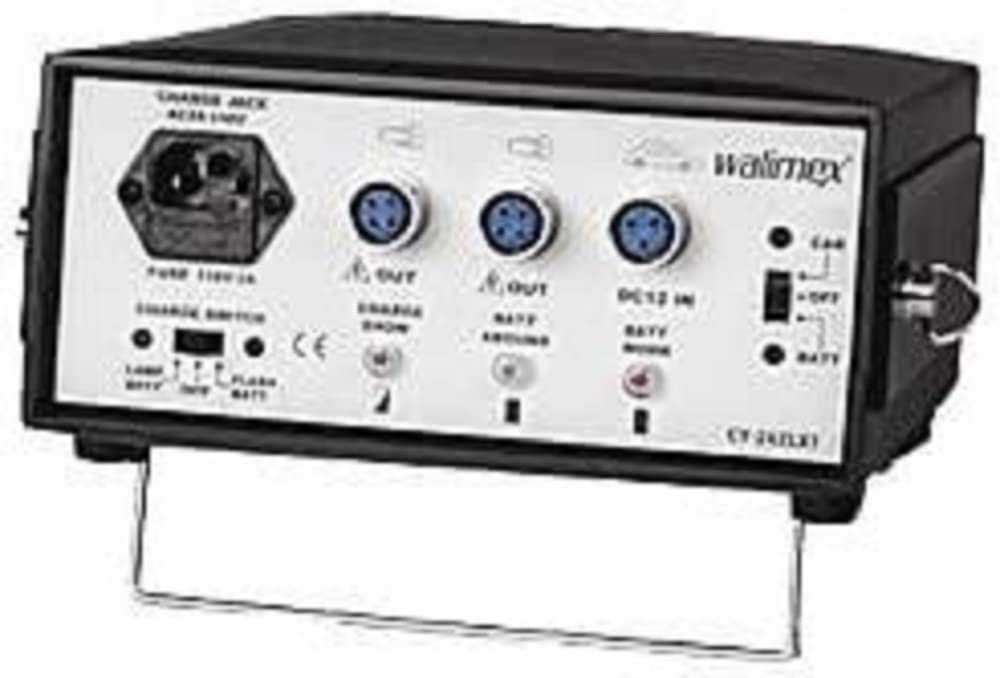
Image: Walimex Pro Powermate CY-28ZLXT CY-300 JZL. This image displays the main unit of the Powermate, showcasin컴팩트한 디자인과 다양한 연결 포트가 특징입니다.
주요 구성 요소는 일반적으로 다음과 같습니다.
- 주 전원 장치
- 전원 케이블
- Output Cables (specific to connected devices)
- Control Panel/Indicators
4. 설정 지침
- 짐 풀기: Carefully remove all components from the packaging. Verify that all parts listed in the product overview 존재합니다.
- 놓기: Place the Powermate unit on a stable, flat surface, ensuring adequate ventilation around the device. Avoid placing it near heat sources or in direct sunlight.
- 전원 연결:
- Connect the provided power cable to the Powermate's input port.
- 전원 케이블의 다른 쪽 끝을 적절한 콘센트에 꽂으십시오.
- 전원 콘센트가 vol을 충족하는지 확인하십시오.tage requirements specified in the product specifications.
- 연결 장치:
- Identify the correct output cable for your camera or lighting equipment.
- Connect the output cable to the appropriate port on the Powermate.
- Connect the other end of the output cable to your device. Ensure a secure connection.
5. 사용 설명서
- 전원 켜기: Press the main power button located on the unit. The indicator light should illuminate, signifying that the device is active.
- 상태 확인: Monitor the status indicators (if present) to ensure proper operation and battery charge levels.
- 설정 조정: If your model includes adjustable power output or other settings, refer to the specific controls on the unit to set them according to your equipment's requirements.
- 전원 끄기: After use, disconnect your equipment from the Powermate. Press and hold the main power button until the indicator light turns off. Disconnect the Powermate from the wall outlet if not in use for an extended period.
Charging the Powermate (if applicable)
If your Walimex Pro Powermate CY-28ZLXT CY-300 JZL includes an internal battery, follow these steps for charging:
- Connect the Powermate to a wall outlet using the provided power cable.
- The charging indicator light will typically show the charging status (e.g., blinking for charging, solid for fully charged).
- Allow the unit to charge completely before its first use or after prolonged storage.
6. 유지관리
- 청소: Disconnect the device from all power sources. Use a soft, dry cloth to wipe the exterior. Do not use liquid cleaners or abrasive materials.
- 저장: Store the Powermate in a cool, dry place, away from direct sunlight and extreme temperatures. If storing for an extended period, ensure the internal battery (if present) is charged to approximately 50-70% capacity.
- 배터리 관리(해당되는 경우): For models with internal batteries, avoid complete discharge and recharge regularly to prolong battery life.
7. 문제 해결
| 문제 | 가능한 원인 | 해결책 |
|---|---|---|
| 장치의 전원이 켜지지 않습니다. | No power from outlet; power cable loose; internal battery depleted (if applicable). | Check wall outlet with another device. Ensure power cable is securely connected. Charge the unit if it has an internal battery. |
| 연결된 장비에 전원이 공급되지 않습니다. | Output cable loose or incorrect; Powermate not powered on; equipment fault. | Verify output cable connection. Ensure Powermate is powered on. Test equipment with another power source if possible. |
| 과열. | 환기구 막힘; 과부하. | Ensure ventilation openings are clear. Reduce the load on the Powermate. Disconnect and allow to cool down. |
If the problem persists after attempting these solutions, please contact Walimex Pro customer support.
8. 사양
- 상표: Walimex Pro
- 모델: 12588 (CY-28ZLXT CY-300 JZL)
- 크기(패키지): 30.2 x 28.8 x 16.8cm
- 무게(패키지): 5.98kg(13.18파운드)
- ASIN: B001UAFALI
- 제품 참조: 4250234525886
- 제조업체: Walimex
- Note: Specific electrical output and input specifications may vary. Refer to the product label on your unit for precise details.
9. 보증 정보
Walimex Pro products are covered by a limited warranty against defects in materials and workmanship. The duration and terms of the warranty may vary by region and product. Please retain your proof of purchase for warranty claims.
The warranty does not cover damage caused by misuse, unauthorized modifications, accidents, or failure to follow the instructions in this manual. For detailed warranty terms and conditions, please visit the official Walimex Pro web사이트를 방문하거나 고객 지원팀에 문의하세요.
10. 고객 지원
For technical assistance, troubleshooting beyond this manual, or warranty inquiries, please contact Walimex Pro customer support.
- Web대지: www.walimexpro.com (지역에 따라 확인해주세요. web사이트)
- 이메일: 참조 web문의 양식이나 이메일 주소를 위한 사이트입니다.
- 핸드폰: 참조 web지역 전화번호를 알려주는 사이트입니다.
지원팀에 문의할 때는 제품 모델 번호(12588)와 구매 증빙 서류를 준비해 두시기 바랍니다.