
1. 서론
The Transformers Universe Deluxe Figure Acid Storm is a highly intelligent, eager, and dedicated Decepticon air warrior. Known as one of "The Rainmakers," Acid Storm possesses Hyperion3 blasters capable of seeding natural clouds with a highly destructive form of acid rain. This figure transforms between a formidable robot mode and a sleek fighter jet mode, offering dynamic play and display options.

Image: Transformers Universe Deluxe Figure Acid Storm in Robot Mode.
2. 안전 정보
- 질식 위험: 작은 부품. 3세 미만 어린이에게는 적합하지 않습니다.
- 화기나 극심한 열에 가까이 두지 마십시오.
- 변형 과정에서 과도한 힘을 가하지 마십시오. 피규어가 손상될 수 있습니다.
- 어린 아이들에게는 어른의 감독이 권장됩니다.
3. 구성 요소
Your Transformers Universe Deluxe Figure Acid Storm package includes:
- Acid Storm Figure (Robot Mode)
- 2 Launching Missiles (accessories)
- Double Hyperion3 Blasters (accessories)
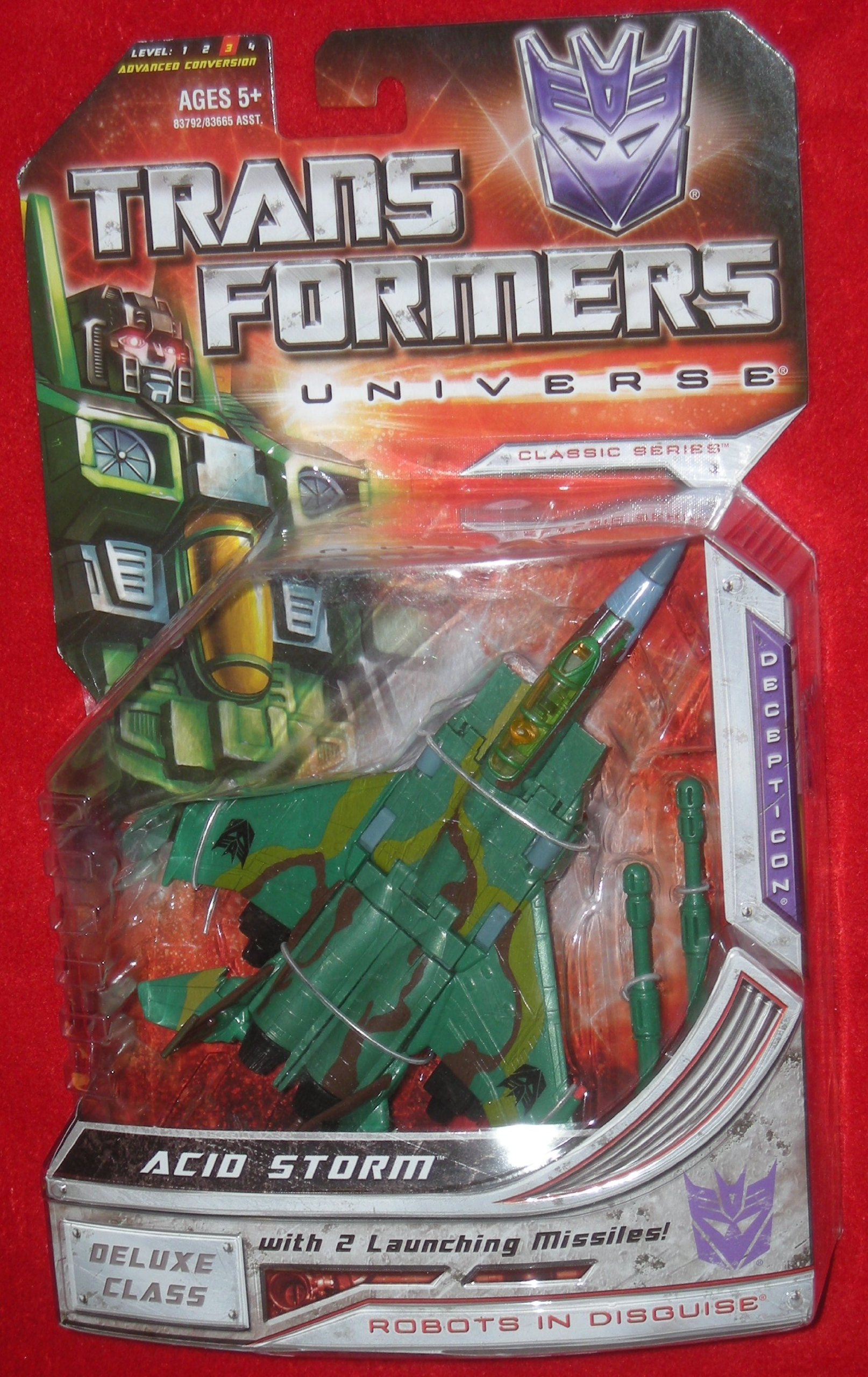
Image: Back of packaging detailing figure components and modes.
4. 변형
Acid Storm transforms between Robot Mode and Fighter Jet Mode. Follow these steps carefully.
4.1. Robot Mode to Fighter Jet Mode
- Remove all accessories (missiles, blasters) from the figure.
- 로봇의 손을 팔뚝 안으로 접으세요.
- 허리를 180도 돌리세요.
- Collapse the chest panel down to form the nosecone of the jet.
- Fold the robot's legs together, aligning them to form the rear fuselage of the jet.
- Rotate the wings from the back of the robot to align with the jet mode. Ensure the Decepticon insignias are facing upwards.
- Adjust the tail fins to their jet mode position.
- Attach the launching missiles to the designated ports under the wings.
- Ensure all panels are securely tabbed into place for a compact jet form.
4.2. Fighter Jet Mode to Robot Mode
- Remove all accessories (missiles, blasters) from the jet.
- Untab the fuselage sections and separate the legs.
- Rotate the legs into their robot mode orientation.
- Unfold the nosecone section to reveal the robot's chest and head.
- Rotate the waist 180 degrees to face forward.
- Rotate the wings and tail fins to position them on the robot's back.
- Extend the robot's arms and unfold the hands.
- Attach the Double Hyperion3 Blasters to the robot's hands.
- Ensure all parts are locked into their robot mode positions.
비디오: 제품 종료view demonstrating features and possibly transformation.
5. 작동 특징
- Launching Missiles: Insert the two launching missiles into the designated ports on the jet's wings. Press the small button near the missile to launch.
- Double Hyperion3 Blasters: These blasters can be held by the figure in robot mode. They can also be stored on the jet mode by attaching them to the underside ports.
- Flip Down Landing Gear: In fighter jet mode, locate the small landing gear components on the underside of the jet. Flip them down for ground display or up for flight mode.
6. 유지관리
- 청소: 부드럽고 마른 천으로 피규어를 닦으십시오. 독한 화학 약품이나 연마성 세척제를 사용하지 마십시오.
- 저장: 변색이나 소재의 변형을 방지하기 위해 직사광선을 피해 시원하고 건조한 곳에 보관하세요.
- 관절 관리: If joints become loose, apply a small amount of clear nail polish to the joint and allow it to dry completely to restore tightness.
7. 문제 해결
- Parts not aligning during transformation: Ensure all previous steps are completed correctly and that no parts are obstructing the movement. Refer to the transformation steps.
- 부속품이 맞지 않습니다. Check the orientation of the accessory and the port. Do not force accessories into place.
- 관절이 헐거워짐: Refer to the "Joint Care" section under Maintenance.
8. 사양
| 특징 | 세부 사항 |
|---|---|
| 제품 치수 | 7.6 x 7.48 x 2.91 인치 |
| 품목 무게 | 7.2 온스 |
| ASIN | B001DIRYO8 |
| 품목 모델 번호 | 653569325185 |
| 제조업체 | 하스브로 |
| 추천연령 | 8+ (based on similar products) |
9. 보증 및 지원
For warranty information or product support, please contact Hasbro customer service directly. Refer to the packaging for specific contact details or visit the official Hasbro web대지.
온라인 리소스: For additional information and community discussions, visit Transformers.com.