
소개
The TC Electronic G-System is a comprehensive, high-quality floor-based guitar system designed to provide a complete and integrated solution for guitar effects, control, and management. It combines two DSP sections to deliver top-tier effects, analog loops, amplifier switching capabilities, and floor control. The unit also offers 9VDC power outputs for external pedals, ensuring a high level of integration within your guitar rig.
The G-System offers flexibility in setup, allowing it to be used as a single floor unit or separated into a 19-inch rackmount processor with a dedicated floor control board. Users can customize effect routing, tailor the footswitch layout, and choose from over 25 different on-board effects to suit their specific needs.

Figure 1: TC Electronic G-System Floor Unit Overview
주요 특징
- 통합 효과 처리: Over 25 built-in effects, including Filter, Compressor, Modulation, Pitch, Delay, and Reverb.
- 유연한 디자인: Can be used as a standalone floor unit or separated into a 19-inch rackmount processor with a floor control board.
- External Pedal Integration: Four switchable mono-loops for integrating external effect pedals into the signal chain.
- Amplifier Switching: Built-in capabilities for controlling amp리파이어 채널.
- 전원 출력: Provides 9VDC power outputs for powering up to 9 external effects pedals.
- Seamless Preset Changes: Features fast and smooth preset changes with delay spill-over functionality.
- 사용자 친화적인 인터페이스: Intuitive footswitches and encoders for easy navigation and parameter editing.
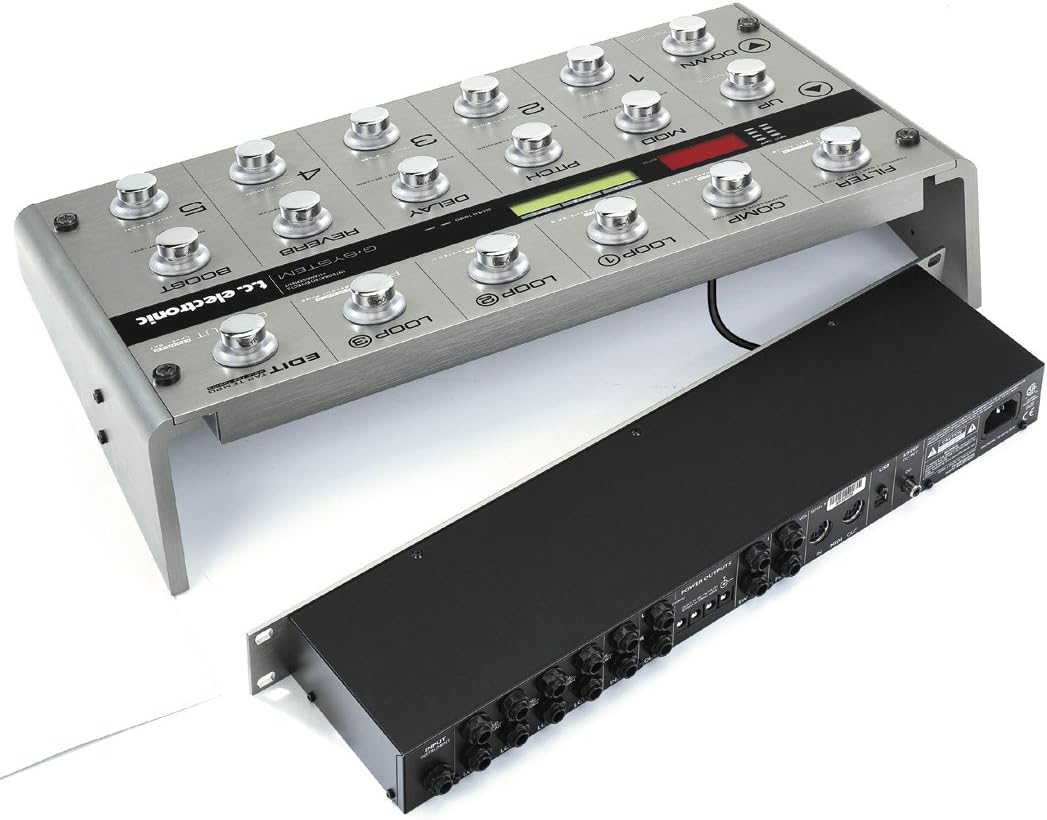
Figure 2: G-System Floor Unit and Rackmount Processor
설정
Proper setup of your G-System is crucial for optimal performance. The unit offers versatile configuration options to integrate seamlessly with your existing guitar rig.
물리적 배치
- Floor Unit Configuration: Place the G-System floor unit on a stable surface where it can be easily accessed by foot.
- Rackmount Configuration: If using the rackmount processor separately, install it in a standard 19-inch equipment rack. Connect the floor control board to the rack unit using a standard CAT5 cable (not included).
사이
Refer to the rear panel diagram for all input and output connections.

Figure 3: G-System Rackmount Processor Rear Panel Connections
- 기타 입력: Connect your guitar to the 'INPUT INSTRUMENT' jack.
- Amplifier 연결: Connect the 'OUTPUT 1' and 'OUTPUT 2' (L/R) jacks to your amplifier's input or effects return.
- External Effects Loops: Use the 'LOOP 1' through 'LOOP 4' Send/Return jacks to integrate your favorite external pedals. These loops are typically used for drive/distortion pedals.
- 힘: Connect the included power cable to the 'AC IN' port and a suitable power outlet.
- USB: The USB port can be used for software updates and communication with a computer.
- 미디: MIDI IN/OUT ports allow for external MIDI control or synchronization.
- S/PDIF 출력: For digital audio output to a DAW or other digital devices.
Powering External Pedals
The G-System provides dedicated 9VDC power outputs for your external pedals. Connect your pedals to these outputs using appropriate power cables.

Figure 4: G-System with External Pedals
운영
The G-System is designed for intuitive operation, allowing quick access to effects and presets.
기본 탐색
- UP/DOWN Footswitches: Navigate through presets or menu options.
- MENU MODE Footswitch: Access the main menu for deeper editing and system settings.
- ENTER/RETURN Footswitch: Confirm selections or return to the previous screen.
사전 설정 선택
The five footswitches (1-5) directly select presets within the current bank. The G-System holds 100 factory presets and 200 user memories, organized in banks of five.
Effect Control and Editing
The G-System features dedicated footswitches and encoders for controlling individual effects and parameters.
- Effect Footswitches: Engage or bypass individual effects such as MOD (Modulation), PITCH, DELAY, REVERB, FILTER, and COMP (Compressor).
- Encoders (A, B, C): Adjust parameters displayed on the LCD screen. The function of these encoders changes based on the selected effect or menu.
- LOOP Footswitches: Engage or bypass the external effects loops.
- 탭 템포: Set the tempo for time-based effects by tapping this footswitch.
- 후원: Activate the pre-set boost level for solos or emphasis.
사전 설정 저장
To save your customized settings, hold down one of the footswitches (1-5) labeled 'HOLD TO STORE' until the save menu appears. Follow the on-screen prompts to store your preset.
유지
To ensure the longevity and optimal performance of your TC Electronic G-System, follow these maintenance guidelines:
- 청소: Regularly wipe the unit with a soft, dry cloth. Avoid using abrasive cleaners, solvents, or waxes, as these can damage the finish and internal components.
- 환경 조건: Operate and store the G-System in a clean, dry environment. Avoid exposure to extreme temperatures, high humidity, direct sunlight, or excessive dust.
- 통풍: 과열을 방지하기 위해 장치의 통풍구가 막히지 않았는지 확인하세요.
- 펌웨어 업데이트: Periodically check the official TC Electronic website for firmware updates. Updates can provide new features, improvements, and bug fixes. Firmware can typically be updated via the USB port.
- 케이블 관리 : Ensure all cables are securely connected and not under undue stress. Avoid bending cables sharply or placing heavy objects on them.
문제 해결
If you encounter issues with your G-System, consider the following troubleshooting steps:
소리가 안 나거나 소리가 간헐적으로 들립니다.
- 연결 확인: Ensure all guitar, amplifier, and effects loop cables are securely plugged in and in the correct jacks.
- 전원 공급 장치: Verify that the G-System is receiving power and the power cable is firmly connected.
- 볼륨 레벨: Check the input and output levels on the G-System, as well as your amp앰프의 볼륨.
- Bypassed Effects: Ensure that the desired effects or loops are engaged and not bypassed.
- 외부 페달: If using external pedals in the loops, bypass them one by one to identify if a specific pedal is causing the issue.
Unexpected Effect Behavior
- Preset Check: Verify that you are on the intended preset and that its parameters are set correctly.
- 전역 설정: Some settings can affect all presets. Check the global settings menu for any unintended configurations.
- 공장 초기화 : As a last resort, a factory reset can restore the unit to its original settings. Consult the full manual on the TC Electronic website for instructions on performing a factory reset, as this will erase all user presets.
디스플레이 문제
- 차이: Adjust the display contrast in the system settings if the screen is difficult to read.
- 전원 주기: 기기를 끄고 몇 초 기다린 후 다시 켜십시오.
For more detailed troubleshooting or issues not covered here, please refer to the comprehensive manual available on the official TC Electronic web사이트를 방문하거나 고객 지원팀에 문의하세요.
명세서
| 특징 | 사양 |
|---|---|
| 모델 번호 | 963000011 |
| 품목 무게 | 17.2파운드(7.8kg) |
| 제품 치수 | 20.2 x 10.5 x 4.1인치(51.3 x 26.7 x 10.4cm) |
| 호환 장치 | 기타 |
| 하드웨어 인터페이스 | USB, MIDI |
| 신호 형식 | Analog, Digital (S/PDIF) |
| 전원 | 코드식 전기 |
| 권tage | 100V(교류) |
| Amp에라 지 | 0.2밀리amps |
| On-board Effects | 25+ (Filter, Comp, Mod, Pitch, Delay, Reverb, etc.) |
| External Loops | 4 switchable mono-loops |
| 전원 출력 | 9VDC for external pedals |
보증 및 지원
자세한 보증 정보, 제품 등록 및 기술 지원은 TC Electronic 공식 웹사이트를 방문하십시오. website. You can find comprehensive FAQs, downloadable manuals, and contact information for customer service there.
공식적인 Web대지: www.tcelectronic.com