1. 서론
This manual provides essential information for the safe and efficient use of your Hama USB 7.1 Surround Sound Card, Model 00051620. Please read these instructions carefully before using the device and keep them for future reference. This external sound card allows you to connect headphones, microphones, or speakers with a 3.5mm jack to your computer or tablet via a USB-A port, enhancing your audio experience with simulated 7.1 surround sound.
2. 안전 지침
- Do not open the device. Opening the device voids the warranty and may lead to electric shock.
- 먼지, 습기 및 과열로부터 제품을 보호하십시오.
- 본 제품을 원래의 용도로만 사용하세요.
- 제품을 떨어뜨리거나 심한 충격을 주지 마십시오.
- 모든 전기 제품과 마찬가지로 이 제품을 어린이의 손이 닿지 않는 곳에 보관하십시오.
- 해당 지역의 적용 규정에 따라 포장재를 즉시 폐기하세요.
3. 패키지 내용
패키지에 다음 품목이 포함되어 있는지 확인하십시오.
- 1x Hama USB 7.1 Surround Sound Card (Model 00051620)
- 1x 사용 설명서
4. 제품 오버view
The Hama USB 7.1 Surround Sound Card is a compact audio adapter designed to provide enhanced sound capabilities for your computer or tablet. It features a USB-A connector for easy plug-and-play functionality and includes dedicated ports for audio input and output.
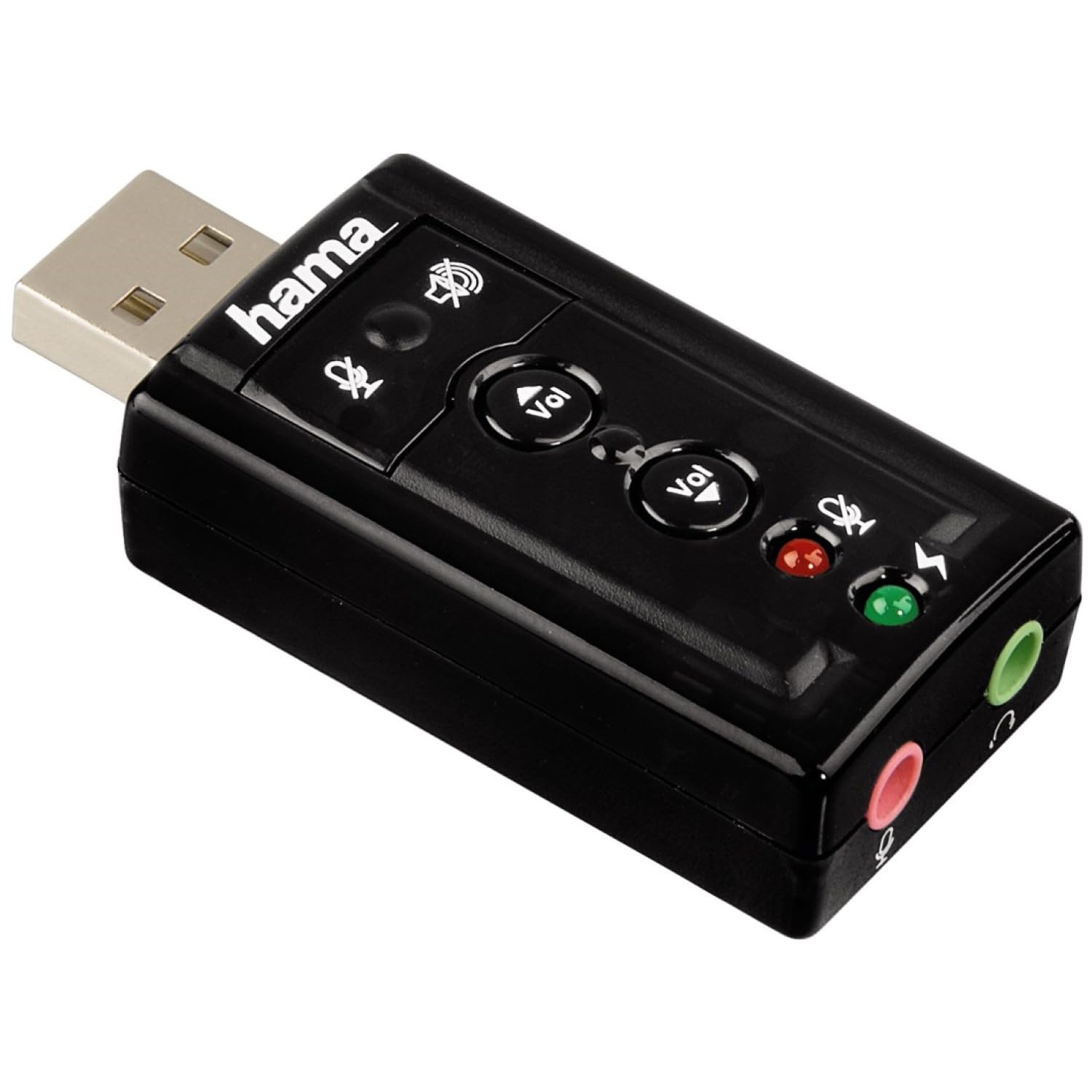
이미지 1: 상단 view of the Hama USB 7.1 Surround Sound Card, showing the USB-A connector, volume control buttons, and mute indicators.
컨트롤 및 포트:
- USB-A 커넥터: For connecting to your computer or tablet.
- 볼륨 크게 / 작게 버튼 : 오디오 출력 볼륨을 조절합니다.
- 마이크 음소거 버튼: Mutes or unmutes the connected microphone.
- 스피커 음소거 버튼: Mutes or unmutes the audio output to headphones/speakers.
- 3.5mm Microphone Jack (Red): 외부 마이크를 연결합니다.
- 3.5mm Headphone/Speaker Jack (Green): 헤드폰이나 스피커를 연결합니다.

이미지 2: 끝 view of the Hama USB 7.1 Surround Sound Card, highlighting the red microphone input jack and the green headphone/speaker output jack.
5. 시스템 요구 사항
- Operating System: Windows, macOS, or compatible tablet OS.
- 사용 가능한 USB-A 포트.
- Headphones, microphone, or speakers with a 3.5mm jack connector.
6. 설치 및 설정
- Connect the Sound Card: Plug the USB-A connector of the Hama USB 7.1 Surround Sound Card into an available USB-A port on your computer or tablet.
- 드라이버 설치: The device is typically plug-and-play, and your operating system should automatically detect and install the necessary drivers. If prompted, follow the on-screen instructions.
- 오디오 장치 연결:
- For headphones or speakers, connect the 3.5mm jack into the 녹색 port on the sound card.
- For a microphone, connect the 3.5mm jack into the 빨간색 port on the sound card.
- 오디오 설정 구성: Access your operating system's sound settings to ensure the Hama USB 7.1 Surround Sound Card is selected as the default playback and recording device.
- 소프트웨어 설치(선택 사항): For advanced features like XeaR-Sound 7.1 surround simulation, 10-band equalizer, and karaoke functions, install the dedicated software. Refer to the manufacturer's website for software downloads and installation instructions.
7. 운영
Basic Audio Control:
- 볼륨 조절: Use the 'Vol +' and 'Vol -' buttons on the sound card to increase or decrease the output volume.
- Mute Audio Output: Press the speaker mute button to temporarily silence the audio output. Press again to unmute.
- Mute Microphone Input: Press the microphone mute button to temporarily disable microphone input. Press again to enable.
고급 소프트웨어 기능:
If you have installed the optional software, you can access the following features:
- XeaR-Sound Technology: Enables simulated 7.1 crystal-clear surround sound for stereo speakers or headsets.
- 10밴드 이퀄라이저: Customize your audio experience with various presets (e.g., Jazz, Rock, Classic) or create your own.
- Additional Sound Effects: Apply various sound effects to your audio.
- Adjustable Room Acoustics: Modify the perceived acoustic environment.
- Karaoke Recording: Record karaoke performances with original voice suppression and tone adjustment capabilities.
8. 유지관리
The Hama USB 7.1 Surround Sound Card requires minimal maintenance.
- 약간 d로 장치를 청소하십시오amp, 보푸라기가 없는 천. 공격적인 세척제를 사용하지 마십시오.
- Ensure the USB port and audio jacks are free from dust and debris.
9. 문제 해결
사운드 출력 없음:
- Ensure the sound card is securely plugged into a USB port.
- Check if your headphones/speakers are correctly connected to the green jack.
- Verify that the speaker mute button on the sound card is not active.
- Confirm that the Hama USB 7.1 Surround Sound Card is selected as the default playback device in your operating system's sound settings.
- Adjust the volume using the sound card's buttons and your computer's volume controls.
마이크가 작동하지 않음:
- Ensure your microphone is correctly connected to the red jack.
- Verify that the microphone mute button on the sound card is not active.
- Confirm that the Hama USB 7.1 Surround Sound Card is selected as the default recording device in your operating system's sound settings.
- 운영체제의 마이크 개인정보 보호 설정을 확인하세요.
음질 문제:
- 모든 연결이 안전한지 확인하세요.
- Try connecting the sound card to a different USB port.
- If using the optional software, check equalizer settings and disable any sound effects that might be causing distortion.
10. 사양
| 특징 | 세부 사항 |
|---|---|
| 상표 | 하마 |
| 모델 번호 | 00051620 (51620으로도 알려짐) |
| 색상 | 검은색 |
| 커넥터 | USB A male |
| USB 표준 | USB 2.0 |
| 스피커 연결 | 3.5mm female jack |
| 헤드폰 연결 | 3.5mm female jack |
| 볼륨 조절 | Yes, with mute function |
| 오디오 출력 모드 | 둘러싸다 |
| 서라운드 사운드 채널 구성 | 7.1 (simulated with software) |
| 최대 Samp링율 | 48kHz |
| 호환 장치 | USB (PC, Laptop, Tablets) |
| 제조업체 | 하마 에URL |
11. 폐기정보
Observe the applicable local regulations for the disposal of electronic devices. The product must not be disposed of with normal household waste. Dispose of the product according to the European Directive 2012/19/EU on waste electrical and electronic equipment (WEEE) at a designated collection point for electrical and electronic equipment.
12. 보증
Hama GmbH & Co KG는 본 제품에 대해 제한적 보증을 제공합니다. 자세한 보증 조건은 Hama 공식 보증서를 참조하십시오. web사이트를 방문하거나 가까운 판매점에 문의하세요. 보증 청구를 위해 구매 증빙 자료를 보관하세요.
13. 고객 지원
If you have any questions about this product or require technical assistance, please contact Hama customer support. You can find contact information on the official Hama web사이트 (www.hama.com) or through your local retailer.