
소개
The AT&T 1070 is a versatile 4-line expandable corded phone system designed for small business environments. It features Caller ID, Call Waiting, and a speakerphone for hands-free communication. This system supports up to four telephone lines and can be expanded to include up to 16 stations when used with compatible AT&T models 1040 and 1080.
주요 특징은 다음과 같습니다.
- 4-line operation, compatible with 1 to 4 telephone lines.
- 32 Speed Dial and 16 Intercom locations for quick access.
- 3-Party Conferencing capability.
- Integrated Speakerphone for hands-free calls.
- Adjustable volume for handset, speaker, headset, and ringer.
- Caller ID and Call Waiting functionality.
- Compatibility with AT&T 1040 and AT&T 1080 models for system expansion.

Image: The AT&T 1070 4-Line Expandable Corded Phone System, showing the handset, keypad, display, and line buttons.
설정
Follow these steps to set up your AT&T 1070 phone system.
1. 전원 연결
Connect the power adapter to the phone and then to a standard electrical outlet. Ensure the connection is secure.
2. 전화선 연결
Connect your telephone lines to the corresponding LINE 1, LINE 2, LINE 3, and LINE 4 jacks on the back of the phone. Use standard RJ11 telephone cords.
메모: If you are a DSL subscriber, you may need to use a DSL filter for each telephone line to prevent interference. This product does not work on a digital line.
3. Handset and Headset Connection
- Connect the coiled handset cord to the handset and the designated handset jack on the phone base.
- For hands-free operation, you can connect a 2.5-millimeter headset to the headset jack.
이미지: 위에서 아래로 view of the AT&T 1070 phone, highlighting the handset and overall layout.
4. Battery Installation (for memory backup)
The phone requires 4 AA batteries (included) for memory loss protection. Install these batteries into the compartment located on the underside of the phone base, observing correct polarity.
5. 시스템 확장
The AT&T 1070 system can be expanded to up to 16 stations using compatible AT&T models 1040 and 1080. Refer to the manuals of those specific models for detailed expansion instructions.
작동 지침
전화 걸기 및 받기
- 전화를 걸려면: 수화기를 들거나 스피커 button. Select an available line (LINE 1-4) if not automatically selected. Dial the desired number.
- 전화를 받으려면: 수화기를 들거나 스피커 button when the phone rings. The corresponding line indicator will flash.
- Automatic Line Selection: When the phone rings, picking up the handset or pressing SPEAKER will automatically connect you to the ringing line.
이미지: 클로즈업 view of the AT&T 1070 keypad and function buttons, including DO NOT DISTURB, REDIAL, FLASH, and TRANSFER.
Speakerphone Usage
를 누르세요 스피커 button to activate the speakerphone function. Press it again to end the call or lift the handset to switch to handset mode.
발신자 ID 및 통화 대기
- The large display shows incoming caller information (name and number) if you subscribe to Caller ID service.
- With Call Waiting service, you will see who is calling even if you are already on another line.
- The phone stores a 200-name-and-number Caller ID history. Numbers can be dialed directly from this history.
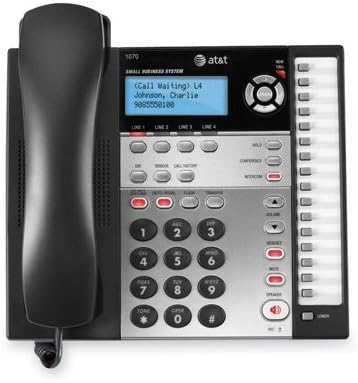
Image: Close-up of the AT&T 1070 display showing "Call Waiting" and caller information, along with line indicators.
3-Party Conferencing
To initiate a 3-party conference call, establish a call on one line, then use the 회의 button to add another party from a different line. Refer to the full user manual for detailed steps.
Intercom and Paging
If your system is expanded with compatible AT&T 1040 or 1080 models, you can use the intercom feature to communicate between stations and page other users. The phone has 16 intercom number locations.
단축 다이얼
The phone supports 32 speed dial locations for frequently called numbers. Consult the detailed manual for programming instructions.
볼륨 조절
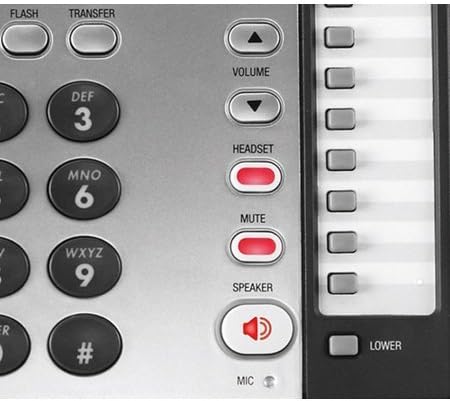
사용하세요 용량 up/down buttons to adjust the listening volume for the handset, speakerphone, or connected headset. Ringer volume can also be adjusted.
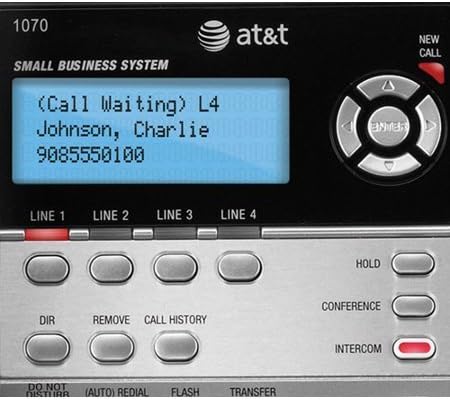
Image: Close-up of the right-side control panel of the AT&T 1070, showing the VOLUME, HEADSET, MUTE, and SPEAKER buttons.
Voicemail Indicator
If you subscribe to a voicemail service, a red light will blink on the phone when you have new voicemail messages.
유지
- 청소: 부드럽고 약간 거친 천으로 휴대폰 외부를 닦으세요.amp 옷감. 강한 화학 물질이나 연마성 세제를 사용하지 마십시오.
- 배터리 교체: Replace the 4 AA batteries annually or as needed to ensure memory backup functionality.
- 코드 관리 : Ensure all cords are free from kinks or excessive tension to prevent damage.
문제 해결
| 문제 | 해결책 |
|---|---|
| 발신음이 없습니다. |
|
| 발신자 ID가 표시되지 않습니다. |
|
| Interference or static on the line. |
|
| Memory settings lost after power outage. |
|
명세서
| 특징 | 세부 사항 |
|---|---|
| 상표 | AT&T |
| 모델 번호 | 1070 |
| 전화 유형 | 유선 |
| 줄의 수 | 4 |
| 색상 | 블랙/실버 |
| 전원 | 코드식 전기 |
| 필요한 배터리 | 4 AA batteries (included, for memory backup) |
| 품목 치수(L x W x H) | 8 x 5 x 10 인치 |
| 품목 무게 | 3 파운드 |
| 거는 사람 확인 | 예 |
| 컨퍼런스 콜 기능 | 3방향 |
| Speed Dial Locations | 32 |
| Intercom Locations | 16 |
| 호환 장치 | AT&T Models 1040, 1070, and 1080 |
보증 정보
The AT&T 1070 4-Line Expandable Corded Phone System comes with a 1년 한정 보증. Please retain your proof of purchase for warranty claims. For specific terms and conditions, refer to the warranty card included with your product or visit the official AT&T support web대지.
지원하다
추가적인 도움이나 기술 지원, 또는 교체 부품에 대한 문의는 AT&T 공식 지원 페이지를 방문해 주십시오. website or contact their customer service department. Contact information can typically be found on the AT&T web현장이나 포장재에.
온라인 지원: www.att.com/support