
소개
Thank you for choosing the RadioShack Lightweight Stereo Headphones, Model 33-1116. These headphones are designed for comfortable listening with clear audio. This manual provides essential information for setting up, operating, maintaining, and troubleshooting your headphones to ensure optimal performance and longevity.
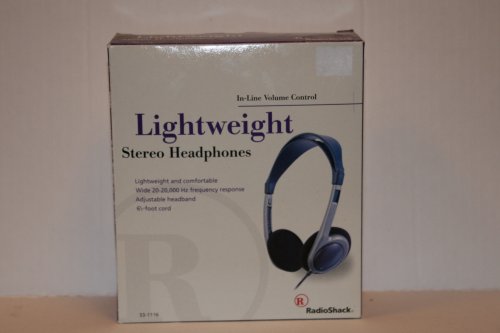
Image: RadioShack Lightweight Stereo Headphones, Model 33-1116. This image displays the headphones with an adjustable headband and a visible audio cable.
안전 정보
- 청력 보호: 청력 손상을 방지하려면 장시간 높은 볼륨으로 청취하지 마십시오.
- 환경 인식: 운전, 자전거 타기, 교통량이 많은 곳에서 걷기 등 주변 소리를 듣지 못하면 위험할 수 있는 상황에서는 헤드폰을 사용하지 마십시오.
- 청소: 부드럽고 마른 천으로 닦아주세요. 액체 세제나 에어로졸은 사용하지 마세요.
- 저장: 헤드폰은 깨끗하고 건조하며 극한 온도에 노출되지 않는 곳에 보관하십시오.
패키지 내용
다음 품목이 패키지에 포함되어 있는지 확인하세요.
- RadioShack Lightweight Stereo Headphones (Model 33-1116)
설정
- 오디오 소스에 연결: Insert the 3.5mm audio jack at the end of the headphone cable into the headphone output port of your audio device (e.g., smartphone, tablet, computer, stereo system).
- 머리띠 조정: Place the headphones on your head. Adjust the sliding headband on both sides until the earcups comfortably cover your ears and the headphones feel secure without excessive pressure.
운영
- 전원 켜기 오디오 소스: Ensure your audio device is powered on and playing audio.
- 볼륨 조절: Use the in-line volume control located on the headphone cable to adjust the listening volume to a comfortable level. You may also need to adjust the volume on your audio source.
- 청취: 오디오를 즐기세요.
유지
- 이어컵과 헤드밴드 청소 방법: Use a soft, dry, lint-free cloth to gently wipe the earcups and headband. Do not use abrasive cleaners, solvents, or spray directly onto the headphones.
- 케이블 관리: Avoid sharply bending or twisting the 6.5-foot cable. Store the cable neatly to prevent tangling and damage.
- 저장: 사용하지 않을 때는 헤드폰을 서늘하고 건조한 곳에 보관하십시오.
문제 해결
헤드폰에 문제가 발생하면 다음의 일반적인 문제와 해결 방법을 참조하세요.
- 소리 없음:
- Ensure the 3.5mm audio jack is fully inserted into your audio device.
- Check the volume level on both the in-line control and your audio device. Increase if necessary.
- 기기 문제인지 확인하기 위해 다른 오디오 소스로 헤드폰을 테스트해 보세요.
- 왜곡된 소리:
- Lower the volume on both the headphones and your audio device. High volume can cause distortion.
- 오디오 잭이 깨끗하고 이물질이 없는지 확인하세요.
- Test with another audio source or audio file.
- 불편한 핏:
- Adjust the headband sliders on both sides to achieve a comfortable and secure fit.
명세서
| 상표 | 라디오샤크 |
| 모델 번호 | 33-1116 |
| 연결 기술 | 열광한 |
| 주파수 응답 | 20Hz - 20kHz |
| 케이블 길이 | 6.5피트(약 2미터) |
| 추가 기능 | Adjustable Headband, Lightweight Design, In-line Volume Control |
보증 및 지원
For warranty information, please refer to the documentation included with your purchase or the retailer's policy where the product was acquired. For further support or inquiries, please visit the official RadioShack brand store or contact their customer service.
RadioShack Brand Store: https://www.amazon.com/stores/RadioShack/page/428CD7AB-87FF-4B6C-B5C3-96B7B297DFC4