
1. 서론
This manual provides detailed instructions for the installation, operation, and maintenance of the Lutron MA-ALFQ35 Maestro Companion Fan and Light Control. This device is designed to work in conjunction with a compatible Lutron Maestro Multi-Location Fan and Light Control (MA-LFQ3 or MA-LFQM) to provide multi-location control of your ceiling fan speed and light levels.
2. 중요한 안전 정보
경고: 감전의 위험이 있습니다.
- 이 장치를 설치하거나 수리하기 전에 항상 회로 차단기 또는 퓨즈 박스에서 전원을 차단하십시오.
- Do not use this device with any fan or light control other than specified Lutron Maestro models.
- Installation must be performed by a qualified electrician or in accordance with all local and national electrical codes.
- 최대 와트를 초과하지 마십시오tage ratings for connected loads.
- 이 제품은 실내에서만 사용하세요.
3. 제품 오버view
The Lutron MA-ALFQ35 is a companion control unit that extends the functionality of a primary Maestro Multi-Location Fan and Light Control. It allows you to adjust both the fan speed and light intensity from additional locations within a room or area. This unit does not function independently and must be paired with a compatible Maestro master control.
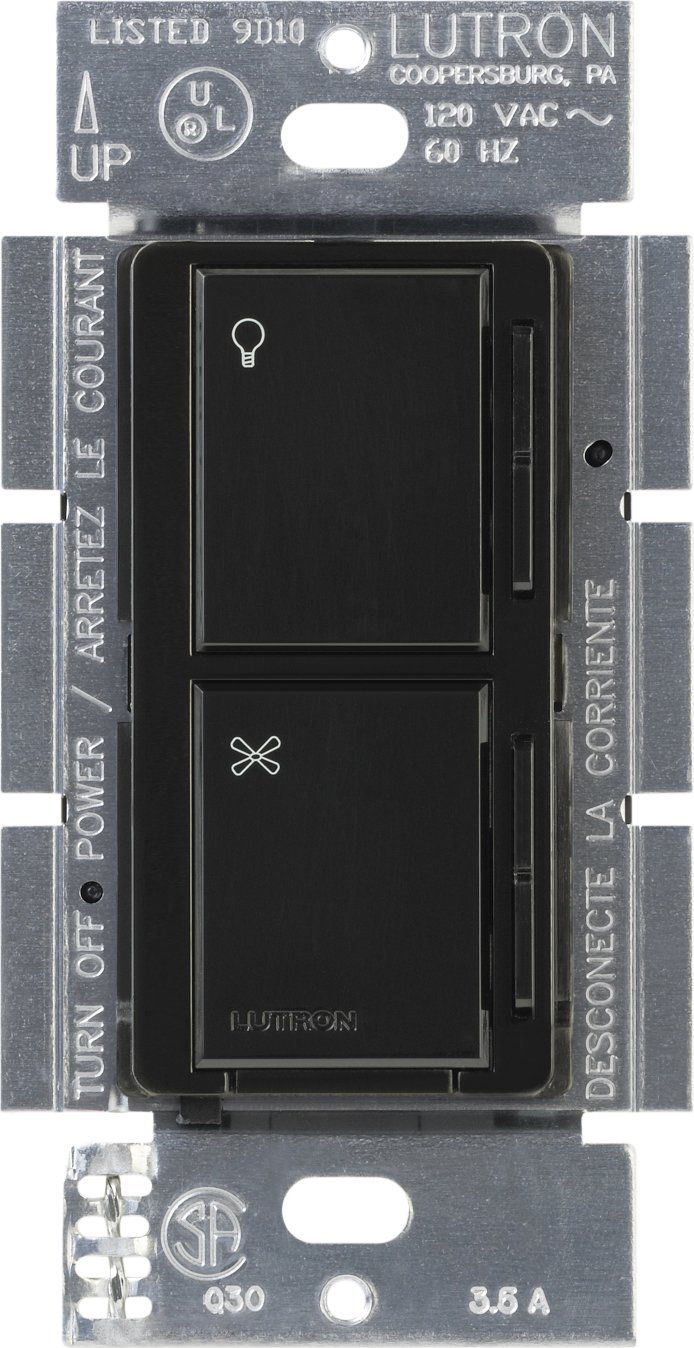
이미지 1: 앞면 view of the Lutron MA-ALFQ35 Maestro Companion Fan and Light Control. This black wall-mounted unit features separate touch controls for light (top) and fan (bottom), with a small Lutron logo at the base.
주요 특징은 다음과 같습니다.
- Multi-location control for fan speed and light level.
- Adjusts fan speed and light level from up to three locations (when used with additional companion controls).
- Sets and recalls 7 distinct light levels and fan speeds.
- Touch control method for intuitive adjustments.
4. 호환성
This companion control unit is designed to operate exclusively with specific Lutron Maestro Multi-Location Fan and Light Controls. It is not a standalone device and will not function without a compatible master unit.
Compatible Master Control Models:
- Lutron MA-LFQ3
- Lutron MA-LFQM
Ensure you have one of these master units installed before attempting to install the MA-ALFQ35 companion control.
5. 설치(Setup)
Installation of the MA-ALFQ35 companion control requires basic electrical wiring knowledge. If you are unsure about any steps, consult a qualified electrician.
5.1 시작하기 전에
- 전원 끄기: Locate the circuit breaker or fuse box that controls the power to the fan and light fixture. Turn off the power completely to prevent electric shock. Verify power is off using a voltag전자 테스터.
- 배선 식별: Carefully remove the existing wall plate and switch. Identify the wiring in the wall box. This companion control typically requires a neutral wire, a hot wire, and a traveler wire connected to the master control. Refer to the wiring diagram provided with your 주인 Maestro Multi-Location Fan and Light Control for specific connections.
- 전선 준비: Strip insulation from wires if necessary, ensuring approximately 1/2 inch (12 mm) of bare wire is exposed.
5.2 Wiring the Companion Control
The MA-ALFQ35 companion control connects to the master control unit via traveler wires. The exact wiring configuration will depend on your specific setup (e.g., 3-way or 4-way control). Always follow the wiring instructions provided with the 주인 Lutron Maestro Multi-Location Fan and Light Control (MA-LFQ3 or MA-LFQM).
- Connect the appropriate wires from the wall box to the terminals on the MA-ALFQ35.
- 모든 전선 연결이 안전한지 확인하십시오.
5.3 조립 및 마감
- 컨트롤러를 장착하세요: Carefully push the wired MA-ALFQ35 into the wall box. Secure it with the provided mounting screws.
- 월플레이트 설치: Attach a coordinating Claro wallplate (sold separately) over the companion control.
- 복원력 : 회로 차단기나 퓨즈 박스에서 전원을 다시 켜세요.
- 테스트 기능: Test both the fan and light controls from all locations to ensure proper operation.
6. 운영
The Lutron MA-ALFQ35 companion control provides intuitive touch-based operation for your ceiling fan and lights.
6.1 조명 제어
- 켜기/끄기: Tap the top section of the control (light icon) to turn the lights on or off.
- 밝기 조정: Press and hold the top section to dim or brighten the lights. Release when the desired brightness is reached. The control supports 7 distinct light levels.
- 프리셋 불러오기: A quick tap will often recall the last set brightness level.
6.2 팬 속도 제어
- 켜기/끄기: Tap the bottom section of the control (fan icon) to turn the fan on or off.
- 속도 조정: Press and hold the bottom section to increase or decrease the fan speed. Release when the desired speed is reached. The control supports 7 distinct fan speeds.
- 프리셋 불러오기: A quick tap will often recall the last set fan speed.
7. 유지관리
The Lutron MA-ALFQ35 requires minimal maintenance.
- 청소: To clean the surface of the control, wipe with a soft, damp 천. 연마성 세제, 용제 또는 화학 스프레이는 마감재나 내부 구성품을 손상시킬 수 있으므로 사용하지 마십시오.
- 사용자가 수리할 수 없는 부품: There are no user-serviceable parts inside this unit. Do not attempt to open or repair the control.
8. 문제 해결
If your Lutron MA-ALFQ35 companion control is not functioning as expected, consider the following:
- 전원 없음: Ensure the circuit breaker or fuse supplying power to the fan and light circuit is in the ON position.
- 응답 없음: Verify that the master Maestro Multi-Location Fan and Light Control (MA-LFQ3 or MA-LFQM) is properly installed and functioning. The companion unit relies on the master unit for operation.
- 잘못된 배선: Double-check all wiring connections, especially the traveler wires between the companion and master units. Refer to the master unit's installation guide for correct wiring diagrams. Ensure all connections are secure.
- Incompatible Master Unit: Confirm that the master control unit is one of the specified compatible Lutron Maestro models (MA-LFQ3 or MA-LFQM). This companion control will not work with other types of fan or light controls.
- 느슨한 연결: Turn off power at the breaker and re-check all wire connections in the wall box for tightness.
If problems persist after checking these points, contact Lutron customer support or a qualified electrician.
9. 사양
| 모델 | MA-ALFQ35-BL |
| 상표 | 루트론 |
| 작동 모드 | 온-오프 |
| 제어 방법 | 만지다 |
| 위치 수 | 7 (for both fan speed and light level) |
| 왓tage | 300 Watts (when used with compatible master) |
| 호환 장치 | MA-LFQ3, MA-LFQM |
| 장착 유형 | 플러그인 마운트 |
| 품목 무게 | 0.3 파운드 |
| 색상 | 검은색 |
10. 보증 및 지원
10.1 보증 정보
The Lutron MA-ALFQ35 Maestro Companion Fan and Light Control comes with a 1년 한정 보증 on materials and manufacture. Please retain your proof of purchase for warranty claims. This warranty covers defects in materials and workmanship under normal use.
10.2 고객 지원
For technical assistance, troubleshooting beyond this manual, or warranty inquiries, please contact Lutron customer support. Visit the official Lutron web연락처 정보와 추가 자료는 해당 사이트를 참조하세요.