
Intermatic T103M
Intermatic T103M Dial Timer Mechanism Instruction Manual
모델: T103M
1. 서론
The Intermatic T103M Dial Timer Mechanism is a robust 24-hour mechanical timer designed for various applications including indoor/outdoor lighting, signs, filters, electric fences, fans, conveyors, pool heaters, blowers, and pumps. This mechanism provides reliable scheduling with up to 12 ON/OFF operations daily, each with a minimum ON/OFF time of one hour. It features a DPST switch with a 40 Amp, 125 VAC, 2 HP rating.
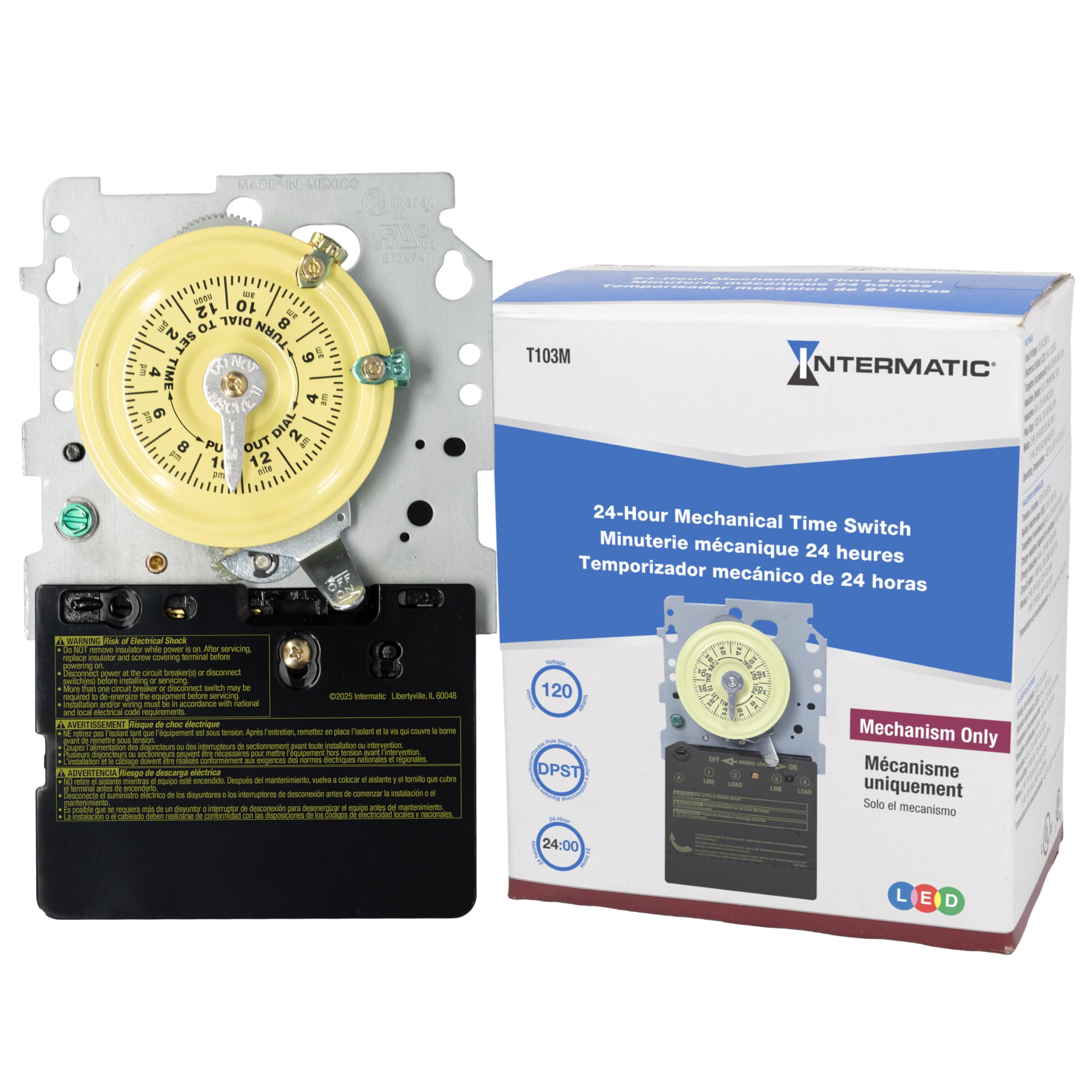
이미지: 앞면 view of the Intermatic T103M Dial Timer Mechanism, showing the yellow 24-hour dial, manual lever, and electrical terminals.
2. 안전 정보
WARNING: Always turn power OFF at the main panel before servicing this switch or the equipment it controls. Failure to do so may result in serious injury or death. Do not connect aluminum wires to switch terminals.
This device must be installed in accordance with the National Electrical Code (NEC) and local codes. Ensure proper grounding and bonding. Keep the enclosure door closed at all times when the unit is operational.
3. 설정 및 설치
Installation of the T103M mechanism typically involves replacing an existing timer or installing it into a compatible control panel. Always ensure power is disconnected before beginning any work.
3.1. Disconnecting Power
- Locate the main electrical panel for the equipment controlled by the timer.
- Turn off the circuit breaker supplying power to the timer and associated equipment (e.g., pool pump). Verify power is off using a voltag전자 테스터.
3.2. Removing the Old Mechanism (if applicable)
- 제어판 도어를 엽니다.
- Carefully remove any protective cover plates inside the panel.
- 중요한: Take clear photographs of the existing wiring connections before disconnecting any wires. This will serve as a reference for connecting the new mechanism.
- Loosen the terminal screws and carefully disconnect all wires from the old timer mechanism. Note the position of each wire (e.g., Line 1, Line 2, Load 1, Load 2, Ground).
- Locate the retaining tab(s) holding the mechanism in place. Press the tab(s) and gently pull the old mechanism out of its housing.

Image: The Intermatic T103M mechanism detached, revealing the internal gear system that drives the dial and switching action.
3.3. Installing the New Mechanism
- Align the new T103M mechanism with the mounting slots in the control panel.
- Push the mechanism firmly into place until the retaining tab(s) click securely.
- Refer to your previously taken photographs and the wiring diagram (usually located inside the control panel door) to connect the wires to the appropriate terminals on the new mechanism. Ensure all connections are tight and secure.
- Replace any protective cover plates.
4. 사용 설명서
4.1. 현재 시간 설정
- Grasp the outer edge of the yellow dial.
- Rotate the dial clockwise until the current time aligns with the "TIME" arrow indicator.
4.2. 작동 켜기/끄기 설정
- The T103M comes with one "ON" (green) and one "OFF" (red) tripper.
- To set an ON time: Push the green tripper into the desired ON time slot on the dial.
- To set an OFF time: Push the red tripper into the desired OFF time slot on the dial.
- Additional trippers can be purchased separately for up to 12 ON/OFF operations per day.
- Minimum ON/OFF time is one hour.
4.3. 수동 조작
The timer mechanism includes a manual lever. This lever allows you to temporarily override the programmed schedule. Pushing the lever to the "ON" or "OFF" position will manually switch the connected equipment. The timer will resume its programmed schedule at the next scheduled ON or OFF event.
5. 유지관리
The Intermatic T103M is designed for durability with all-metal construction and a heavy-duty gear train. Regular maintenance is generally not required beyond ensuring the unit is free from debris and moisture. Periodically inspect the wiring connections for tightness and signs of wear. Ensure the control panel door is securely closed to protect the mechanism from environmental elements.
6. 문제 해결
6.1. Timer Not Activating/Deactivating Equipment
- 전원 확인: Ensure power is supplied to the control panel and the timer mechanism.
- Verify Tripper Placement: Confirm that the ON and OFF trippers are correctly positioned on the dial for the desired schedule.
- 기어를 점검하십시오: If the timer dial is not rotating or the manual lever does not engage the switch, the internal gears may be damaged or stripped. This often requires replacement of the timer mechanism. You can often feel the smaller gears turning by gently touching them through openings in the back of the mechanism, even if the main dial is not moving.
- 배선 연결: Recheck all wiring connections for tightness and proper placement according to the wiring diagram.
6.2. Timer Dial Not Moving
- This indicates a motor or gear train failure within the mechanism. The mechanism will need to be replaced.
7. 사양
| 특징 | 사양 |
|---|---|
| 모델 번호 | T103M |
| 상표 | 인터매틱 |
| 스위치 유형 | DPST(이중극 단일투과) |
| Amp에이지 등급 | 40 Amp |
| 권tage 등급 | 125VAC |
| 마력 등급 | 2마력 |
| 일상 업무 | Up to 12 ON/OFF operations |
| 최소 켜짐/꺼짐 시간 | 1시간 |
| 건축자재 | 모든 금속 건설 |
| 치수(D x W x H) | 2.5인치 깊이 x 4.5인치 너비 x 7인치 높이 |
| 품목 무게 | 1.3 파운드 |
| 승인 | UL(캐나다 및 미국), CSA(캐나다 및 미국) |
8. 보증 및 지원
For warranty information, please refer to the manufacturer's description or contact Intermatic customer support directly. Keep your purchase receipt for warranty claims.
For technical assistance or further inquiries, please visit the official Intermatic web해당 웹사이트를 방문하거나 고객 서비스 부서에 문의하십시오. 연락처 정보는 일반적으로 제품 포장이나 제조업체의 안내에 나와 있습니다. web대지.
Ask a question about this manual
Ask about setup, troubleshooting, compatibility, parts, safety, or missing instructions. Manuals+ will review the question and use this page’s manual context to help answer it.