
소개
This manual provides essential instructions for the safe and effective use of your Sanitas SBG 19 Glass Diagnostic Scale. This device is designed to measure body weight and perform diagnostic functions such as body fat percentage. Please read these instructions carefully before first use and keep them for future reference.
안전 정보
- The scale is intended for personal use only.
- Do not use the scale if you have a medical implant (e.g., pacemaker). The diagnostic function uses a bioelectrical impedance analysis (BIA) which may interfere with such devices.
- Pregnant women, children under 10, and individuals with acute medical conditions should not use the diagnostic function.
- Place the scale on a firm, level surface. Uneven surfaces can affect accuracy.
- Step onto the scale with bare, dry feet for accurate diagnostic measurements.
- Do not step on the scale with wet feet or when the surface is wet, as this may cause slipping.
- Protect the scale from impacts, moisture, dust, chemicals, extreme temperature fluctuations, and heat sources.
- 수리는 공인 서비스 담당자만 수행해야 합니다.
시작하기
1. 풀기
Carefully remove the scale from its packaging. Inspect the device for any signs of damage. If damaged, do not use it and contact your retailer.
2. 배터리 설치
The Sanitas SBG 19 scale operates on batteries. Locate the battery compartment on the underside of the scale. Open the compartment cover, insert the required batteries (type and quantity usually indicated inside the compartment) ensuring correct polarity (+/-). Close the battery compartment securely.
3. 초기 배치
Place the scale on a hard, flat, and stable surface, such as a tiled or wooden floor. Avoid placing it on carpets or uneven surfaces, as this can affect measurement accuracy.
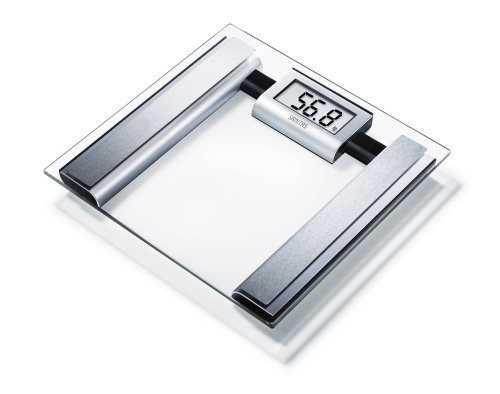
Image: Sanitas SBG 19 Glass Diagnostic Scale. The scale features a clear glass platform with a central display area, designed for accurate weight and diagnostic measurements.
작동 지침
1. 사용자 프로 설정files
For diagnostic measurements, you need to set up a personal user profile. This typically involves entering your age, height, gender, and activity level. Refer to the specific buttons (e.g., SET, UP, DOWN) on your scale or its underside to navigate the menu and save your data. The scale can usually store multiple user profiles.
- Press the 'SET' or 'MODE' button to enter setup mode.
- Use the 'UP' or 'DOWN' arrows to select a user memory slot (e.g., P1, P2).
- Confirm your selection and then enter your personal data (height, age, gender, activity level) using the arrow buttons and confirming each entry.
- Once all data is entered, the scale will save the profile.
2. 체중 측정하기
To measure only your weight, simply step onto the scale with dry feet. The scale will automatically turn on and display your weight. Step off once the reading stabilizes.
3. Taking a Diagnostic Measurement
For diagnostic measurements (body fat, body water, muscle percentage), ensure your user profile 선택되었습니다.
- Tap the scale lightly with your foot to turn it on.
- 사용자 프로를 선택하세요file (if not automatically detected) by pressing the appropriate user button or cycling through profiles.
- Step onto the scale with bare, dry feet, ensuring your feet are positioned correctly on the electrodes (metal pads).
- Stand still. The scale will first display your weight, then cycle through your diagnostic values (e.g., body fat percentage, 체수분 퍼센트tage, 근육 퍼센트tag이자형).
- Step off the scale once all readings have been displayed. The scale will usually turn off automatically after a few seconds.
4. 결과 이해하기
The scale provides various body composition metrics. These values are estimates and should be interpreted in conjunction with other health indicators. Consult a healthcare professional for personalized advice.
- 체중: 당신의 총 체중.
- 체지방률tage: 신체 내 지방의 비율.
- 체수분율tage: 신체 내 수분의 비율.
- 근육 백분율tage: 신체의 근육량 비율.
관리 및 유지 보수
- 청소: 정기적으로 저울을 청소하십시오.amp cloth and a mild detergent if necessary. Do not use abrasive cleaning agents or immerse the scale in water.
- 저장: Store the scale in a dry place, away from direct sunlight and extreme temperatures. Do not place heavy objects on the scale when not in use.
- 배터리 교체: Replace batteries when the low battery indicator appears on the display. Always replace all batteries at the same time with new ones of the correct type. Dispose of used batteries according to local regulations.
문제 해결
| 문제 | 가능한 원인 | 해결책 |
|---|---|---|
| 저울이 켜지지 않습니다. | 배터리가 소진되었거나 잘못 삽입되었습니다. | 배터리 극성을 확인하거나 배터리를 교체하세요. |
| 부정확한 무게 측정. | Scale on an uneven surface; scale moved after last use; initial calibration needed. | Place on a hard, flat surface. Step on and off quickly to calibrate (zero out) the scale before use. |
| Diagnostic functions not working. | 발은 맨발이 아니거나 건조하지 않습니다. 사용자 프로file not set up or selected; error in data entry. | Ensure bare, dry feet are on electrodes. Set up/select user profile. Re-enter personal data if necessary. |
| "Lo" 또는 "Err"가 표시됩니다. | Low battery; measurement error. | Replace batteries. Step off, wait for display to clear, then step on again. |
기술 사양
- 모델: Sanitas SBG 19 (Item Model Number: 767.20)
- 제조업체: Beurer GmbH
- 특별 기능: Diagnostic functions (Body Fat, Body Water, Muscle Percentage)
- 디스플레이 유형: Digital (for diagnostic readings)
- 크기(패키지): 33.4 x 32.6 x 5.4cm
- 무게(패키지): 2.28kg
- 전원: Batteries (type not specified in provided data, typically CR2032 or AAA)
- GTIN: 04211125767204
보증 및 폐기
For warranty information, please refer to the warranty card included with your product or contact the manufacturer, Beurer GmbH, directly.
처분: Do not dispose of the device or batteries with household waste. Dispose of them according to local regulations for electronic waste and batteries.